
databrowser


A terminal file browser for quickly viewing data files, from local disk or S3.
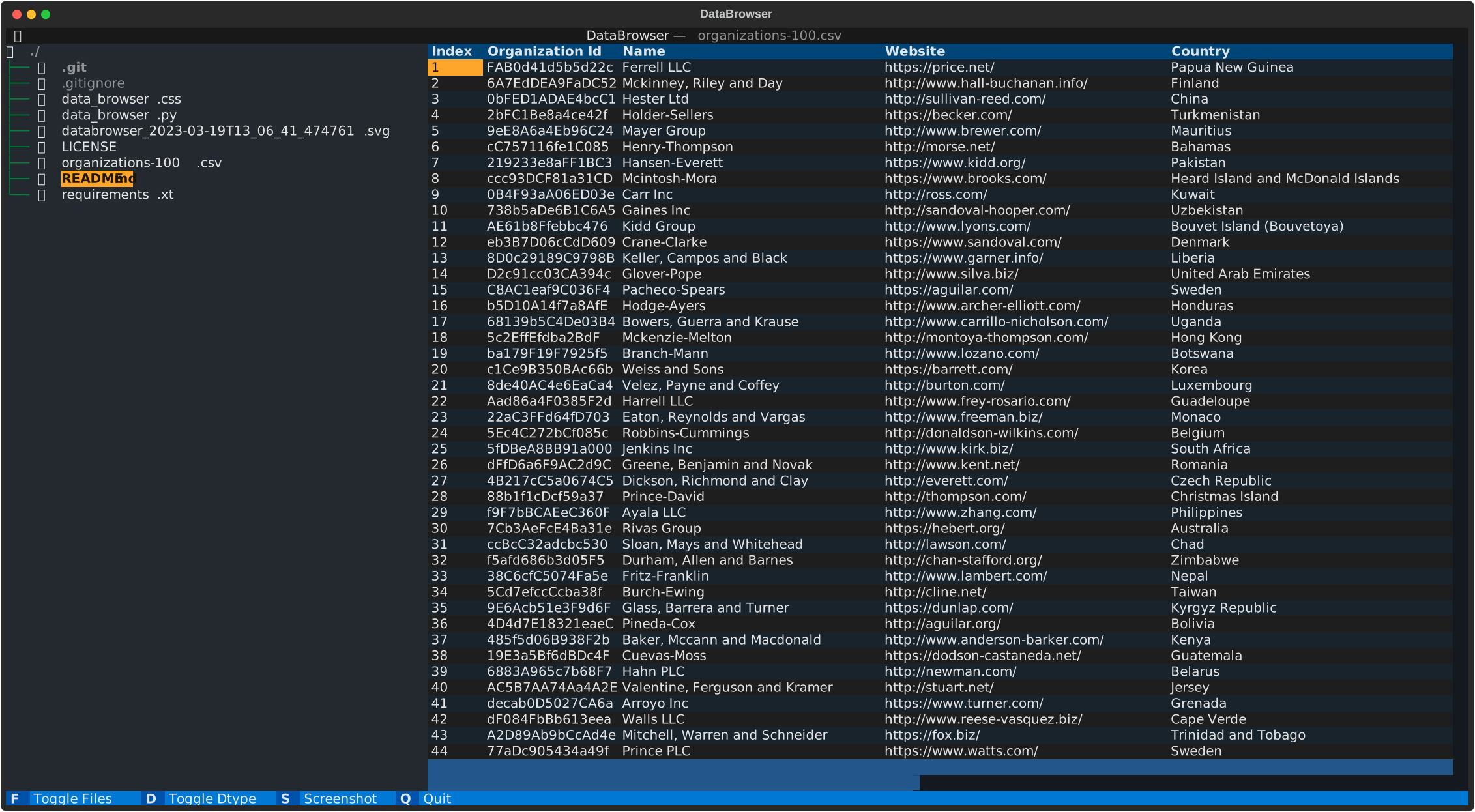
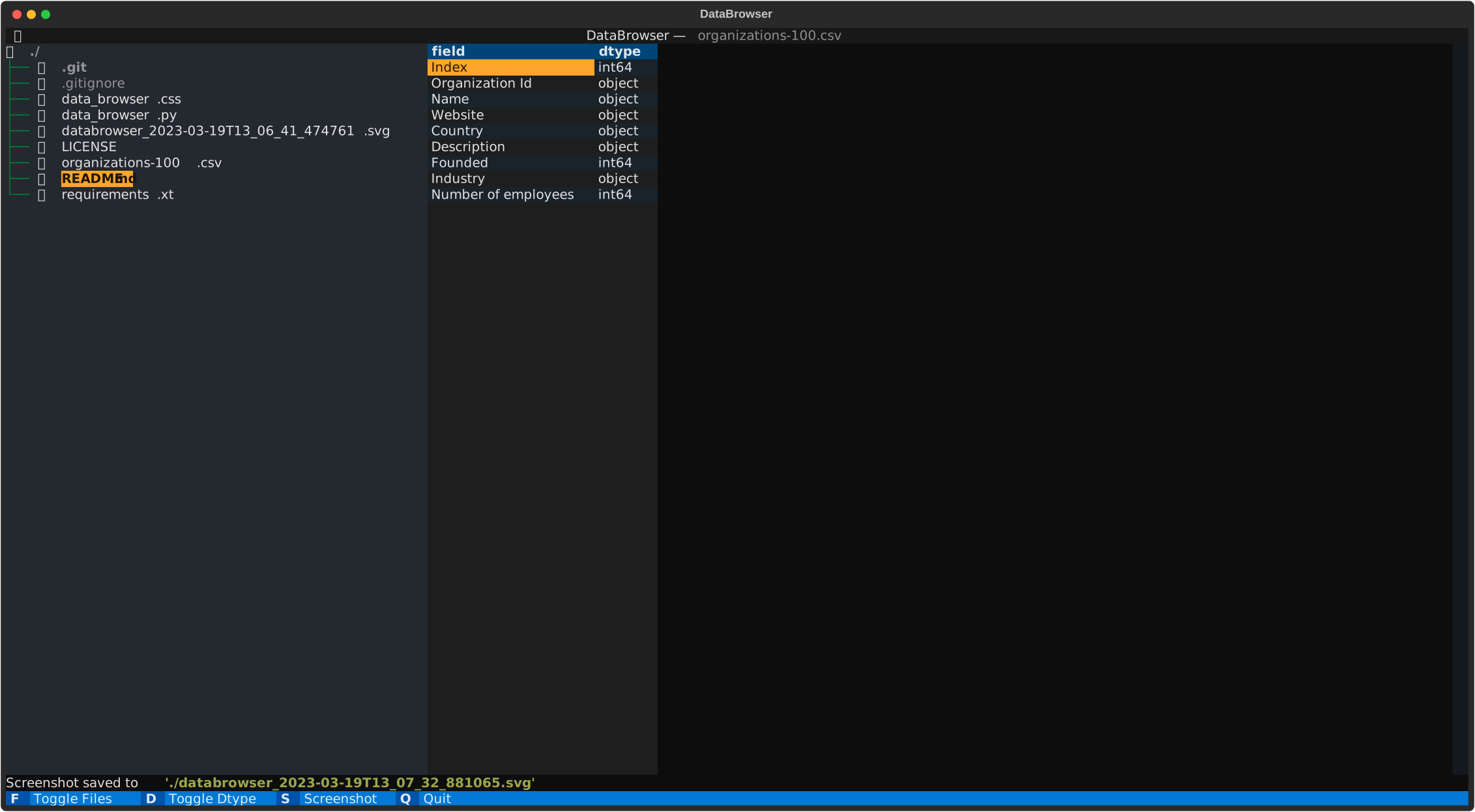
Supports csv, tsv, parquet, feather, orc, json, xlsx, xls, xml and html — read into pandas DataFrames and shown in a scrollable table (with a dtype view). Built on Textual.
Originally based on the example code_browser from Textual.
install
Run without installing (uvx)
With uv, run it in a throwaway environment — no install needed:
uvx databrowser [path]
uvx databrowser s3://bucket/dir/
uvx databrowser hf://datasets/org/name
For Google Cloud Storage or Azure, pull in the matching extra:
uvx --from 'databrowser[gcs]' databrowser gs://bucket/dir/
uvx --from 'databrowser[azure]' databrowser az://container/dir/
Install from PyPI
The package is published on pypi https://pypi.org/project/databrowser/
run pip install databrowser (pip install databrowser --upgrade to get latest version).
Then just execute databrowser. The gcs / azure / all extras add those cloud backends.
Build
This project uses uv (Python >= 3.13).
Execute uv sync to create the virtual env and install the package and its dependencies.
Run uv run databrowser to execute in the virtual env
(or uv run python src/databrowser/data_browser.py).
Usage
databrowser [optional path] (defaults to the current directory)
Remote filesystems
Any fsspec URL works, not just local paths:
databrowser s3://bucket/path/— S3 (uses the default AWS credentials in the environment)databrowser hf://datasets/org/name— Hugging Face datasets (setHF_TOKENfor private ones)databrowser gs://bucket/path/— Google Cloud Storage (needsgcsfsinstalled)
The protocol is resolved automatically, so the same browsing works for every backend.
Select a data file to view
-
press F to hide the filebrowser
-
press D to show the dtypes
-
press S to save a screenshot in svg
-
press Q to quit
By default the preview shows the first 100 rows. Set DATABROWSER_ROWS to change it,
e.g. DATABROWSER_ROWS=500 databrowser data/ (or pass --rows 500).
Run databrowser --help for all options.
examples
1 maintainer

Metadata
1 maintainer
Release files for databrowser 1.1.15
For a detailed explanation of source distributions (sdists) and built distributions (wheels), please see the package formats documentation.
Source distribution (sdist)
| File | Size | Uploaded | Provenance | Actions |
|---|---|---|---|---|
| databrowser-1.1.15.tar.gz | 141.8 kB | Without provenance | Details for databrowser-1.1.15.tar.gz |
Built distribution (wheel)
| File | Interpreter | ABI | Platform | Actions Reset |
|---|---|---|---|---|
| databrowser-1.1.15-py3-none-any.whl | Python 3 | none | any | Details for databrowser-1.1.15-py3-none-any.whl |
Total release size: 152.0 kB
Release files / databrowser-1.1.15.tar.gz
| Download URL | databrowser-1.1.15.tar.gz |
|---|---|
| Size | 141.8 kB |
| Tags | Source |
|
SHA-256 checksum How to use checksums |
3bfc9b0708c7195677fdd82eb380c8ccd98a6db944c7114994025666923d4f6f
|
|
BLAKE2b-256 checksum How to use checksums |
60cb79274295aa63c0b886a969d27c0e83b62f45f6f159db23528fd446613e6e
|
| Upload date | |
|
Uploaded using Trusted Publishing? What is trusted publishing? |
Yes |
| Uploaded via |
uv/0.13.6 {"installer":{"name":"uv","version":"0.13.6","subcommand":["publish"]},"python":null,"implementation":{"name":null,"version":null},"distro":{"name":"Ubuntu","version":"24.04","id":"noble","libc":null},"system":{"name":null,"release":null},"cpu":null,"openssl_version":null,"setuptools_version":null,"rustc_version":null,"ci":true}
|
Release files / databrowser-1.1.15-py3-none-any.whl
| Download URL | databrowser-1.1.15-py3-none-any.whl |
|---|---|
| Size | 10.2 kB |
| Tags | Python 3 |
|
SHA-256 checksum How to use checksums |
3bba126797583e20fd6298ad3ce908da38d1dd57eae09954bc1030c707ffa5d2
|
|
BLAKE2b-256 checksum How to use checksums |
e2c06b6a29567b98416b9d6c8fba92c2b064e2a893f367ac69cade3ac200c6ba
|
| Upload date | |
|
Uploaded using Trusted Publishing? What is trusted publishing? |
Yes |
| Uploaded via |
uv/0.13.6 {"installer":{"name":"uv","version":"0.13.6","subcommand":["publish"]},"python":null,"implementation":{"name":null,"version":null},"distro":{"name":"Ubuntu","version":"24.04","id":"noble","libc":null},"system":{"name":null,"release":null},"cpu":null,"openssl_version":null,"setuptools_version":null,"rustc_version":null,"ci":true}
|
Security for databrowser 1.1.15
Provenance
Provenance describes where a file came from. On PyPI, provenance is shared via attestations, which provide a verifiable record of the build or publishing details. View details, limitations and caveats.
No provenance found
None of the files in this release were uploaded with provenance metadata.
A note on package security
PyPI is a repository for distributing packages, not a service for auditing them. While third-party security researchers and our staff do their best to detect and remove malicious packages, PyPI cannot guarantee the quality, security or suitability of any given package.
To learn more about protecting yourself from malicious actors, visit our package security documentation.














