
Making it easier to use SEC filings.

Project description



datamule
A python package to make using SEC filings easier. Integrated with datamule's APIs and datasets.
features
current:
- parse textual filings into simplified html, interactive html, or structured json.
- download sec filings quickly and easily
- download datasets such as every MD&A from 2024 or every 2024 10K converted to structured json
Installation
pip install datamule
quickstart:
parsing
Uses endpoint: https://jgfriedman99.pythonanywhere.com/parse_url with params url and return_type. Current endpoint can be slow. If it's too slow for your use-case, please contact me.
simplified html
simplified_html = dm.parse_textual_filing(url='https://www.sec.gov/Archives/edgar/data/1318605/000095017022000796/tsla-20211231.htm',return_type='simplify')

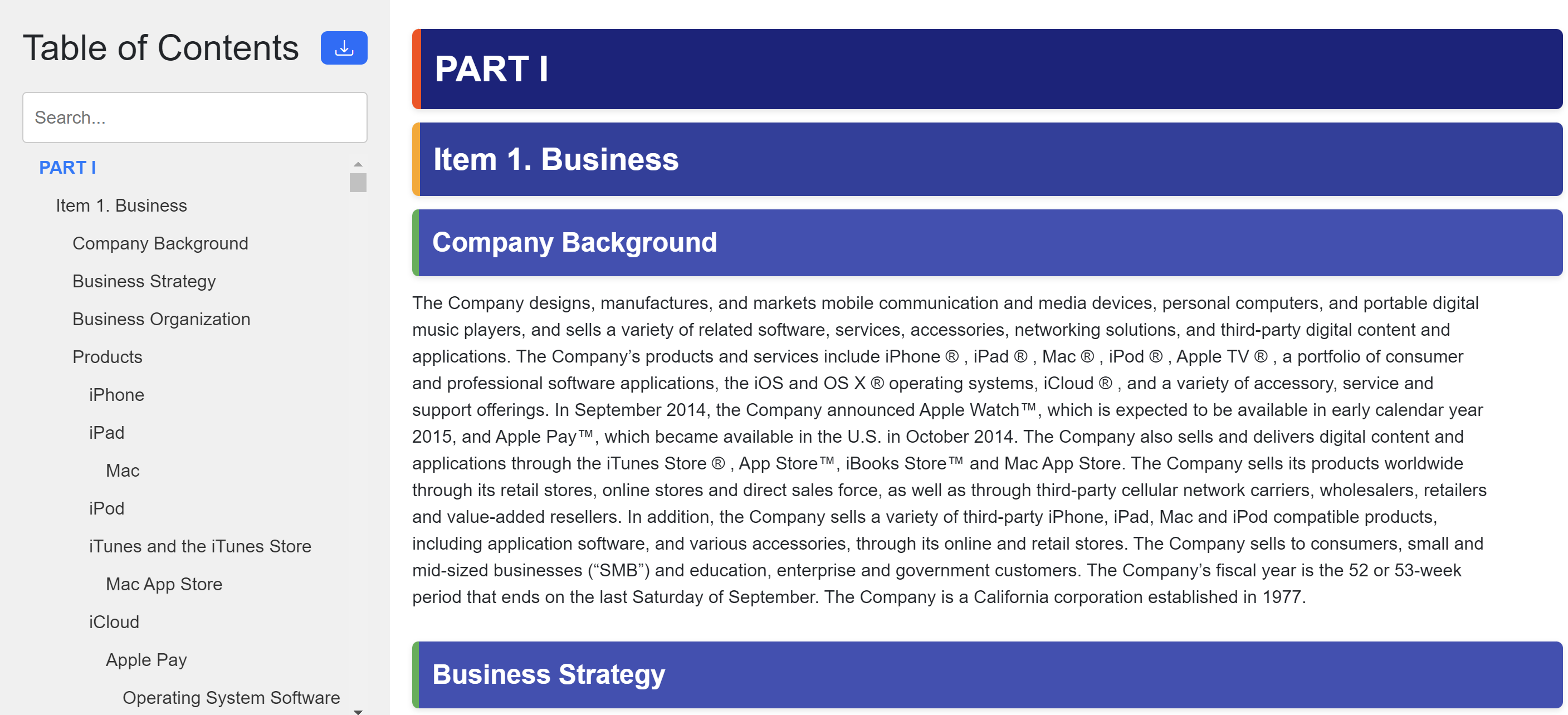
interactive html
interactive_html = dm.parse_textual_filing(url='https://www.sec.gov/Archives/edgar/data/1318605/000095017022000796/tsla-20211231.htm',return_type='interactive')
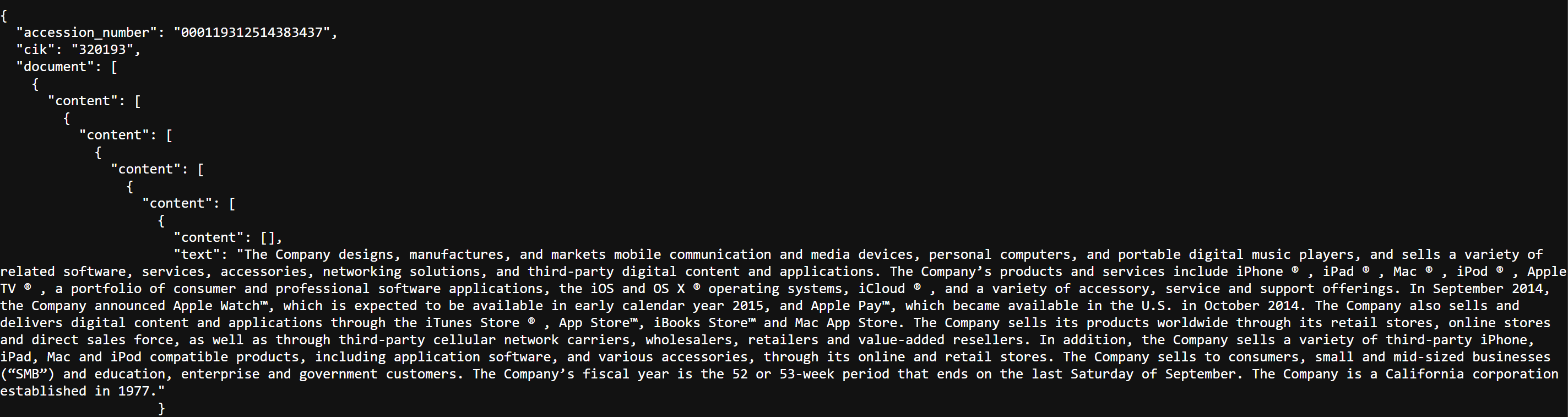
json
d = dm.parse_textual_filing(url='https://www.sec.gov/Archives/edgar/data/1318605/000095017022000796/tsla-20211231.htm',return_type='json')
downloading filings using the indices api
Limited to 10,000 results per query. Uses endpoint: https://api.datamule.xyz/submissions. A full list of params can be found here SEC Router
from datamule import Downloader
downloader = Downloader()
downloader.download_using_api(form='10-K',ticker='AAPL')
downloading filings without the indices api
Either download the pre-built indices from the links in the readme and set the indices_path to the folder
from datamule import Downloader
downloader = Downloader()
downloader.set_indices_path(indices_path)
Or run the indexer. If download = True, downloads the last uploaded indices (9/14/24). If false, re-runs the indexer.
from datamule import Indexer
indexer = Indexer()
indexer.run(download=False)
Example Downloads
# Example 1: Download all 10-K filings for Tesla using CIK
downloader.download(form='10-K', cik='1318605', output_dir='filings')

# Example 2: Download 10-K filings for Tesla and META using CIK
downloader.download(form='10-K', cik=['1318605','1326801'], output_dir='filings')

# Example 3: Download 10-K filings for Tesla using ticker
downloader.download(form='10-K', ticker='TSLA', output_dir='filings')

# Example 4: Download 10-K filings for Tesla and META using ticker
downloader.download(form='10-K', ticker=['TSLA','META'], output_dir='filings')

# Example 5: Download every form 3 for a specific date
downloader.download(form ='3', date='2024-05-21', output_dir='filings')

# Example 6: Download every 10K for a year
downloader.download(form='10-K', date=('2024-01-01', '2024-12-31'), output_dir='filings')

# Example 7: Download every form 4 for a list of dates
downloader.download(form = '4',date=['2024-01-01', '2024-12-31'], output_dir='filings')
datasets
Need a better way to store datasets, as I'm running out of storage. Currently stored on Dropbox 2gb free tier.
downloader.download_dataset('10K')
downloader.download_dataset('MDA')
TODO
- standardize accession number to not include '-'. Currently db does not have '-' but submissions_index.csv does.
- add code to convert parsed json to interactive html
- add mulebot
Update Log
9/15/24
- fixed downloading filings overwriting each other due to same name.
9/14/24
- added support for parser API
9/13/24
- added download_datasets
- added option to download indices
- added support for jupyter notebooks
9/9/24
- added download_using_api(self, output_dir, **kwargs). No indices required.
9/8/24
- Added integration with datamule's SEC Router API
9/7/24
- Simplified indices approach
- Switched from pandas to polar. Loading indices now takes under 500 milliseconds.
Release history Release notifications | RSS feed


Download files
Download the file for your platform. If you're not sure which to choose, learn more about installing packages.
Source Distribution
Built Distribution
Filter files by name, interpreter, ABI, and platform.
If you're not sure about the file name format, learn more about wheel file names.
Copy a direct link to the current filters
File details
Details for the file datamule-0.23.tar.gz.
File metadata
- Download URL: datamule-0.23.tar.gz
- Upload date:
- Size: 11.5 kB
- Tags: Source
- Uploaded using Trusted Publishing? No
- Uploaded via: twine/5.1.0 CPython/3.11.5
File hashes
| Algorithm | Hash digest | |
|---|---|---|
| SHA256 |
1164fa7ee979aefa05311a0995d935d7e391a6ee9dc28687be8199da68ffb43c
|
|
| MD5 |
165aa38435f6aac88f08f7af67e636a3
|
|
| BLAKE2b-256 |
13aef8b4e059aa103b2ae083992c80016ffe4dc5702a8a158e9d78986b92478f
|
File details
Details for the file datamule-0.23-py3-none-any.whl.
File metadata
- Download URL: datamule-0.23-py3-none-any.whl
- Upload date:
- Size: 11.8 kB
- Tags: Python 3
- Uploaded using Trusted Publishing? No
- Uploaded via: twine/5.1.0 CPython/3.11.5
File hashes
| Algorithm | Hash digest | |
|---|---|---|
| SHA256 |
aa8c8dc1df77a5037d6277e8fbbdcdf0ccc038d534dac18667027efd0d8bb8ed
|
|
| MD5 |
7a883302dd151a1c31b89cd752b90af8
|
|
| BLAKE2b-256 |
4bad511b4bd27c867200e19a2abd6594f1f691a4df827039cc04260f9a5398ec
|






