
DataoceanAI Open-source Large Speech Model

Project description
Dolphin
Paper Github Huggingface Modelscope Openi Wisemodel
Dolphin is a multilingual, multitask ASR model developed through a collaboration between Dataocean AI and Tsinghua University. It supports 40 Eastern languages across East Asia, South Asia, Southeast Asia, and the Middle East, while also supporting 22 Chinese dialects. It is trained on over 210,000 hours of data, which includes both DataoceanAI's proprietary datasets and open-source datasets. The model can perform speech recognition, voice activity detection (VAD), segmentation, and language identification (LID).
🔥 News
- [2026-05-09] Dolphin-CN-Dialect small/base released, including base, base.streaming, small, small.prompt, small.streaming; Support Word timestamps prediction for all Dolphin models.
Approach
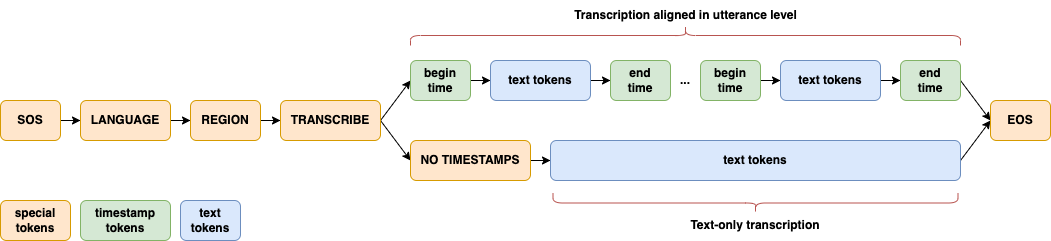
A significant enhancement in Dolphin is the introduction of a two-level language token system to better handle linguistic and regional diversity, especially in Dataocean AI dataset. The first token specifies the language (e.g., <zh>, <ja>), while the second token indicates the region (e.g., <CN>, <JP>). See details in paper.
Setup
Dolphin requires FFmpeg to convert audio file to WAV format. If FFmpeg is not installed on your system, please install it first:
# Ubuntu or Debian
sudo apt update && sudo apt install ffmpeg

# MacOS
brew install ffmpeg

# Windows
choco install ffmpeg
You can install the latest version of Dolphin using the following command:
pip install -U dataoceanai-dolphin
Alternatively, it can also be installed from the source:
pip install git+https://github.com/SpeechOceanTech/Dolphin.git
Available Models and Languages
Models
There are 4 models in Dolphin, and 2 of them are available now. See details in paper.
| Model | Parameters | Publicly Available |
|---|---|---|
| base | 0.1 B | ✅ |
| small | 0.4 B | ✅ |
| medium | 0.9 B | |
| large | 1.7B | |
| base.cn | 0.1 B | ✅ |
| base.cn.streaming | 0.1 B | ✅ |
| small.cn | 0.4 B | ✅ |
| small.cn.streaming | 0.4 B | ✅ |
| small.cn.prompt | 0.4 B | ✅ |
Languages
Dolphin supports 40 Eastern languages and 22 Chinese dialects. For a complete list of supported languages, see languages.md.
Usage
Command-line usage
# default model:small
dolphin audio.wav

# Download model and specify the model path
dolphin audio.wav --model small.cn

# Specify language and region
dolphin audio.wav --model small.cn --lang_sym "zh" --region_sym "CN"

# Specify the hotwords file with Encoder-biased method
dolphin audio.wav --model small.cn --hotword_list_path hotwords.txt --use_deep_biasing true

# Using prompt-based model
dolphin audio.wav --model small.cn.prompt --hotword_list_path hotwords.txt --use_prompt_hotword true --use_two_stage_filter true

# predict word timestamp
dolphin audio.wav --model small.cn.prompt --word_timestamp true
Python usage
import dolphin
from dolphin import transcribe

model_name = 'small.cn'
model = dolphin.load_model(model_name, device="cuda")

result = transcribe(model, 'audio.wav')
print(result.text)

# Specify language
result = transcribe(model, 'audio.wav', lang_sym="zh")
print(result.text)

# Specify language and region and encoder-biased hotwords
result = transcribe(model, 'audio.wav', lang_sym="zh", region_sym="CN", hotwords=['诺香丹青牌科研胶囊'], use_deep_biasing=True, use_two_stage_filter=True)
print(result.text)

## prompt-based hotwords

model_name = 'small.cn.prompt'
model = dolphin.load_model(model_name, device="cuda")

result = transcribe(model, 'audio.wav', hotwords=['诺香丹青牌科研胶囊'], use_prompt_hotword=True, use_two_stage_filter=True, decoding_method='attention')

print(result.text)
Acknowledgements
Thanks to the following excellent open-source works:
License
Dolphin's code and model weights are released under the Apache 2.0 License.
Release history Release notifications | RSS feed


Download files
Download the file for your platform. If you're not sure which to choose, learn more about installing packages.
Source Distribution
Built Distribution
Filter files by name, interpreter, ABI, and platform.
If you're not sure about the file name format, learn more about wheel file names.
Copy a direct link to the current filters
File details
Details for the file dataoceanai_dolphin-20260513.tar.gz.
File metadata
- Download URL: dataoceanai_dolphin-20260513.tar.gz
- Upload date:
- Size: 652.5 kB
- Tags: Source
- Uploaded using Trusted Publishing? No
- Uploaded via: twine/6.2.0 CPython/3.10.18
File hashes
| Algorithm | Hash digest | |
|---|---|---|
| SHA256 |
5e0a1fab42751ba73cc768ced2ddc9ae4011e60e3236251282902feb76dda091
|
|
| MD5 |
e5d773c4a64ab2db8ed8d65d1620e808
|
|
| BLAKE2b-256 |
b1bb4e7fad786d4ec918b8c79609fa9b35f88ab28cfe88fc574f94ddc36810a2
|
File details
Details for the file dataoceanai_dolphin-20260513-py3-none-any.whl.
File metadata
- Download URL: dataoceanai_dolphin-20260513-py3-none-any.whl
- Upload date:
- Size: 661.3 kB
- Tags: Python 3
- Uploaded using Trusted Publishing? No
- Uploaded via: twine/6.2.0 CPython/3.10.18
File hashes
| Algorithm | Hash digest | |
|---|---|---|
| SHA256 |
3372ebbf2731acb937a1c412e9cd7383df2fdb79a762e2c69ed87c1cf6d3a852
|
|
| MD5 |
aafeaa4ac4d57cccd86c4236f96d84ed
|
|
| BLAKE2b-256 |
17a89aa838a1e9c445c58244fbb344ee1cd89d92061aa2269186dadaf298b3e2
|






