
Dolphin
Paper Github Huggingface Modelscope Openi Wisemodel
Dolphin is a multilingual, multitask ASR model developed through a collaboration between Dataocean AI and Tsinghua University. It supports 40 Eastern languages across East Asia, South Asia, Southeast Asia, and the Middle East, while also supporting 22 Chinese dialects. It is trained on over 210,000 hours of data, which includes both DataoceanAI's proprietary datasets and open-source datasets. The model can perform speech recognition, voice activity detection (VAD), segmentation, and language identification (LID).
🔥 News
- [2026-05-09] Dolphin-CN-Dialect small/base released, including base, base.streaming, small, small.prompt, small.streaming.
Approach
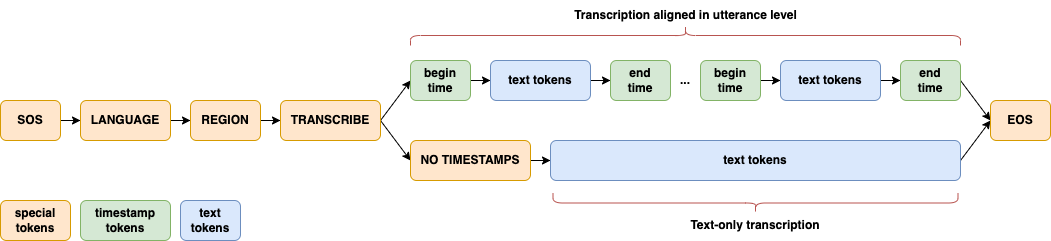
A significant enhancement in Dolphin is the introduction of a two-level language token system to better handle linguistic and regional diversity, especially in Dataocean AI dataset. The first token specifies the language (e.g., <zh>, <ja>), while the second token indicates the region (e.g., <CN>, <JP>). See details in paper.
Setup
Dolphin requires FFmpeg to convert audio file to WAV format. If FFmpeg is not installed on your system, please install it first:
# Ubuntu or Debian
sudo apt update && sudo apt install ffmpeg

# MacOS
brew install ffmpeg

# Windows
choco install ffmpeg
You can install the latest version of Dolphin using the following command:
pip install -U dataoceanai-dolphin
Alternatively, it can also be installed from the source:
pip install git+https://github.com/SpeechOceanTech/Dolphin.git
Available Models and Languages
Models
There are 4 models in Dolphin, and 2 of them are available now. See details in paper.
| Model | Parameters | Publicly Available |
|---|---|---|
| base | 0.1 B | ✅ |
| small | 0.4 B | ✅ |
| medium | 0.9 B | |
| large | 1.7B | |
| base.cn | 0.1 B | ✅ |
| base.cn.streaming | 0.1 B | ✅ |
| small.cn | 0.4 B | ✅ |
| small.cn.streaming | 0.4 B | ✅ |
| small.cn.prompt | 0.4 B | ✅ |
Languages
Dolphin supports 40 Eastern languages and 22 Chinese dialects. For a complete list of supported languages, see languages.md.
Supported Devices
| Device Type | Support Status |
|---|---|
| CUDA | ✅Supported |
| MPS (Apple) | ✅Supported |
| Ascend NPU (Huawei) | ✅Supported |
| CPU | ✅Supported |
To run Dolphin on Ascend NPU, you need to install the corresponding torch_npu package and configure the environment ASCEND_RT_VISIBLE_DEVICES. The tested configuration is: CANN==8.0.1, torch==2.2.0, torch_npu==2.2.0. With this setup, the model has been verified to run inference correctly on the Ascend NPU.
Usage
Command-line usage
# default model:small
dolphin audio.wav

# Download model and specify the model path
dolphin audio.wav --model small.cn

# Specify language and region
dolphin audio.wav --model small.cn --lang_sym "zh" --region_sym "CN"

# Specify the hotwords file with Encoder-biased method
dolphin audio.wav --model small.cn --hotword_list_path hotwords.txt --use_deep_biasing true

# Using prompt-based model
dolphin audio.wav --model small.cn.prompt --hotword_list_path hotwords.txt --use_prompt_hotword true --use_two_stage_filter true
Python usage
import dolphin
from dolphin import transcribe

model_name = 'small.cn'
model = dolphin.load_model(model_name, device="cuda")

result = transcribe(model, 'audio.wav')
print(result.text)

# Specify language
result = transcribe(model, 'audio.wav', lang_sym="zh")
print(result.text)

# Specify language and region and encoder-biased hotwords
result = transcribe(model, 'audio.wav', lang_sym="zh", region_sym="CN", hotwords=['诺香丹青牌科研胶囊'], use_deep_biasing=True, use_two_stage_filter=True)
print(result.text)

## prompt-based hotwords

model_name = 'small.cn.prompt'
model = dolphin.load_model(model_name, device="cuda")

result = transcribe(model, 'audio.wav', hotwords=['诺香丹青牌科研胶囊'], use_prompt_hotword=True, use_two_stage_filter=True, decoding_method='attention')

print(result.text)
Acknowledgements
Thanks to the following excellent open-source works:
License
Dolphin's code and model weights are released under the Apache 2.0 License.
1 maintainer

Metadata
1 maintainer
Release files for dataoceanai-dolphin 20260511
For a detailed explanation of source distributions (sdists) and built distributions (wheels), please see the package formats documentation.
Source distribution (sdist)
| File | Size | Uploaded | |
|---|---|---|---|
| dataoceanai_dolphin-20260511.tar.gz | 650.3 kB | Details |
Built distribution (wheel)
| File | Interpreter | ABI | Platform | Reset |
|---|---|---|---|---|
| dataoceanai_dolphin-20260511-py3-none-any.whl | Python 3 | none | any | Details |
Total release size: 1.3 MB
Release files / dataoceanai_dolphin-20260511.tar.gz
| Download URL | dataoceanai_dolphin-20260511.tar.gz |
|---|---|
| Size | 650.3 kB |
| Tags | Source |
|
SHA-256 checksum How to use checksums |
faa665929ede969b7e99b4e15ad2412795ff28929386b8f83984239c0dd1d715
|
|
BLAKE2b-256 checksum How to use checksums |
c7c519d016f2fcc26c3bf47e7567a515f0719f26b005b00120eab020530b218b
|
| Upload date | |
|
Uploaded using Trusted Publishing? What is trusted publishing? |
No |
| Uploaded via |
twine/6.2.0 CPython/3.10.18
|
Release files / dataoceanai_dolphin-20260511-py3-none-any.whl
| Download URL | dataoceanai_dolphin-20260511-py3-none-any.whl |
|---|---|
| Size | 658.8 kB |
| Tags | Python 3 |
|
SHA-256 checksum How to use checksums |
2d98fdd616faba4d6cb82c83f2d81aa78a57dce697b98a1c4d65e39ea0b7873a
|
|
BLAKE2b-256 checksum How to use checksums |
1bd519f58f60b353328d8d57e591350c6de828a4a2f9730164f03226e6ff5b06
|
| Upload date | |
|
Uploaded using Trusted Publishing? What is trusted publishing? |
No |
| Uploaded via |
twine/6.2.0 CPython/3.10.18
|














