
dbdemos
DBDemos is a toolkit to easily install Lakehouse demos for Databricks.
Looking for the dbdemos notebooks and content? Access https://github.com/databricks-demos/dbdemos?
Simply deploy & share demos on any workspace. dbdemos is packaged with a list of demos:
- Lakehouse, end-to-end demos (ex: Lakehouse Retail Churn)
- Product demos (ex: Delta Live Table, CDC, ML, DBSQL Dashboard, MLOps...)
Please visit dbdemos.ai to explore all our demos.
Installation
Do not clone the repo, just pip install dbdemos wheel:
%pip install dbdemos
Usage within Databricks
See demo video
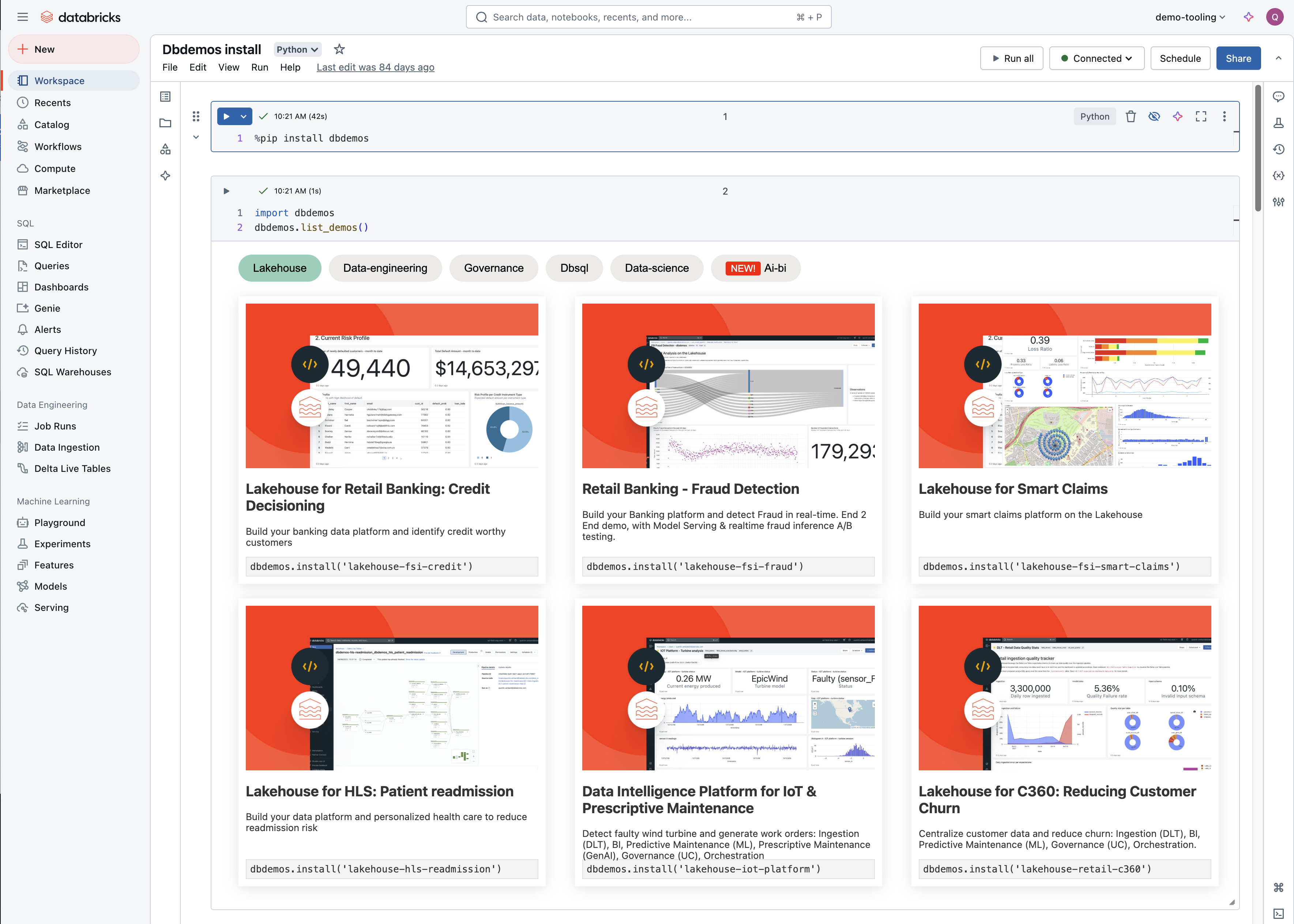
import dbdemos
dbdemos.help()
dbdemos.list_demos()

dbdemos.install('lakehouse-retail-c360', path='./', overwrite = True)
Requirements
dbdemos requires the current user to have:
- Cluster creation permission
- SDP Pipeline creation permission
- DBSQL dashboard & query creation permission
- For UC demos: Unity Catalog metastore must be available (demo will be installed but won't work)
Features
- Load demo notebooks (pre-run) to the given path
- Start job to load dataset based on demo requirement
- Start demo cluster customized for the demo & the current user
- Setup SDP pipelines
- Setup DBSQL dashboard
- Create ML Model
- Demo links are updated with resources created for an easy navigation
Feedback
Demo not working? Can't use dbdemos? Please open a github issue.
Make sure you mention the name of the demo.
DBDemos Developer options
Adding an AI/BI demo to dbdemos
open README_AIBI.md for more details on how to contribute & add an AI/BI demo.
Read the following if you want to add a new demo bundle.
Packaging a demo with dbdemos
Your demo must contain a _resources folder where you include all initialization scripts and your bundle configuration file.
Links & tags
DBdemos will dynamically override the link to point to the resources created.
Always use links relative to the local path to support multi workspaces. Do not add the workspace id.
SDP pipelines:
Your SDP pipeline must be added in the bundle file (see below).
Within your notebook, to identify your pipeline using the id in the bundle file, specify the id dbdemos-pipeline-id="<id>"as following:
<a dbdemos-pipeline-id="sdp-churn" href="#joblist/pipelines/a6ba1d12-74d7-4e2d-b9b7-ca53b655f39d" target="_blank">Spark Declarative Pipeline</a>
Workflows:
Your workflows must be added in the bundle file (see below).
Within your notebook, to identify your workflow using the id in the bundle file, specify the id dbdemos-workflow-id="<id>"as following:
<a dbdemos-workflow-id="credit-job" href="#joblist/pipelines/a6ba1d12-74d7-4e2d-b9b7-ca53b655f39d" target="_blank">Access your workflow</a>
DBSQL dashboards:
Similar to workflows, your dashboard id must match the one in the bundle file.
Dashboards definition should be added to the _dashboards folder (make sure the file name matches the dashboard id: churn-prediction.lvdash.json).
<a dbdemos-dashboard-id="churn-prediction" href="/sql/dashboardsv3/19394330-2274-4b4b-90ce-d415a7ff2130" target="_blank">Churn Analysis Dashboard</a>
bundle_config
The demo must contain the a ./_resources/bundle_config file containing your bundle definition.
This need to be a notebook & not a .json file (due to current api limitation).
{
  "name": "<Demo name, used in dbdemos.install('xxx')>",
  "category": "<Category, like data-engineering>",
  "title": "<Title>.",
  "description": "<Description>",
  "bundle": <Will bundle when True, skip when False>,
  "tags": [{"sdp": "Spark Declarative Pipeline"}],
  "notebooks": [
    {
      "path": "<notebbok path from the demo folder (ex: resources/00-load-data)>",
      "pre_run": <Will start a job to run it before packaging to get the cells results>,
      "publish_on_website": <Will add the notebook in the public website (with the results if it's pre_run=True)>,
      "add_cluster_setup_cell": <if True, add a cell with the name of the demo cluster>,
      "title":  "<Title>",
      "description": "<Description (will be in minisite also)>",
      "parameters": {"<key>": "<value. Will be sent to the pre_run job>"}
    }
  ],
  "init_job": {
    "settings": {
        "name": "demos_sdp_cdc_init_{{CURRENT_USER_NAME}}",
        "email_notifications": {
            "no_alert_for_skipped_runs": False
        },
        "timeout_seconds": 0,
        "max_concurrent_runs": 1,
        "tasks": [
            {
                "task_key": "init_data",
                "notebook_task": {
                    "notebook_path": "{{DEMO_FOLDER}}/_resources/01-load-data-quality-dashboard",
                    "source": "WORKSPACE"
                },
                "job_cluster_key": "Shared_job_cluster",
                "timeout_seconds": 0,
                "email_notifications": {}
            }
        ]
        .... Full standard job definition
    }
  },
  "pipelines": <list of SDP pipelines if any>
  [
    {
      "id": "sdp-cdc", <id, used in the notebook links to go to the generated notebook: <a dbdemos-pipeline-id="sdp-cdc" href="#joblist/pipelines/xxxx">installed SDP pipeline</a> >
      "run_after_creation": True,
      "definition": {
        ... Any SDP pipeline configuration...
        "libraries": [
            {
                "notebook": {
                    "path": "{{DEMO_FOLDER}}/_resources/00-Data_CDC_Generator"
                }
            }
        ],
        "name": "demos_sdp_cdc_{{CURRENT_USER_NAME}}",
        "storage": "/demos/sdp/cdc/{{CURRENT_USER_NAME}}",
        "target": "demos_sdp_cdc_{{CURRENT_USER_NAME}}"
      }
    }
  ],
  "workflows": [{
    "start_on_install": False,
    "id": "credit-job",
    "definition": {
        "settings": {
        ... full pipeline settings
    }
  }],
  "dashboards": [{"name": "[dbdemos] Retail Churn Prediction Dashboard",       "id": "churn-prediction"}]
}
dbdemos will replace the values defined as {{}} based on who install the demo. Supported keys:
- TODAY
- CURRENT_USER (email)
- CURRENT_USER_NAME (derivated from email)
- DEMO_NAME
- DEMO_FOLDER
DBDemo Installer configuration
The following describe how to package the demos created.
The installer needs to fetch data from a workspace & start jobs. To do so, it requires informations local_conf.json
{
  "pat_token": "xxx",
  "username": "xx.xx@databricks.com",
  "url": "https://xxx.databricks.com",
  "repo_staging_path": "/Repos/xx.xx@databricks.com",
  "repo_name": "dbdemos-notebooks",
  "repo_url": "https://github.com/databricks-demos/dbdemos-notebooks.git", #put your clone here
  "branch": "master",
  "current_folder": "<Used to mock the current folder outside of a notebook, ex: /Users/quentin.ambard@databricks.com/test_install_demo>"
}
Creating the bundles:
bundler = JobBundler(conf)
# the bundler will use a stating repo dir in the workspace to analyze & run content.
bundler.reset_staging_repo(skip_pull=False)
# Discover bundles from repo:
bundler.load_bundles_conf()
# Or manually add bundle to run faster:
#bundler.add_bundle("product_demos/Auto-Loader (cloudFiles)")

# Run the jobs (only if there is a new commit since the last time, or failure, or force execution)
bundler.start_and_wait_bundle_jobs(force_execution = False)

packager = Packager(conf, bundler)
packager.package_all()
Licence
See LICENSE file.
Data collection
To improve users experience and dbdemos asset quality, dbdemos sends report usage and capture views in the installed notebook (usually in the first cell) and dashboards. This information is captured for product improvement only and not for marketing purpose, and doesn't contain PII information. By using dbdemos and the assets it provides, you consent to this data collection. If you wish to disable it, you can set Tracker.enable_tracker to False in the tracker.py file.
Resource creation
To simplify your experience, dbdemos will create and start for you resources. As example, a demo could start (not exhaustive):
- A cluster to run your demo
- A Delta Live Table Pipeline to ingest data
- A DBSQL endpoint to run DBSQL dashboard
- An ML model
While dbdemos does its best to limit the consumption and enforce resource auto-termination, you remain responsible for the resources created and the potential consumption associated.
Support
Databricks does not offer official support for dbdemos and the associated assets.
For any issue with dbdemos or the demos installed, please open an issue and the demo team will have a look on a best effort basis.
3 maintainers


Metadata
3 maintainers
Release files for dbdemos 0.6.38
For a detailed explanation of source distributions (sdists) and built distributions (wheels), please see the package formats documentation.
Source distribution (sdist)
| File | Size | Uploaded | Provenance | Actions |
|---|---|---|---|---|
| dbdemos-0.6.38.tar.gz | 19.8 MB | Without provenance | Details for dbdemos-0.6.38.tar.gz |
Built distribution (wheel)
| File | Interpreter | ABI | Platform | Actions Reset |
|---|---|---|---|---|
| dbdemos-0.6.38-py3-none-any.whl | Python 3 | none | any | Details for dbdemos-0.6.38-py3-none-any.whl |
Total release size: 40.5 MB
Release files / dbdemos-0.6.38.tar.gz
| Download URL | dbdemos-0.6.38.tar.gz |
|---|---|
| Size | 19.8 MB |
| Tags | Source |
|
SHA-256 checksum How to use checksums |
7beec957959507c104c440e125eba3873114fbc0e422254bbd04637ae52b6eef
|
|
BLAKE2b-256 checksum How to use checksums |
7f0bf75aab091f977ce61d4c42b37e51e32fb33f36acc2b67144d6c9a458bda4
|
| Upload date | |
|
Uploaded using Trusted Publishing? What is trusted publishing? |
Yes |
| Uploaded via |
twine/7.0.0 CPython/3.11.17
|
Release files / dbdemos-0.6.38-py3-none-any.whl
| Download URL | dbdemos-0.6.38-py3-none-any.whl |
|---|---|
| Size | 20.7 MB |
| Tags | Python 3 |
|
SHA-256 checksum How to use checksums |
f7f400ae749c26d5db96dbf07e1d473c38b28611d398680fefb0a788529ee0ba
|
|
BLAKE2b-256 checksum How to use checksums |
f1154e5558bcdadeb41baeddb9db80f4a2d7068a8d6c5f7d20e2686c667132e1
|
| Upload date | |
|
Uploaded using Trusted Publishing? What is trusted publishing? |
Yes |
| Uploaded via |
twine/7.0.0 CPython/3.11.17
|
Security for dbdemos 0.6.38
Provenance
Provenance describes where a file came from. On PyPI, provenance is shared via attestations, which provide a verifiable record of the build or publishing details. View details, limitations and caveats.
No provenance found
None of the files in this release were uploaded with provenance metadata.
A note on package security
PyPI is a repository for distributing packages, not a service for auditing them. While third-party security researchers and our staff do their best to detect and remove malicious packages, PyPI cannot guarantee the quality, security or suitability of any given package.
To learn more about protecting yourself from malicious actors, visit our package security documentation.














