
Install databricks demos: notebooks, Delta Live Table Pipeline, DBSQL Dashboards, ML Models etc.


Project description
dbdemos
DBDemos is a toolkit to easily install Lakehouse demos for Databricks.
Looking for the dbdemos notebooks and content? Access https://github.com/databricks-demos/dbdemos?
Simply deploy & share demos on any workspace. dbdemos is packaged with a list of demos:
- Lakehouse, end-to-end demos (ex: Lakehouse Retail Churn)
- Product demos (ex: Delta Live Table, CDC, ML, DBSQL Dashboard, MLOps...)
Please visit dbdemos.ai to explore all our demos.
Installation
Do not clone the repo, just pip install dbdemos wheel:
%pip install dbdemos
Usage within Databricks
See demo video
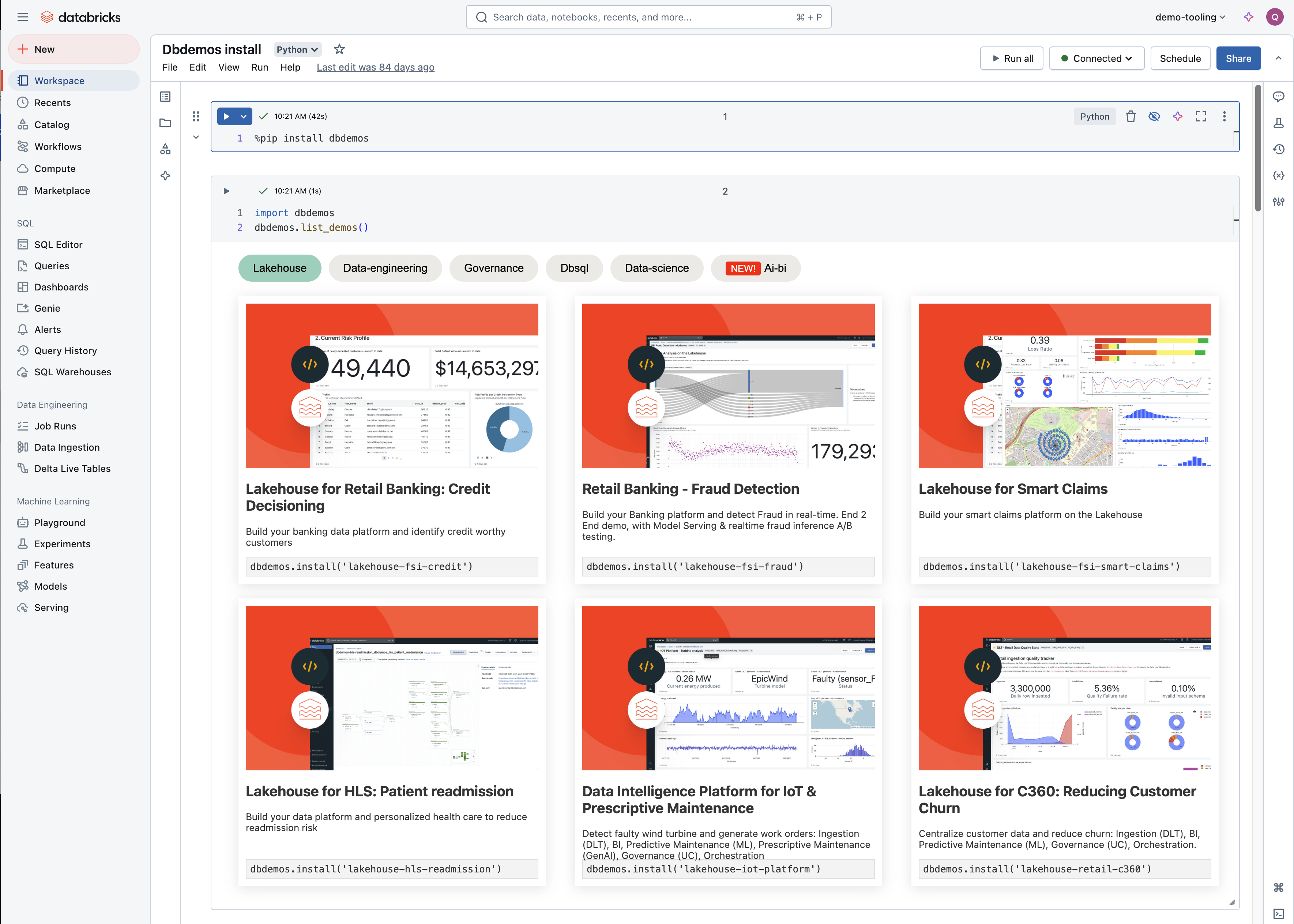
import dbdemos
dbdemos.help()
dbdemos.list_demos()

dbdemos.install('lakehouse-retail-c360', path='./', overwrite = True)
Requirements
dbdemos requires the current user to have:
- Cluster creation permission
- DLT Pipeline creation permission
- DBSQL dashboard & query creation permission
- For UC demos: Unity Catalog metastore must be available (demo will be installed but won't work)
Features
- Load demo notebooks (pre-run) to the given path
- Start job to load dataset based on demo requirement
- Start demo cluster customized for the demo & the current user
- Setup DLT pipelines
- Setup DBSQL dashboard
- Create ML Model
- Demo links are updated with resources created for an easy navigation
Feedback
Demo not working? Can't use dbdemos? Please open a github issue.
Make sure you mention the name of the demo.
DBDemos Developer options
Adding an AI/BI demo to dbdemos
open README_AIBI.md for more details on how to contribute & add an AI/BI demo.
Read the following if you want to add a new demo bundle.
Packaging a demo with dbdemos
Your demo must contain a _resources folder where you include all initialization scripts and your bundle configuration file.
Links & tags
DBdemos will dynamically override the link to point to the resources created.
Always use links relative to the local path to support multi workspaces. Do not add the workspace id.
DLT pipelines:
Your DLT pipeline must be added in the bundle file (see below).
Within your notebook, to identify your pipeline using the id in the bundle file, specify the id dbdemos-pipeline-id="<id>"as following:
<a dbdemos-pipeline-id="dlt-churn" href="#joblist/pipelines/a6ba1d12-74d7-4e2d-b9b7-ca53b655f39d" target="_blank">Delta Live Table pipeline</a>
Workflows:
Your workflows must be added in the bundle file (see below).
Within your notebook, to identify your workflow using the id in the bundle file, specify the id dbdemos-workflow-id="<id>"as following:
<a dbdemos-workflow-id="credit-job" href="#joblist/pipelines/a6ba1d12-74d7-4e2d-b9b7-ca53b655f39d" target="_blank">Access your workflow</a>
DBSQL dashboards:
Similar to workflows, your dashboard id must match the one in the bundle file.
Dashboards definition should be added to the _dashboards folder (make sure the file name matches the dashboard id: churn-prediction.lvdash.json).
<a dbdemos-dashboard-id="churn-prediction" href="/sql/dashboardsv3/19394330-2274-4b4b-90ce-d415a7ff2130" target="_blank">Churn Analysis Dashboard</a>
bundle_config
The demo must contain the a ./_resources/bundle_config file containing your bundle definition.
This need to be a notebook & not a .json file (due to current api limitation).
{
  "name": "<Demo name, used in dbdemos.install('xxx')>",
  "category": "<Category, like data-engineering>",
  "title": "<Title>.",
  "description": "<Description>",
  "bundle": <Will bundle when True, skip when False>,
  "tags": [{"dlt": "Delta Live Table"}],
  "notebooks": [
    {
      "path": "<notebbok path from the demo folder (ex: resources/00-load-data)>",
      "pre_run": <Will start a job to run it before packaging to get the cells results>,
      "publish_on_website": <Will add the notebook in the public website (with the results if it's pre_run=True)>,
      "add_cluster_setup_cell": <if True, add a cell with the name of the demo cluster>,
      "title":  "<Title>",
      "description": "<Description (will be in minisite also)>",
      "parameters": {"<key>": "<value. Will be sent to the pre_run job>"}
    }
  ],
  "init_job": {
    "settings": {
        "name": "demos_dlt_cdc_init_{{CURRENT_USER_NAME}}",
        "email_notifications": {
            "no_alert_for_skipped_runs": False
        },
        "timeout_seconds": 0,
        "max_concurrent_runs": 1,
        "tasks": [
            {
                "task_key": "init_data",
                "notebook_task": {
                    "notebook_path": "{{DEMO_FOLDER}}/_resources/01-load-data-quality-dashboard",
                    "source": "WORKSPACE"
                },
                "job_cluster_key": "Shared_job_cluster",
                "timeout_seconds": 0,
                "email_notifications": {}
            }
        ]
        .... Full standard job definition
    }
  },
  "pipelines": <list of DLT pipelines if any>
  [
    {
      "id": "dlt-cdc", <id, used in the notebook links to go to the generated notebook: <a dbdemos-pipeline-id="dlt-cdc" href="#joblist/pipelines/xxxx">installed DLT pipeline</a> >
      "run_after_creation": True,
      "definition": {
        ... Any DLT pipelineconfiguration...
        "libraries": [
            {
                "notebook": {
                    "path": "{{DEMO_FOLDER}}/_resources/00-Data_CDC_Generator"
                }
            }
        ],
        "name": "demos_dlt_cdc_{{CURRENT_USER_NAME}}",
        "storage": "/demos/dlt/cdc/{{CURRENT_USER_NAME}}",
        "target": "demos_dlt_cdc_{{CURRENT_USER_NAME}}"
      }
    }
  ],
  "workflows": [{
    "start_on_install": False,
    "id": "credit-job",
    "definition": {
        "settings": {
        ... full pipeline settings
    }
  }],
  "dashboards": [{"name": "[dbdemos] Retail Churn Prediction Dashboard",       "id": "churn-prediction"}]
}
dbdemos will replace the values defined as {{}} based on who install the demo. Supported keys:
- TODAY
- CURRENT_USER (email)
- CURRENT_USER_NAME (derivated from email)
- DEMO_NAME
- DEMO_FOLDER
DBDemo Installer configuration
The following describe how to package the demos created.
The installer needs to fetch data from a workspace & start jobs. To do so, it requires informations local_conf.json
{
  "pat_token": "xxx",
  "username": "xx.xx@databricks.com",
  "url": "https://xxx.databricks.com",
  "repo_staging_path": "/Repos/xx.xx@databricks.com",
  "repo_name": "dbdemos-notebooks",
  "repo_url": "https://github.com/databricks-demos/dbdemos-notebooks.git", #put your clone here
  "branch": "master",
  "current_folder": "<Used to mock the current folder outside of a notebook, ex: /Users/quentin.ambard@databricks.com/test_install_demo>"
}
Creating the bundles:
bundler = JobBundler(conf)
# the bundler will use a stating repo dir in the workspace to analyze & run content.
bundler.reset_staging_repo(skip_pull=False)
# Discover bundles from repo:
bundler.load_bundles_conf()
# Or manually add bundle to run faster:
#bundler.add_bundle("product_demos/Auto-Loader (cloudFiles)")

# Run the jobs (only if there is a new commit since the last time, or failure, or force execution)
bundler.start_and_wait_bundle_jobs(force_execution = False)

packager = Packager(conf, bundler)
packager.package_all()
Licence
See LICENSE file.
Data collection
To improve users experience and dbdemos asset quality, dbdemos sends report usage and capture views in the installed notebook (usually in the first cell) and dashboards. This information is captured for product improvement only and not for marketing purpose, and doesn't contain PII information. By using dbdemos and the assets it provides, you consent to this data collection. If you wish to disable it, you can set Tracker.enable_tracker to False in the tracker.py file.
Resource creation
To simplify your experience, dbdemos will create and start for you resources. As example, a demo could start (not exhaustive):
- A cluster to run your demo
- A Delta Live Table Pipeline to ingest data
- A DBSQL endpoint to run DBSQL dashboard
- An ML model
While dbdemos does its best to limit the consumption and enforce resource auto-termination, you remain responsible for the resources created and the potential consumption associated.
Support
Databricks does not offer official support for dbdemos and the associated assets.
For any issue with dbdemos or the demos installed, please open an issue and the demo team will have a look on a best effort basis.
Release history Release notifications | RSS feed


Download files
Download the file for your platform. If you're not sure which to choose, learn more about installing packages.
Source Distributions
Built Distribution
Filter files by name, interpreter, ABI, and platform.
If you're not sure about the file name format, learn more about wheel file names.
Copy a direct link to the current filters
File details
Details for the file dbdemos-0.6.29-py3-none-any.whl.
File metadata
- Download URL: dbdemos-0.6.29-py3-none-any.whl
- Upload date:
- Size: 28.8 MB
- Tags: Python 3
- Uploaded using Trusted Publishing? No
- Uploaded via: twine/4.0.2 CPython/3.11.0
File hashes
| Algorithm | Hash digest | |
|---|---|---|
| SHA256 |
8c4997f727ca69ef48103b850420851c39b7edd6033b36691fb5ef131c0f4c6d
|
|
| MD5 |
05ee2c3c428df7b901647221bb41bdc0
|
|
| BLAKE2b-256 |
be612640b7d92da024a088f710f18cb74362a12202335382a8e71c3aa519cbfc
|






