





DBMS-Benchmarker
DBMS-Benchmarker is a Python-based application-level blackbox benchmark tool for Database Management Systems (DBMS). It aims at reproducible measuring and easy evaluation of the performance the user receives even in complex benchmark situations. It connects to a given list of DBMS (via JDBC) and runs a given list of (SQL) benchmark queries. Queries can be parametrized and randomized. Results and evaluations are available via a Python interface and can be inspected with standard Python tools like pandas DataFrames. An interactive visual dashboard assists in multi-dimensional analysis of the results.
See the homepage and the documentation.
If you encounter any issues, please report them to our Github issue tracker.
Key Features
DBMS-Benchmarker
- is Python3-based
- helps to benchmark DBMS
- connects to all DBMS having a JDBC interface - including GPU-enhanced DBMS
- requires only JDBC - no vendor specific supplements are used
- benchmarks arbitrary SQL queries - in all dialects
- allows planning of complex test scenarios - to simulate realistic or revealing use cases
- allows easy repetition of benchmarks in varying settings - different hardware, DBMS, DBMS configurations, DB settings etc
- investigates a number of timing aspects - connection, execution, data transfer, in total, per session etc
- investigates a number of other aspects - received result sets, precision, number of clients
- collects hardware metrics from a Prometheus server - hardware utilization, energy consumption etc
- helps to evaluate results - by providing
- metrics that can be analyzed by aggregation in multi-dimensions, like maximum throughput per DBMS, average CPU utilization per query or geometric mean of run latency per workload
- predefined evaluations like statistics
- in standard Python data structures
- in Jupyter notebooks see rendered example
- in an interactive dashboard
For more informations, see a basic example or take a look in the documentation for a full list of options.
The code uses several Python modules, in particular jaydebeapi for handling DBMS. This module has been tested with Citus Data (Hyperscale), Clickhouse, CockroachDB, Exasol, IBM DB2, MariaDB, MariaDB Columnstore, MemSQL (SingleStore), MonetDB, MySQL, OmniSci (HEAVY.AI), Oracle DB, PostgreSQL, SQL Server, SAP HANA, TimescaleDB, and Vertica.
Installation
Run pip install dbmsbenchmarker to install the package.
You will also need to have
- Java installed (we tested with Java 8)
JAVA_HOMEset correctly- a JDBC driver suitable for the DBMS you want to connect to (optionally located in your
CLASSPATH)
Basic Usage
The following very simple use case runs the query SELECT COUNT(*) FROM test 10 times against one local MySQL installation.
As a result we obtain an interactive dashboard to inspect timing aspects.
Configuration
We need to provide
- a DBMS configuration file, e.g. in
./config/connections.config
[
  {
    'name': "MySQL",
    'active': True,
    'JDBC': {
      'driver': "com.mysql.cj.jdbc.Driver",
      'url': "jdbc:mysql://localhost:3306/database",
      'auth': ["username", "password"],
      'jar': "mysql-connector-java-8.0.13.jar"
    }
  }
]
- the required JDBC driver, e.g.
mysql-connector-java-8.0.13.jar - a Queries configuration file, e.g. in
./config/queries.config
{
  'name': 'Some simple queries',
  'connectionmanagement': {
        'timeout': 5 # in seconds
    },
  'queries':
  [
    {
      'title': "Count all rows in test",
      'query': "SELECT COUNT(*) FROM test",
      'numRun': 10
    }
  ]
}
Perform Benchmark
Run the CLI command: dbmsbenchmarker run -e yes -b -f ./config
-e yes: This will precompile some evaluations and generate the timer cube.-b: This will suppress some output-f: This points to a folder having the configuration files.
This is equivalent to python benchmark.py run -e yes -b -f ./config
After benchmarking has been finished we will see a message like
Experiment <code> has been finished
The script has created a result folder in the current directory containing the results. code is the name of the folder.
Evaluate Results in Dashboard
Run the command: dbmsdashboard
This will start the evaluation dashboard at localhost:8050.
Visit the address in a browser and select the experiment code.
Alternatively you may use a Jupyter notebook, see a rendered example.
Limitations
Limitations are:
- strict black box perspective - may not use all tricks available for a DBMS
- strict JDBC perspective - depends on a JVM and provided drivers
- strict user perspective - client system, network connection and other host workloads may affect performance
- not officially applicable for well known benchmark standards - partially, but not fully complying with TPC-H and TPC-DS
- hardware metrics are collected from a monitoring system - not as precise as profiling
- no GUI for configuration
- strictly Python - a very good and widely used language, but maybe not your choice
Other comparable products you might like
- Apache JMeter - Java-based performance measure tool, including a configuration GUI and reporting to HTML
- HammerDB - industry accepted benchmark tool based on Tcl, but limited to some DBMS
- Sysbench - a scriptable multi-threaded benchmark tool based on LuaJIT
- OLTPBench - Java-based performance measure tool, using JDBC and including a lot of predefined benchmarks
- BenchBase - successor of OLTPBench
Contributing, Bug Reports
If you have any question or found a bug, please report them to our Github issue tracker. In any bug report, please let us know:
- Which operating system and hardware (32 bit or 64 bit) you are using
- Python version
- DBMSBenchmarker version (or git commit/date)
- DBMS you are connecting to
- Traceback that occurs (the full error message)
We are always looking for people interested in helping with code development, documentation writing, technical administration, and whatever else comes up. If you wish to contribute, please first read the contribution section or visit the documentation.
Benchmarking in a Kubernetes Cloud
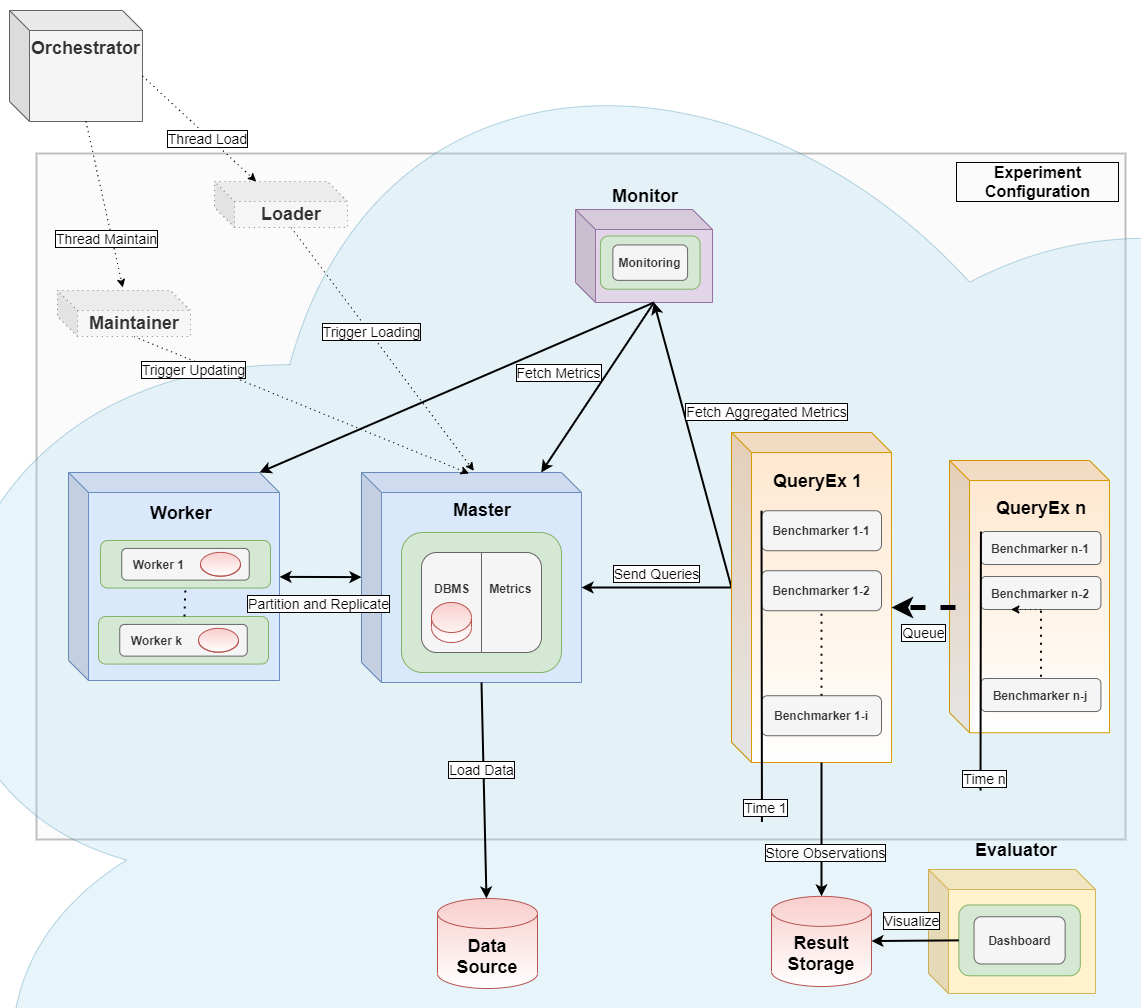
This module can serve as the query executor [2] and evaluator [1] for distributed parallel benchmarking experiments in a Kubernetes Cloud, see the orchestrator for more details.
References
If you use DBMSBenchmarker in work contributing to a scientific publication, we kindly ask that you cite our application note [1] and/or [3]:
Erdelt P.K. (2021) A Framework for Supporting Repetition and Evaluation in the Process of Cloud-Based DBMS Performance Benchmarking. In: Nambiar R., Poess M. (eds) Performance Evaluation and Benchmarking. TPCTC 2020. Lecture Notes in Computer Science, vol 12752. Springer, Cham. https://doi.org/10.1007/978-3-030-84924-5_6
[2] Orchestrating DBMS Benchmarking in the Cloud with Kubernetes
Erdelt P.K. (2022) Orchestrating DBMS Benchmarking in the Cloud with Kubernetes. In: Nambiar R., Poess M. (eds) Performance Evaluation and Benchmarking. TPCTC 2021. Lecture Notes in Computer Science, vol 13169. Springer, Cham. https://doi.org/10.1007/978-3-030-94437-7_6
[3] DBMS-Benchmarker: Benchmark and Evaluate DBMS in Python
Erdelt P.K., Jestel J. (2022). DBMS-Benchmarker: Benchmark and Evaluate DBMS in Python. Journal of Open Source Software, 7(79), 4628 https://doi.org/10.21105/joss.04628
1 maintainer

Metadata
1 maintainer
Release files for dbmsbenchmarker 0.15.3
For a detailed explanation of source distributions (sdists) and built distributions (wheels), please see the package formats documentation.
Source distribution (sdist)
| File | Size | Uploaded | Provenance | |
|---|---|---|---|---|
| dbmsbenchmarker-0.15.3.tar.gz | 130.6 kB | Without provenance | Details |
Built distribution (wheel)
| File | Interpreter | ABI | Platform | Reset |
|---|---|---|---|---|
| dbmsbenchmarker-0.15.3-py3-none-any.whl | Python 3 | none | any | Details |
Total release size: 266.2 kB
Release files / dbmsbenchmarker-0.15.3.tar.gz
| Download URL | dbmsbenchmarker-0.15.3.tar.gz |
|---|---|
| Size | 130.6 kB |
| Tags | Source |
|
SHA-256 checksum How to use checksums |
3ee7ebf7d17a7def405ed9cba50b16e29b64cea998cba640a0ced55230d0db8b
|
|
BLAKE2b-256 checksum How to use checksums |
cf9c9cd871c5c451fd65cb95811847e0d01494a3f031c38ca6e7738091470b5e
|
| Upload date | |
|
Uploaded using Trusted Publishing? What is trusted publishing? |
No |
| Uploaded via |
twine/7.0.0 CPython/3.13.14
|
Release files / dbmsbenchmarker-0.15.3-py3-none-any.whl
| Download URL | dbmsbenchmarker-0.15.3-py3-none-any.whl |
|---|---|
| Size | 135.6 kB |
| Tags | Python 3 |
|
SHA-256 checksum How to use checksums |
3da9c89b6b2e65f5bbdf6efbd262f8ddca7c40563565462c7af37c9a3df7f15f
|
|
BLAKE2b-256 checksum How to use checksums |
f45ff4c64e5acc28d90f2f4da90bb8b36107d64fa568a9bdd8712ece66b6cc26
|
| Upload date | |
|
Uploaded using Trusted Publishing? What is trusted publishing? |
No |
| Uploaded via |
twine/7.0.0 CPython/3.13.14
|
Security for dbmsbenchmarker 0.15.3
Provenance
Provenance describes where a file came from. On PyPI, provenance is shared via attestations, which provide a verifiable record of the build or publishing details. View details, limitations and caveats.
No provenance found
None of the files in this release were uploaded with provenance metadata.
A note on package security
PyPI is a repository for distributing packages, not a service for auditing them. While third-party security researchers and our staff do their best to detect and remove malicious packages, PyPI cannot guarantee the quality, security or suitability of any given package.














