
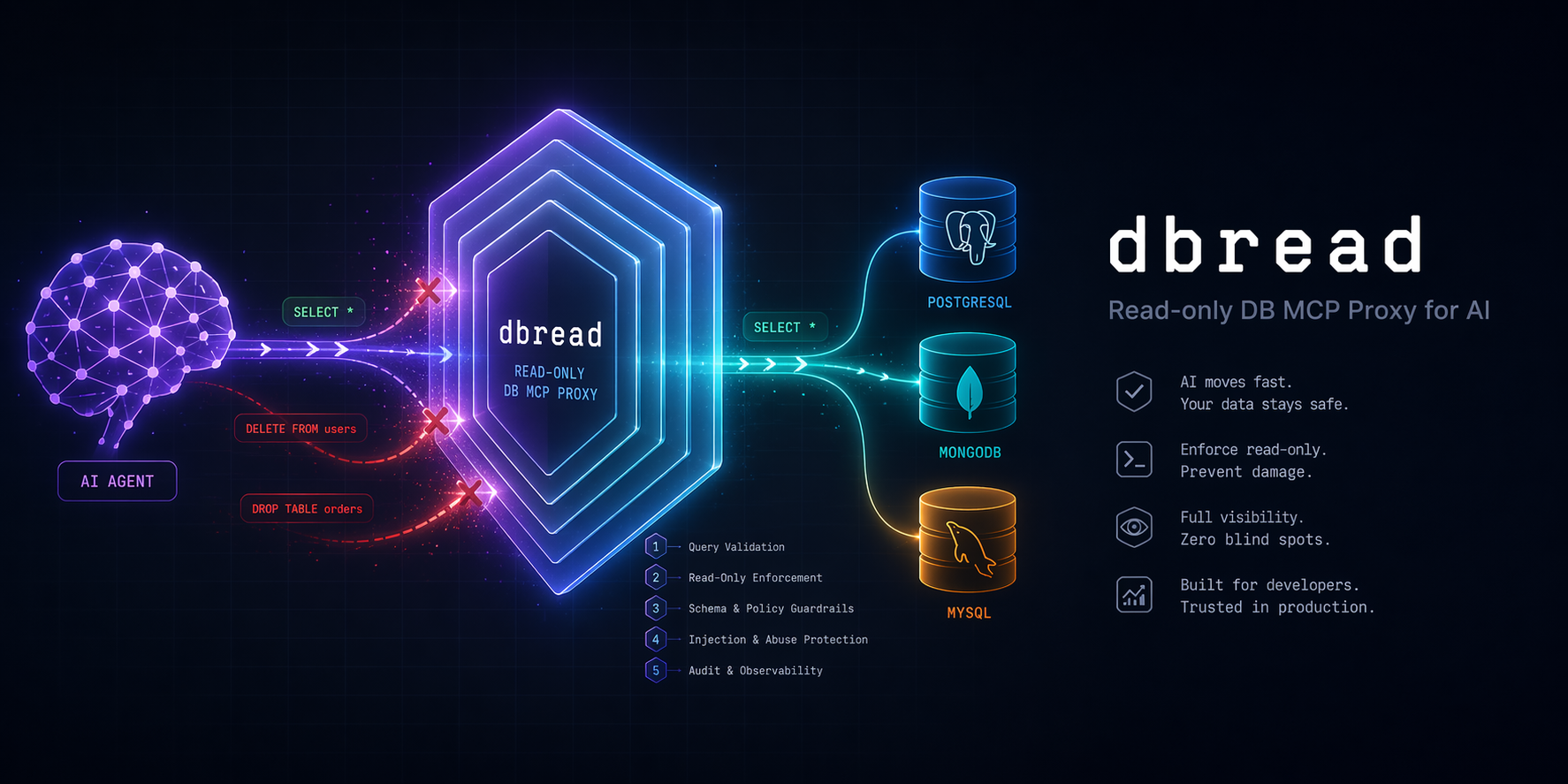
dbread
Read-only database MCP proxy for AI — safe SELECT + MongoDB read access with 5-layer defense







Why · Quickstart · Add a connection · CLI · Tools · Security · Update · Docs
🤔 Why
Handing a raw database connection string to an AI is like handing a stranger your car keys. They probably won't crash it, but you wouldn't bet the car on it.
dbread sits between your AI and your DBs and enforces read-only access through five independent layers — if one layer has a bug, the next one still blocks you.
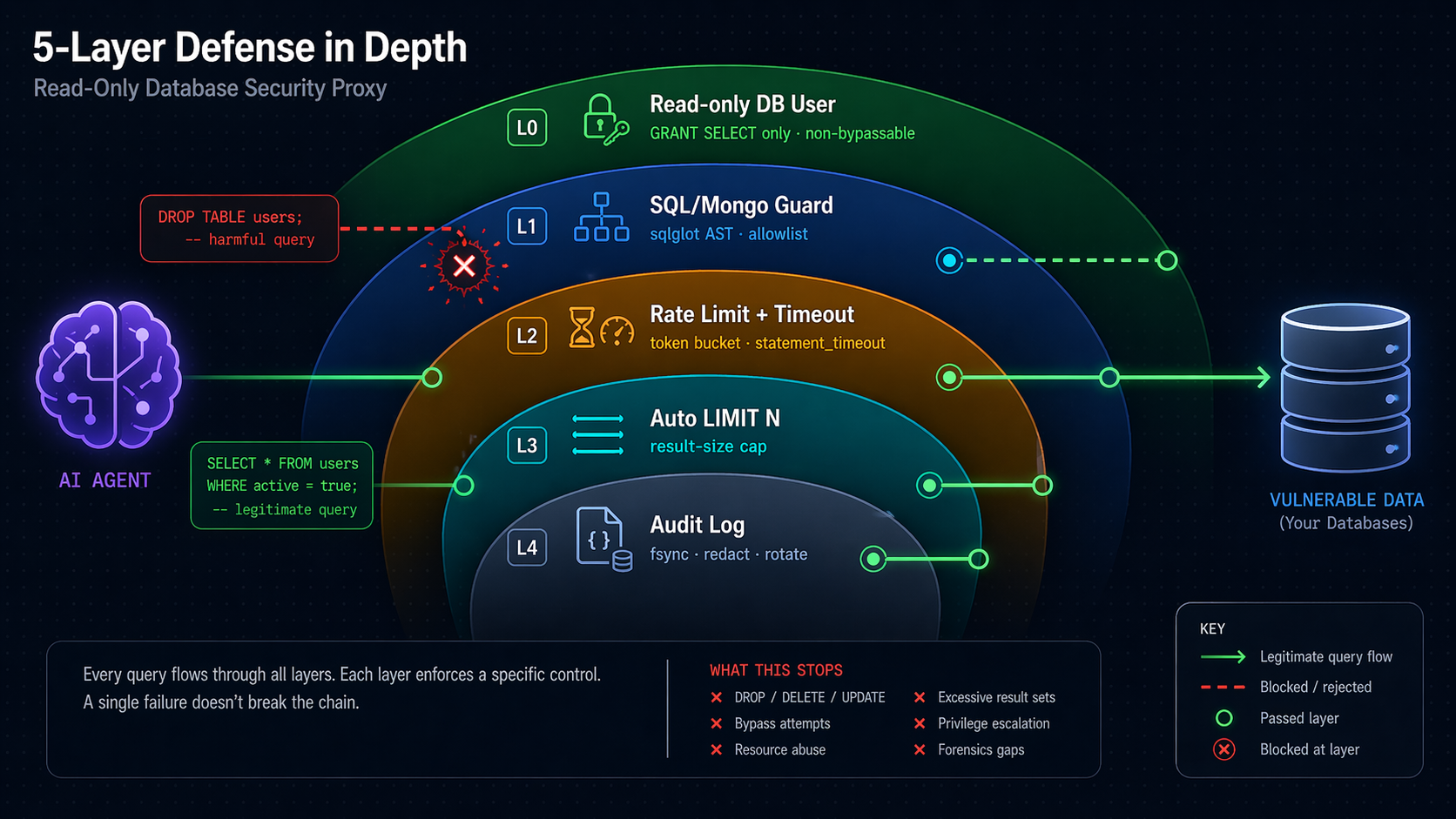
⚠️ Security note — do not skip. Layer 0 (a read-only DB user, step 2b) is the only non-bypassable guarantee. Layers 1–4 reduce blast radius and make attacks loud — they are not substitutes. If you point dbread at a DB where the configured user can write, a single sqlglot parser gap (past, present, or future) can let a write through. See Known Limitations.
⚡ Quickstart (2 minutes, no clone needed)
1. Install as a tool
# From PyPI (recommended):
uv tool install "dbread[postgres]"          # extras: postgres, mysql, mssql, oracle, duckdb, clickhouse, mongo

# OR straight from GitHub (no PyPI needed):
uv tool install "git+https://github.com/tvtdev94/dbread[postgres]"
💡 Pick the extras you need now. To add more drivers later, use
dbread add-extra <name>(preserves prior).
2. Scaffold config (one command)
dbread init
Creates ~/.dbread/config.yaml, ~/.dbread/.env, and ~/.dbread/sample.db (a tiny read-only SQLite demo so everything works immediately). Prints the exact claude mcp add line to paste in step 4. Skip to step 4 if you only want the demo; otherwise edit config.yaml / .env first (step 3).
💡 Claude Code users:
dbread initalso installs a skill at~/.claude/skills/dbread/SKILL.mdthat teaches Claude the safe query workflow (discover → describe → query), SQL vs MongoDB routing, when to reach forsample_table/profile_table, thedbread add/add-extra/doctorsetup helpers, and how to recover from guard / rate-limit errors. Auto-refreshes onuv tool upgrade dbread(v0.7.2+) — no manual re-install needed.
2b. Create a read-only DB user (when pointing at a real DB)
See docs/setup-db-readonly.md — copy-paste SQL/Mongo snippets for PostgreSQL / MySQL / MSSQL / Oracle / SQLite / DuckDB / ClickHouse / MongoDB, plus compat notes for CockroachDB · Timescale · Aurora · SingleStore · PlanetScale · Yugabyte · DocumentDB · CosmosDB.
2c. Add your real connection (one command)
Have a connection string from a tool, cloud console, or .NET / JDBC / ODBC config? Don't hand-edit YAML:
dbread add
Paste your connection string when prompted (input is hidden — safe for passwords). dbread:
- Auto-detects the format — URI · JDBC · ADO.NET / C# · ODBC · MongoDB Atlas (
mongodb+srv://) · MotherDuck · file path - Converts to the right SQLAlchemy URL with the correct
+driversuffix and URL-escaped password - Tests with
SELECT 1(or Mongoping) — fail-fast before saving - Writes
~/.dbread/.env(chmod0600on POSIX) +~/.dbread/config.yaml(preserves your comments)
Supports PostgreSQL · MySQL · MSSQL · Oracle · SQLite · DuckDB · ClickHouse · MongoDB.
# Common flags:
dbread add prod_pg                          # provide a name (otherwise prompted)
dbread add --no-test                        # skip the live connection test
dbread add --dialect-hint mssql             # force dialect when ambiguous
dbread add --manual --dialect-hint postgres # skip detection, paste a SQLAlchemy URL directly
dbread add --from-stdin < my-conn.txt       # script-friendly (non-interactive)
💡 Auto-detect failed? dbread offers a fallback menu — paste a SQLAlchemy URL manually, generate a copy-paste config template, or cancel. Same recovery if the live test fails (save anyway / edit & retry / cancel).
See docs/connection-string-formats.md for all recognised formats and
URL templates per dialect, and docs/cli-reference.md for the complete CLI reference.
3. Create config.yaml + .env
# ~/.dbread/config.yaml
connections:
  mydb:
    url_env: MYDB_URL
    dialect: postgres
    rate_limit_per_min: 60
    statement_timeout_s: 30
    max_rows: 1000
    # max_rows_estimate: 100000   # opt-in Layer 2.5 — reject if EXPLAIN > N rows (postgres/mysql/mssql/oracle/duckdb/mongodb)

  # Optional: MongoDB (requires `uv tool install "dbread[mongo]"`)
  # analytics_mongo:
  #   url_env: MONGO_URL
  #   dialect: mongodb
  #   rate_limit_per_min: 60
  #   statement_timeout_s: 30    # becomes maxTimeMS=30000 per command
  #   max_rows: 1000
  #   mongo:
  #     sample_size: 100         # docs sampled by describe_table (10-1000)

audit:
  path: ~/.dbread/audit.jsonl   # ~ expansion supported
  rotate_mb: 50                  # rotates current → .1 → .2 → .3 (oldest dropped)
  timezone: UTC                  # IANA name; default UTC
  redact_literals: false         # true → SQL literals become "?" in log (PII hardening)
  retention_days: 7              # auto-prune entries older than N days (null = off)
# ~/.dbread/.env
MYDB_URL=postgresql+psycopg2://ai_readonly:password@host:5432/mydb
# MONGO_URL=mongodb://ai_ro:password@host:27017/analytics?tls=true
4. Register with Claude Code
claude mcp add --scope user dbread \
  --env DBREAD_CONFIG=/path/to/config.yaml \
  -- dbread
Or without install (one-shot via uvx):
claude mcp add --scope user dbread \
  --env DBREAD_CONFIG=/path/to/config.yaml \
  -- uvx --from "dbread[postgres]" dbread
5. Use it
Restart Claude Code → /mcp → dbread appears. Ask Claude: "list connections in dbread, then count rows per status in the orders table."
Alternative: clone the repo (for development)
git clone https://github.com/tvtdev94/dbread && cd dbread
uv sync --extra postgres --extra dev
cp config.example.yaml config.yaml && cp .env.example .env
claude mcp add --scope user dbread -- uv --directory $(pwd) run dbread
Ask Claude: "List connections in dbread, then count rows per status in the orders table."
🏗️ Architecture
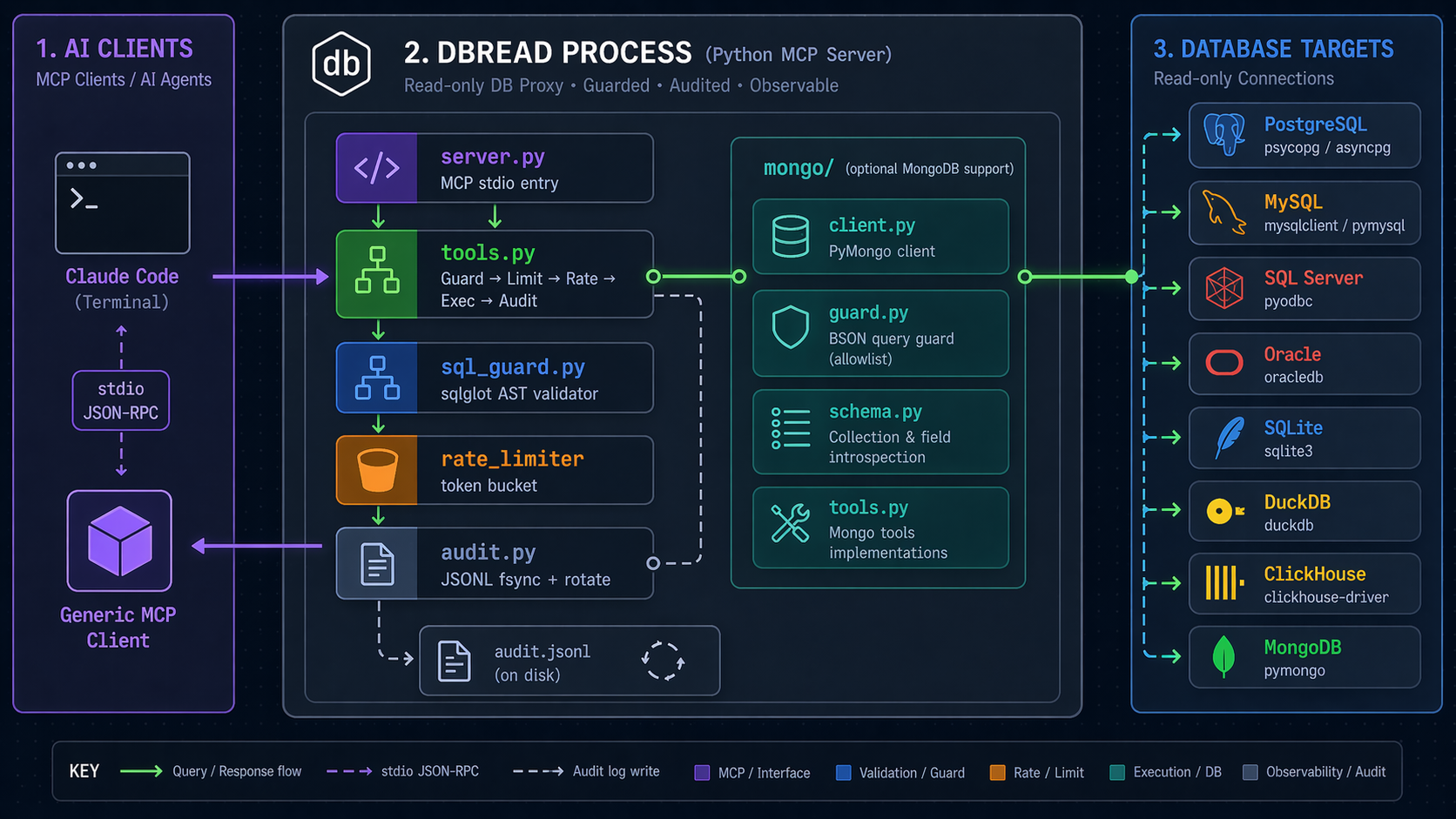
Data flow for a query call:
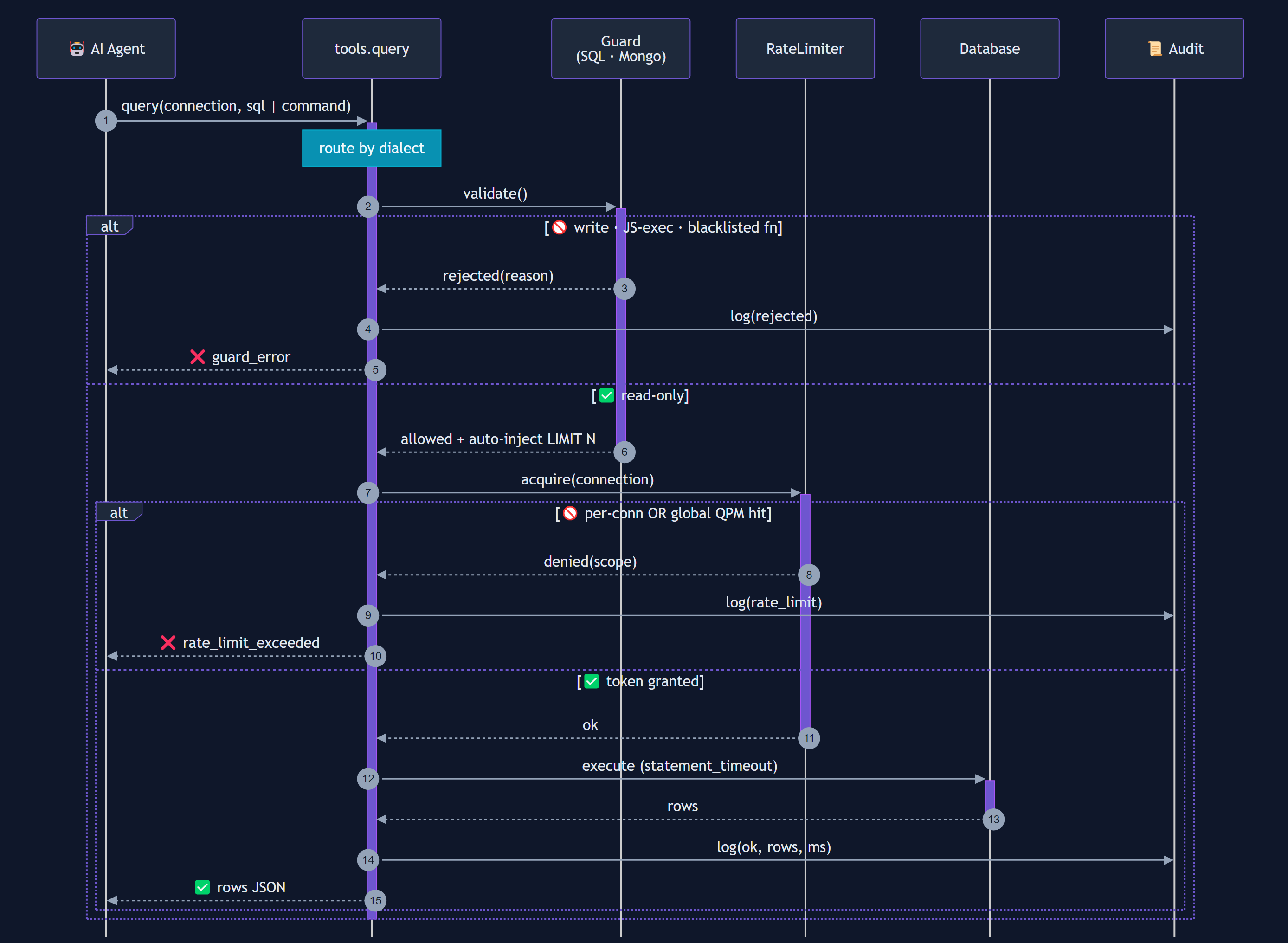
Mermaid source (for contributors — re-render with mmdc)
sequenceDiagram
    autonumber
    participant AI as 🤖 AI Agent
    participant T as tools.query
    participant G as Guard<br/>(SQL · Mongo)
    participant R as RateLimiter
    participant D as Database
    participant A as 📜 Audit

    AI->>+T: query(connection, sql | command)
    Note over T: route by dialect

    T->>+G: validate()
    alt 🚫 write · JS-exec · blacklisted fn
        G-->>T: rejected(reason)
        T->>A: log(rejected)
        T-->>AI: ❌ guard_error
    else ✅ read-only
        G-->>-T: allowed + auto-inject LIMIT N

        T->>+R: acquire(connection)
        alt 🚫 per-conn OR global QPM hit
            R-->>T: denied(scope)
            T->>A: log(rate_limit)
            T-->>AI: ❌ rate_limit_exceeded
        else ✅ token granted
            R-->>-T: ok
            T->>+D: execute (statement_timeout)
            D-->>-T: rows
            T->>A: log(ok, rows, ms)
            T-->>AI: ✅ rows JSON
        end
    end
    deactivate T
Source: docs/images/query-flow.mmd. Regenerate with:
npx -p @mermaid-js/mermaid-cli mmdc \
  -i docs/images/query-flow.mmd \
  -o docs/images/query-flow.png \
  -c docs/images/mermaid-config.json \
  -b "#0f172a" -w 1600 -H 1200 --scale 2
🧰 Tools
| Tool | Purpose | Input |
|---|---|---|
list_connections |
Configured connections + dialects | — |
list_tables |
Relations in a connection, tagged table / view / materialized_view / collection |
connection, schema? |
list_schemas |
Schema names (Mongo: the one pinned database) | connection |
describe_table |
SQL: columns/types/PKs/defaults/indexes/foreign keys. Mongo: sampled field schema + indexes | connection, table, schema? |
sample_table |
Most recent rows, auto-ordered by timestamp column, else PK desc (_id on Mongo) |
connection, table, n?, schema? |
profile_table |
Per column: null count + %, distinct count, min/max — over a bounded sample | connection, table, columns?, schema?, sample_size? |
query |
Run SELECT/WITH/EXPLAIN/SHOW (SQL) or Mongo command (find/count/distinct/aggregate). Auto-limited. Rate-limited. Audited. |
connection, sql | command, max_rows?, params? |
explain |
Query execution plan | connection, sql | command |
Debugging data fast. sample_table then profile_table answers "what does
this data actually look like, and which column is broken" in two calls instead
of a dozen hand-written queries against the rate budget.
💻 CLI Commands
dbread is also a CLI for setup, troubleshooting, and audit analysis.
| Command | Purpose |
|---|---|
dbread |
Start the MCP stdio server (reads DBREAD_CONFIG) |
dbread init |
Scaffold ~/.dbread/{config.yaml,.env,sample.db} + install Claude skill |
dbread add [name] |
Interactive wizard — paste any connection string, auto-detect & convert |
dbread add-extra <e1> ... |
Install additional driver extras without losing existing ones |
dbread list-extras |
Show tracked vs actually-importable extras |
dbread doctor |
Per-connection health table — driver check + live ping (5s, parallel) + summary stats + smart fix hints. Use --quick to skip live tests. |
dbread audit [opts] |
Analyze audit.jsonl (--since, --conn, --slow, --rejected, --tail) |
dbread query <conn> "<sql>" |
One-shot query — TTY → ASCII table, pipe → JSONL, --format csv for export. --explain, --max-rows, --command '<json>' (Mongo). Same guard/audit pipeline as MCP path. |
dbread upgrade [--check] |
Reinstall via uv tool install --reinstall preserving tracked extras. Windows pre-check + --force-windows override + --check dry-run (compares vs PyPI latest). |
dbread install-skill [--force] |
Install/refresh the Claude Code skill |
dbread --version / --help |
Self-explanatory |
Full reference: docs/cli-reference.md.
🛡️ Security Model
| Layer | Mechanism | What it rejects |
|---|---|---|
| 0 | DB user with GRANT SELECT only |
All writes — mandatory, non-bypassable |
| 1 | sqlglot AST validation (SQL) · allowlist validator (Mongo) |
SQL: INSERT · UPDATE · DELETE · MERGE · CREATE · ALTER · DROP · TRUNCATE · GRANT · REVOKE · USE · SELECT … FOR UPDATE/SHARE · multi-statement (SELECT 1; DROP...) · PG CTE-DML trick (WITH d AS (DELETE...) SELECT...) · time-based DoS (pg_sleep*, sleep, benchmark, MSSQL WAITFOR DELAY/TIME) · function blacklist (pg_read_file, xp_cmdshell, load_file, dblink_exec, ClickHouse url/s3/remote, DuckDB read_csv/read_parquet, …). Mongo: only find/count/distinct/aggregate, plus a per-command field allowlist so an unsupported option is rejected rather than silently ignored; blocks $out · $merge · $function · $accumulator · $where · mapReduce · cross-DB $lookup/$unionWith · recursively walks $facet/$lookup.pipeline/$unionWith.pipeline. |
| 2 | Rate limit + statement_timeout |
Runaway loops · long-running queries |
| 2.5 | Pre-exec cost guard — EXPLAIN-based row estimate (postgres / mysql / mssql / oracle / duckdb / mongodb; opt-in via max_rows_estimate) |
Queries the planner estimates will return / scan more than max_rows_estimate rows |
| 3 | Auto-inject LIMIT N, and clamp a larger caller-supplied LIMIT down to it |
Oversized result sets |
| 4 | JSONL audit log (fsync each write, 3-backup rotate, opt-in PII redact) |
(detection, not prevention — grep-friendly forensics) |
💡 Principle: Never rely on a single layer. Layer 0 is the guarantee; Layers 1–4 make attacks loud and rare.
Where statement_timeout_s is actually enforced (Layer 2):
| Dialect | Mechanism |
|---|---|
postgres |
-c statement_timeout + default_transaction_read_only=on |
mysql |
SET SESSION MAX_EXECUTION_TIME |
mssql |
pyodbc Connection.timeout set on connect |
clickhouse |
max_execution_time setting |
sqlite |
set_progress_handler interrupt |
oracle |
Connection.call_timeout |
mongodb |
maxTimeMS on every command |
duckdb |
Not supported — DuckDB exposes no statement-timeout knob. max_rows and the rate limit still apply. |
Full threat model: docs/security-threat-model.md (STRIDE analysis).
⚡ Overhead
dbread adds guard + limit-injection work on every query. Rough p95 per call, measured in-process (no DB round-trip):
| Workload | guard.validate | guard.inject_limit | total overhead |
|---|---|---|---|
SELECT 1 |
~0.17 ms | ~0.44 ms | ~0.6 ms |
| Realistic WHERE + ORDER BY | ~0.65 ms | ~1.28 ms | ~1.9 ms |
| 5-CTE 10-table join | ~3.1 ms | ~4.8 ms | ~7.9 ms |
Rate-limit acquire: ~1 µs. Run uv run python scripts/benchmark_overhead.py on your box. Full methodology: docs/benchmarks.md.
📋 Example Prompts
💬 "List connections in dbread."
💬 "Describe the schema of the orders table in analytics_prod."
💬 "Top 10 customers by lifetime value — use dbread."
💬 "Run EXPLAIN on: SELECT ... ORDER BY created_at"
💬 "Count orders by status in analytics_mongo (use aggregate)."
💬 '{"find": "users", "filter": {"status": "active"}}'   (Mongo command form)
💬 "Update user 1 to 'hacked'."
   → ❌ sql_guard: node_rejected: Update

💬 "WITH d AS (DELETE FROM users RETURNING *) SELECT * FROM d"
   → ❌ sql_guard: node_rejected: Delete   (PG CTE-DML blocked)

💬 "SELECT 1; DROP TABLE users;"
   → ❌ sql_guard: multi_statement_not_allowed

💬 '{"aggregate": "users", "pipeline": [{"$out": "leak"}]}'
   → ❌ mongo_guard: blocked_operator: $out
📜 Audit Log
Every call lands in audit.jsonl — one JSON per line, append-only, fsync'd on each write (survives kill -9), auto-rotated at 50 MB through a 3-backup chain (.1 → .2 → .3).
{"ts":"2026-04-22T12:30:12+00:00","conn":"analytics","sql":"SELECT * FROM users LIMIT 100","rows":100,"ms":42,"status":"ok"}
{"ts":"2026-04-22T12:30:15+00:00","conn":"analytics","sql":"DELETE FROM users","rows":0,"ms":0,"status":"rejected","reason":"node_rejected: Delete"}
Default timezone is UTC; override with audit.timezone: Asia/Bangkok (IANA). Enable audit.redact_literals: true to rewrite SQL literals to ? before logging — handy when prompts may contain PII.
Set audit.retention_days: N to auto-prune entries older than N days. Runs once at startup then at most once per hour on subsequent writes — covers both current file and rotated backups (.1, .2, .3). Malformed lines are kept (fail-safe). Leave unset to keep only size-based rotation (max ~4 × rotate_mb).
jq 'select(.status=="rejected")' audit.jsonl     # just rejections
jq 'select(.ms > 1000)' audit.jsonl              # slow queries
jq -s 'group_by(.status)|map({s:.[0].status,n:length})' audit.jsonl   # counts
No jq? Use the built-in analyzer:
dbread audit                     # summary: counts, top slow, top rejected
dbread audit --since 1h          # last hour only
dbread audit --conn analytics    # filter by connection
dbread audit --slow 1000         # queries >= 1000 ms
dbread audit --rejected          # only rejections, grouped by reason
dbread audit --tail              # follow new entries (like tail -f)
Rotated backups (.1 · .2 · .3) are aggregated automatically.
🗂️ Config
config.yaml (gitignored — safe to edit with real values):
connections:
  analytics_prod:
    url_env: ANALYTICS_PROD_URL        # credentials from .env
    dialect: postgres
    rate_limit_per_min: 60
    statement_timeout_s: 30
    max_rows: 1000

  local_mysql:
    url: mysql+pymysql://readonly:pw@localhost/shop
    dialect: mysql
    rate_limit_per_min: 120
    statement_timeout_s: 15
    max_rows: 500

  local_duckdb:
    url: duckdb:///./analytics.duckdb?access_mode=read_only
    dialect: duckdb
    rate_limit_per_min: 200
    statement_timeout_s: 30
    max_rows: 5000

  clickhouse_prod:
    url_env: CLICKHOUSE_URL            # clickhouse+http://readonly:pw@host:8123/db
    dialect: clickhouse
    rate_limit_per_min: 60
    statement_timeout_s: 30
    max_rows: 1000

audit:
  path: ~/.dbread/audit.jsonl         # ~ expansion supported
  rotate_mb: 50                        # rotate chain: current → .1 → .2 → .3
  timezone: UTC                        # IANA; default UTC
  redact_literals: false               # true → SQL literals → "?"
  retention_days: 7                    # auto-prune entries older than N days (null = off)
Supported dialects: postgres · mysql · mssql · sqlite · oracle · duckdb · clickhouse · mongodb.
Compat (no new dialect): CockroachDB, TimescaleDB, Aurora PG (use postgres) · Aurora MySQL, SingleStore, PlanetScale (use mysql). See docs/setup-db-readonly.md.
🧪 Testing
uv sync --extra dev
uv run pytest                          # 622 passing
uv run pytest --cov=dbread             # coverage report (87% overall)
uv run ruff check src/                 # lint

# Integration tests with real PG + MySQL + ClickHouse + MongoDB (needs Docker):
cd tests/integration && docker compose up -d
uv run pytest tests/integration/ -v
- 600+ unit tests cover config, connections, audit (fsync/tz/redact/rotate), SQL guard (57 evasion cases incl. WAITFOR & sleep variants), Mongo guard (24 adversarial cases — $out/$merge smuggling, JS exec, cross-DB $lookup/$unionWith, deep nesting), rate limiter, tools, the v0.8 cost guard (41 tests across 6 dialects + Mongo + integration),
dbread queryCLI (18 tests),dbread upgradeCLI (24 tests), plus the v0.7 connection-string parsers (84 tests across 6 format families × 8 dialects), converter (54 tests), wizard + writers (47 tests), extras tracking (36 tests), CLI (22 tests). - Per-field behavioral tests prove
findactually appliessort,skip,hintandcollation, against both a recording fake and a live server. A cheaper contract test compares the guard's accepted field set with the executor's declared one, which catches the two drifting apart but does not by itself prove a field is applied. - 4 subprocess smoke tests drive
server.pyvia real stdio JSON-RPC. - 4 SQLite + 4 DuckDB E2E tests always run (no Docker).
- PG + MySQL + ClickHouse + MongoDB E2E tests skip gracefully without Docker.
- CI runs on GitHub Actions matrix: Python 3.11/3.12 × Ubuntu/Windows + a dedicated
extras-install-orderjob that provesdbread add-extrapreserves prior drivers.
⚠️ Known Limitations
Honesty pass — what dbread does not do:
- sqlglot is best-effort, dialect-dependent. Coverage is strong for Postgres / MySQL / SQLite; medium for MSSQL / Oracle / ClickHouse / DuckDB. See the dialect coverage table. Function blacklists are deny-lists; new dialect features arrive between releases.
- Rate limit is single-process, in-memory. Multiple dbread processes (multi-user install) don't share buckets.
global_rate_limit_per_mincaps one process only. - Audit is reactive, not preventive. JSONL +
dbread audithelp you notice; they don't block. - No query cost estimator. Layer 2 has
statement_timeoutandLIMIT N, but an expensive index-less scan that finishes in time still runs. - Pre-1.0 project. Real-world adversarial testing accumulates over time. Treat dbread as one layer of defense, not the whole perimeter.
- MongoDB guard is new (v0.4). Allowlist-based, less battle-tested than sqlglot. Adversarial suite covers the known write-stage / JS-exec evasions; report new ones.
- Mongo schema and
profile_tableare sampled, not authoritative (default 100 docs on Mongo, 5000 rows on SQL). Rare fields and outliers may be missed — bumpmongo.sample_size(max 1000) orsample_sizeif needed. - No Atlas Search /
$search/$vectorSearchsupport. Deferred. - No cursor pagination. Deliberate: a
getMorecarries no query to re-validate and audits as an opaque cursor id, which would bypass Layers 1 and 4. Usesort+limit, then a range filter on the sort key for deeper pages. - SQLite drops CTE column lists.
WITH c(n) AS (...)is re-serialized by sqlglot without the(n), so the statement fails withno such column. WriteWITH c AS (SELECT 1 AS n ...)instead. PostgreSQL, MySQL and DuckDB are unaffected. paramsskips LIMIT injection. Re-serializing a parameterized statement would rewrite:nameinto a placeholder style the driver may not accept, so the SQL is left untouched and only the fetch cap applies. Include your ownLIMITwithparams.truncatedis conservative. A result landing exactly onmax_rowsreportstruncated: trueeven when nothing was cut.$indexStatsneeds an extra grant beyond the plainreadrole. It is allowlisted, and fails loudly withnot authorizedwhen the role lacks it.
🔄 Update / add more drivers
# Upgrade to latest:
uv tool upgrade dbread

# Add a new driver later WITHOUT losing existing ones:
dbread add-extra mongo
# (under the hood: uv tool install --force "dbread[postgres,mysql,mongo,...]")

# Check what's installed and what your config needs:
dbread doctor
dbread list-extras
⚠️ Why
add-extrainstead ofuv tool install dbread[mongo]? Becauseuv tool installalways recreates the tool environment, dropping previously-installed extras.dbread add-extratracks the union of all installed extras and reinstalls correctly so you never lose drivers you already had.
💡 Skill auto-refresh (v0.7.2+):
uv tool upgrade dbreadupgrades the package; the next time you run anydbreadcommand (e.g.dbread doctor, or Claude Code starts the MCP server), the bundled Claude skill at~/.claude/skills/dbread/SKILL.mdis silently refreshed if its content has changed. No manualdbread install-skill --forceneeded. Restart Claude Code to pick up the new skill in your session.
⚠️ Windows: close Claude Code before upgrading.
dbread.exeis a running process when Claude Code is open, and Windows refuses to overwrite a running.exe(os error 32: ... being used by another process). Quit Claude Code (or kill stray processes withGet-Process dbread | Stop-Process -Force) beforeuv tool upgrade dbread, then reopen. Linux/macOS don't have this restriction.
Working from a git checkout (source install)? Run bash scripts/dev-install.sh (or the .ps1 variant) — see the
Development section.
📚 Docs
| Document | What's in it |
|---|---|
docs/setup-db-readonly.md |
Copy-paste SQL / Mongo for Layer 0 read-only user on PG / MySQL / MSSQL / Oracle / SQLite / DuckDB / ClickHouse / MongoDB |
docs/cli-reference.md |
Complete CLI reference for all dbread commands with examples and exit codes |
docs/connection-string-formats.md |
Every format dbread add recognises + SQLAlchemy URL templates per dialect + fallback options |
docs/release-process.md |
Auto-publish pipeline (GitHub Actions → PyPI) — how to release, safety gates, troubleshooting |
docs/architecture.md |
Component diagram · 5-layer details · data flow · design decisions |
docs/security-threat-model.md |
Full STRIDE analysis · residual risks · response plan |
docs/benchmarks.md |
Overhead methodology + per-workload p95 numbers |
docs/manual-smoke-test.md |
Step-by-step checklist for verifying integration with Claude Code |
🧱 Project Layout
src/dbread/
├── server.py            # MCP stdio entry — registers 8 tools, dispatches to handlers
├── tools.py             # SQL tool handlers (guard → limit → rate → exec → audit)
├── explore.py           # statement builders for sample_table / profile_table
├── cost_guard.py        # Layer 2.5 — EXPLAIN-based row estimate before execution
├── sql_guard.py         # sqlglot AST validator + LIMIT injection/clamping
├── rate_limiter.py      # thread-safe token bucket per connection + global cap
├── connections.py       # SQLAlchemy engine manager (lazy, per-dialect)
├── config.py            # pydantic Settings (YAML + env)
├── audit.py             # append-only JSONL with fsync + size rotation + redaction
├── audit_cli.py         # `dbread audit` analyzer (since/conn/slow/rejected/tail)
├── cli.py               # CLI dispatcher: init, add, add-extra, list-extras, doctor, audit, ...
├── mongo/               # MongoDB stack
│   ├── client.py        # MongoClient manager (one per connection name)
│   ├── guard.py         # command/stage/field allowlists + limit injection
│   ├── schema.py        # sample-based schema inference + column profiling
│   └── tools.py         # Mongo tool handlers (list/describe/query/explain)
├── extras/              # NEW v0.7 — driver-extra tracking
│   ├── manager.py       # state file (~/.dbread/installed_extras.json) + find_spec scan
│   └── installer.py     # subprocess wrapper: `uv tool install --force "dbread[<union>]"`
└── connstr/             # NEW v0.7 — `dbread add` connection-string wizard
    ├── types.py         # ParsedConn dataclass + UnsupportedConnString / UnknownFormat
    ├── detector.py      # priority-ordered format dispatch
    ├── converter.py     # ParsedConn → SQLAlchemy URL (URL.create + Mongo hand-build)
    ├── wizard.py        # interactive 10-step flow (paste → detect → test → write)
    ├── writers.py       # comment-preserving .env / config.yaml writers
    ├── _manual_entry.py # fallback: manual URL entry + template generator
    └── parsers/         # one per format family
        ├── uri.py       # postgresql://, mysql://, mongodb://, mongodb+srv://, ...
        ├── jdbc.py      # jdbc:postgresql://, jdbc:oracle:thin:@..., ...
        ├── adonet.py    # Server=...;Database=...;User Id=...;Password=...; (C# / .NET)
        ├── odbc.py      # Driver={ODBC Driver 17 for SQL Server};Server=...;...
        ├── cloud.py     # mongodb+srv://, MotherDuck md:, *.clickhouse.cloud
        └── filepath.py  # *.db / *.sqlite / *.duckdb / :memory:
Every core runtime module stays small and single-purpose — most files sit under 200 LOC so the whole stack is readable end-to-end in a single sitting.
🛠️ Development
Working from source (no PyPI release yet, or iterating on a patch)? Use the
dev-install scripts — they reinstall the uv tool with a full wheel
rebuild even when the version hasn't changed (uv tool install --force
alone does NOT re-copy source when the version is unchanged).
# Bash (macOS, Linux, Git-Bash on Windows)
bash scripts/dev-install.sh            # installs [mongo] extras by default
bash scripts/dev-install.sh "mongo,postgres,mysql"
# PowerShell
.\scripts\dev-install.ps1
.\scripts\dev-install.ps1 -Extras "mongo,postgres,mysql"
Then in Claude Code: /mcp → pick dbread → Reconnect so the new tool
list is fetched.
🙏 Credits
Built with mcp · sqlglot · SQLAlchemy 2.x · pydantic · uv.
1 maintainer

Metadata
1 maintainer
Release files for dbread 0.9.2
For a detailed explanation of source distributions (sdists) and built distributions (wheels), please see the package formats documentation.
Source distribution (sdist)
| File | Size | Uploaded | |
|---|---|---|---|
| dbread-0.9.2.tar.gz | 5.2 MB | Details |
Built distribution (wheel)
| File | Interpreter | ABI | Platform | Reset |
|---|---|---|---|---|
| dbread-0.9.2-py3-none-any.whl | Python 3 | none | any | Details |
Total release size: 5.3 MB
Release files / dbread-0.9.2.tar.gz
| Download URL | dbread-0.9.2.tar.gz |
|---|---|
| Size | 5.2 MB |
| Tags | Source |
|
SHA-256 checksum How to use checksums |
3915965b42e3cabb6fe9970ccb6c77566a6f9de8d1fb785080555f4d61fe6ff3
|
|
BLAKE2b-256 checksum How to use checksums |
ffdef5329474e49ce28aae0f205906a6675ed3ef93daa4086f2691983e56a3c7
|
| Upload date | |
|
Uploaded using Trusted Publishing? What is trusted publishing? |
No |
| Uploaded via |
twine/7.0.0 CPython/3.13.14
|
Release files / dbread-0.9.2-py3-none-any.whl
| Download URL | dbread-0.9.2-py3-none-any.whl |
|---|---|
| Size | 105.9 kB |
| Tags | Python 3 |
|
SHA-256 checksum How to use checksums |
0f1a22aaf406c3c2c99aa950f6a58b26484429dc48e094793a3f7ef2583c9564
|
|
BLAKE2b-256 checksum How to use checksums |
61f2a83755f825042b7afeca21b2bc2a26947a293e950a2778bcef43b3adcf93
|
| Upload date | |
|
Uploaded using Trusted Publishing? What is trusted publishing? |
No |
| Uploaded via |
twine/7.0.0 CPython/3.13.14
|














