
A CLI tool to monitor individual dbt Cloud run jobs and receive OS notifications when they complete.

Project description
dbt-heartbeat
A CLI tool to monitor individual dbt Cloud run jobs and receive Slack or OS notifications when they complete.
Why This Exists
Developers working with large dbt projects and merge queues often wait for long-running CI jobs. This tool solves two problems:
- Manual Monitoring: Instead of repeatedly checking job status or working on other things and forgetting about your dbt job and holding up the merge queue, automatically get notified when your specific run job completes.
- Notification Control: AFAIK, dbt Cloud does not have notifications for job-specific runs. You can get notifications for all jobs of a specific environment/deployment, but not for specific runs within those environment/deployment jobs (i.e your own CI jobs in a staging environment).
Prerequisites
- Python >= 3.8
uv(Python package manager)- dbt Cloud account with API access (via the dbt developer PAT)
- Environment variables:
DBT_CLOUD_ACCOUNT_IDDBT_CLOUD_API_KEYSLACK_WEBHOOK_URL- Only needed if posting notifications to Slack (need a valid Slack App with an authorized webhook URL)
- Default behavior of
dhis to post to OS notifications
NOTE: While uv is the recommended method for installing dbt-heartbeat, you can also install it using pip install. However, when installing with pip, you are responsible for managing your Python virtual environment and ensuring that the directory containing the executable is included in your system's PATH. In contrast, when using uv no additional environment configuration is required, and the executable is automatically made available in your PATH for immediate use.
Installation
brew install uvuv tool install dbt-heartbeat- Add environment variables to your
.zshrcshell configuration file:# Paste in your .zshrc file (Mac: /Users/<user_name>/.zshrc) export DBT_CLOUD_ACCOUNT_ID=<dbt_cloud_account_id> export DBT_CLOUD_API_KEY=<dbt_cloud_pat> export SLACK_WEBHOOK_URL=<webhook_url>
- Run
dh <run_job_id> --slack
Version Upgrade:
# Check for latest version
dh --version

# Upgrade to the latest version
uv tool upgrade dbt-heartbeat
Usage
For help:
dh --help
Arguments
job_run_id: The ID of the dbt Cloud job run to monitor-
--slackor-s: Send notifications to Slack (requires SLACK_WEBHOOK_URL environment variable)
--poll-interval: Time in seconds between polls (default: 30)--log-level: Set the logging level (default: INFO)- Choices: DEBUG, INFO, WARNING, ERROR, CRITICAL
--version: Checks for the latest version and prints the current version
Example
# Poll run job with default settings and send notification to system OS
dh 123456

# Poll run job with default settings and send notification to Slack
dh 123456 --slack

# Poll run job with debug logging and 15-second interval and send notification to Slack
dh 123456 --s --log-level DEBUG --poll-interval 15
Note: You can find the <job_run_id> in the dbt Cloud UI:
- In the job run details page, look for
Run #<job_run_id>in the header of each run - Or from the URL when viewing a job run:
https://cloud.getdbt.com/deploy/<account_id>/projects/<project_id>/runs/<job_run_id>
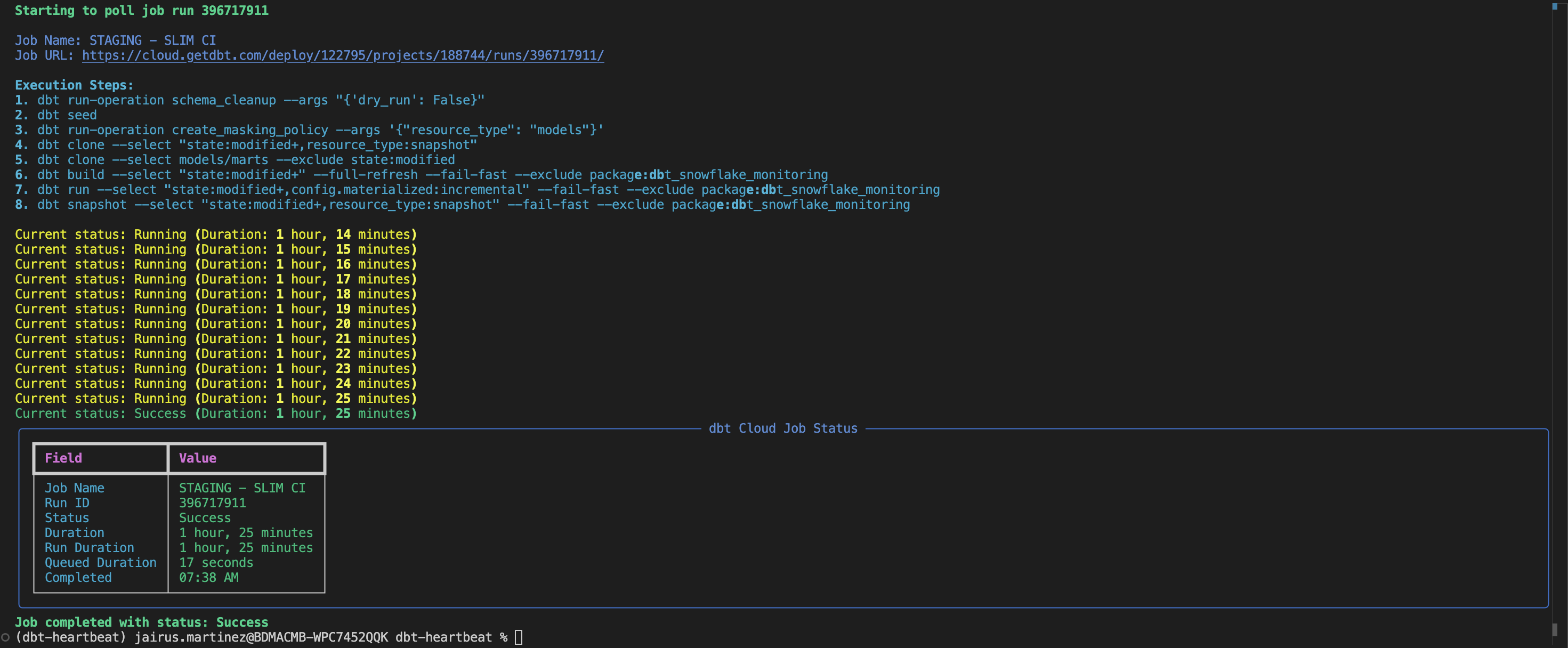
Terminal Output
Slack App Notification
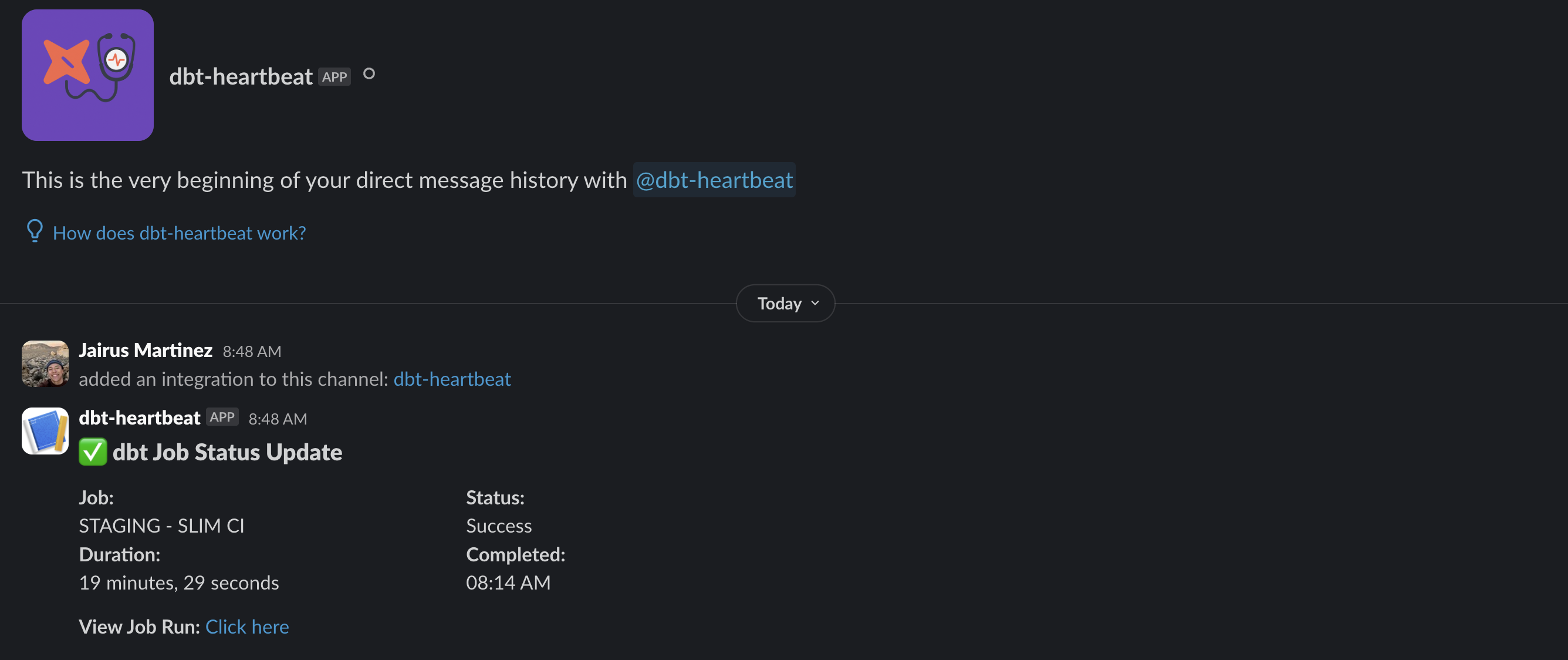 Note that in the example above, I created a Slack App in my company's workspace and authorized the incoming webhook URL to post messages directly to the Slack App's Direct Messages
Release history Release notifications | RSS feed


Download files
Download the file for your platform. If you're not sure which to choose, learn more about installing packages.
Source Distribution
Built Distribution
Filter files by name, interpreter, ABI, and platform.
If you're not sure about the file name format, learn more about wheel file names.
Copy a direct link to the current filters
File details
Details for the file dbt_heartbeat-0.2.4.tar.gz.
File metadata
- Download URL: dbt_heartbeat-0.2.4.tar.gz
- Upload date:
- Size: 16.2 kB
- Tags: Source
- Uploaded using Trusted Publishing? No
- Uploaded via: uv/0.7.6
File hashes
| Algorithm | Hash digest | |
|---|---|---|
| SHA256 |
308078d8e2c76c1fd96ce62c375bdc1f5ea5a57e699ebdf3d3fea2107c7a5fcd
|
|
| MD5 |
c767c118d6fbd0735f5341c2282ed1f7
|
|
| BLAKE2b-256 |
69eee00b79eba388b412f0001654593cd6dc9eee07dd2d495d0c0d3fa8e19762
|
File details
Details for the file dbt_heartbeat-0.2.4-py3-none-any.whl.
File metadata
- Download URL: dbt_heartbeat-0.2.4-py3-none-any.whl
- Upload date:
- Size: 16.0 kB
- Tags: Python 3
- Uploaded using Trusted Publishing? No
- Uploaded via: uv/0.7.6
File hashes
| Algorithm | Hash digest | |
|---|---|---|
| SHA256 |
6a5ed505afe425c6698101692830356573a4c8029a8556b72c007fd388ab6f04
|
|
| MD5 |
1f85d8e0c7665b3e83b12623e59ce038
|
|
| BLAKE2b-256 |
cf1d4f92814419eb41546bb87c34cb10b50c075078141545e52ccab5bb278146
|






