
ddaemon-django-papertrail (Fork)
Project Description
An elegant Solution for keeping a relational Log of chronological Events in a Django Application.
Installation
To install django-papertrail:
python manage.py migrate
Using it
import papertrail

###########################################################################
### Creating Entries.
###########################################################################

# Basic Usage. Timestamp defaults to now.
papertrail.log("cache-flushed", "Cache was flushed!")

# Optional Data.
papertrail.log(
    "periodic-cleanup-ran",
    "Periodic cleanup task executed.",
    data={
        "success":          True,
        "cleaned_objects":  100,
    })

# Optional Targets.
papertrail.log(
    "user-logged-in",
    f"{request.user.get_full_name()} logged in",
    targets={
        "user": request.user,
    })

# Optional Timestamp.
papertrail.log(
    "user-joined",
    "User joined site",
    targets={
        "user": request.user,
    },
    timestamp=request.user.date_joined)

# Multiple Targets.
user1 = User.objects.get(...)
user2 = User.objects.get(...)

papertrail.log(
    "user-followed",
    "User followed another user",
    targets={
        "follower":     user1,
        "following":    user2,
    })

###########################################################################
### Querying the Papertrail.
###########################################################################

# Getting all `Papertrail` Entries, that point to `user1`, without taking
# into Account the Target Relationship Name.
qs = papertrail.related_to(user1)
entry = qs.first()

print(f"[{entry.timestamp}] {entry.type} ({entry.message}) - {entry.data}")

# Get all Entries, that point to both Users.
# Will only return Entries, that have both `user1` and `user2` in their Targets.
qs = papertrail.related_to(user1, user2)

# Query specific Relationships, such as `user1` following `user2`.
qs = papertrail.related_to(follower=user1, following=user2)

# Filtering Entries by a specific Type (or any Django ORM Filter).
qs = papertrail.filter(type="user-followed")

# And chaining.
qs = papertrail.filter(type="user-followed").related_to(follower=user1)

# Get all the Users, that have followed a specific User (`user1`).
# This might look a bit confusing at first, but can be very useful.
# The Objects, represented Filter, allow filtering a given `queryset` to contain
# only Elements, that have a specific `papertrail` Entry, pointing at them.
all_users = get_user_model().objects.all()

users_who_followed_user1 = papertrail
.filter(type="user-followed")  # Narrow down to only `user-followed` Entries,
                               # that followed `user1`
.related_to(following=user1)
.objects_represented(all_users, "followed")  # Return a User `queryset`, that
                                             # only has the Users, for which
                                             # we have a `user-followed` Entry,
                                             # that has a followed Target,
                                             # pointing at them.

# `objects_not_represented` does the same, but returns a `queryset`, that
# excludes any Object, that has a `papertrail` Entry, pointing at it.
# Get all Users, who never logged in:
users_who_never_logged_in = papertrail
.filter(type="user-logged-in")
.objects_not_represented(all_users, "user")
Admin Integration
django-papertrail provides a Django Admin Integration to both View Entries (simple Django Admin Entry List, usually available under /admin/papertrail/entry/), as well as a more advanced Integration for Objects you want to keep the Track of.
The advanced Integration provides two useful Functionalities:
- Change tracking - whenever an Object, for which the Integration is enabled, is added/edited/deleted, a
papertrailEntry will be created. - A convenient Link to view all
papertrailEntries, pointing to the Object being viewed, as well as an integratedpapertrailViewer:

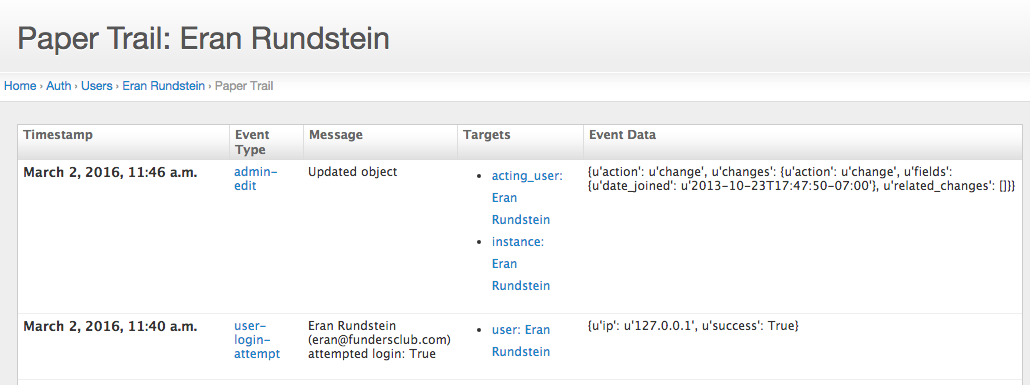
To enable the Integration, your ModelAdmin Class needs to inherit from AdminEventLoggerMixin:
from papertrail.admin import AdminEventLoggerMixin


class MyObjectAdmin(AdminEventLoggerMixin, admin.ModelAdmin):
    pass


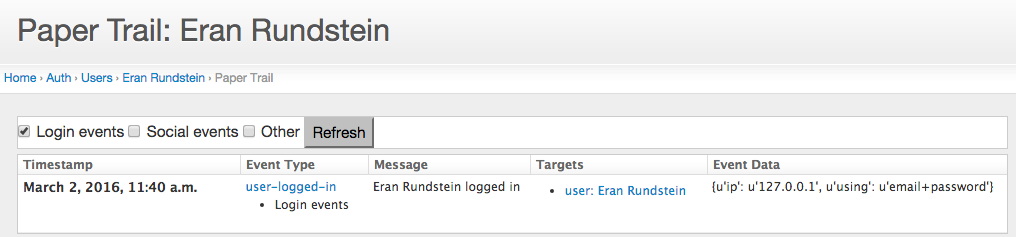
# The admin papertrail viewer can have filters:
papertrail_type_filters = {
    "Login events": (
        "user-logged-in",
        "user-logged-out"),
    "Social events": (
        "user-followed",
        "user-unfollowed"),
}
A Viewer with Filters would look like this:
Maintained by Artem Suvorov @asuvorov
1 maintainer

Metadata
1 maintainer
Release files for ddaemon-django-papertrail 0.1.3
For a detailed explanation of source distributions (sdists) and built distributions (wheels), please see the package formats documentation.
Source distribution (sdist)
| File | Size | Uploaded | |
|---|---|---|---|
| ddaemon_django_papertrail-0.1.3.tar.gz | 29.3 kB | Details |
Built distribution (wheel)
| File | Interpreter | ABI | Platform | Reset |
|---|---|---|---|---|
| ddaemon_django_papertrail-0.1.3-py3-none-any.whl | Python 3 | none | any | Details |
Total release size: 61.2 kB
Release files / ddaemon_django_papertrail-0.1.3.tar.gz
| Download URL | ddaemon_django_papertrail-0.1.3.tar.gz |
|---|---|
| Size | 29.3 kB |
| Tags | Source |
|
SHA-256 checksum How to use checksums |
0953bd24aa38df963fc5d65aca2f48405a5c7e8b9dacabe2895abda7124e3a73
|
|
BLAKE2b-256 checksum How to use checksums |
8e9071e574e96fedbe52e92e73423ec19c942947b1c2c3086528f72b9dca442c
|
| Upload date | |
|
Uploaded using Trusted Publishing? What is trusted publishing? |
No |
| Uploaded via |
twine/6.1.0 CPython/3.10.16
|
Release files / ddaemon_django_papertrail-0.1.3-py3-none-any.whl
| Download URL | ddaemon_django_papertrail-0.1.3-py3-none-any.whl |
|---|---|
| Size | 31.8 kB |
| Tags | Python 3 |
|
SHA-256 checksum How to use checksums |
11480b601705aa913f9ef340ab4797552f0b1b0ac4014eff4ad78aa16768decc
|
|
BLAKE2b-256 checksum How to use checksums |
906ede261aafa3531a817bc5a0deb00017bd435aa094df650341ac53dc215ab0
|
| Upload date | |
|
Uploaded using Trusted Publishing? What is trusted publishing? |
No |
| Uploaded via |
twine/6.1.0 CPython/3.10.16
|














