
Django Papertrail

Project description
ddaemon-django-papertrail (Fork)
Project Description
An elegant Solution for keeping a relational Log of chronological Events in a Django Application.
Installation
To install django-papertrail:
python manage.py migrate
Using it
import papertrail

###########################################################################
### Creating Entries.
###########################################################################

# Basic Usage. Timestamp defaults to now.
papertrail.log("cache-flushed", "Cache was flushed!")

# Optional Data.
papertrail.log(
    "periodic-cleanup-ran",
    "Periodic cleanup task executed.",
    data={
        "success":          True,
        "cleaned_objects":  100,
    })

# Optional Targets.
papertrail.log(
    "user-logged-in",
    f"{request.user.get_full_name()} logged in",
    targets={
        "user": request.user,
    })

# Optional Timestamp.
papertrail.log(
    "user-joined",
    "User joined site",
    targets={
        "user": request.user,
    },
    timestamp=request.user.date_joined)

# Multiple Targets.
user1 = User.objects.get(...)
user2 = User.objects.get(...)

papertrail.log(
    "user-followed",
    "User followed another user",
    targets={
        "follower":     user1,
        "following":    user2,
    })

###########################################################################
### Querying the Papertrail.
###########################################################################

# Getting all `Papertrail` Entries, that point to `user1`, without taking
# into Account the Target Relationship Name.
qs = papertrail.related_to(user1)
entry = qs.first()

print(f"[{entry.timestamp}] {entry.type} ({entry.message}) - {entry.data}")

# Get all Entries, that point to both Users.
# Will only return Entries, that have both `user1` and `user2` in their Targets.
qs = papertrail.related_to(user1, user2)

# Query specific Relationships, such as `user1` following `user2`.
qs = papertrail.related_to(follower=user1, following=user2)

# Filtering Entries by a specific Type (or any Django ORM Filter).
qs = papertrail.filter(type="user-followed")

# And chaining.
qs = papertrail.filter(type="user-followed").related_to(follower=user1)

# Get all the Users, that have followed a specific User (`user1`).
# This might look a bit confusing at first, but can be very useful.
# The Objects, represented Filter, allow filtering a given `queryset` to contain
# only Elements, that have a specific `papertrail` Entry, pointing at them.
all_users = get_user_model().objects.all()

users_who_followed_user1 = papertrail
.filter(type="user-followed")  # Narrow down to only `user-followed` Entries,
                               # that followed `user1`
.related_to(following=user1)
.objects_represented(all_users, "followed")  # Return a User `queryset`, that
                                             # only has the Users, for which
                                             # we have a `user-followed` Entry,
                                             # that has a followed Target,
                                             # pointing at them.

# `objects_not_represented` does the same, but returns a `queryset`, that
# excludes any Object, that has a `papertrail` Entry, pointing at it.
# Get all Users, who never logged in:
users_who_never_logged_in = papertrail
.filter(type="user-logged-in")
.objects_not_represented(all_users, "user")
Admin Integration
django-papertrail provides a Django Admin Integration to both View Entries (simple Django Admin Entry List, usually available under /admin/papertrail/entry/), as well as a more advanced Integration for Objects you want to keep the Track of.
The advanced Integration provides two useful Functionalities:
- Change tracking - whenever an Object, for which the Integration is enabled, is added/edited/deleted, a
papertrailEntry will be created. - A convenient Link to view all
papertrailEntries, pointing to the Object being viewed, as well as an integratedpapertrailViewer:

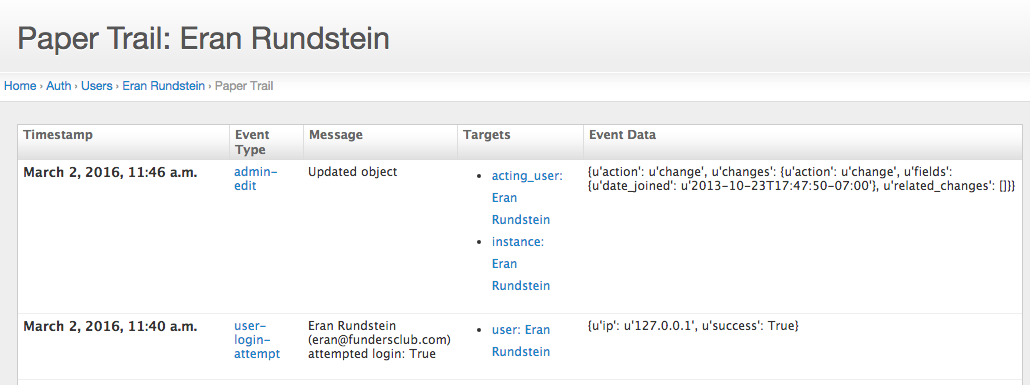
To enable the Integration, your ModelAdmin Class needs to inherit from AdminEventLoggerMixin:
from papertrail.admin import AdminEventLoggerMixin


class MyObjectAdmin(AdminEventLoggerMixin, admin.ModelAdmin):
    pass


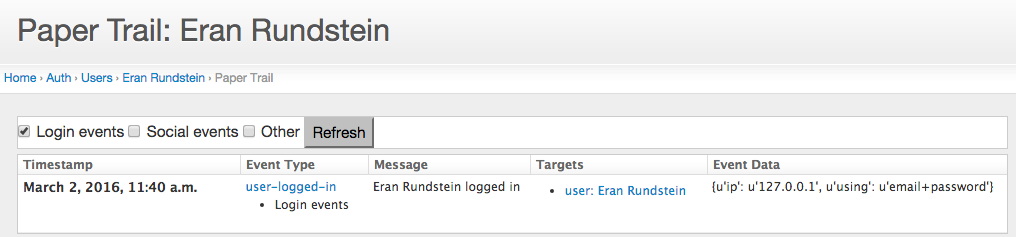
# The admin papertrail viewer can have filters:
papertrail_type_filters = {
    "Login events": (
        "user-logged-in",
        "user-logged-out"),
    "Social events": (
        "user-followed",
        "user-unfollowed"),
}
A Viewer with Filters would look like this:
Maintained by Artem Suvorov @asuvorov
Release history Release notifications | RSS feed


Download files
Download the file for your platform. If you're not sure which to choose, learn more about installing packages.
Source Distribution
Built Distribution
Filter files by name, interpreter, ABI, and platform.
If you're not sure about the file name format, learn more about wheel file names.
Copy a direct link to the current filters
File details
Details for the file ddaemon_django_papertrail-0.1.3.tar.gz.
File metadata
- Download URL: ddaemon_django_papertrail-0.1.3.tar.gz
- Upload date:
- Size: 29.3 kB
- Tags: Source
- Uploaded using Trusted Publishing? No
- Uploaded via: twine/6.1.0 CPython/3.10.16
File hashes
| Algorithm | Hash digest | |
|---|---|---|
| SHA256 |
0953bd24aa38df963fc5d65aca2f48405a5c7e8b9dacabe2895abda7124e3a73
|
|
| MD5 |
2333568ad21e237aa5c11480450dcbc1
|
|
| BLAKE2b-256 |
8e9071e574e96fedbe52e92e73423ec19c942947b1c2c3086528f72b9dca442c
|
File details
Details for the file ddaemon_django_papertrail-0.1.3-py3-none-any.whl.
File metadata
- Download URL: ddaemon_django_papertrail-0.1.3-py3-none-any.whl
- Upload date:
- Size: 31.8 kB
- Tags: Python 3
- Uploaded using Trusted Publishing? No
- Uploaded via: twine/6.1.0 CPython/3.10.16
File hashes
| Algorithm | Hash digest | |
|---|---|---|
| SHA256 |
11480b601705aa913f9ef340ab4797552f0b1b0ac4014eff4ad78aa16768decc
|
|
| MD5 |
ccf257a8d059fe8be1ee4b41a1fbe909
|
|
| BLAKE2b-256 |
906ede261aafa3531a817bc5a0deb00017bd435aa094df650341ac53dc215ab0
|






