
Data-Driven Multitask Optimization Laboratory



📖 Overview
D2MTOLab (Data-Driven Multitask Optimization Laboratory) is a comprehensive Python platform for optimization research, featuring 110+ algorithms, 180+ benchmark problems, and powerful experiment tools for problem definition, algorithm development, and performance evaluation.
Whether you're working on expensive black-box optimization, multiobjective optimization, or complex multitask scenarios, D2MTOLab provides a flexible and extensible framework to accelerate your research and support real-world applications.
✨ Features
- 🚀 Comprehensive Algorithms - 110+ algorithms for expensive/inexpensive, single/multitask, single/multiobjective, unconstrained/constrained optimization
- 📊 Rich Problem Suite - 180+ benchmark problems and real-world applications
- 🤖 Data-Driven Optimization - Surrogate modelling for expensive optimization
- 🔧 Flexible Framework - Simple API and intuitive workflow for rapid prototyping
- 🔌 Fully Extensible - Easy to add custom algorithms and problems
- ⚡ Parallel Computing - Multi-core support for batch experiments
- 📈 Powerful Analysis Tools - Built-in visualization and statistical analysis
- 📝 Complete Documentation - Comprehensive documentation and API reference
🚀 Quick Start
Installation
pip install ddmtolab
Requirements:
- Python 3.10+
- PyTorch 2.5+ (supports CPU, GPU optional for acceleration)
- NumPy 2.0+, SciPy 1.15+, scikit-learn 1.7+
- Matplotlib 3.10+, Pandas 2.3+
For detailed installation instructions, see Installation Guide.
Basic Usage
import numpy as np
from ddmtolab.Methods.mtop import MTOP
from ddmtolab.Algorithms.MTSO.MTBO import MTBO

# Step 1: Define objective function
def forrester(x):
    """Forrester function: (6x-2)^2 * sin(12x-4)"""
    return (6 * x - 2) ** 2 * np.sin(12 * x - 4)

# Step 2: Create optimization problem
problem = MTOP()
problem.add_task(forrester, dim=1)

# Step 3: Run optimization
results = MTBO(problem).optimize()

# Step 4: Display results
print(f"Best solution: {results.best_decs}")
print(f"Best objective: {results.best_objs}")

# Step 5: Analyze and visualize
from ddmtolab.Methods.test_data_analysis import TestDataAnalyzer
TestDataAnalyzer().run()
Batch Experiment
from ddmtolab.Methods.batch_experiment import BatchExperiment
from ddmtolab.Methods.data_analysis import DataAnalyzer
from ddmtolab.Algorithms.STSO.BO import BO
from ddmtolab.Algorithms.MTSO.MTBO import MTBO
from ddmtolab.Problems.MTSO.cec17_mtso_10d import CEC17MTSO_10D

if __name__ == '__main__':
    # Step 1: Create batch experiment manager
    batch_exp = BatchExperiment(
        base_path='./Data',      # Data save path
        clear_folder=True        # Clear existing data
    )

    # Step 2: Add test problems
    prob = CEC17MTSO_10D()
    batch_exp.add_problem(prob.P1, 'P1')
    batch_exp.add_problem(prob.P2, 'P2')

    # Step 3: Add algorithms with parameters
    batch_exp.add_algorithm(BO, 'BO', n_initial=20, max_nfes=100)
    batch_exp.add_algorithm(MTBO, 'MTBO', n_initial=20, max_nfes=100)

    # Step 4: Run batch experiments
    batch_exp.run(n_runs=20, verbose=True, max_workers=8)

    # Step 5: Run data analysis
    analyzer = DataAnalyzer()
    results = analyzer.run()
Optimization Process Visualization
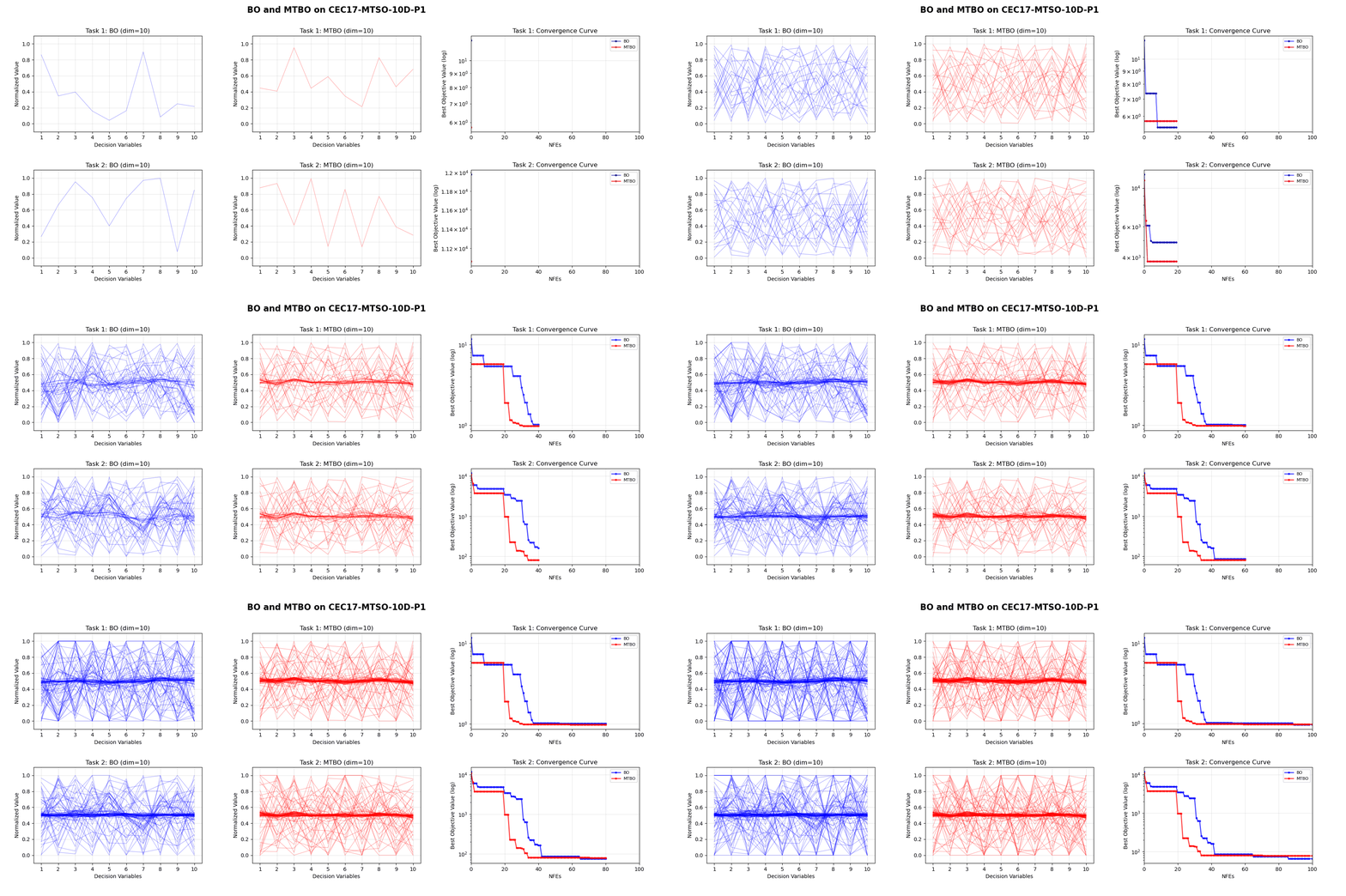
D2MTOLab provides built-in animation tools to visualize the optimization process:
from ddmtolab.Problems.MTSO.cec17_mtso_10d import CEC17MTSO_10D
from ddmtolab.Algorithms.STSO.BO import BO
from ddmtolab.Algorithms.MTSO.MTBO import MTBO
from ddmtolab.Methods.animation_generator import create_optimization_animation

# Define problem
problem = CEC17MTSO_10D().P1()

# Run algorithms
BO(problem, n_initial=20, max_nfes=100, name='BO').optimize()
MTBO(problem, n_initial=20, max_nfes=100, name='MTBO').optimize()

# Generate animation
animation = create_optimization_animation(max_nfes=100, merge=2, title='BO vs MTBO')
🎯 Key Components
Algorithms (110+)
| Category | Type | Algorithms |
|---|---|---|
| STSO | Inexpensive | GA, DE, PSO, SL_PSO, KLPSO, CSO, CMA_ES, IPOP_CMA_ES, sep_CMA_ES, MA_ES, xNES, OpenAI_ES, AO, GWO, EO |
| STSO | Expensive | BO, EEI_BO, ESAO, SHPSO, SA_COSO, TLRBF, GL_SADE, AutoSAEA, DDEA_MESS, LSADE |
| STMO | Inexpensive | NSGA_II, NSGA_III, NSGA_II_SDR, SPEA2, MOEA_D, MOEA_DD, MOEA_D_FRRMAB, MOEA_D_STM, RVEA, IBEA, TwoArch2, MSEA, C_TAEA, CCMO |
| STMO | Expensive | ParEGO, K_RVEA, DSAEA_PS, KTA2, REMO, ADSAPSO, CSEA, DISK, DRLSAEA, DirHV_EI, EDN_ARMOEA, EIM_EGO, EM_SAEA, KTS, MGSAEA, MMRAEA, MOEA_D_EGO, MultiObjectiveEGO, PCSAEA, PEA, PIEA, SAEA_DBLL, SSDE, TEA, CPS_MOEA, MCEA_D |
| MTSO | Inexpensive | MFEA, MFEA_II, EMEA, EBS, G_MFEA, MTEA_AD, MKTDE, MTEA_SaO, SREMTO, LCB_EMT, BLKT_DE, DTSKT, EMTO_AI, MFEA_AKT, MFEA_DGD, MFEA_VC, MTDE_ADKT, MTEA_HKTS, MTEA_PAE, MTES_KG, SSLT_DE, TNG_SNES |
| MTSO | Expensive | MTBO, RAMTEA, SELF, EEI_BO_plus, MUMBO, BO_LCB_CKT, BO_LCB_BCKT, MFEA_SSG, SaEF_AKT, DFMAB_MTO, EMTO_OTL, TATS_BO, TGPBO |
| MTMO | Inexpensive | MO_MFEA, MO_MFEA_II, MO_EMEA, MO_MTEA_SaO, MTDE_MKTA, MTEA_D_DN, EMT_ET, EMT_PD, EMT_GS, MO_MTEA_PAE, MO_SBO, MTEA_D_TSD, MTEA_DCK |
| MTMO | Expensive | ParEGO_KT |
Problems (180+)
| Category | Problem Suites |
|---|---|
| STSO | CLASSICALSO (8 functions), CEC10_CSO (20 functions) |
| STMO | ZDT (6), DTLZ (9), WFG (9), UF (10), CF (10), MW (14) |
| MTSO | CEC17MTSO (9), CEC17MTSO_10D (9), CEC19MaTSO (many-task), CMT (9), STOP (12), ManyTask_10D (4) |
| MTMO | CEC17MTMO (9), CEC19MTMO (10), CEC19_MaTMO (many-task), CEC21MTMO (10), MTMO_DTLZ, MTMOInstances |
| Real-World | PEPVM, PINN_HPO (12), SOPM, SCP, MO_SCP, PKACP, NN_Training, TSP (6) |
Methods
- MTOP Class: Flexible problem definition supporting single/multitask and single/multiobjective
- Batch Experiments: Parallel execution framework for large-scale experiments
- Data Analysis: Statistical analysis (mean, std, ranking) and visualization tools
- Performance Metrics: IGD, GD, IGD+, HV, DeltaP, Spacing, Spread, FR, CV
- Animation Generator: Optimization process visualization
- Algorithm Utilities: Reusable components (initialization, selection, operators)
🖥️ GUI (Experimental)
An experimental desktop GUI built with DearPyGui lives in the ui/ directory. It is shipped in this repository only (not part of the PyPI package):
pip install -r ui/requirements.txt
python ui/main.py
📚 Documentation
📄 Citation
If you use D2MTOLab in your research, please cite:
@software{ddmtolab2025,
  author = {Jiangtao Shen},
  title = {D$^2$MTOLab: A Python Platform for Data-Driven Multitask Optimization},
  year = {2025},
  url = {https://github.com/JiangtaoShen/DDMTOLab}
}
🤝 Contributing
Contributions are welcome! Please feel free to submit a Pull Request. For major changes, please open an issue first to discuss what you would like to change.
📧 Contact
- Author: Jiangtao Shen
- Email: j.shen5@exeter.ac.uk
- Documentation: https://jiangtaoshen.github.io/DDMTOLab/
- Issues: GitHub Issues
📜 License
This project is licensed under the MIT License - see the LICENSE file for details.
Made with ❤️ by Jiangtao Shen
1 maintainer

Metadata
1 maintainer
Release files for ddmtolab 1.0.10
For a detailed explanation of source distributions (sdists) and built distributions (wheels), please see the package formats documentation.
Source distribution (sdist)
| File | Size | Uploaded | Provenance | |
|---|---|---|---|---|
| ddmtolab-1.0.10.tar.gz | 4.8 MB | Without provenance | Details |
Built distribution (wheel)
| File | Interpreter | ABI | Platform | Reset |
|---|---|---|---|---|
| ddmtolab-1.0.10-py3-none-any.whl | Python 3 | none | any | Details |
Total release size: 10.0 MB
Release files / ddmtolab-1.0.10.tar.gz
| Download URL | ddmtolab-1.0.10.tar.gz |
|---|---|
| Size | 4.8 MB |
| Tags | Source |
|
SHA-256 checksum How to use checksums |
46ebbcef49e2fc8a23aa905bec6aebb444e4395658ebdd972521a0047afa6a1a
|
|
BLAKE2b-256 checksum How to use checksums |
98f34b9957e072bddcb3d94f29c8ff66ec952595aab1a096983cde6410499525
|
| Upload date | |
|
Uploaded using Trusted Publishing? What is trusted publishing? |
No |
| Uploaded via |
twine/6.2.0 CPython/3.10.19
|
Release files / ddmtolab-1.0.10-py3-none-any.whl
| Download URL | ddmtolab-1.0.10-py3-none-any.whl |
|---|---|
| Size | 5.2 MB |
| Tags | Python 3 |
|
SHA-256 checksum How to use checksums |
7b38c64e6c80a9f70b140b10be38a64a47f6719993508c6cd648867d84d27c29
|
|
BLAKE2b-256 checksum How to use checksums |
8c7df7dbd384a3c460b5cccc44e1666aef24460cf2c512635718d97e81a267b0
|
| Upload date | |
|
Uploaded using Trusted Publishing? What is trusted publishing? |
No |
| Uploaded via |
twine/6.2.0 CPython/3.10.19
|
Security for ddmtolab 1.0.10
Provenance
Provenance describes where a file came from. On PyPI, provenance is shared via attestations, which provide a verifiable record of the build or publishing details. View details, limitations and caveats.
No provenance found
None of the files in this release were uploaded with provenance metadata.
A note on package security
PyPI is a repository for distributing packages, not a service for auditing them. While third-party security researchers and our staff do their best to detect and remove malicious packages, PyPI cannot guarantee the quality, security or suitability of any given package.














