
Extensible DDNS Updater
Pushes the possibly changing IP address of a host myhost.mydomain.com to a remote dynamic domain name service (DDNS).
Overview
Usage: a cron job would typically be used at regular intervals to run
sudo /path/to/ddns-updater <ddns-service-name>
Assuming the program runs on myhost.mydomain.com, it each time:
- Detects myhost's current IP address
- Inquires which IP DNS services currently provide for the host
- If the two IP addresses differ, updates the DDNS service
A rotating log is maintained at
<package-root>/lanmanagement/logs/ddns.log<n>
Installation
Install the package (recommended into a virtual env, like conda):
pip install ddns-updater-ext
the program will now be available as ddns-updater. Out of the box, NameCheap's DDNS service is supported. See Extending for New DDNS Services for how to add others.
DDNS services require some kind of secret, such as a password, or API key. You should place that information for your service in a place like:
$HOME/.ssh/ddns_password
where .ssh is accessible only for your user (chmod 700 $HOME/.ssh). You tell ddns-updater where that secrets file resides in a configuration file ddns.ini. You find this configuration file by running
ddns-updater --info
This command tells you the location of the default config file, as well as the default location of the secrets file. You can copy that default config file, or change it in place. If you copy it, you then always tell ddns-updater about the new location:
ddns-updater --config_path path/to/your/ddns.ini <service name>
Copying that config file, and changing the copy is recommended so that your changes are not overwritten if you update the ddns-updater-ext package.
Usages
You can immediatly try three commands:
ddns-updater --help
ddns-updater --list   # Implemented DDNS services; extensible.
ddns-updater --info   # Location of future logs, the config file,
                      # and the secrets file
To run in a terminal: since the active-ingredient command needs to run as sudo you need to provide the sudo environment with the full location of ddns-updater. This is required because your path is not passed into the sudo environment. You can provide the full path in several ways, either by explicitly typing out the full path, or via:
sudo which ddns-updater namecheap
Unless an error, such as a misconfiguration occurs, the ddns-updater command runs silently. But you can always check what happened by inspecting the logs (location via ddns-updater --info).
You will eventually have the updater run periodically on its own. One method is a cron job.
# Open an editor with the current root crontab:
sudo crontab -e
# Add a line like this:
0 * * * * /path/to/ddns-updater --config_path /to/ddns.ini namecheap
# Save the file, and check that your change worked:
crontab -l
For details, see crontab(5).
Implementation
After configuration, the out-of-the-box implementation can interact with NameCheap's DDNS service. The files utils.py and dns_service.py provide DNS related facilities that can be useful for purposes other than dynamic DNS.
To inspect the code, clone ddns-updater into proj-root. Then:
cd <proj-root>
pip install .
# You can run the unittests via:
pytest
Extending for New DDNS Services
Administrators can extend the implementation to interact with additional DDNS services. The core of these service interactions is to generate a proper URL that instructs the service to update its IP address for myhost.mydomain.com/.net.io,... For each supported service the query parameters are stored as a section of options in a Python configparser ddns.ini file. Like this:
[namecheap]

# Part of URL for updating service before the query parms:
url_root     = https://dynamicdns.park-your-domain.com/update?
secrets_file = $HOME/.ssh/ddns_password
# The query parameters:
host         = myhost
domain       = mydomain.net
Other services might require additional information.
The administrator creates a short subclass, such as NameCheap in ddns_service_adapters.py. The class just needs to provide a single method ddns_update_url(new_ip), which returns a URL suitable to send to the new DDNS service for IP update.
Architecture
The main class is DDNSUpdater. Its constructor takes a DDNS servicename, such as "namecheap". That name is provided as argument when ddns_updater.py is run on the command line, or in a cron job.
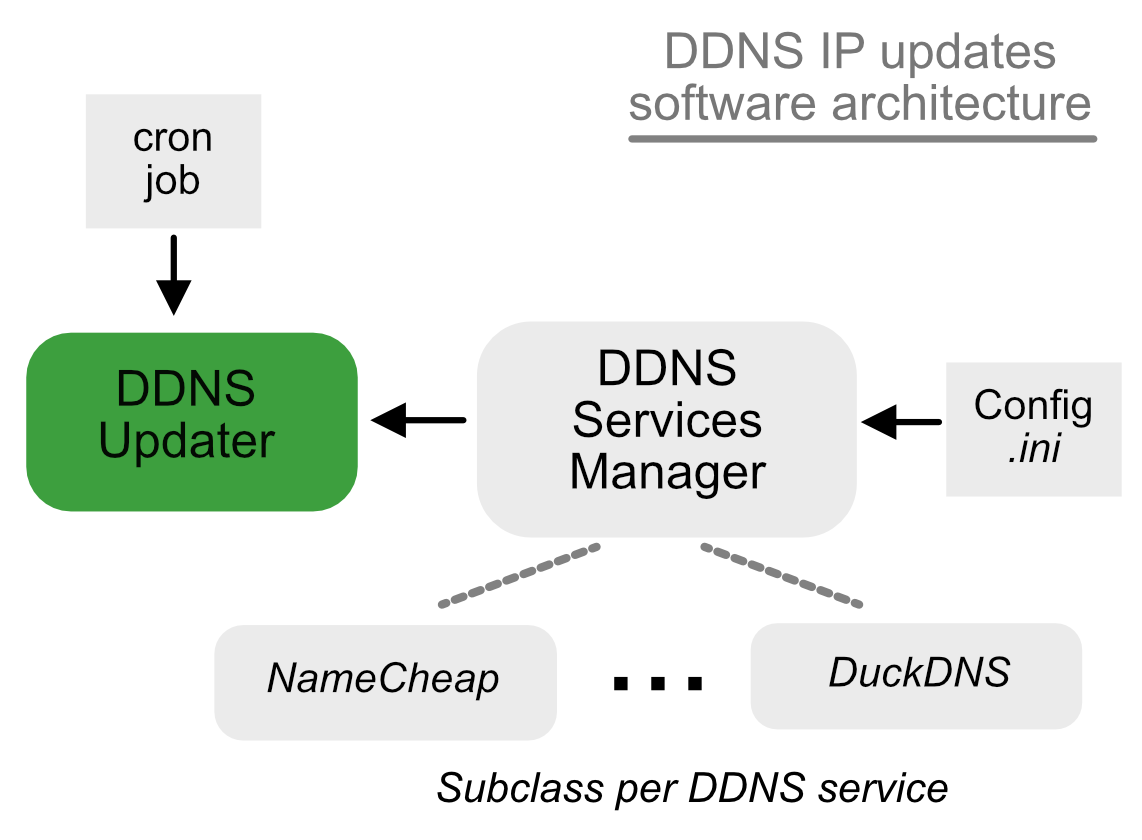
The DDNSUpdater requests a handler for the respective DDNS service from a singleton instance of class DDNSServiceManager. This returned handler will be an instance of the subclass mentioned in Extending for New DDNS Services . The DDNSUpdater then calls ddns_update_url() on the handler whenever it determines that the host's IP address has changed. It issues an HTTP request using the returned URL.
1 maintainer

Metadata
1 maintainer
Release files for ddns-updater-ext 1.0.7
For a detailed explanation of source distributions (sdists) and built distributions (wheels), please see the package formats documentation.
Source distribution (sdist)
| File | Size | Uploaded | Provenance | |
|---|---|---|---|---|
| ddns_updater_ext-1.0.7.tar.gz | 17.7 kB | Without provenance | Details |
Built distribution (wheel)
| File | Interpreter | ABI | Platform | Reset |
|---|---|---|---|---|
| ddns_updater_ext-1.0.7-py3-none-any.whl | Python 3 | none | any | Details |
Total release size: 37.5 kB
Release files / ddns_updater_ext-1.0.7.tar.gz
| Download URL | ddns_updater_ext-1.0.7.tar.gz |
|---|---|
| Size | 17.7 kB |
| Tags | Source |
|
SHA-256 checksum How to use checksums |
9dd0c23e87d726dd7b906822dee7ca4a6545633b88ba46132e1a5a4dcfc0930d
|
|
BLAKE2b-256 checksum How to use checksums |
83151fd778fd952fd934753e666d1e73b347aadf170a96e81ec7f928626f4900
|
| Upload date | |
|
Uploaded using Trusted Publishing? What is trusted publishing? |
No |
| Uploaded via |
twine/6.2.0 CPython/3.13.7
|
Release files / ddns_updater_ext-1.0.7-py3-none-any.whl
| Download URL | ddns_updater_ext-1.0.7-py3-none-any.whl |
|---|---|
| Size | 19.8 kB |
| Tags | Python 3 |
|
SHA-256 checksum How to use checksums |
ad6a9d10fc35905292b9d7e12edde4b1082251438ca0d2a0baef79c08872c0b9
|
|
BLAKE2b-256 checksum How to use checksums |
c05069641283cf434e8ef9f820b1c0027393f426752967cfd2bcf4676bc49abc
|
| Upload date | |
|
Uploaded using Trusted Publishing? What is trusted publishing? |
No |
| Uploaded via |
twine/6.2.0 CPython/3.13.7
|
Security for ddns-updater-ext 1.0.7
Provenance
Provenance describes where a file came from. On PyPI, provenance is shared via attestations, which provide a verifiable record of the build or publishing details. View details, limitations and caveats.
No provenance found
None of the files in this release were uploaded with provenance metadata.
A note on package security
PyPI is a repository for distributing packages, not a service for auditing them. While third-party security researchers and our staff do their best to detect and remove malicious packages, PyPI cannot guarantee the quality, security or suitability of any given package.
To learn more about protecting yourself from malicious actors, visit our package security documentation.














