
Update DDNS services; extensible

Project description
Extensible DDNS Updater
Pushes the possibly changing IP address of a host myhost.mydomain.com to a remote dynamic domain name service (DDNS).
Overview
Usage: a cron job would typically be used at regular intervals to run
sudo <proj-root>/src/lanmanagement/ddns_updater.py <ddns-service-name>
Assuming the program runs on myhost.mydomain.com, it each time:
- Detects myhost's current IP address
- Inquires which IP DNS services currently provide for the host
- If the two IP addresses differ, updates the DDNS service
A rotating log is maintained at
<proj-root>/src/lanmanagement/logs/ddns.log<n>
To obtain a list of supported DDNS services, add the --list (or -l) to the above call.
Implementation
The out-of-the-box implementation can interact with NameCheap's DDNS service. The files utils.py and dns_service.py provide DNS related facilities that can be useful for purposes other than dynamic DNS.
Extending for New DDNS Services
Administrators can extend the implementation to interact with additional DDNS services. The core of these service interactions is to generate a proper URL that instructs the service to update its IP address for myhost.mydomain.com/.net.io,... For each supported service the query parameters are stored as a section of options in a Python configparser .ini file. Like this:
[namecheap]

# Part of URL for updating service before the query parms:
url_root     = https://dynamicdns.park-your-domain.com/update?
secrets_file = $HOME/.ssh/ddns_password
# The query parameters:
host         = myhost
domain       = mydomain.net
Other services might require additional information.
The administrator creates a short subclass, such as NameCheap in ddns_service_adapters.py. The class just needs to provide a single method ddns_update_url(new_ip), which returns a URL suitable to send to the new DDNS service for IP update.
Architecture
The main class is DDNSUpdater. Its constructor takes a DDNS servicename, such as "namecheap". That name is provided as argument when ddns_updater.py is run on the command line, or in a cron job.
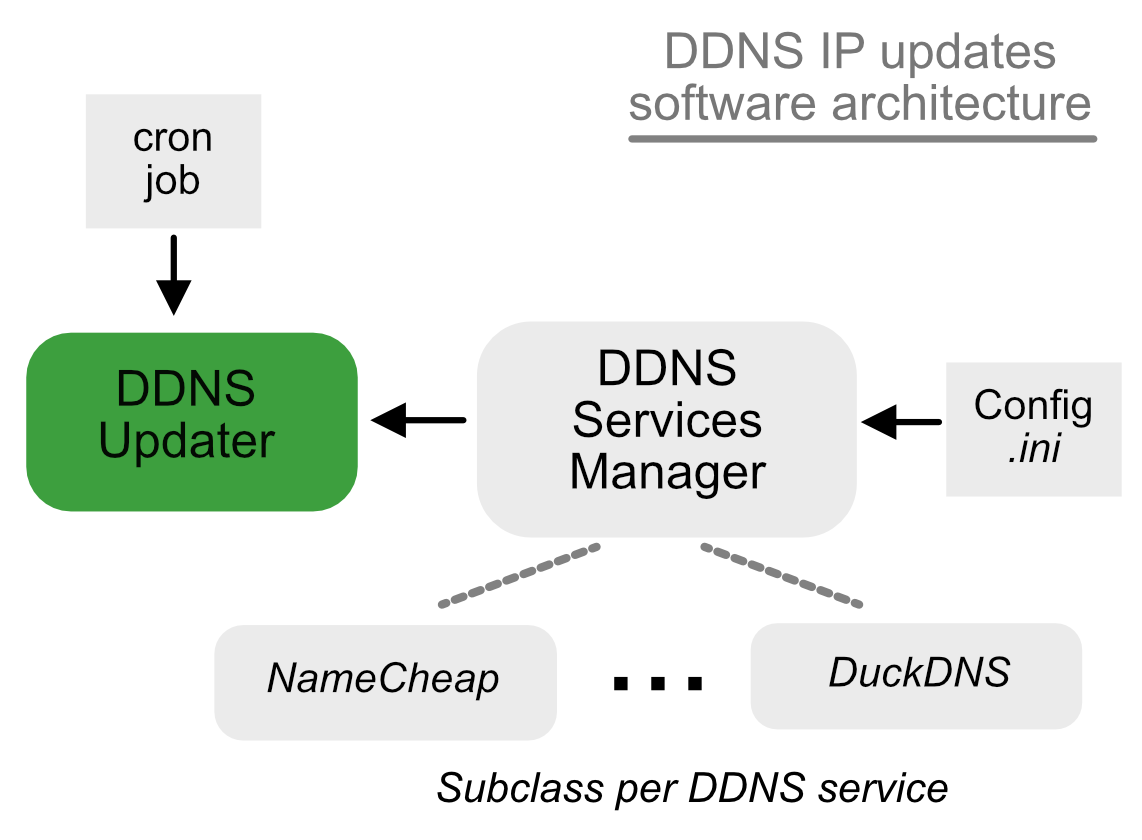
The DDNSUpdater requests a handler for the respective DDNS service from a singleton instance of class DDNSServiceManager. This returned handler will be an instance of the subclass mentioned in Extending for New DDNS Services . The DDNSUpdater then calls ddns_update_url() on the handler whenever it determines that the host's IP address has changed. It issues an HTTP request using the returned URL.
Release history Release notifications | RSS feed


Download files
Download the file for your platform. If you're not sure which to choose, learn more about installing packages.
Source Distribution
Built Distribution
Filter files by name, interpreter, ABI, and platform.
If you're not sure about the file name format, learn more about wheel file names.
Copy a direct link to the current filters
File details
Details for the file ddns_updater_ext-0.1.6.tar.gz.
File metadata
- Download URL: ddns_updater_ext-0.1.6.tar.gz
- Upload date:
- Size: 15.4 kB
- Tags: Source
- Uploaded using Trusted Publishing? No
- Uploaded via: twine/6.2.0 CPython/3.13.7
File hashes
| Algorithm | Hash digest | |
|---|---|---|
| SHA256 |
fdd3afa2f876adbcd8d2fb0eded2edc120f55ec0821614c86064044696d6bbab
|
|
| MD5 |
431f1ab0f37245a4fcf19f3c252641f7
|
|
| BLAKE2b-256 |
d62a3661f4bfbb140b2398ce825b01e371ec5d3da8eaee28cd948bfe6a6dc1e9
|
File details
Details for the file ddns_updater_ext-0.1.6-py3-none-any.whl.
File metadata
- Download URL: ddns_updater_ext-0.1.6-py3-none-any.whl
- Upload date:
- Size: 17.6 kB
- Tags: Python 3
- Uploaded using Trusted Publishing? No
- Uploaded via: twine/6.2.0 CPython/3.13.7
File hashes
| Algorithm | Hash digest | |
|---|---|---|
| SHA256 |
059f49f5c617931138e4d79fb6dbdc325a902f79750d9a7b0d6914366ee1c06a
|
|
| MD5 |
b6d9142eeb04c35a56a9f1d8451d1f7a
|
|
| BLAKE2b-256 |
4fdae726371afc016ef2fdef8fdb260ba4eeb66616e88937fec2c49d69226390
|






