
DebugBrief


Record commands and notes while you debug, then turn them into a report for a pull request, a handoff, or an incident review.
DebugBrief keeps the actual commands, exit codes, output previews and Git changes. It does not use AI or infer a root cause. You decide what to run and what to share.
Install
Python 3.9 or newer on Linux or macOS. The project you debug can use any language.
pipx install debugbrief
# or
uv tool install debugbrief
Upgrade an existing installation with pipx upgrade debugbrief or
uv tool upgrade debugbrief. Inside an activated Python environment, use
python -m pip install --upgrade debugbrief.
The HTML and Explorer workflows below require DebugBrief 1.4.0 or newer.
Check your installed version with debugbrief --version. Install your project's
test tools and dependencies separately; DebugBrief does not install them for you.
Quickstart
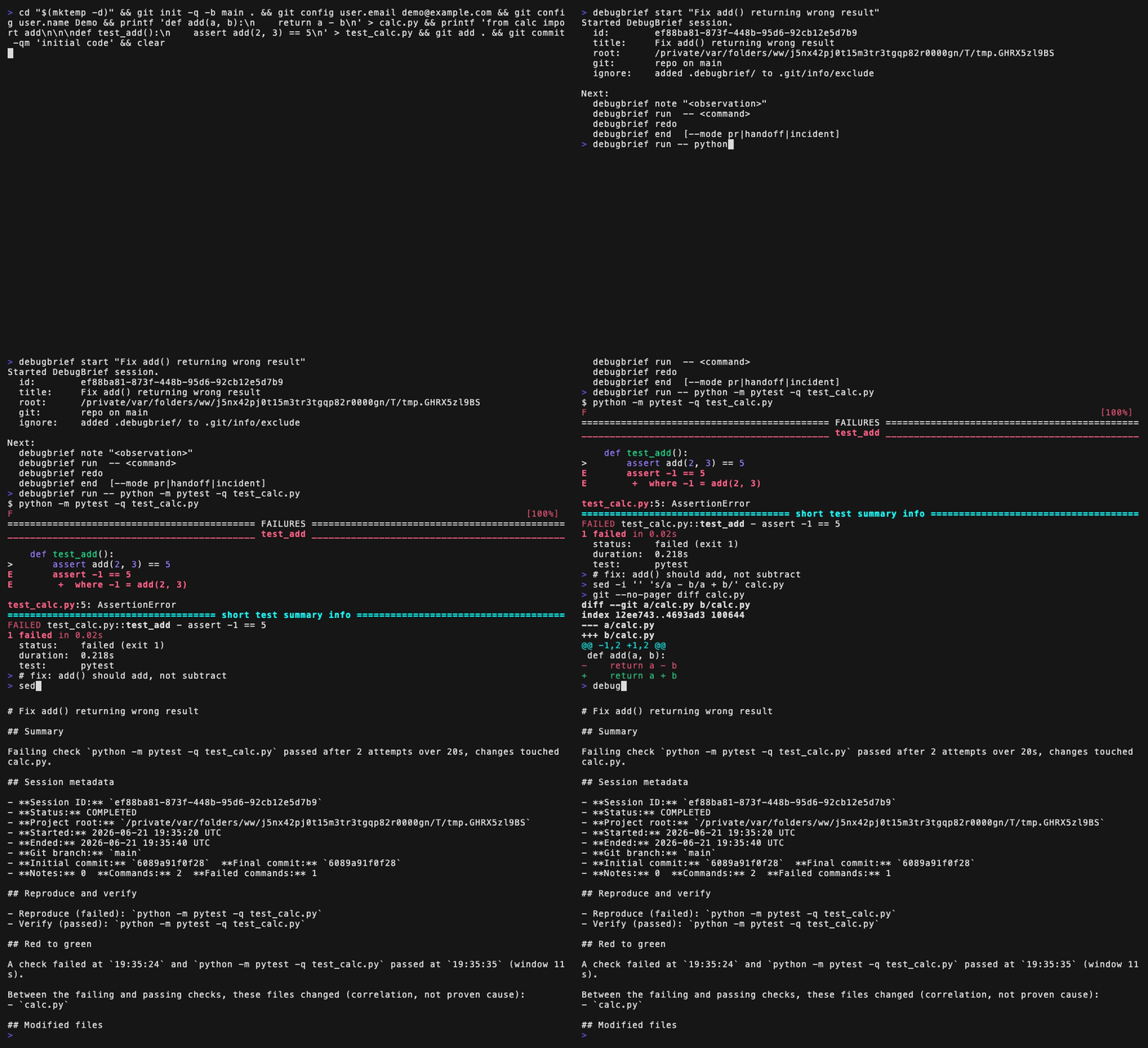
Run this from your project, replacing the pytest command with your usual check:
debugbrief run -- python -m pytest -q
# If it fails, edit the files and run the same command again:
debugbrief redo
debugbrief end --format html --open
The first run starts a session automatically. A title and notes are optional:
debugbrief start "Handle an expired cache entry"
debugbrief note "Expired entries still reach the read path."
Use start before your first captured command if you want to set the title.
Put DebugBrief flags before --; everything after it is the command to capture.
An optional alias saves some typing:
alias db="debugbrief run --"
db pytest -q
Reports
| Mode | What it contains |
|---|---|
pr |
Reproduce and verify commands, changed files, failed attempts and a red-to-green window when available. |
handoff |
Current status, notes, command history and next steps drawn from your notes. |
incident |
A timeline, the recorded error, current outcome and follow-up notes. |
end defaults to a compact PR report in Markdown. Use --detail full for the
complete Markdown record. JSON and HTML always retain the complete evidence.
debugbrief end --format all    # Markdown, JSON and HTML
debugbrief open --html         # open the newest HTML report
The other formats are md, json, both (Markdown and JSON), and html.
Use preview --format html or preview --format json to inspect an active
session without ending it.
Current illustrative reports, generated by the report code: PR, handoff, incident. The incident example deliberately retains a later failure and incomplete capture.
Review a report before sharing it. To post a reviewed Markdown brief with the optional GitHub CLI:
debugbrief end --stdout | gh pr comment --body-file -
What the evidence means
- Verification needs an eligible passing check, valid recorded timestamps for all
verification candidates, and no currently failing check. A previous failure is
not required. Help, version and collection/list commands do not count, even
with
--verify. Use that flag to declare a custom check. - A red-to-green window requires Git and the same command failing and then passing in the same directory. Files changed during that window are a correlation, not a proven cause. A later failure keeps the report unverified.
redoruns the stored command in its recorded directory using the current files, environment and dependencies. It does not recreate an old environment.redo --dry-runshows what would run; potentially destructive reruns ask for confirmation.--yesskips that prompt.- Reports retain project-relative command directories. Missing directory data in older reports stays unknown. The project-root field uses the repository name by default; absolute paths inside commands, notes and output can still appear.
- Stored text goes through best-effort secret redaction. Live command output is
shown as the command prints it. Redaction can miss secrets, and
--no-redactdisables it for a captured command. Review reports before sharing.
Verification covers the recorded checks, not the whole issue. Full capture and privacy details are in SECURITY.md.
Commands
| Command | Purpose |
|---|---|
init |
Set up local state and show the workflow. |
start "<title>" |
Start a named session. |
note <text> |
Record an observation. |
run -- <command> |
Run and capture a command. |
redo |
Run the last captured command again. |
preview |
Print a report without ending the session. |
end |
Finish the session and write reports. |
cancel |
Abandon the session, keeping its local record. |
status |
Inspect the active session and command. |
doctor |
Check the project and local state. |
recover |
Repair stale state after an interruption. |
last / open |
Find or open a saved report. |
list / show <id> |
Inspect earlier sessions. |
See the command reference for flags, configuration, recognized runners and recovery behavior.
Dependencies and limits
The CLI uses the Python standard library and native Git. Python 3.9 and 3.10 also
need tomli, installed automatically to read optional TOML configuration.
DebugBrief itself sends no telemetry and makes no network requests. Commands you
run can still use the network.
Linux and macOS are tested in CI on Python 3.9–3.14. Native Windows and PowerShell
are not supported. Capture is explicit through run; it does not read shell
history or meaningfully capture full-screen programs such as vim or htop. Output
previews are bounded, so reports are not complete terminal transcripts.
Ordinary background descendants are stopped during command cleanup. Deliberately detached processes can survive; run long-lived servers outside DebugBrief. Outside a Git repository, command and note capture still work, but Git state, changed-file correlation and red-to-green windows are unavailable.
Website and development
The static site includes a command reference and a JSON Evidence Explorer. Imported reports stay in memory in the browser; they are never uploaded or stored. An explicitly chosen color theme is saved. Fonts and optional homepage animations load from a CDN. Generated HTML reports are self-contained and need no CDN.
From a source checkout, preview the site with python3 scripts/serve_site.py.
The site is included in the source archive, not the installed wheel.
For Python development:
python -m pip install -e ".[dev]"
python -m pytest
CONTRIBUTING.md covers setup, linting, types, browser checks and builds.
License
MIT. See LICENSE.
1 maintainer

Metadata
1 maintainer
Release files for debugbrief 1.4.1
For a detailed explanation of source distributions (sdists) and built distributions (wheels), please see the package formats documentation.
Source distribution (sdist)
| File | Size | Uploaded | Provenance | Actions |
|---|---|---|---|---|
| debugbrief-1.4.1.tar.gz | 1.5 MB | With provenance | Details for debugbrief-1.4.1.tar.gz |
Built distribution (wheel)
| File | Interpreter | ABI | Platform | Actions Reset |
|---|---|---|---|---|
| debugbrief-1.4.1-py3-none-any.whl | Python 3 | none | any | Details for debugbrief-1.4.1-py3-none-any.whl |
Total release size: 1.6 MB
Release files / debugbrief-1.4.1.tar.gz
| Download URL | debugbrief-1.4.1.tar.gz |
|---|---|
| Size | 1.5 MB |
| Tags | Source |
|
SHA-256 checksum How to use checksums |
99bfe013ca66d373580a0d237cbbd8c43d04f645f66c5f3676f3502ec958980c
|
|
BLAKE2b-256 checksum How to use checksums |
91c4d6a315405f690a136858c138cf63c59a363bb5f7aee62e559d94c6fc9c0b
|
| Upload date | |
|
Uploaded using Trusted Publishing? What is trusted publishing? |
Yes |
| Uploaded via |
twine/7.0.0 CPython/3.13.14
|
Provenance
Provenance describes where a file came from. On PyPI, provenance is shared via attestations, which provide a verifiable record of the build or publishing details. View details, limitations and caveats.


PyPI Publish Attestation
PyPI verified that this artifact, at this checksum, originated from the publisher listed below.
Signed by GitHub Actions, verified by PyPI on Oct 16, 2026.
Transparency logRelease files / debugbrief-1.4.1-py3-none-any.whl
| Download URL | debugbrief-1.4.1-py3-none-any.whl |
|---|---|
| Size | 123.4 kB |
| Tags | Python 3 |
|
SHA-256 checksum How to use checksums |
ea0bd5d3385b253ff87499058180d17822bfadea60495989e4697f58c56a40a8
|
|
BLAKE2b-256 checksum How to use checksums |
df723fe67779af25dec4ed76a8b3cbf5a8a04163c4e92800396e3c609e4e0917
|
| Upload date | |
|
Uploaded using Trusted Publishing? What is trusted publishing? |
Yes |
| Uploaded via |
twine/7.0.0 CPython/3.13.14
|
Provenance
Provenance describes where a file came from. On PyPI, provenance is shared via attestations, which provide a verifiable record of the build or publishing details. View details, limitations and caveats.
PyPI Publish Attestation
PyPI verified that this artifact, at this checksum, originated from the publisher listed below.
Signed by GitHub Actions, verified by PyPI on Oct 16, 2026.
Transparency logSecurity for debugbrief 1.4.1
Provenance
Provenance describes where a file came from. On PyPI, provenance is shared via attestations, which provide a verifiable record of the build or publishing details. View details, limitations and caveats.
Full provenance
Both files in this release have been uploaded with provenance metadata.
Attestation for debugbrief-1.4.1.tar.gz
PyPI Publish Attestation
PyPI verified that this artifact, at this checksum, originated from the publisher listed below.
Signed by GitHub Actions, verified by PyPI on Oct 16, 2026.
Transparency logA note on package security
PyPI is a repository for distributing packages, not a service for auditing them. While third-party security researchers and our staff do their best to detect and remove malicious packages, PyPI cannot guarantee the quality, security or suitability of any given package.
To learn more about protecting yourself from malicious actors, visit our package security documentation.














