
decafe-timer


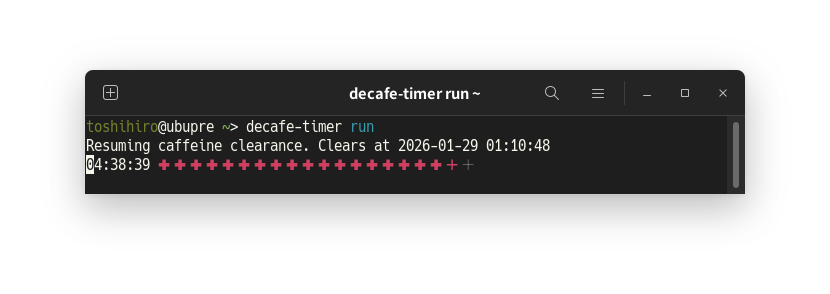
A lightweight CLI tracker for caffeine clearance and intake. It was created for people who want to pace caffeine and avoid overuse.
Note: The command structure changed significantly in 0.9.0.
Installation
pipx install decafe-timer
Usage
The model is intentionally simple:
- Memory (
mem) is the bar's maximum length and the default intake size. - Remaining time is treated as the amount of caffeine still in your body.
intakeadds to the remaining amount; the bar shrinks as it clears.- If you intake again before it reaches zero, remaining can exceed
memand the bar shows>>.
Basics
decafe-timer              # show a snapshot if active; otherwise show ---
decafe-timer mem 3h       # set bar memory (default intake size)
decafe-timer mem          # show current bar memory
decafe-timer intake 45m   # add intake time (starts a new timer if none)
decafe-timer intake       # add the memory amount
decafe-timer +5h          # short form for intake 5h
decafe-timer clear        # clear the current timer (shows ---)
decafe-timer run          # resume the live UI for an active timer
decafe-timer config       # show memory + bar style + layout
Options
decafe-timer --layout one-line        # use the single-line ASCII layout (temporary)
decafe-timer --layout graph-only      # snapshot with the ASCII bar only (temporary)
decafe-timer --one-line               # legacy alias for --layout one-line (temporary)
decafe-timer --graph-only             # legacy alias for --layout graph-only (temporary)
decafe-timer --bar-style blocks        # save and use the classic block bar
decafe-timer --bar-style counting-rod  # save and use the counting rod bar
decafe-timer --bar-style random        # pick one style now and save that result
decafe-timer --color=always    # force ANSI colors on
decafe-timer --color=never     # force ANSI colors off
decafe-timer --version         # show the current version
Configuration
decafe-timer config --bar-style blocks       # save the default bar style
decafe-timer config --layout one-line        # save the default layout
decafe-timer config --layout graph-only      # save the default layout
decafe-timer config --one-line               # legacy layout setter (saves default)
decafe-timer config --graph-only             # legacy layout setter (saves default)
Notes
run,intake,mem,config, andclearare mutually exclusive in the same invocation.intakeextends the remaining time without changing the bar scale.- If the timer is expired,
intakestarts a new timer from now. memdefaults to 3h when not yet set.- The default bar style is
greek-cross. --bar-styleis saved immediately and becomes the default for later runs.--bar-style randompicks one concrete style immediately and saves that result.--layoutremains temporary unless used withconfig.- When the remaining time exceeds the bar scale, a
>>suffix is shown at the end of the bar. decafe-timershows status without changing state;decafe-timer 45mis invalid.clearis the supported way to remove the current timer.0is mentioned in the CLI help text but is not currently accepted by the parser.
License
decafe-timer is distributed under the terms of the MIT license.
1 maintainer

Metadata
1 maintainer
Release files for decafe-timer 0.10.0
For a detailed explanation of source distributions (sdists) and built distributions (wheels), please see the package formats documentation.
Source distribution (sdist)
| File | Size | Uploaded | |
|---|---|---|---|
| decafe_timer-0.10.0.tar.gz | 2.0 MB | Details |
Built distribution (wheel)
| File | Interpreter | ABI | Platform | Reset |
|---|---|---|---|---|
| decafe_timer-0.10.0-py3-none-any.whl | Python 3 | none | any | Details |
Total release size: 2.0 MB
Release files / decafe_timer-0.10.0.tar.gz
| Download URL | decafe_timer-0.10.0.tar.gz |
|---|---|
| Size | 2.0 MB |
| Tags | Source |
|
SHA-256 checksum How to use checksums |
094608cd076ed6a80f98d95348157844b42c78f7ba2b88622daba3a945c8bb56
|
|
BLAKE2b-256 checksum How to use checksums |
6d06d275e79ae4439779da499f4ece027c43c64e832a5205759676a540d9e34d
|
| Upload date | |
|
Uploaded using Trusted Publishing? What is trusted publishing? |
No |
| Uploaded via |
Hatch/1.16.5 cpython/3.12.3 HTTPX/0.28.1
|
Release files / decafe_timer-0.10.0-py3-none-any.whl
| Download URL | decafe_timer-0.10.0-py3-none-any.whl |
|---|---|
| Size | 14.0 kB |
| Tags | Python 3 |
|
SHA-256 checksum How to use checksums |
7e81ca31fee985511d15b5bfc770f3de3f7fb334166ceee4b50d907aca5d6a8c
|
|
BLAKE2b-256 checksum How to use checksums |
842991cc622b36cce8860eca5ebdc6e7998ded8ed314f876f9d52f20f7eb7f1b
|
| Upload date | |
|
Uploaded using Trusted Publishing? What is trusted publishing? |
No |
| Uploaded via |
Hatch/1.16.5 cpython/3.12.3 HTTPX/0.28.1
|














