
CLI coffee cooldown timer with a shrinking ASCII bar.

Project description
decafe-timer


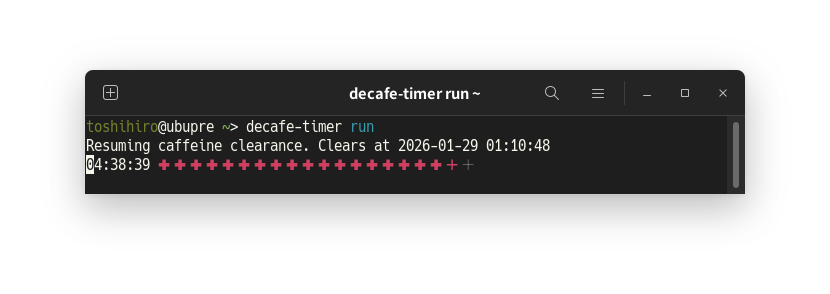
A lightweight CLI cooldown timer for coffee breaks and caffeine tracking. It was created for people who worry about taking too much caffeine and becoming dependent on it.
Installation
pipx install decafe-timer
Usage
The CLI revolves around three ideas:
- Passing a duration creates a new cooldown; omitting it resumes whatever is already running. You can use single durations (
2h,15m30s,0:45:00) or a remaining/total pair like3h/5h(spaces around/are allowed, and mixed formats like3h/4:50:00work too). --rundecides whether to keep the live UI updating until the cooldown expires. Without--run, the command prints the current status once and exits.- Style flags pick the ASCII layout and ANSI behavior.
- Layout output:
- Default is multi-line (
Remaining/Expires at+ bar). --one-lineusesHH:MM:SS ✕ ✕ ✕ ….--graph-onlyprints just the bar.
- Default is multi-line (
- Bar characters:
--bar-styleswaps the bar characters (greek-crossdefault,counting-rod, orblocksfor the previous look).
- ANSI output:
- ANSI is auto-enabled on TTYs.
--color=alwaysforces ANSI on;--color=neverforces it off (applies to both live and snapshot output).
- Live updates:
- When paired with
--run, the live updates use the same ASCII bar (colored via ANSI).
- When paired with
- Snapshot finish:
- Snapshots print
[You may drink coffee now.]once the timer finishes.
- Snapshots print
- Layout output:
decafe-timer 45m          # start a new timer, print one snapshot
decafe-timer 3h/5h        # start with 3h remaining out of a 5h total
decafe-timer              # resume the latest timer, one snapshot
decafe-timer --run 45m    # start a new timer and watch it count down
decafe-timer --run        # resume the live UI for an active timer
decafe-timer --run --one-line 10m  # live ASCII updates on one line
decafe-timer --bar-style blocks   # use the classic block bar
decafe-timer --bar-style counting-rod  # use the counting rod bar
decafe-timer --graph-only # snapshot with the ASCII bar only
decafe-timer --version    # show the current version
License
decafe-timer is distributed under the terms of the MIT license.


Download files
Download the file for your platform. If you're not sure which to choose, learn more about installing packages.
Source Distribution
Built Distribution
Filter files by name, interpreter, ABI, and platform.
If you're not sure about the file name format, learn more about wheel file names.
Copy a direct link to the current filters
File details
Details for the file decafe_timer-0.5.3.tar.gz.
File metadata
- Download URL: decafe_timer-0.5.3.tar.gz
- Upload date:
- Size: 1.6 MB
- Tags: Source
- Uploaded using Trusted Publishing? No
- Uploaded via: Hatch/1.16.2 cpython/3.12.3 HTTPX/0.28.1
File hashes
| Algorithm | Hash digest | |
|---|---|---|
| SHA256 |
eb62e939bd138ffaf553b3c4000d0f988d446f3eef3b993394f785579f8d033e
|
|
| MD5 |
87eec0e9e8beb78acc580f5a59c88979
|
|
| BLAKE2b-256 |
1fc0c2e6ad9ad20fbd6fa97323e344256135dfa09c188f7b4a20aec27fd41339
|
File details
Details for the file decafe_timer-0.5.3-py3-none-any.whl.
File metadata
- Download URL: decafe_timer-0.5.3-py3-none-any.whl
- Upload date:
- Size: 10.2 kB
- Tags: Python 3
- Uploaded using Trusted Publishing? No
- Uploaded via: Hatch/1.16.2 cpython/3.12.3 HTTPX/0.28.1
File hashes
| Algorithm | Hash digest | |
|---|---|---|
| SHA256 |
785b1847e3ad894a40ee9d39adc0e62e8fa8861c12820e91e9f0583c6c9bf226
|
|
| MD5 |
d6e6276a87debd08924c8bc4cd015be5
|
|
| BLAKE2b-256 |
4309ff28017f659dd42189200e8bc96b04bfe7221529292da3f4745528ffa12a
|






