

DeckSmith
A powerful application to dynamically generate decks of cards from a YAML specification and a CSV data file.


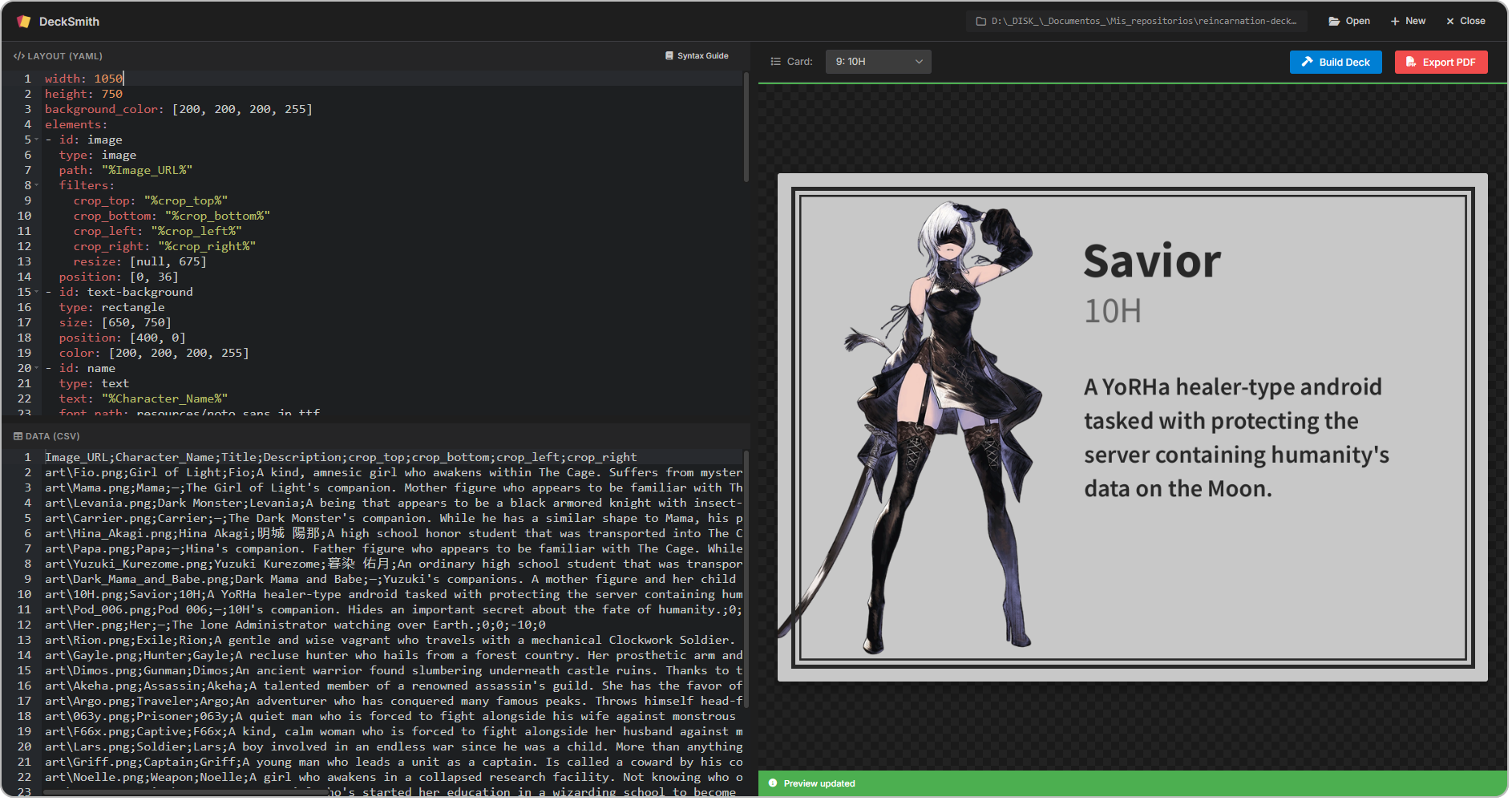
DeckSmith is ideal for automating the creation of all kinds of decks, including TCG decks, tarot decks, business cards, and even slides.
Why DeckSmith?
- ✨ Consistent layout and formatting across all cards. Define once, edit anytime, generate as many cards as you need.
- 🍳 Pure python, for easy installation via pip or with the Windows installer.
- 🖥️ Modern GUI with a live preview to visualize your changes in real time as you design.
- ⚡ Highly performant card generation using parallel processing.
- 📖 Intuitive syntax and extensive documentation that includes examples to help you get started.
- 🧰 Tons of powerful features such as:
- Start from a sample project and edit it instead of starting from scratch
- Extensive support for images, text, and all kinds of different shapes
- Link any field to a column in the CSV file
- Position elements absolutely or relative to other elements, using anchors to simplify placement
- Powerful image transformations using filters like crop, resize, rotate, or flip
- Export your deck as images or as a PDF for printing
Getting started (APP)
- Download and install the latest release.
- Take a look at this to learn how to make the most out of the app and start building your first deck today!
Getting started (CLI)
Installation
-
To begin, install DeckSmith by running:
pip install decksmith
-
To launch the GUI, run:
decksmith --gui
Creating a project
-
Run the following command to start from sample
deck.yamlanddeck.csvfiles:decksmith init
deck.yamldefines the layout for the cards in the deck.deck.csvholds the data for each card, like the content of the text fields and the image paths.
Defining the layout
-
Edit
deck.yamlto include all the elements you want on your cards. You can find a complete list of all the available elements and their properties in the documentation. -
You can reference any column from
deck.csvin thedeck.yamlfile as%column_name%.
Building the deck
-
When you are ready to generate the deck images, run:
decksmith build
-
After building a deck, you can export it to PDF by running:
decksmith export
Documentation
Check out the full documentation for more detailed information on how to use DeckSmith.
1 maintainer

Metadata
1 maintainer
Release files for decksmith 0.9.9
For a detailed explanation of source distributions (sdists) and built distributions (wheels), please see the package formats documentation.
Source distribution (sdist)
| File | Size | Uploaded | |
|---|---|---|---|
| decksmith-0.9.9.tar.gz | 38.4 kB | Details |
Built distribution (wheel)
| File | Interpreter | ABI | Platform | Reset |
|---|---|---|---|---|
| decksmith-0.9.9-py3-none-any.whl | Python 3 | none | any | Details |
Total release size: 83.3 kB
Release files / decksmith-0.9.9.tar.gz
| Download URL | decksmith-0.9.9.tar.gz |
|---|---|
| Size | 38.4 kB |
| Tags | Source |
|
SHA-256 checksum How to use checksums |
4d9a7d92667403423e7a976e74b44405f3c2c2091b8a60cbfe560a3660a9a3bd
|
|
BLAKE2b-256 checksum How to use checksums |
0387c21e23c29b555d6db471fbad6f6d2771d7d9b95c7c73076b845d0f1e65c1
|
| Upload date | |
|
Uploaded using Trusted Publishing? What is trusted publishing? |
No |
| Uploaded via |
uv/0.12.3 {"installer":{"name":"uv","version":"0.12.3","subcommand":["publish"]},"python":null,"implementation":{"name":null,"version":null},"distro":{"name":"Fedora Linux","version":"44","id":"","libc":null},"system":{"name":null,"release":null},"cpu":null,"openssl_version":null,"setuptools_version":null,"rustc_version":null,"ci":null}
|
Release files / decksmith-0.9.9-py3-none-any.whl
| Download URL | decksmith-0.9.9-py3-none-any.whl |
|---|---|
| Size | 44.9 kB |
| Tags | Python 3 |
|
SHA-256 checksum How to use checksums |
11dfc020a7d9a8f806d06df745719ac71d8c19e5095c2dead3b8bfeff9731e79
|
|
BLAKE2b-256 checksum How to use checksums |
df0d8fc8b1dc7ce7dddd5aca56b69c4fd9726ce86c62d95e672eedd5c6e8ba07
|
| Upload date | |
|
Uploaded using Trusted Publishing? What is trusted publishing? |
No |
| Uploaded via |
uv/0.12.3 {"installer":{"name":"uv","version":"0.12.3","subcommand":["publish"]},"python":null,"implementation":{"name":null,"version":null},"distro":{"name":"Fedora Linux","version":"44","id":"","libc":null},"system":{"name":null,"release":null},"cpu":null,"openssl_version":null,"setuptools_version":null,"rustc_version":null,"ci":null}
|














