
A command-line application to dynamically generate decks of cards from a YAML specification and a CSV data file, inspired by nandeck.

Project description
DeckSmith
A powerful application to dynamically generate decks of cards from a YAML specification and a CSV data file.

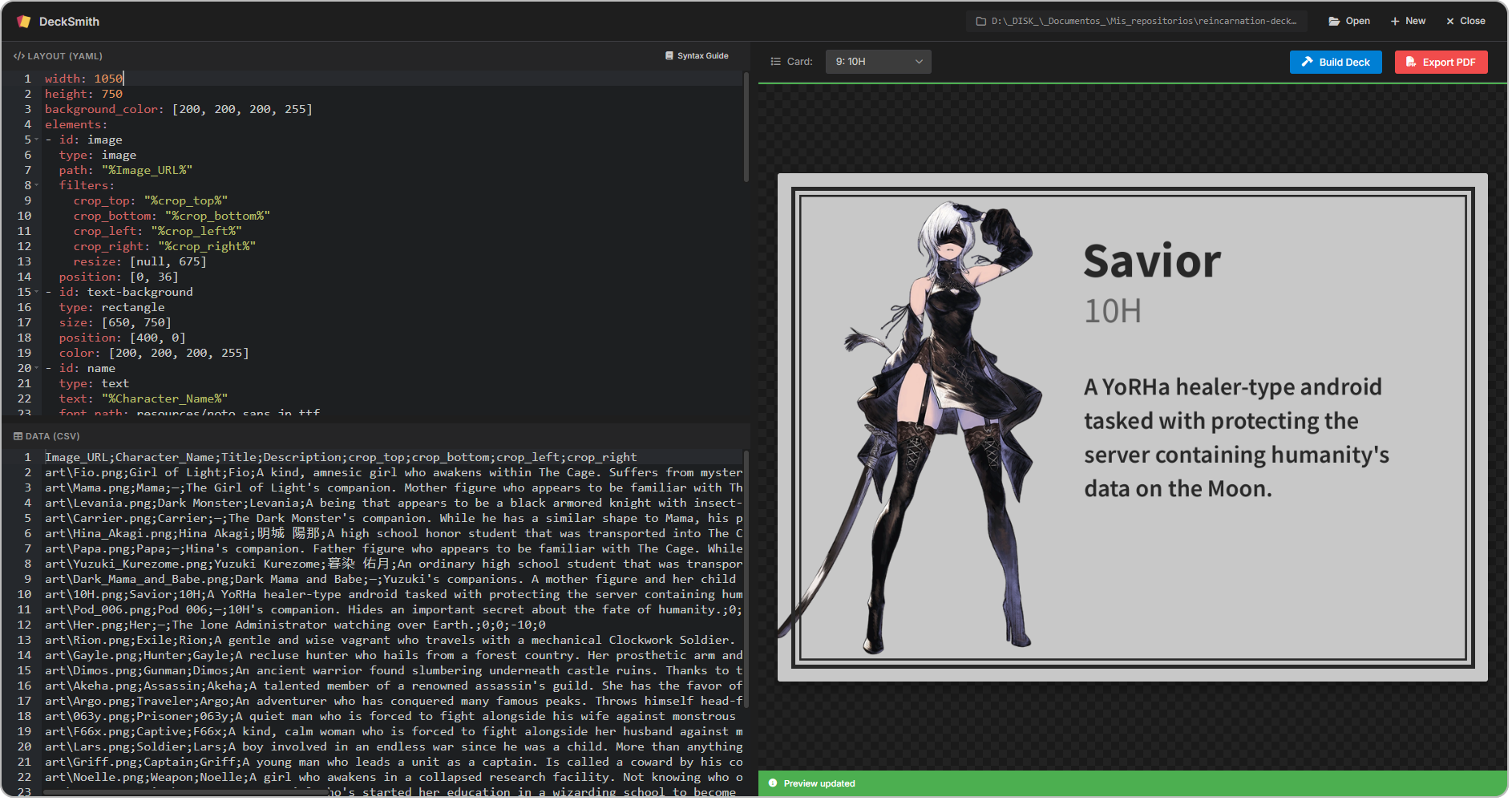
DeckSmith is ideal for automating the creation of all kinds of decks, including TCG decks, tarot decks, business cards, and even slides.
Why DeckSmith?
- ✨ Consistent layout and formatting across all cards. Define once, edit anytime, generate as many cards as you need.
- 🍳 Pure python, for easy installation via pip or with the Windows installer.
- 🖥️ Modern GUI with a live preview to visualize your changes in real time as you design.
- ⚡ Highly performant card generation using parallel processing.
- 📖 Intuitive syntax and extensive documentation that includes examples to help you get started.
- 🧰 Tons of powerful features such as:
- Start from a sample project and edit it instead of starting from scratch
- Extensive support for images, text, and all kinds of different shapes
- Link any field to a column in the CSV file
- Position elements absolutely or relative to other elements, using anchors to simplify placement
- Powerful image transformations using filters like crop, resize, rotate, or flip
- Export your deck as images or as a PDF for printing
Getting started (APP)
- Download and install the latest release.
- Take a look at this to learn how to make the most out of the app and start building your first deck today!
Getting started (CLI)
Installation
-
To begin, install DeckSmith by running:
pip install decksmith
-
To launch the GUI, run:
decksmith --gui
Creating a project
-
Run the following command to start from sample
deck.yamlanddeck.csvfiles:decksmith init
deck.yamldefines the layout for the cards in the deck.deck.csvholds the data for each card, like the content of the text fields and the image paths.
Defining the layout
-
Edit
deck.yamlto include all the elements you want on your cards. You can find a complete list of all the available elements and their properties in the documentation. -
You can reference any column from
deck.csvin thedeck.yamlfile as%column_name%.
Building the deck
-
When you are ready to generate the deck images, run:
decksmith build
-
After building a deck, you can export it to PDF by running:
decksmith export
Documentation
Check out the full documentation for more detailed information on how to use DeckSmith.
Release history Release notifications | RSS feed


Download files
Download the file for your platform. If you're not sure which to choose, learn more about installing packages.
Source Distribution
Built Distribution
Filter files by name, interpreter, ABI, and platform.
If you're not sure about the file name format, learn more about wheel file names.
Copy a direct link to the current filters
File details
Details for the file decksmith-0.9.6.tar.gz.
File metadata
- Download URL: decksmith-0.9.6.tar.gz
- Upload date:
- Size: 57.5 kB
- Tags: Source
- Uploaded using Trusted Publishing? No
- Uploaded via: uv/0.10.8 {"installer":{"name":"uv","version":"0.10.8","subcommand":["publish"]},"python":null,"implementation":{"name":null,"version":null},"distro":null,"system":{"name":null,"release":null},"cpu":null,"openssl_version":null,"setuptools_version":null,"rustc_version":null,"ci":null}
File hashes
| Algorithm | Hash digest | |
|---|---|---|
| SHA256 |
3e0a94862b496aeaff97e6acfafb324fafd9dc9290f342f7563d5420de0e5742
|
|
| MD5 |
38691908c787b01c42eb45f77f443973
|
|
| BLAKE2b-256 |
ff6d6cd819411688459d00f8a4c15d4765af6d5d9733676d00998b48f9683eea
|
File details
Details for the file decksmith-0.9.6-py3-none-any.whl.
File metadata
- Download URL: decksmith-0.9.6-py3-none-any.whl
- Upload date:
- Size: 63.3 kB
- Tags: Python 3
- Uploaded using Trusted Publishing? No
- Uploaded via: uv/0.10.8 {"installer":{"name":"uv","version":"0.10.8","subcommand":["publish"]},"python":null,"implementation":{"name":null,"version":null},"distro":null,"system":{"name":null,"release":null},"cpu":null,"openssl_version":null,"setuptools_version":null,"rustc_version":null,"ci":null}
File hashes
| Algorithm | Hash digest | |
|---|---|---|
| SHA256 |
0b96ac54c41e2ff86a936e7ad3efa48c10ab08cd77e54926f16d9f988773b7a3
|
|
| MD5 |
1e14446a1f588d0e518c1aaa9e20381c
|
|
| BLAKE2b-256 |
fe8045007cc81f8388ccd63ea523af6eae755e1abfa2f4fab9a08cc62ea09079
|






