
Dedal
This repository provides functionalities to easily managed spack environments and helpers for the container image build flow. Additionally, it offers serialization and deserialization capabilities, making it compatible with HPC (High-Performance Computing) environments.
This library was tested on Ubuntu, Debian and Rocky operating systems.
Setting up the needed environment variables
The <checkout path>\dedal\.env file contains the environment variables required for OCI registry used for
caching.
Ensure that you edit the <checkout path>\dedal\.env file to match your environment.
The following provides an explanation of the various environment variables:
   # OCI Registry Configuration Sample for concretization caches
   # =============================
   # The following variables configure the Harbor docker OCI registry (EBRAINS) used for caching.

   # The hostname of the OCI registry. e.g. docker-registry.ebrains.eu
   CONCRETIZE__OCI_HOST="docker-registry.ebrains.eu"

   # The project name in the Docker registry.
   CONCRETIZE__OCI_PROJECT="concretize_caches"

   # The username used for authentication with the Docker registry.
   CONCRETIZE__OCI_USERNAME="robot$concretize-cache-test+user"

   # The password used for authentication with the Docker registry.
   CONCRETIZE_OCI_PASSWORD="###ACCESS_TOKEN###"


   # OCI Registry Configuration Sample for binary caches
   # =============================
   # The following variables configure the Harbor docker OCI registry (EBRAINS) used for caching.

   # The hostname of the OCI registry. e.g. docker-registry.ebrains.eu
   BUILDCACHE_OCI_HOST="docker-registry.ebrains.eu"

   # The project name in the Docker registry.
   BUILDCACHE_OCI_PROJECT="binary-cache-test"

   # The username used for authentication with the Docker registry.
   BUILDCACHE_OCI_USERNAME="robot$binary-cache-test+user"

   # The password used for authentication with the Docker registry.
   BUILDCACHE_OCI_PASSWORD="###ACCESS_TOKEN###"

   Access token for the testing spack env reposiotry
   SPACK_ENV_ACCESS_TOKEN="###ACCESS_TOKEN###"
For both concretization and binary caches, the cache version can be changed via the attributes
cache_version_concretize and cache_version_build.
The default values are v1.
Before using this library, the following tool must be installed on Linux distribution if the spack installation will be handled by Dedal:
apt install -y bzip2 ca-certificates g++ gcc gfortran git gzip lsb-release patch python3 python3-pip tar unzip xz-utils zstd
python3 -m pip install --upgrade pip setuptools wheel
Dedal library installation
pip install dedal
Dedal CLI Commands
The following commands are available in this CLI tool. You can view detailed explanations by using the --help option
with any command.
1. dedal install-spack
Install spack in the install_dir folder.
Options:
--spack_version <TEXT>: Specifies the Spack version to be installed (default: v0.23.0).--bashrc_path <TEXT>: Defines the path to .bashrc.
2. dedal set-config
Sets configuration parameters for the session.
Options:
--use_cacheEnables caching--use_spack_globalUses spack installed globally on the os--env_name <TEXT>Environment name--env_path <TEXT>Environment path to download locally--env_git_path <TEXT>Git path to download the environment--install_dir <TEXT>Install directory for installing spack; spack environments and repositories are stored here--upstream_instance <TEXT>Upstream instance for spack environment--system_name <TEXT>System name; it is used inside the spack environment--concretization_dir <TEXT>Directory where the concretization caching (spack.lock) will be downloaded--buildcache_dir <TEXT>Directory where the binary caching is downloaded for the spack packages--gpg_name <TEXT>Gpg name--gpg_mail <TEXT>Gpg mail contact address--cache_version_concretize <TEXT>Cache version for concretization data--cache_version_build <TEXT>Cache version for binary caches data--view <SpackViewEnum>Spack environment view--override_cache <bool>Flag for overriding existing cache
3. dedal show-config
Show the current configuration.
4. dedal clear-config
Clears stored configuration
5. dedal add-spack-repo
Adds a spack repository to the spack environments.
Options:
--repo_name <TEXT>Repository name [required]--path <TEXT>Repository path to download locally [required]--git_path <TEXT>Git path to download the repository [required]
6. dedal setup-spack-env
Sets up a spack environment according to the given configuration.
7. dedal concretize
Spack concretization step.
8. dedal install-packages
Installs spack packages present in the spack environment defined in configuration.
Options:
--jobs <INTEGER>Number of parallel jobs for spack installation
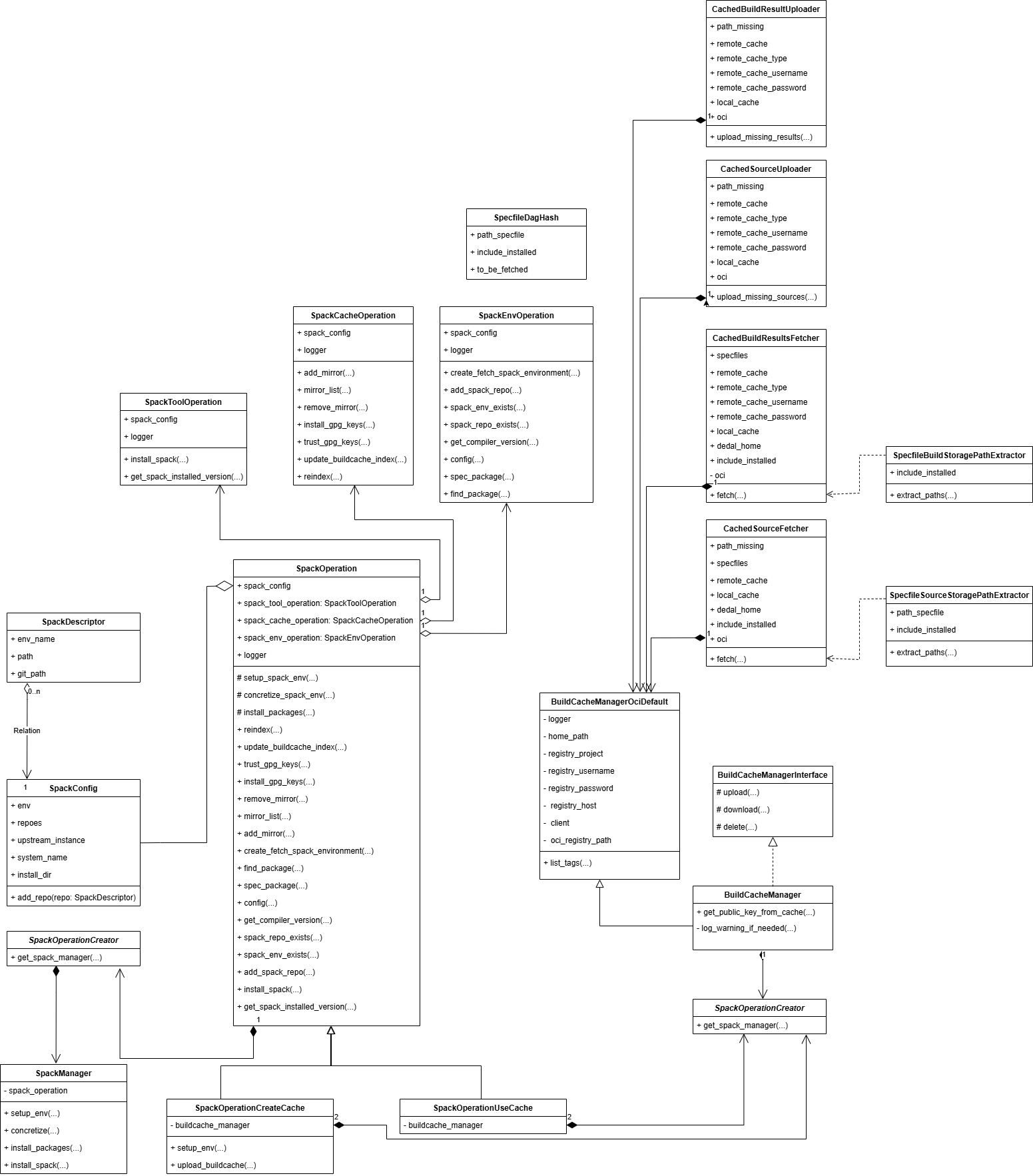
Dedal's UML diagram
Acknowledgments
This project has received funding from the European Union’s Horizon Europe Programme under the Specific Grant Agreement No. 101147319 (EBRAINS 2.0 Project).
This project has received funding from the European Union’s Research and Innovation Program Horizon Europe under Grant Agreement No. 101137289 (Virtual Brain Twin Project).
1 maintainer

Metadata
1 maintainer
Release files for dedal 1.0.0
For a detailed explanation of source distributions (sdists) and built distributions (wheels), please see the package formats documentation.
Source distribution (sdist)
| File | Size | Uploaded | |
|---|---|---|---|
| dedal-1.0.0.tar.gz | 50.7 kB | Details |
Built distribution (wheel)
| File | Interpreter | ABI | Platform | Reset |
|---|---|---|---|---|
| dedal-1.0.0-py3-none-any.whl | Python 3 | none | any | Details |
Total release size: 145.5 kB
Release files / dedal-1.0.0.tar.gz
| Download URL | dedal-1.0.0.tar.gz |
|---|---|
| Size | 50.7 kB |
| Tags | Source |
|
SHA-256 checksum How to use checksums |
7e16ca82117e842bc9e1a21432ed8e95e65132012e283b5b2e8890b35d3112ab
|
|
BLAKE2b-256 checksum How to use checksums |
a7c8492b7d1ab3f8b2dda2c8221989e99a0fee532dc8a2b1a027fe16f3fff747
|
| Upload date | |
|
Uploaded using Trusted Publishing? What is trusted publishing? |
No |
| Uploaded via |
twine/6.2.0 CPython/3.14.0
|
Release files / dedal-1.0.0-py3-none-any.whl
| Download URL | dedal-1.0.0-py3-none-any.whl |
|---|---|
| Size | 94.8 kB |
| Tags | Python 3 |
|
SHA-256 checksum How to use checksums |
4925aab3d9804ba156cb105456b36bfe8aa42eb6660e2444bc48a39e6c068aae
|
|
BLAKE2b-256 checksum How to use checksums |
a4d0f3c30607518cce697b69706b8e372703be0fc74a0e3f345b0e997367db0c
|
| Upload date | |
|
Uploaded using Trusted Publishing? What is trusted publishing? |
No |
| Uploaded via |
twine/6.2.0 CPython/3.14.0
|














