
This package includes all the essential tools required to set up an EBRAINS Software Distribution environment.

Project description
Dedal
This repository provides functionalities to easily managed spack environments and helpers for the container image build flow.
This library was tested on Ubuntu operating system.
Setting up the needed environment variables
The <checkout path>\dedal\.env file contains the environment variables required for OCI registry used for
caching.
Ensure that you edit the <checkout path>\dedal\.env file to match your environment.
The following provides an explanation of the various environment variables:
   # OCI Registry Configuration Sample for concretization caches
   # =============================
   # The following variables configure the Harbor docker OCI registry (EBRAINS) used for caching.

   # The hostname of the OCI registry. e.g. docker-registry.ebrains.eu
   CONCRETIZE__OCI_HOST="docker-registry.ebrains.eu"

   # The project name in the Docker registry.
   CONCRETIZE__OCI_PROJECT="concretize_caches"

   # The username used for authentication with the Docker registry.
   CONCRETIZE__OCI_USERNAME="robot$concretize-cache-test+user"

   # The password used for authentication with the Docker registry.
   CONCRETIZE_OCI_PASSWORD="###ACCESS_TOKEN###"


   # OCI Registry Configuration Sample for binary caches
   # =============================
   # The following variables configure the Harbor docker OCI registry (EBRAINS) used for caching.

   # The hostname of the OCI registry. e.g. docker-registry.ebrains.eu
   BUILDCACHE_OCI_HOST="docker-registry.ebrains.eu"

   # The project name in the Docker registry.
   BUILDCACHE_OCI_PROJECT="binary-cache-test"

   # The username used for authentication with the Docker registry.
   BUILDCACHE_OCI_USERNAME="robot$binary-cache-test+user"

   # The password used for authentication with the Docker registry.
   BUILDCACHE_OCI_PASSWORD="###ACCESS_TOKEN###"
For both concretization and binary caches, the cache version can be changed via the attributes
cache_version_concretize and cache_version_build.
The default values are v1.
Before using this library, the following tool must be installed on Linux distribution:
apt install -y bzip2 ca-certificates g++ gcc gfortran git gzip lsb-release patch python3 python3-pip tar unzip xz-utils zstd
python3 -m pip install --upgrade pip setuptools wheel
Dedal library installation
pip install dedal
Dedal CLI Commands
The following commands are available in this CLI tool. You can view detailed explanations by using the --help option
with any command.
1. dedal install-spack
Install spack in the install_dir folder.
Options:
--spack_version <TEXT>: Specifies the Spack version to be installed (default: v0.23.0).--bashrc_path <TEXT>: Defines the path to .bashrc.
2. dedal set-config
Sets configuration parameters for the session.
Options:
--use_cacheEnables caching--use_spack_globalUses spack installed globally on the os--env_name <TEXT>Environment name--env_path <TEXT>Environment path to download locally--env_git_path <TEXT>Git path to download the environment--install_dir <TEXT>Install directory for installing spack; spack environments and repositories are stored here--upstream_instance <TEXT>Upstream instance for spack environment--system_name <TEXT>System name; it is used inside the spack environment--concretization_dir <TEXT>Directory where the concretization caching (spack.lock) will be downloaded--buildcache_dir <TEXT>Directory where the binary caching is downloaded for the spack packages--gpg_name <TEXT>Gpg name--gpg_mail <TEXT>Gpg mail contact address--cache_version_concretize <TEXT>Cache version for concretization data--cache_version_build <TEXT>Cache version for binary caches data--view <SpackViewEnum>Spack environment view--override_cache <bool>Flag for overriding existing cache
3. dedal show-config
Show the current configuration.
4. dedal clear-config
Clears stored configuration
5. dedal add-spack-repo
Adds a spack repository to the spack environments.
Options:
--repo_name <TEXT>Repository name [required]--path <TEXT>Repository path to download locally [required]--git_path <TEXT>Git path to download the repository [required]
6. dedal setup-spack-env
Sets up a spack environment according to the given configuration.
7. dedal concretize
Spack concretization step.
9. dedal install-packages
Installs spack packages present in the spack environment defined in configuration.
Options:
--jobs <INTEGER>Number of parallel jobs for spack installation
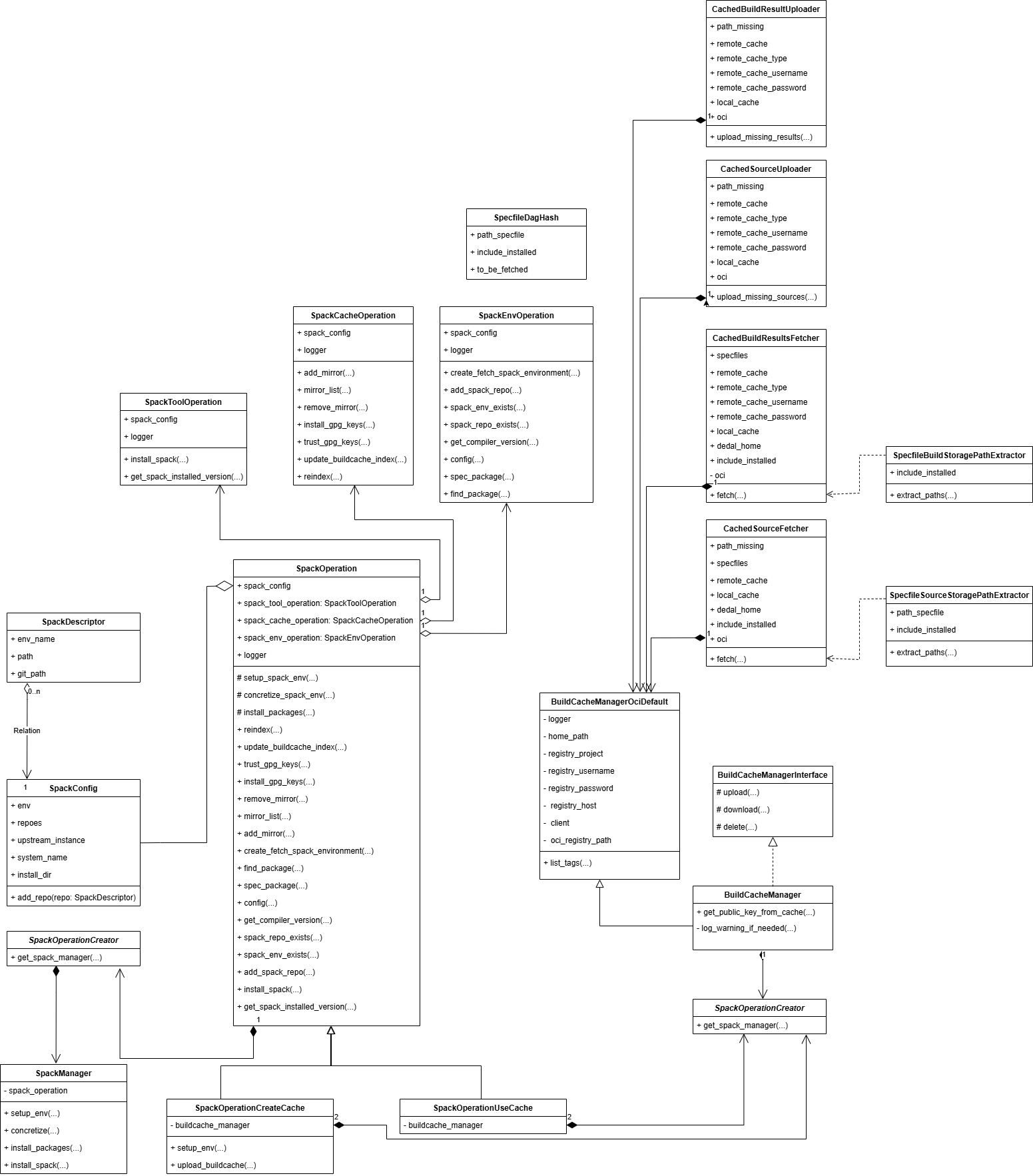
Dedal's UML diagram
Acknowledgments
This project has received funding from the European Union’s Research and Innovation Program Horizon Europe under Grant Agreement No. 101137289 (Virtual Brain Twin Project).
Release history Release notifications | RSS feed


Download files
Download the file for your platform. If you're not sure which to choose, learn more about installing packages.
Source Distribution
Built Distribution
Filter files by name, interpreter, ABI, and platform.
If you're not sure about the file name format, learn more about wheel file names.
Copy a direct link to the current filters
File details
Details for the file dedal-0.9.0.tar.gz.
File metadata
- Download URL: dedal-0.9.0.tar.gz
- Upload date:
- Size: 18.2 kB
- Tags: Source
- Uploaded using Trusted Publishing? No
- Uploaded via: twine/6.1.0 CPython/3.13.3
File hashes
| Algorithm | Hash digest | |
|---|---|---|
| SHA256 |
c07596be0467f55b971fe24eaf8d936acedf88d22aa14bf43d0c3db8d636912f
|
|
| MD5 |
c6fbfe3f3c962f8716ed0728642ae3eb
|
|
| BLAKE2b-256 |
fe7e22ba1f77edb80ed0cd1efd30fe1db22ab2956e78699a861959b05edcb9d1
|
File details
Details for the file dedal-0.9.0-py3-none-any.whl.
File metadata
- Download URL: dedal-0.9.0-py3-none-any.whl
- Upload date:
- Size: 21.9 kB
- Tags: Python 3
- Uploaded using Trusted Publishing? No
- Uploaded via: twine/6.1.0 CPython/3.13.3
File hashes
| Algorithm | Hash digest | |
|---|---|---|
| SHA256 |
c044b41499f55366aa8317f8304f0769a59ec9eacff47b01946b0d5850876c8c
|
|
| MD5 |
f1e59bb9082ac920fefae27cbf315884
|
|
| BLAKE2b-256 |
837f939f12da85f3e81b9a5d62d0754d2bbe8440462639adc624f69b9a310414
|






