
DeepEcoHab: fast and intuitive data analysis platform for your EcoHab experiments


DeepEcoHab is an analytics platform built for preprocessing, analysis and visualization of data acquired in the DeepEcoHab.
Our backend is built on Polars - Extremely fast Query Engine for DataFrames, written in Rust and frontend utilizes Plotly Dash which allows for system independent operation - running the app in your Chromium based browser - providing an interactive, high quality and responsive visualization of experiments regardless of their length.
Quick start
On Windows, three steps get you from nothing to a running dashboard:
uv tool install deepecohab   # install as a standalone app
deepecohab-shortcut          # create a desktop icon
Then double-click the DeepEcoHab icon on your desktop. See
Installation for uv setup and other platforms.
Installation
We keep DeepEcoHab lean to ensure easy integration and fast installation. In the spirit of open-source we build on uv — a fast, self-contained Python package manager.
Step 1 — Install uv
Windows:
powershell -ExecutionPolicy ByPass -c "irm https://astral.sh/uv/install.ps1 | iex"
Linux / macOS:
curl -LsSf https://astral.sh/uv/install.sh | sh
Step 2 — Install DeepEcoHab
For most users the simplest path is to install DeepEcoHab as a standalone
application. This puts the deepecohab and deepecohab-shortcut commands on
your PATH in an isolated environment — no virtual environment to create or
activate:
uv tool install deepecohab
That's it. Run deepecohab to launch the dashboard, which opens automatically
in your browser.
If the commands aren't found afterwards, run
uv tool update-shelland reopen your terminal.
Desktop shortcut (Windows)
After uv tool install deepecohab, create a clickable desktop icon with:
deepecohab-shortcut
This places a DeepEcoHab shortcut on your desktop. Double-clicking it starts the dashboard and opens it in your browser — no terminal required. This is the recommended way to launch DeepEcoHab on Windows.
On Linux / macOS there is no desktop shortcut — simply run
deepecohabfrom the terminal to launch the dashboard.
Using DeepEcoHab as a library
If you want to run the example notebooks or call DeepEcoHab from your own Python code, install it into an environment instead of as a tool:
uv venv
# Windows:        .venv\Scripts\activate
# Linux / macOS:  source .venv/bin/activate
uv pip install deepecohab
Already have an environment running python>=3.12? Just run pip install deepecohab.
We recommend VSCode with the Jupyter extension to run the example notebooks provided in the repository.
How it works
A DeepEcoHab analysis follows three stages — and you can run all of them from
the dashboard, no Python required. Launch the app (run deepecohab or
double-click the desktop shortcut) and:
- Create a project from your raw EcoHab
.txtfiles on the Home page. Point it at your data, describe your layout, light/dark phases, timezone and animal IDs, and the app builds a project folder with aconfig.toml. You can also load an existing project's config to continue working on it. - Run the analysis pipeline on the Analysis page. Results (chasings, activity, sociability, social hierarchy, …) are computed and written to the project as fast parquet files, with a live progress bar.
- Explore the results in the dashboard — browse and compare plots interactively across days, phases and animals.
Prefer to script it? Every stage is also available from Python — see the
example notebooks for the deepecohab.create_ecohab_project(...)
and deepecohab.df_registry.run_pipeline(config_path) API.
Example data
We provide 3 example datasets that reflect 3 main possibilites for an EcoHab layout.
- example_notebook for a vanilla 4 cage, 8 antenna setup.
- example_notebook_custom_layout for a custom layout that can be user defined in the
config.tomlof the created project. - example_notebook_field for a field EcoHab layout.
Dashboard
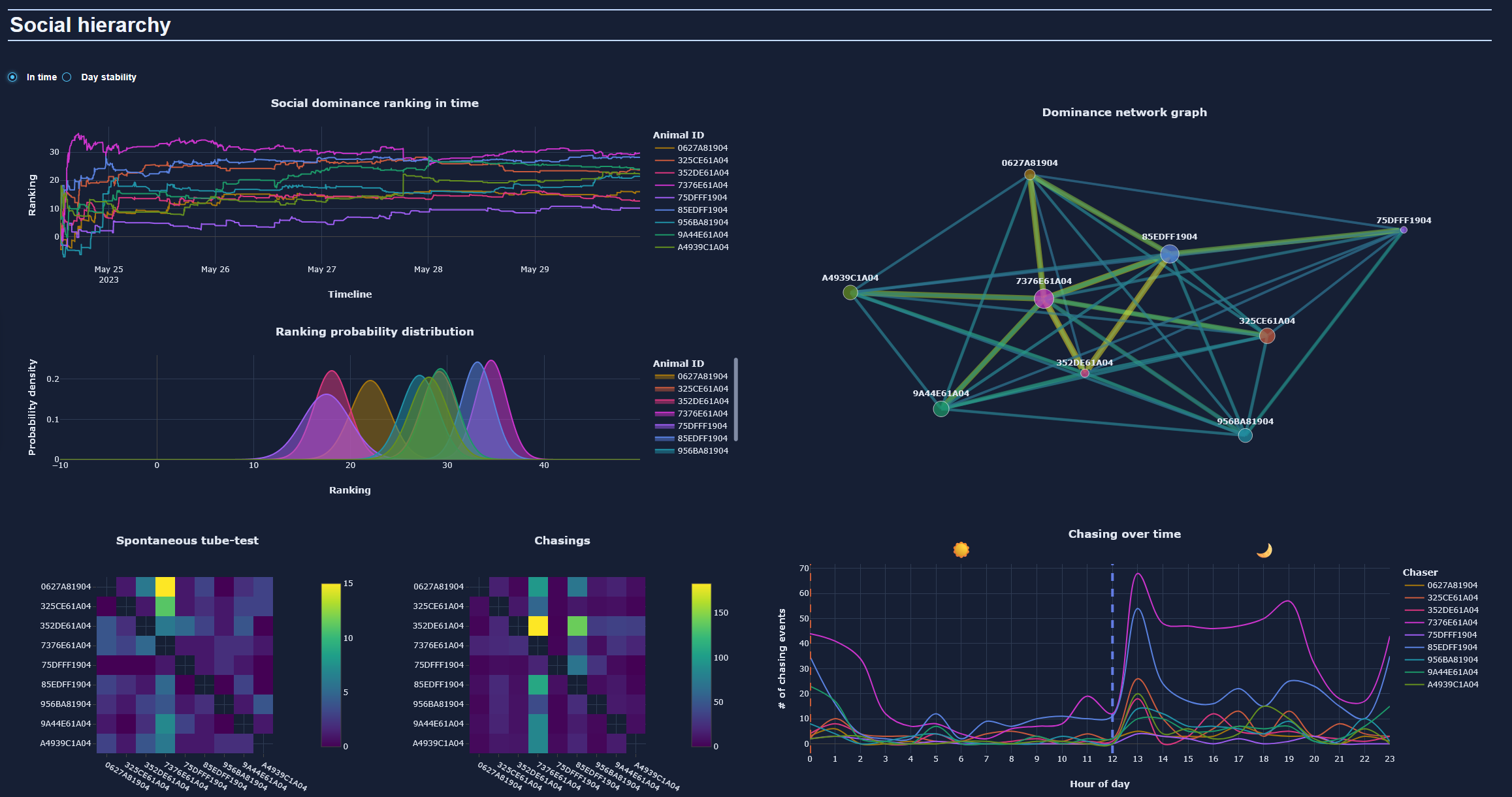
The dashboard contains visualization of the experiment analysis results. It is divided into two tabs: main dashboard tab and a tab for comparisons (when the user wants to compare same plot in different days/phases etc.) and 3 sections:
- Social hierarchy
- Activity
- Sociability
All providing multiple plots controlled via the settings block located on top.
Data structure:
The data is stored in parquet format - an open-source, column-oriented data storage format which allows extremely fast read/write operations of large dataframes.
To get the list of available keys simply call: deepecohab.df_registry.list_available() similarily deepecohab.plot_registry.list_available() can be called to obtain the list of currently available visualizations.
Roadmap
- Full web-app style GUI, deployable via a docker container.
- Group analysis - combined analysis of multiple cohort, comparing different groups of cohorts.
- Pose estimation based analysis of animal interactions and more detailed social structure analysis.
1 maintainer

Download files
Download the file for your platform. If you're not sure which to choose, learn more about installing packages.
Source Distribution
Built Distribution
Filter files by name, interpreter, ABI, and platform.
If you're not sure about the file name format, learn more about wheel file names.
Copy a direct link to the current filters
File details
Details for the file deepecohab-0.5.3.tar.gz.
File metadata
- Download URL: deepecohab-0.5.3.tar.gz
- Upload date:
- Size: 729.4 kB
- Tags: Source
- Uploaded using Trusted Publishing? No
- Uploaded via:
uv/0.9.18 {"installer":{"name":"uv","version":"0.9.18","subcommand":["publish"]},"python":null,"implementation":{"name":null,"version":null},"distro":null,"system":{"name":null,"release":null},"cpu":null,"openssl_version":null,"setuptools_version":null,"rustc_version":null,"ci":null}
File hashes
| Algorithm | Hash digest | |
|---|---|---|
| SHA256 |
66052bde34a1f4e4eff32abacb3b645ec2d29ba193a1947a4a95e637fa60e576
|
|
| MD5 |
8556322449c0abea6240d45b2d226892
|
|
| BLAKE2b-256 |
e9f7482c0b6201b19403ddce1be52f3510f3aaced669ffb6e1fbd52a2a18ab10
|
File details
Details for the file deepecohab-0.5.3-py3-none-any.whl.
File metadata
- Download URL: deepecohab-0.5.3-py3-none-any.whl
- Upload date:
- Size: 719.1 kB
- Tags: Python 3
- Uploaded using Trusted Publishing? No
- Uploaded via:
uv/0.9.18 {"installer":{"name":"uv","version":"0.9.18","subcommand":["publish"]},"python":null,"implementation":{"name":null,"version":null},"distro":null,"system":{"name":null,"release":null},"cpu":null,"openssl_version":null,"setuptools_version":null,"rustc_version":null,"ci":null}
File hashes
| Algorithm | Hash digest | |
|---|---|---|
| SHA256 |
cde4bd53215febeade43ab6a314266c5f5bd5feb4e215b3842f58b02908a8f08
|
|
| MD5 |
6e36136f5a148736ba0b5591095686d3
|
|
| BLAKE2b-256 |
13ef61c9d0d4a7c66694d6df99c5b972326d3618674e992fded614c3ac4a4a59
|














