












Dolby Encoding Engine Wrapper

English readme • Magyar leírás
DDP encoding has never been so easy!
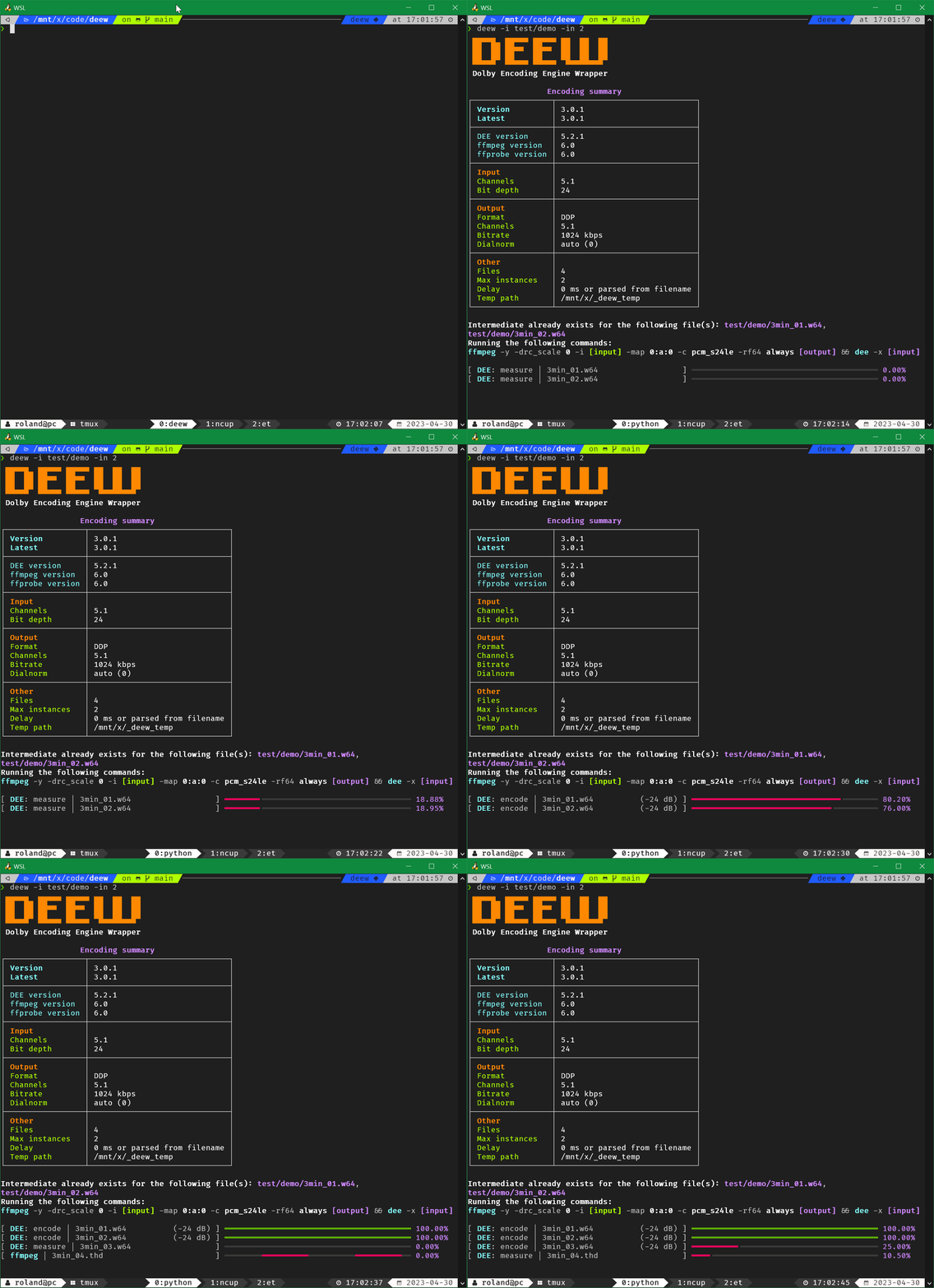
Description
- handles Dolby's XML input fuckery in the background, giving you a proper CLI interface
- converts inputs to RF64 which DEE can use
- bit depth, number of channels and other infos are parsed from the source
- an XML file will be generated for each input based on the settings
- the script utilizes thread pooling for batch encoding (see config)
- supports WSL path conversion for the Windows version of DEE (see config)
- in case of an invalid bitrate it will pick the closest allowed one
- automatic sample rate conversion using ffmpeg's soxr resampler in case of an unsupported sample rate
- for DD/DDP/AC4 unsupported rates will be converted to 48 kHz
- for TrueHD unsupported rates will be converted to 48 kHz if source sample rate is lower than 72 kHz, otherwise will be converted to 96 kHz
- automatic channel swapping for 7.1 sources (DEE swaps Ls Rs with Lrs Rrs for some reason)
- automatic dialnorm setting
- automatically compensates for DEE's 256 sample delay (DD and DDP encoding)
- checks if intermediate file is already created so you can encode different formats/bitrates using a single intermediate file, for example:
deew -f dd -b 448 -i input -k
deew -f dd -b 640 -i input -k
deew -f ddp -i input - works even with video inputs (first audio will be selected)
- fancy terminal output using rich
- versatile delay option that supports ms, s and also frame@fps formats
- parsing delay from filenames
Requirements
- Python (you don't need it if you use a standalone build of deew)
- ffmpeg
- ffprobe
- Dolby Encoding Engine
Dolby Encoding Engine installation
- install DEE (if you use macOS, install DME)
- for TrueHD encoding support you need the Windows version
- if you use WSL1 use the Windows version for better performance
- if you use the Windows version of DEE under Linux (and not from WSL) / macOS install
wine-binfmt
- place your
license.licfile next to the DEE binary (dee.exeunder Windows,deeunder Linux/macOS) - if DEE throws
Failed to load library "...dll".errors when you run deew install VisualCppRedist AIO
deew installation
with standalone build (Windows 7-11/Linux):
- grab the latest build from: https://github.com/pcroland/deew/releases
- run with:
deew
(run the binary from terminal, doubleclicking it won't work) - on the first run it will create a config file, choose where you want to keep it
- updating: grab the latest build from: https://github.com/pcroland/deew/releases
with Python environment (Windows/Linux/macOS):
- install Python and pip if you don't have it already
- run:
pip install deew - run with:
deew - on the first run it will create a config file
- updating:
pip install deew --upgrade
Setup system PATH variable
If you don't want to use full paths for the binaries in your config or when you use them from CLI, I suggest to setup system PATH variables
Windows:
- open
cmd.exeas administrator - run a
setx /m PATH "%PATH%;[location]"command for each path that contains binaries
(replace[location]with the path) - for example:
setx /m PATH "%PATH%;C:\bin\dee"
setx /m PATH "%PATH%;C:\bin\ffmpeg"
Linux/macOS:
- add a
PATH="[location]:$PATH"line in your~/.bashrcor~/.zshrcfile for each path that contains a binary
(replace[location]with the path) - for example:
PATH="/usr/local/bin/dee:$PATH"
PATH="/usr/local/bin/ffmpeg:$PATH"
Usage
❯ deew -h
deew 3.2.1

USAGE: deew [-h] [-v] [-i [INPUT ...]] [-ti INDEX] [-o DIRECTORY] [-f FORMAT]
            [-b BITRATE] [-dm CHANNELS] [-d DELAY] [-r DRC] [-dn DIALNORM]
            [-in INSTANCES] [-k] [-mo] [-fs] [-fb] [-lb] [-la] [-np] [-pl]
            [-cl] [-c] [-gc]

FLAGS:
  -h, --help                  show this help message.
  -v, --version               show version.
  -i, --input [INPUT ...]     audio file(s) or folder(s)
  -ti, --track-index INDEX    default: 0
                              select audio track index of input(s)
  -o, --output DIRECTORY      default: current directory
                              specifies output directory
  -f, --format FORMAT         options: dd / ddp / ac4 / thd
                              default: ddp
  -b, --bitrate BITRATE       options: run -lb/--list-bitrates
                              default: run -c/--config
  -dm, --downmix CHANNELS     options: 1 / 2 / 6
                              specifies downmix, only works for DD/DDP
                              DD will be automatically downmixed to 5.1 in case of a 7.1 source
  -d, --delay DELAY           examples: -5.1ms, +1,52s, -24@pal, +10@24000/1001
                              default: 0ms or parsed from filename
                              specifies delay as ms, s or frame@FPS
                              FPS can be a number, division or ntsc / pal
                              you have to specify negative values as -d=-0ms
  -r, --drc DRC               options: film_light / film_standard / music_light / music_standard / speech
                              default: music_light (this is the closest to the missing none preset)
                              specifies drc profile
  -dn, --dialnorm DIALNORM    options: between -31 and 0 (in case of 0 DEE's measurement will be used)
                              default: 0
                              applied dialnorm value between
  -in, --instances INSTANCES  examples: 1, 4, 50%
                              default: 50%
                              specifies how many encodes can run at the same time
                              50% means 4 on a cpu with 8 threads
                              one DEE can use 2 threads so 50% can utilize all threads
                              (this option overrides the config's number)
  -k, --keeptemp              keep temp files
  -mo, --measure-only         kills DEE when the dialnorm gets written to the progress bar
                              this option overrides format with ddp
  -fs, --force-standard       force standard profile for 7.1 DDP encoding (384-1024 kbps)
  -fb, --force-bluray         force bluray profile for 7.1 DDP encoding (768-1664 kbps)
  -lb, --list-bitrates        list bitrates that DEE can do for DD and DDP encoding
  -la, --long-argument        print ffmpeg and DEE arguments for each input
  -np, --no-prompt            disables prompt
  -pl, --print-logos          show all logo variants you can set in the config
  -cl, --changelog            show changelog
  -c, --config                show config and config location(s)
  -gc, --generate-config      generate a new config
Examples
deew -i *thd
encode DDP
deew -b 768 -i *flac
encode DDP@768
deew -dm 2 -f dd -b 192 -i *.ec3
encode DD@192 with stereo downmixing
deew -f dd -b 448 -in 4 -i S01
encode DD@448 using 4 instances (input is a folder)
deew -f thd -i *w64
encode TrueHD
deew -f dd -i *dts -k
deew -f ddp -i *dts
encode multiple formats/bitrates while creating the temp file only once
Discussion and Support
1 maintainer

Metadata
1 maintainer
Release files for deew 3.2.2
For a detailed explanation of source distributions (sdists) and built distributions (wheels), please see the package formats documentation.
Source distribution (sdist)
| File | Size | Uploaded | Provenance | Actions |
|---|---|---|---|---|
| deew-3.2.2.tar.gz | 20.6 kB | Without provenance | Details for deew-3.2.2.tar.gz |
Built distribution (wheel)
| File | Interpreter | ABI | Platform | Actions Reset |
|---|---|---|---|---|
| deew-3.2.2-py3-none-any.whl | Python 3 | none | any | Details for deew-3.2.2-py3-none-any.whl |
Total release size: 42.2 kB
Release files / deew-3.2.2.tar.gz
| Download URL | deew-3.2.2.tar.gz |
|---|---|
| Size | 20.6 kB |
| Tags | Source |
|
SHA-256 checksum How to use checksums |
ecd710da36a99d3843b2e14933ae26c836632fd183109c2604ad69f90fca68e0
|
|
BLAKE2b-256 checksum How to use checksums |
9633bd0052dd6420ad6411e26694fe3d57340c2160bb315a446db8ba07071f51
|
| Upload date | |
|
Uploaded using Trusted Publishing? What is trusted publishing? |
No |
| Uploaded via |
poetry/2.1.1 CPython/3.12.1 Windows/2022Server
|
Release files / deew-3.2.2-py3-none-any.whl
| Download URL | deew-3.2.2-py3-none-any.whl |
|---|---|
| Size | 21.6 kB |
| Tags | Python 3 |
|
SHA-256 checksum How to use checksums |
24b40cef38fb2685be71f26876ec61a8259a798001a6ca8a001c093c175109bc
|
|
BLAKE2b-256 checksum How to use checksums |
493f30d40597e6342efe76ed2a468dc1a7f136d0a1cfe7cd905516b69c8b0414
|
| Upload date | |
|
Uploaded using Trusted Publishing? What is trusted publishing? |
No |
| Uploaded via |
poetry/2.1.1 CPython/3.12.1 Windows/2022Server
|
Security for deew 3.2.2
Provenance
Provenance describes where a file came from. On PyPI, provenance is shared via attestations, which provide a verifiable record of the build or publishing details. View details, limitations and caveats.
No provenance found
None of the files in this release were uploaded with provenance metadata.
A note on package security
PyPI is a repository for distributing packages, not a service for auditing them. While third-party security researchers and our staff do their best to detect and remove malicious packages, PyPI cannot guarantee the quality, security or suitability of any given package.
To learn more about protecting yourself from malicious actors, visit our package security documentation.














