
Dolby Encoding Engine Wrapper

Project description











Dolby Encoding Engine Wrapper

English readme • Magyar leírás
DDP encoding has never been so easy!
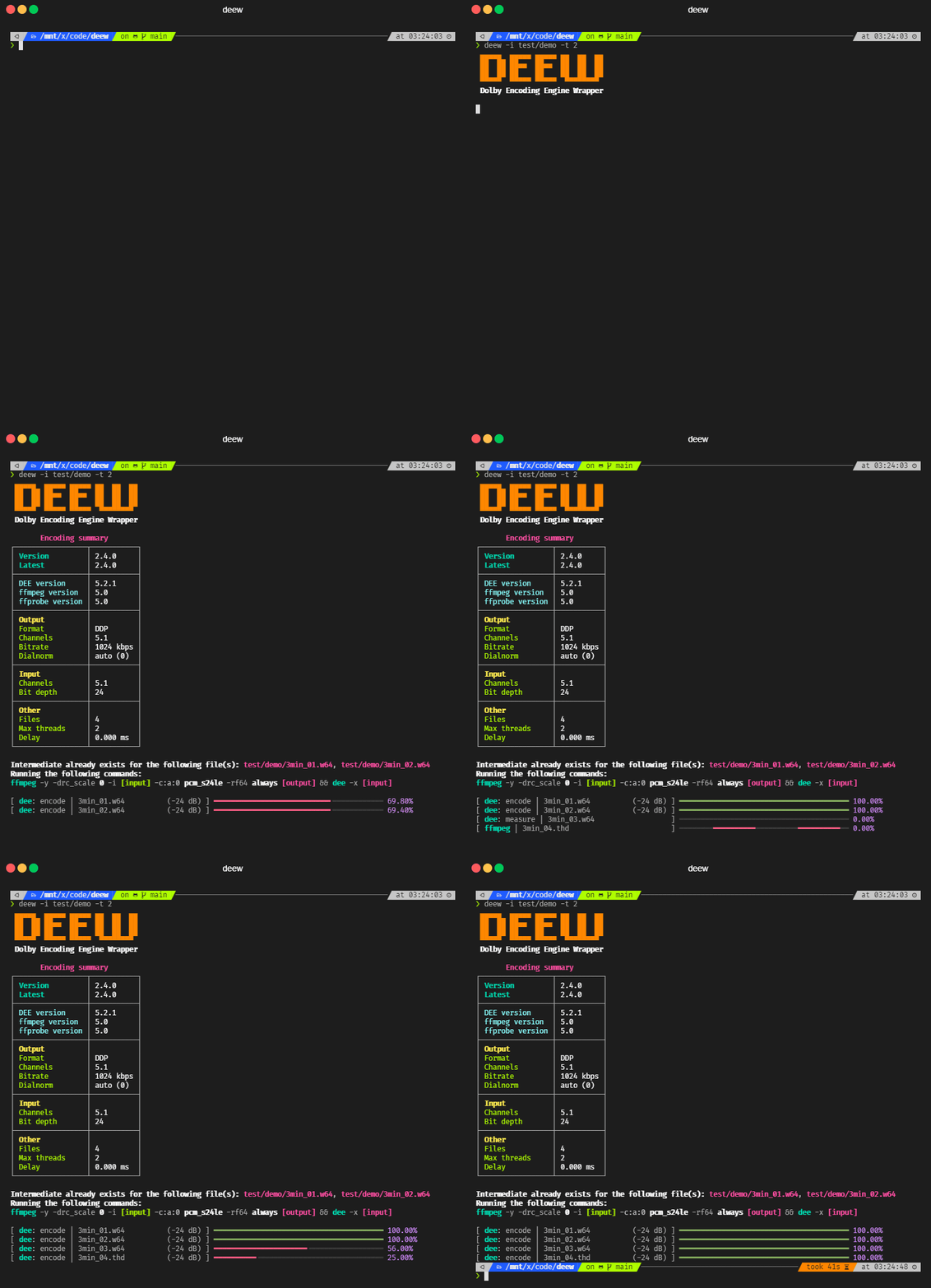
Description
- handles Dolby's XML input fuckery in the background, giving you a proper CLI interface
- converts inputs to rf64 which DEE can use
- bit depth, number of channels and other infos are parsed from the source
- an XML file will be generated for each input based on the settings
- the script utilizes thread pooling for batch encoding (see config)
- supports WSL path conversion for the Win version of DEE (see config)
- in case of an invalid bitrate it will pick the closest allowed one
- automatic sample rate conversion using ffmpeg's soxr resampler in case of an unsupported sample rate
- for dd/ddp unsupported rates will be converted to 48000
- for thd unsupported rates will be converted to 48000 if source sample rate is lower than 72000, otherwise will be converted to 96000
- automatic channel swapping for 7.1 sources (DEE swaps Ls Rs with Lrs Rrs for some reason)
- automatic dialnorm setting
- automatically compensates for DEE's 256 sample delay (DD and DDP encoding)
- checks if intermediate file is already created so you can encode different formats/bitrates using a single intermediate file, for example:
deew -f dd -b 448 -i input -k
deew -f dd -b 640 -i input -k
deew -f ddp -i input - works even with video inputs (first audio will be selected)
- fancy terminal output using rich
- versatile delay option that supports ms, s and also frame@fps formats
Requirements
- Python (you don't need it if you use a standalone build of deew)
- ffmpeg
- ffprobe
- Dolby Encoding Engine
Dolby Encoding Engine installation
- install DEE (if you use macOS, install DME)
- for TrueHD encoding support you need the Windows version
- if you use WSL1 use the Windows version for better performance
- if you use the Windows version of DEE under Linux (and not from WSL) / macOS install
wine-binfmt
- place your
license.licfile next to the DEE binary (dee.exeunder Windows,deeunder Linux/macOS)
deew installation
with standalone build (Windows/Linux):
- grab the latest build from: https://github.com/pcroland/deew/releases
- run with:
deew
(run the binary from terminal, doubleclicking it won't work) - on the first run it will create a config file, choose where you want to keep it
- updating: grab the latest build from: https://github.com/pcroland/deew/releases
with Python environment (Windows/Linux/macOS):
- install Python and pip if you don't have it already
- run:
pip install deew - run with:
deew - on the first run it will create a config file
- updating:
pip install deew --upgrade
Setup system PATH variable
If you don't want to use full paths for the binaries in your config or when you use them from CLI, I suggest to setup system PATH variables
Windows:
- open
cmd.exeas administrator - run:
setx /m PATH "%PATH%;[location]"(replace[location]with the path where DEE and ffmpeg is) - for example if you have DEE installed in
C:\bin\deeand ffmpeg and ffprobe inC:\bin\ffmpeg, run these two commands:
setx /m PATH "%PATH%;C:\bin\dee"
setx /m PATH "%PATH%;C:\bin\ffmpeg"
Linux/macOS:
- in your
~/.bashrcor~/.zshrcfile putPATH="[location]:$PATH"(replace[location]with the path where DEE and ffmpeg is) - for example if you have DEE installed in
/usr/local/bin/deeand ffmpeg and ffprobe in/usr/local/bin/ffmpeg, put these two lines in your rc file:
PATH="/usr/local/bin/dee:$PATH"
PATH="/usr/local/bin/ffmpeg:$PATH"
Usage
❯ deew -h
deew 2.6.0

USAGE: deew [-h] [-v] [-i [INPUT ...]] [-o OUTPUT] [-f FORMAT] [-b BITRATE]
            [-dm DOWNMIX] [-d DELAY] [-drc DRC] [-dn DIALNORM] [-in INSTANCES]
			[-k] [-mo] [-fs] [-fb] [-lb] [-la] [-np] [-pl] [-cl] [-c] [-gc]

FLAGS:
  -h, --help                      show this help message.
  -v, --version                   show version.
  -i [INPUT ...], --input [INPUT ...]
                                  audio file(s) or folder(s)
  -o OUTPUT, --output OUTPUT      default: current directory
                                  specifies output directory
  -f FORMAT, --format FORMAT      options: dd / ddp / thd
                                  default: ddp
  -b BITRATE, --bitrate BITRATE   default:: see config
  -dm DOWNMIX, --downmix DOWNMIX  options: 1 / 2 / 6
                                  specifies downmix, only works for DD/DDP
                                  DD will be automatically downmixed to 5.1 in case of a 7.1 source
  -d DELAY, --delay DELAY         examples: -5.1ms, +1,52s, p5s, m24@pal, +10@24000/1001
                                  default: 0ms
                                  specifies delay as ms, s or frame@FPS
                                  FPS can be a number, division or ntsc / pal
                                  + / - can also be defined as p / m
  -drc DRC                        options: film_light / film_standard / music_light / music_standard / speech
                                  default: music_light (this is the closes to the missing none preset)
                                  specifies drc profile
  -dn DIALNORM, --dialnorm DIALNORM
                                  options: between -31 and 0 (in case of 0 DEE's measurement will be used)
                                  default: 0
                                  applied dialnorm value between
  -in INSTANCES, --instances INSTANCES
                                  examples: 1, 4, 50%
                                  default: 50%
                                  specifies how many encodes can run at the same time
                                  50% means 4 on a cpu with 8 threads
                                  one DEE can use 2 threads so 50% can utilize all threads
                                  (this option overwrites the config's number)
  -k, --keeptemp                  keep temp files
  -mo, --measure-only             kills DEE when the dialnorm gets written to the progress bar
                                  this option overwrites format with ddp
  -fs, --force-standard           force standard profile for 7.1 DDP encoding (384-1024 kbps)
  -fb, --force-bluray             force bluray profile for 7.1 DDP encoding (768-1664 kbps)
  -lb, --list-bitrates            list bitrates that DEE can do for DD and DDP encoding
  -la, --long-argument            print ffmpeg and DEE arguments for each input
  -np, --no-prompt                disables prompt
  -pl, --print-logos              show all logo variants you can set in the config
  -cl, --changelog                show changelog
  -c, --config                    show config and config location(s)
  -gc, --generate-config          generate a new config
Examples
deew -i *thd
encode DDP
deew -b 768 -i *flac
encode DDP@768
deew -dm 2 -f dd -b 192 -i *.ec3
encode DD@192 with stereo downmixing
deew -f dd -b 448 -t 4 -i S01
encode DD@448 using 4 threads (input is a folder)
deew -f thd -i *w64
encode TrueHD
deew -f dd -i *dts -k
deew -f ddp -i *dts
encode multiple formats/bitrates while creating the temp file only once
Discussion and Support
Release history Release notifications | RSS feed


Download files
Download the file for your platform. If you're not sure which to choose, learn more about installing packages.
Source Distribution
Built Distribution
Filter files by name, interpreter, ABI, and platform.
If you're not sure about the file name format, learn more about wheel file names.
Copy a direct link to the current filters
File details
Details for the file deew-2.6.0.tar.gz.
File metadata
- Download URL: deew-2.6.0.tar.gz
- Upload date:
- Size: 20.3 kB
- Tags: Source
- Uploaded using Trusted Publishing? No
- Uploaded via: poetry/1.1.14 CPython/3.10.6 Windows/10
File hashes
| Algorithm | Hash digest | |
|---|---|---|
| SHA256 |
ab0ef82ca40ed9461b774d1086558deda331111fc20115f3590ee407a04eefc5
|
|
| MD5 |
092801b5010b101d429f773660471fe1
|
|
| BLAKE2b-256 |
3763b6f16aacb1419fe734cbcb48464561af06a1b28f1fc6a50356dfd62c670f
|
File details
Details for the file deew-2.6.0-py3-none-any.whl.
File metadata
- Download URL: deew-2.6.0-py3-none-any.whl
- Upload date:
- Size: 19.9 kB
- Tags: Python 3
- Uploaded using Trusted Publishing? No
- Uploaded via: poetry/1.1.14 CPython/3.10.6 Windows/10
File hashes
| Algorithm | Hash digest | |
|---|---|---|
| SHA256 |
0b7537ec6193110d219a7ea82c4d16e2a64a5604a8c9f5c0933937571273ff5b
|
|
| MD5 |
f25c331e5ab02a312dda9af423f98c9b
|
|
| BLAKE2b-256 |
3519d4cf3b6c0accfa5f1a505e1b6690bcaf0b861b9076c8c005be74dbc3cd4c
|






