
DeezSpot 🎵
A powerful Python and Lightweight library for downloading music from Deezer and Spotify. Clone of the original deezloader with additional features and improvements.
⚠️ IMPORTANT NOTES !!!!! ⚠️
USE AS YOUR OWN RISK I'M NOT RESPONSIBLE TO ANY YOUR PROBLEM AT SPOTIFY OR DEEZER ACCOUNT !
✨ Features
- Download songs, albums, playlists from Deezer
- Download songs, albums, playlists, episode from Spotify
- Support for multiple audio qualities (MP3, FLAC) and OGG for spotify
- Download podcast episodes
- Batch downloading
- Progress bar support
- ID3 tags and artwork
🚀 Installation
pip install deezspot
Or
pip install git+https://github.com/jakiepari/deezspot
🔑 Authentication Setup
Deezer Authentication
- Get your Deezer ARL token from browser cookies after logging in to Deezer
- Use the token in your code:
from deezspot.deezloader import DeeLogin

dl = DeeLogin(arl='your_arl_token', email='your_Deezer_email', password='your_Deezer_password', tags_separator=" / ")
Spotify Authentication
- Clone the librespot-auth repository:
git clone https://github.com/dspearson/librespot-auth
cd librespot-auth
cargo build --release
- Generate credentials:
./target/release/librespot-auth
- Adjust your credentials.json with the format:
{
    "username": "your_spotify_username",
    "credentials": "your_credentials_string",
    "type": "AUTHENTICATION_STORED_SPOTIFY_CREDENTIALS"
}
Or also you can use this code
from librespot.zeroconf import ZeroconfServer
import time
import logging
import pathlib

zs = ZeroconfServer.Builder().create()
logging.warning("Transfer playback from desktop client to librespot-python via Spotify Connect in order to store session")

while True:
    time.sleep(1)
    if zs._ZeroconfServer__session:
        logging.warning(f"Grabbed {zs._ZeroconfServer__session} for {zs._ZeroconfServer__session.username()}")

        if pathlib.Path("credentials.json").exists():
            logging.warning("Session stored in credentials.json. Now you can Ctrl+C")
            break
Steps: Its same like using the code from librespot-auth. but you need a premium plan to use this code! Just play 1 song and then click connect to a device and select librespot-python then your credentials.json will be appear
📚 Usage Examples
Downloading with Deezer
import sys
import os
import traceback

# Add the local deezspot directory to the sys.path
sys.path.insert(0, os.path.abspath(os.path.join(os.path.dirname(__file__), '..')))

from deezspot.deezloader import DeeLogin
from deezspot.spotloader import SpoLogin

try:
    # Deezer Example
    print("Initializing Deezer client...")
    deezer = DeeLogin(arl='your_arl_token', email='', password='', tags_separator=" / ")

    # Download a single track from Deezer
    deezer.download_trackdee(
        link_track='https://www.deezer.com/track/123456789',
        output_dir='./downloads/deezer/tracks',
        quality_download='MP3_320',
        recursive_quality=False,
        recursive_download=False
    )

    # Download an album from Deezer
    deezer.download_albumdee(
        link_album='https://www.deezer.com/album/123456789',
        output_dir='./downloads/deezer/albums',
        quality_download='FLAC',
        recursive_quality=True,
        recursive_download=False
    )

    # Download a playlist from Deezer
    deezer.download_playlistdee(
        link_playlist='https://www.deezer.com/playlist/123456789',
        output_dir='./downloads/deezer/playlists',
        quality_download='MP3_320',
        recursive_quality=True,
        recursive_download=False
    )

    # Download an artist's top tracks from Deezer
    deezer.download_artisttopdee(
        link_artist='https://www.deezer.com/artist/123456789',
        output_dir='./downloads/deezer/artists',
        quality_download='MP3_320',
        recursive_quality=True,
        recursive_download=False
    )

    # Download an episode from Deezer
    deezer.download_episode(
        link_episode='https://www.deezer.com/episode/123456789',
        output_dir='./downloads/deezer/episodes',
        quality_download='MP3_320',
        recursive_quality=True,
        recursive_download=False
    )

    # Spotify Example
    print("Initializing Spotify client...")
    credentials_path = os.path.abspath(os.path.join(os.path.dirname(__file__), 'credentials.json'))
    spotify = SpoLogin(credentials_path=credentials_path, client_id='your_client_id', client_secret='your_client_secret')

    # Download a single track from Spotify
    spotify.download_track(
        link_track="https://open.spotify.com/track/4tCtwWceOPWzenK2HAIJSb",
        output_dir="./downloads/spotify/tracks",
        quality_download="NORMAL",
        recursive_quality=False,
        recursive_download=False,
        not_interface=False,
        method_save=1
    )

    # Download an album from Spotify
    spotify.download_album(
        link_album="https://open.spotify.com/album/6n4YU8iRm07O7lR1zQZypN",
        output_dir="./downloads/spotify/albums",
        quality_download="NORMAL",
        recursive_quality=True,
        recursive_download=False,
        not_interface=False,
        method_save=1,
        make_zip=True
    )

    # Download a playlist from Spotify
    spotify.download_playlist(
        link_playlist="https://open.spotify.com/playlist/1ZyEi4bBTYGTIlY23U1kwG",
        output_dir="./downloads/spotify/playlists",
        quality_download="NORMAL",
        recursive_quality=True,
        recursive_download=False,
        not_interface=False,
        method_save=1,
        make_zip=True
    )

    # Download an episode from Spotify
    spotify.download_episode(
        link_episode="https://open.spotify.com/episode/1hgO8Y3CCymyxn934lNtDq",
        output_dir="./downloads/spotify/episodes",
        quality_download="NORMAL",
        recursive_quality=False,
        recursive_download=False,
        not_interface=False,
        method_save=1
    )

except Exception as e:
    traceback.print_exc()
📋 Supported Formats
Deezer
- MP3_128
- MP3_320 (SOMETIMES NEED PAID DEEZER)
- FLAC (PAID DEEZER ONLY)
Spotify
- NORMAL
- HIGH
- VERY_HIGH
NOTE !
Sometimes when you using spotloader after downloading 20+ tracks, Will be giving an error about audio key. its because you're using free spotify!
🤝 Contributing
- Fork the repository
- Create your feature branch (
git checkout -b feature/amazing-feature) - Commit your changes (
git commit -m 'Add some amazing feature') - Push to the branch (
git push origin feature/amazing-feature) - Open a Pull Request
⚖️ License
This project is licensed under the GNU Affero General Public License v3 - see the
LICENSE
file for details.
🙏 Acknowledgments
- Original deezloader project
- Deezer API
- Spotify API
- Spotify Anon
- librespot-python
- librespot-auth
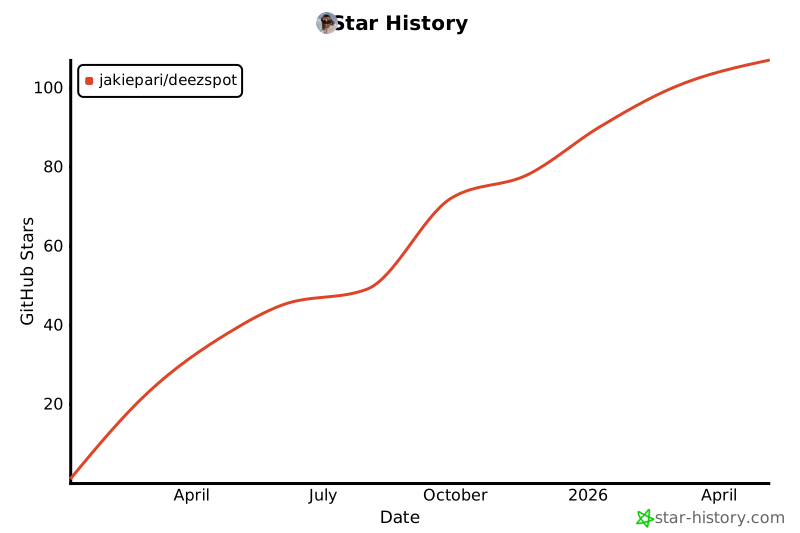
⭐️ Star History
1 maintainer

Metadata
1 maintainer
Release files for deezspot 1.6
For a detailed explanation of source distributions (sdists) and built distributions (wheels), please see the package formats documentation.
Source distribution (sdist)
| File | Size | Uploaded | |
|---|---|---|---|
| deezspot-1.6.tar.gz | 40.4 kB | Details |
Built distribution (wheel)
| File | Interpreter | ABI | Platform | Reset |
|---|---|---|---|---|
| deezspot-1.6-py3-none-any.whl | Python 3 | none | any | Details |
Total release size: 85.0 kB
Release files / deezspot-1.6.tar.gz
| Download URL | deezspot-1.6.tar.gz |
|---|---|
| Size | 40.4 kB |
| Tags | Source |
|
SHA-256 checksum How to use checksums |
beb23eeec968eb3957f8f7fc23c41025eabb93df8b68618016a1b30a03cc5da1
|
|
BLAKE2b-256 checksum How to use checksums |
699a326447b73f9768b435297a8f78bab5df12956c06f34f440f956fce973da2
|
| Upload date | |
|
Uploaded using Trusted Publishing? What is trusted publishing? |
No |
| Uploaded via |
twine/6.2.0 CPython/3.12.1
|
Release files / deezspot-1.6-py3-none-any.whl
| Download URL | deezspot-1.6-py3-none-any.whl |
|---|---|
| Size | 44.6 kB |
| Tags | Python 3 |
|
SHA-256 checksum How to use checksums |
1ee4f9d4429f7fbd31aaf387c65d41ab4952ebb6d777a5d6010549762ede9af2
|
|
BLAKE2b-256 checksum How to use checksums |
879c17de5602de09eb81a2b6fcbe9a7d7e3514e6c8e683a55f446a4f7e8e485b
|
| Upload date | |
|
Uploaded using Trusted Publishing? What is trusted publishing? |
No |
| Uploaded via |
twine/6.2.0 CPython/3.12.1
|














