
Intelligent AI Agents to ensure accurate, unique, and reliable customer data

Project description

Delpha Data Quality MCP
Intelligent AI Agents to ensure accurate, unique, and reliable customer data

📋 Table of Contents
🌟 Overview
Delpha is an AI-driven data quality solution that uses intelligent AI Agents to ensure accurate, unique, and reliable customer data. Delpha's specialized AI Agents automate data cleansing and enrichment, helping businesses enhance operational efficiency and drive stronger revenue performance.
- Reduce Data Maintenance Costs: Delpha minimizes the need for manual data cleanup, reducing labor costs and overhead associated with constant data maintenance.
- Improve Sales Productivity: By automating data quality tasks, Delpha frees up significant portions of sales teams' schedules, allowing them to focus on selling rather than data entry and correction.
- Shorten Data Migration: Delpha accelerates the process of unifying CRM datasets, enabling sales reps to confidently approach newly acquired customers and drive incremental revenue sooner.
- Deduplication with AI: Delpha's advanced AI accurately scores potential duplicates by analyzing multiple fields and detecting subtle variations, offering both automatic and manual merging options.
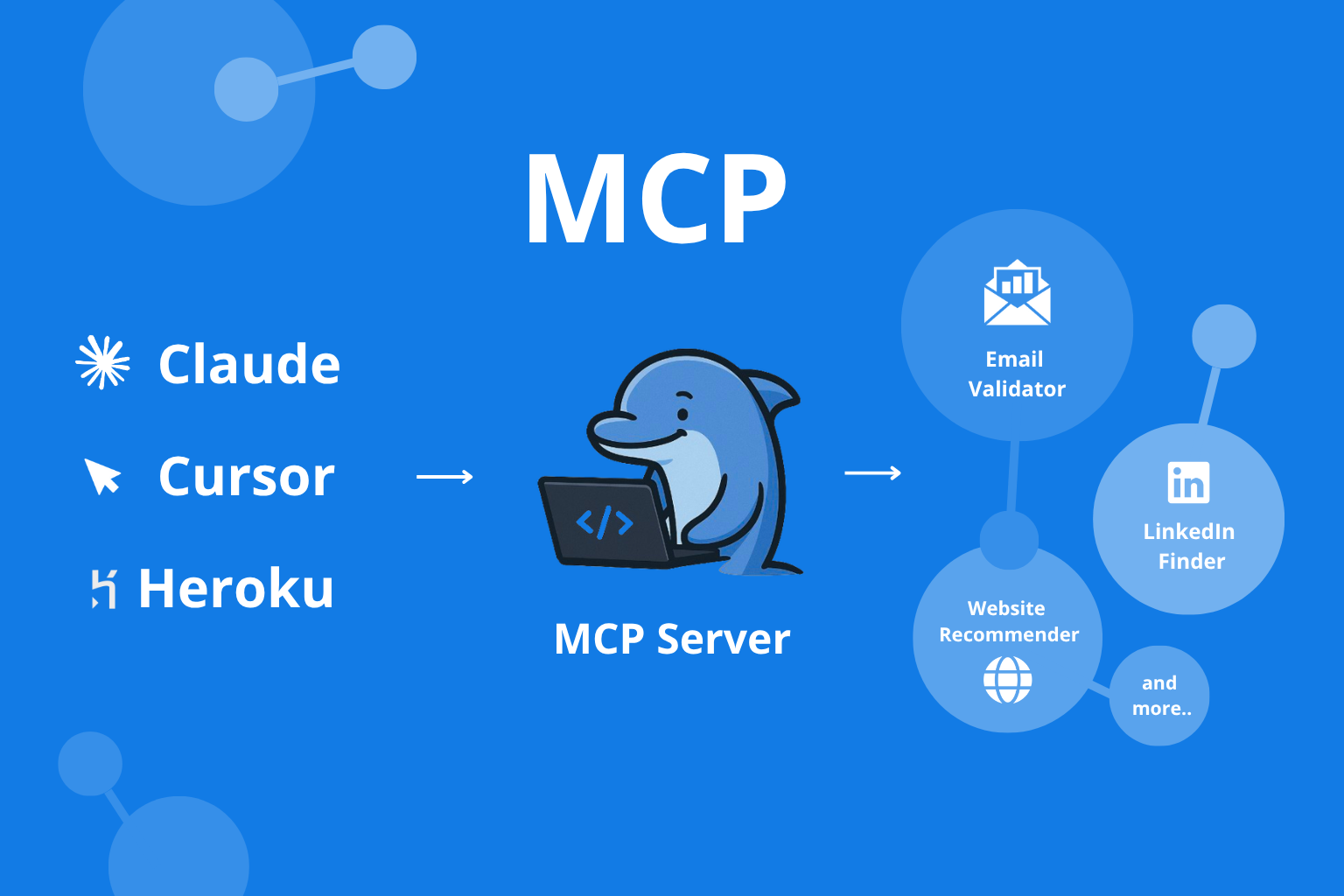
🎬 Demo
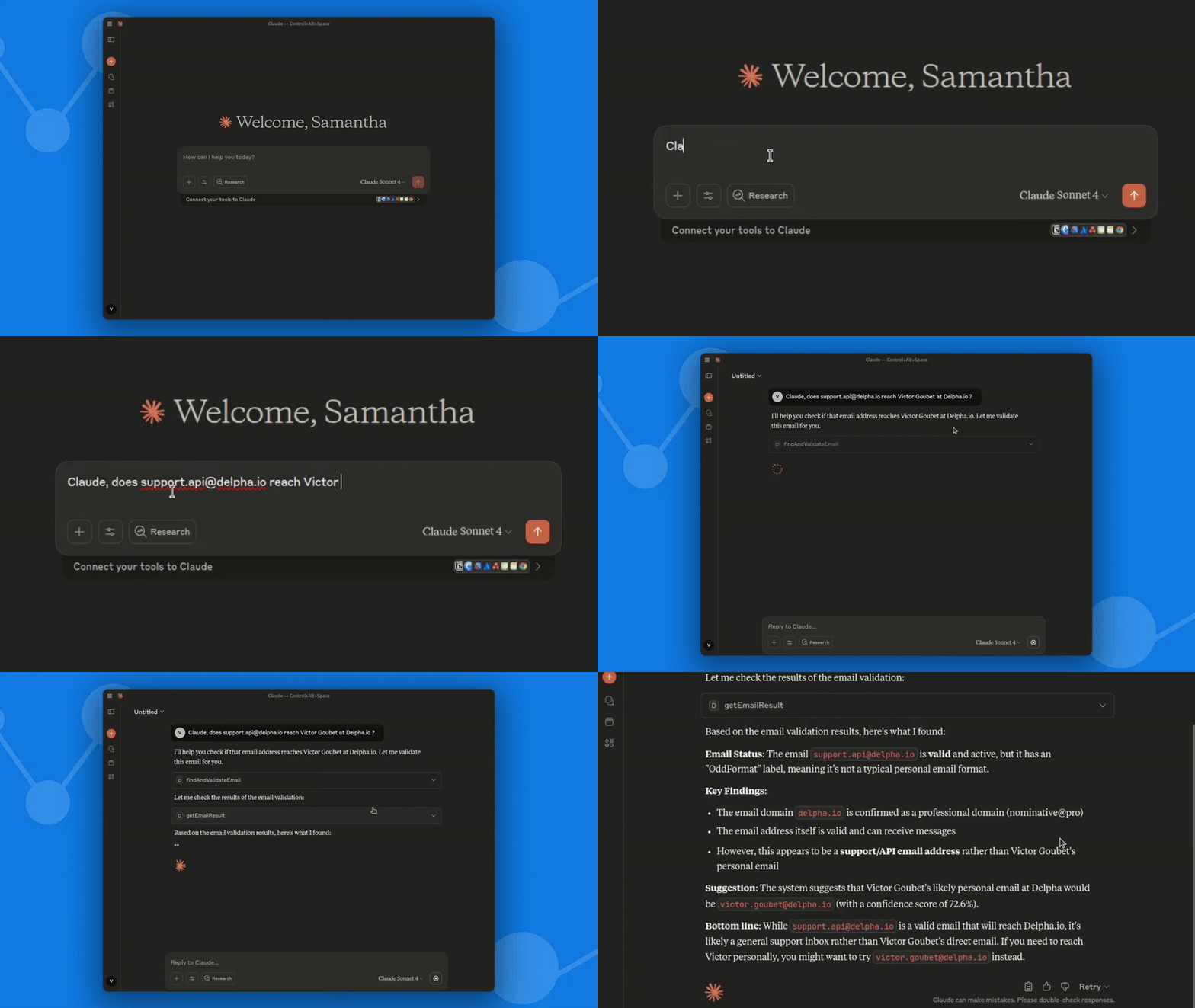
See Delpha MCP in action! Watch how easy it is to validate and enrich email data directly from your AI assistant.
🚀 Quickstart
-
Install the package:
pip install delpha-mcp
-
Configure:
- Go to
Settings → MCPand add:
{
  "mcpServers": {
    "Delpha": {
      "command": "python",
      "args": [
        "-m",
        "delpha_mcp"
      ],
      "env": {
        "DELPHA_CLIENT_ID": "your_client_id_here",
        "DELPHA_CLIENT_SECRET": "your_client_secret_here"
      }
    }
  }
}
- Replace with your Delpha credentials.
- Go to
-
Restart your app — Delpha tools are now available!
🗝️ Getting Client Credentials
To use Delpha MCP, you need OAuth2 client credentials. Please contact the Delpha team at support.api@delpha.io to request your client ID and secret.
🛠️ Tools
Delpha MCP exposes a set of intelligent tools to assess and improve the quality of your data. Each tool is designed to address specific data quality challenges, providing actionable insights and suggestions for improvement.
Available MCP Tool Names:
findAndValidateEmail: Submit an email address for validation and enrichment, and receive a job ID for tracking progress.getEmailResult: Retrieve the result and status of a previously submitted email validation/enrichment job.
Goal:
In today’s data-driven landscape, having accurate and complete email data directly impacts your organization’s efficiency, deliverability, and outreach success. Delpha’s Email Finder and Email Validator solutions ensure your email database remains robust, accurate, and up-to-date by systematically discovering missing emails and verifying email addresses.
Delpha evaluates email data across four critical dimensions:
- Completeness: Uses advanced Email Finder technology to locate and populate missing email addresses.
- Validity: Employs a powerful Email Validator to confirm emails adhere to standard formatting rules and are deliverable.
- Accuracy: Ensures that discovered emails match the intended individuals correctly.
- Consistency: Verifies alignment between emails and related data points such as domains, company websites, etc..
Additionally:
- Email Validator classifies emails as personal or professional, supporting GDPR compliance and improving deliverability.
- Email Finder offers AI-generated email recommendation for correcting or completing emails, accompanied by confidence scores to guide effective decision-making.
Delpha’s integrated Email Finder and Email Validator provide a comprehensive health check and intelligent enrichment, delivering actionable insights that enhance communication success, regulatory compliance, and overall data integrity.
Email Insights
Available MCP Tool Name:
getEmailInsights: Extract key insights from email content including name, phone number, title, company, and out-of-office status.
Goal:
Email communications contain a wealth of valuable information beyond just the email address itself. Delpha's Email Insight solution systematically analyzes email bodies to identify and extract critical contact information, professional details, and contextual insights that can transform how you understand and interact with your contacts.
Delpha's Email Insight solution extracts and enriches information such as:
- Name: Automatically identifies and extracts the sender's name from email communications.
- Phone Number: Detects and normalizes phone numbers to facilitate direct contact.
- Title: Extracts the sender's professional title, providing context for better engagement.
- Company: Identifies the sender's organization to enhance CRM accuracy and business insights.
- Out-of-Office Status: Determines if the sender is currently out of office, enabling timely and informed responses.
Delpha's Email Insight delivers precise, structured insights, enhancing data quality, enabling smarter interactions, and driving informed business decisions.
LinkedIn Import
Available MCP Tool Names:
submitLinkedinImport: Submit a LinkedIn import job for profiles or companies; returns a job ID to track progress.getLinkedinImportResult: Retrieve the status and final result of a previously submitted LinkedIn import job.
Goal: Accelerate prospecting and research with a high-throughput importer for LinkedIn and Sales Navigator. Submit a search or list source and fetch normalized profile or company data at scale.
Supported sources:
- LinkedIn search URLs (People/Companies)
- Sales Navigator search URLs
- Sales Navigator list URLs
Inputs:
- url: LinkedIn or Sales Navigator search/list URL
- cookie: The LinkedIn session cookie to fetch data on the user’s behalf
- user_agent (optional): Custom User-Agent string (defaults to a modern desktop browser)
- lang (optional): Language string like
v=2&lang=en-us - object_type:
profile|company
Flow:
- Start a job with
submitLinkedinImport. - We handle throttling and retries automatically.
- Poll with
getLinkedinImportResultuntil complete. - Receive a
result_urlpointing to the final JSON dataset.
Use cases:
- Lead sourcing and pipeline generation
- Account and company research
- CRM enrichment and analytics
More tools (address, social, website, deduplication, etc.) will be added soon as Delpha expands its data quality platform.
📞 Support
if you encounter any issues or have questions, please reach out to the Delpha support team or open an issue in the repository.
Release history Release notifications | RSS feed


Download files
Download the file for your platform. If you're not sure which to choose, learn more about installing packages.
Source Distribution
Built Distribution
Filter files by name, interpreter, ABI, and platform.
If you're not sure about the file name format, learn more about wheel file names.
Copy a direct link to the current filters
File details
Details for the file delpha_mcp-0.1.16.tar.gz.
File metadata
- Download URL: delpha_mcp-0.1.16.tar.gz
- Upload date:
- Size: 8.9 kB
- Tags: Source
- Uploaded using Trusted Publishing? No
- Uploaded via: uv/0.8.15
File hashes
| Algorithm | Hash digest | |
|---|---|---|
| SHA256 |
767b0bc2eda5789ec0958e8f89de4ac66fe91a2c0eb444d06baa11ccf221bb5e
|
|
| MD5 |
192d313ed031ee53717c44055dd9b0e2
|
|
| BLAKE2b-256 |
06b97442a8dce24deda173462240d9d3c1c96fda10930adb873c2ace803e6c73
|
File details
Details for the file delpha_mcp-0.1.16-py3-none-any.whl.
File metadata
- Download URL: delpha_mcp-0.1.16-py3-none-any.whl
- Upload date:
- Size: 9.1 kB
- Tags: Python 3
- Uploaded using Trusted Publishing? No
- Uploaded via: uv/0.8.15
File hashes
| Algorithm | Hash digest | |
|---|---|---|
| SHA256 |
2c49e6492981c0cb75f41d70ec30ec38326e5e9af8246ca23f993ef2bcc3c938
|
|
| MD5 |
c032692c1ae42fdf8351e6e23146f361
|
|
| BLAKE2b-256 |
5e31e9a4aa20856f62f78545acd7ebddb30df1ebaa2b3c1f773c3c051fdd9054
|






