
DendroViz


DendroViz takes CSV, JSON, or Newick input and turns it into a dendrogram dataset. The CSV output can be used in Tableau and other charting tools. The tool can also create SVG images.
Vertical tree with straight lines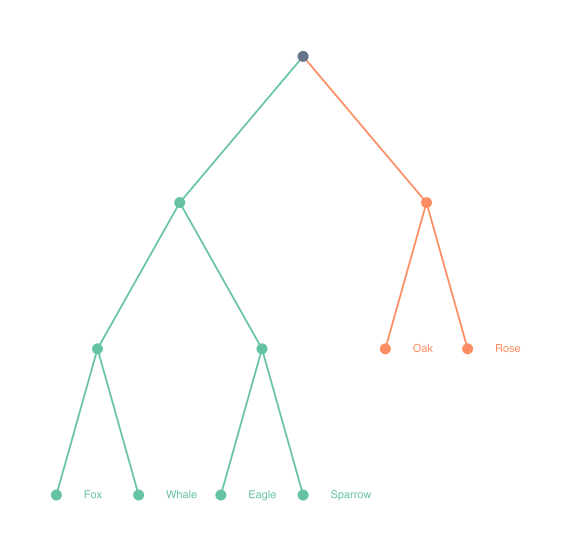
|
Horizontal tree with curved lines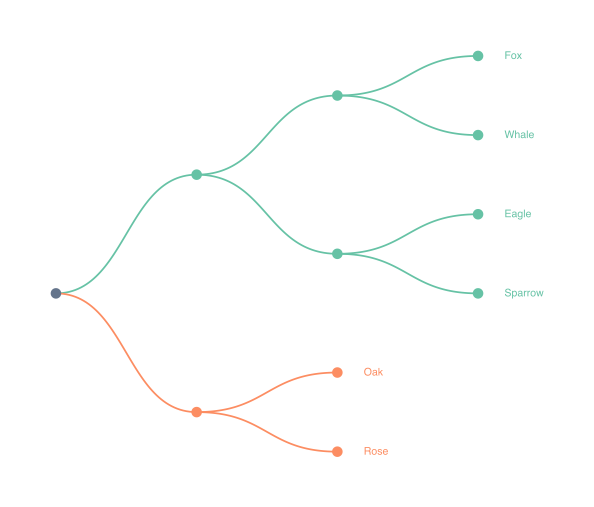
|
Radial tree with split lines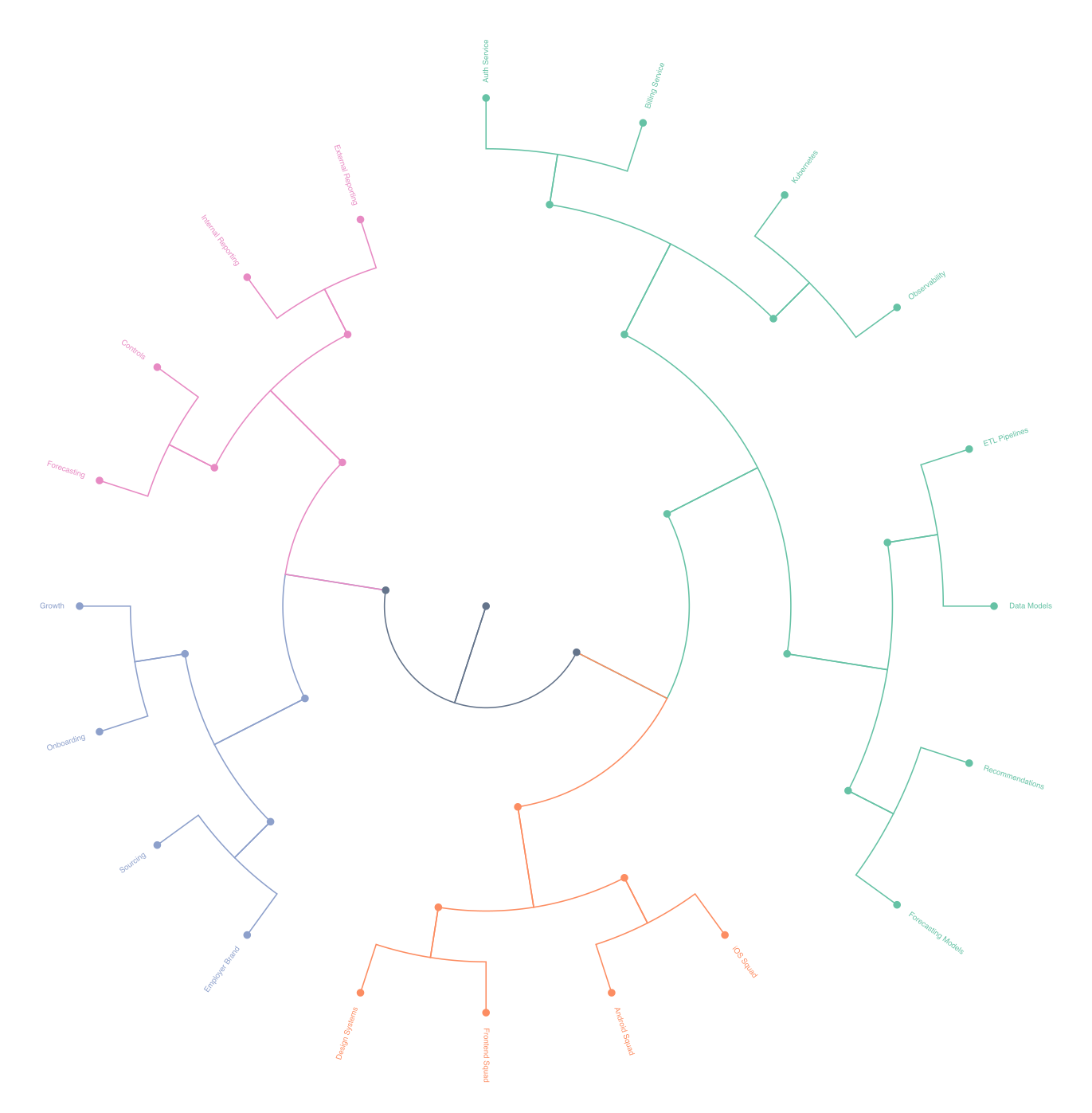
|
Table of Contents
Installation
pip install dendroviz
Install the optional Newick parser only if you need it:
pip install biopython
For local development:
pip install -e .[dev]
Quickstart
Python API
from dendroviz import DendrogramGenerator, LayoutOptions

generator = DendrogramGenerator()
result = generator.generate_tree(
    "examples/dummy_deep.csv",
    tree_layout="radial",
    line_style="split",
    output_csv="build/dummy-deep-radial-split.csv",
    output_json="build/dummy-deep.json",
    output_svg="build/dummy-deep-radial-split.svg",
    options=LayoutOptions(
        label_mode="leaves",
        show_internal_nodes=True,
        show_root_node=True,
        label_orientation="auto",
        label_offset=24,
        colour_mode="palette",
        palette="set2",
        palette_depth=2,
    ),
)

print(len(result.nodes), len(result.edges))
CLI
dendroviz build examples/dummy_deep.csv \
  --input-format csv \
  --tree-layout radial \
  --line-style split \
  --output-svg build/dummy-deep-radial-split.svg \
  --label-mode leaves \
  --label-orientation auto \
  --label-offset 24 \
  --colour-mode palette \
  --palette set2 \
  --palette-depth 2 \
  --show-palette-legend
Example test runs:
dendroviz build examples/dummy_small.csv \
  --tree-layout vertical \
  --line-style straight \
  --output-csv build/dummy-small-vertical-straight.csv \
  --output-svg build/dummy-small-vertical-straight.svg \
  --label-mode all \
  --label-orientation auto \
  --colour-mode palette \
  --palette set2 \
  --palette-depth 2

dendroviz build examples/dummy_small.csv \
  --tree-layout horizontal \
  --line-style curved \
  --output-csv build/dummy-small-horizontal-curved.csv \
  --output-svg build/dummy-small-horizontal-curved.svg \
  --label-mode all \
  --label-offset 28 \
  --colour-mode palette \
  --palette set2 \
  --palette-depth 2

dendroviz build examples/dummy_deep.csv \
  --tree-layout radial \
  --line-style split \
  --output-csv build/dummy-deep-radial-split.csv \
  --output-svg build/dummy-deep-radial-split.svg \
  --label-mode leaves \
  --label-orientation auto \
  --colour-mode palette \
  --palette set2 \
  --palette-depth 2
Try it with the included dummy data:
Input Format
CSV
The library expects a single rooted tree with exactly these columns:
id,parent,label,order
root,,Root,0
branch_a,root,Branch A,0
branch_b,root,Branch B,1
leaf_a1,branch_a,Leaf A1,0
leaf_a2,branch_a,Leaf A2,1
leaf_b1,branch_b,Leaf B1,0
Rules:
idmust be uniqueparentis empty for the single root row- every non-root parent must exist
ordercontrols sibling order and must be numeric- cycles are not allowed
JSON
JSON input uses the same row fields as CSV. The loader accepts either:
- a top-level array of node objects
- an object with a
nodesarray
Each node object should include:
idparentlabelorder
Example:
{
  "nodes": [
    { "id": "root", "parent": null, "label": "Root", "order": 0 },
    { "id": "left", "parent": "root", "label": "Left", "order": 0 },
    { "id": "right", "parent": "root", "label": "Right", "order": 1 }
  ]
}
Rules:
idmust be uniqueparentisnullfor the single root row- every non-root parent must exist
ordercontrols sibling order and must be numeric- cycles are not allowed
Newick
Newick input is also supported when BioPython is installed. Install it with pip install biopython:
from dendroviz import DendrogramGenerator

generator = DendrogramGenerator()
tree = generator.load_tree("examples/tree.nwk", input_format="newick")
Sibling order is taken from the order children appear in the Newick file.
Branch lengths are used directly when present, and branch_length_spacing controls how much screen space each unit of branch length gets so length-based trees remain readable. If a Newick tree omits branch lengths, the library falls back to its depth-based spacing. In Newick, :1 means the branch has length 1.
CLI Reference
Mandatory
| Option | Values | Notes |
|---|---|---|
build |
subcommand | Generate dendrogram artefacts from an input tree |
| input path | path | Path to the input tree file |
--tree-layout |
radial, vertical, horizontal |
radial uses angle/radius coordinates, vertical grows top-to-bottom, horizontal grows left-to-right |
--line-style |
curved, split, straight |
curved uses smooth splines, split branches at forks, straight uses direct segments |
| output flag(s) | --output-csv, --output-json, --output-svg |
Write one or more render artefacts |
Optional
These CLI flags map directly to LayoutOptions fields in the Python API.
| Option | Values | Notes |
|---|---|---|
--log-level |
CRITICAL, ERROR, WARNING, INFO, DEBUG |
Controls CLI verbosity |
--label-mode |
all, leaves, none |
all shows every label; leaves shows labels only on leaf nodes; none hides all labels |
--label-orientation |
horizontal, auto |
auto is the default; it points labels away from the tree trunk in radial and vertical layouts |
--label-offset |
float |
Pushes labels farther from the tree |
--font-size |
int |
Controls label size |
--hide-internal-nodes |
flag | Hides non-leaf node markers |
--hide-root-node |
flag | Hides the root node marker |
--colour-mode |
global, palette |
global uses the explicit node, edge, and label colours; palette colours branches automatically |
--palette |
preset name or hex colours | Used only when --colour-mode palette is active |
--palette-depth |
int |
Used only when --colour-mode palette is active; chooses which tree level gets palette colouring |
--show-palette-legend |
flag | Adds a small SVG legend when palette colouring is active |
--show-svg-data-attributes |
flag | Adds data-* metadata to SVG nodes and edges for browser scripting |
--show-svg-titles |
flag | Adds short hover titles to SVG nodes and edges |
--svg-title-parts |
comma-separated parts | Controls node tooltip content, for example label or label,group |
--svg-title-template |
template string | Controls node tooltip text, for example Family: {group}\nLanguage: {label} |
--node-colour |
hex colour | Fallback node colour in global mode |
--edge-colour |
hex colour | Fallback edge colour in global mode |
--label-colour |
hex colour | Fallback label colour in global mode |
Advanced
These CLI flags map directly to LayoutOptions fields in the Python API.
| Option | Values | Notes |
|---|---|---|
--depth-spacing |
float |
Adjusts the gap between tree levels when the tree has no usable branch lengths |
--branch-length-spacing |
float |
Scales Newick branch lengths into screen space when branch lengths are present |
--sibling-spacing |
float |
Adjusts the gap between siblings |
--radial-base-angle-deg |
float |
Sets the starting angle for radial layouts |
--radial-sweep-deg |
float |
Sets the angular sweep for radial layouts |
--scale |
float |
Enlarges SVG geometry, strokes, nodes, and text without changing the tree structure |
Colour Palettes
All built-in palettes below are official ColorBrewer, Tableau, or Okabe-Ito palettes.
set1 is the default palette.
Custom palettes are also supported:
- In Python, pass a list or tuple of hex colours to
LayoutOptions.palette - On the CLI, pass a comma-separated hex string with
--palette, such as#112233,#445566,#778899 - Hex colours are validated before export, so invalid values fail fast
Built-In Palettes
| Name | Swatches | Hex codes |
|---|---|---|
set1 |
 |
#e41a1c #377eb8 #4daf4a #984ea3 #ff7f00 #ffff33 #a65628 #f781bf #999999 |
set2 |
 |
#66c2a5 #fc8d62 #8da0cb #e78ac3 #a6d854 #ffd92f #e5c494 #b3b3b3 |
set3 |
 |
#8dd3c7 #ffffb3 #bebada #fb8072 #80b1d3 #fdb462 #b3de69 #fccde5 #d9d9d9 #bc80bd #ccebc5 #ffed6f |
pastel1 |
 |
#fbb4ae #b3cde3 #ccebc5 #decbe4 #fed9a6 #ffffcc #e5d8bd #fddaec #f2f2f2 |
pastel2 |
 |
#b3e2cd #fdcdac #cbd5e8 #f4cae4 #e6f5c9 #fff2ae #f1e2cc #cccccc |
accent |
 |
#7fc97f #beaed4 #fdc086 #ffff99 #386cb0 #f0027f #bf5b17 #666666 |
paired |
 |
#a6cee3 #1f78b4 #b2df8a #33a02c #fb9a99 #e31a1c #fdbf6f #ff7f00 #cab2d6 #6a3d9a #ffff99 #b15928 |
tableau |
 |
#1f77b4 #ff7f0e #2ca02c #d62728 #9467bd #8c564b #e377c2 #7f7f7f #bcbd22 #17becf |
dark2 |
 |
#1b9e77 #d95f02 #7570b3 #e7298a #66a61e #e6ab02 #a6761d #666666 |
scientific |
 |
#e69f00 #56b4e9 #009e73 #f0e442 #0072b2 #d55e00 #cc79a7 #000000 |
Contributing
Contributor guidance, local development commands, and the release process live in CONTRIBUTING.md.
1 maintainer

Release files for dendroviz 0.1.6
For a detailed explanation of source distributions (sdists) and built distributions (wheels), please see the package formats documentation.
Source distribution (sdist)
| File | Size | Uploaded | |
|---|---|---|---|
| dendroviz-0.1.6.tar.gz | 38.0 kB | Details |
Built distribution (wheel)
| File | Interpreter | ABI | Platform | Reset |
|---|---|---|---|---|
| dendroviz-0.1.6-py3-none-any.whl | Python 3 | none | any | Details |
Total release size: 66.0 kB
Release files / dendroviz-0.1.6.tar.gz
| Download URL | dendroviz-0.1.6.tar.gz |
|---|---|
| Size | 38.0 kB |
| Tags | Source |
|
SHA-256 checksum How to use checksums |
100d8cb97da66caa73f8a8c384c20b824c598ec5cab5c5b0a84fa896c98f4cbd
|
|
BLAKE2b-256 checksum How to use checksums |
41e7bc792855fdd8b532e36af5fd7fede0102fdce2f47bee0d4688b8b5ca0ef1
|
| Upload date | |
|
Uploaded using Trusted Publishing? What is trusted publishing? |
Yes |
| Uploaded via |
twine/6.1.0 CPython/3.13.12
|
Provenance
Provenance describes where a file came from. On PyPI, provenance is shared via attestations, which provide a verifiable record of the build or publishing details. View details, limitations and caveats.


PyPI Publish Attestation
PyPI verified that this artifact, at this checksum, originated from the publisher listed below.
Signed by GitHub Actions, verified by PyPI on Apr 27, 2026.
Transparency logRelease files / dendroviz-0.1.6-py3-none-any.whl
| Download URL | dendroviz-0.1.6-py3-none-any.whl |
|---|---|
| Size | 28.0 kB |
| Tags | Python 3 |
|
SHA-256 checksum How to use checksums |
ef1127c72d61638e4aaa845bdf33db76dc8846ca448a1619e563016159b63811
|
|
BLAKE2b-256 checksum How to use checksums |
aff9306a6b26dae85c8d91c7cd2e9c239ae38ff1088ebb63050c3dddd39d54aa
|
| Upload date | |
|
Uploaded using Trusted Publishing? What is trusted publishing? |
Yes |
| Uploaded via |
twine/6.1.0 CPython/3.13.12
|
Provenance
Provenance describes where a file came from. On PyPI, provenance is shared via attestations, which provide a verifiable record of the build or publishing details. View details, limitations and caveats.
PyPI Publish Attestation
PyPI verified that this artifact, at this checksum, originated from the publisher listed below.
Signed by GitHub Actions, verified by PyPI on Apr 27, 2026.
Transparency log













