
Generate dendrogram scaffolding CSV and SVG from rooted tree data.
Verified details
These details have been verified by PyPIProject links
GitHub Statistics
Maintainers

Project description
DendroViz


DendroViz takes CSV, JSON, or Newick input and turns it into a dendrogram dataset. The CSV output can be used in Tableau and other charting tools. The tool can also create SVG images.
Vertical tree with straight lines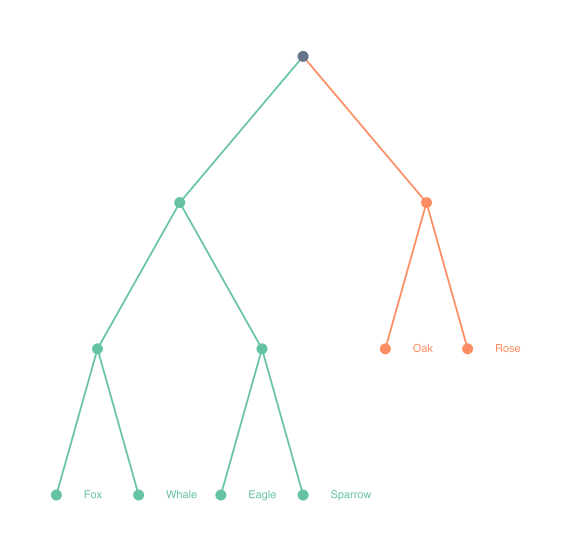
|
Horizontal tree with curved lines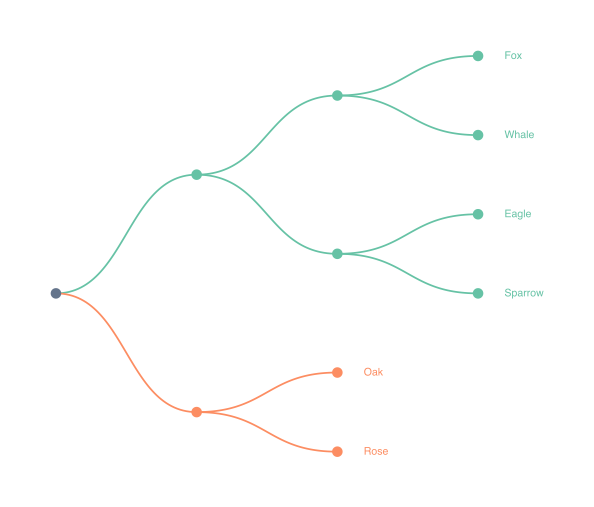
|
Radial tree with split lines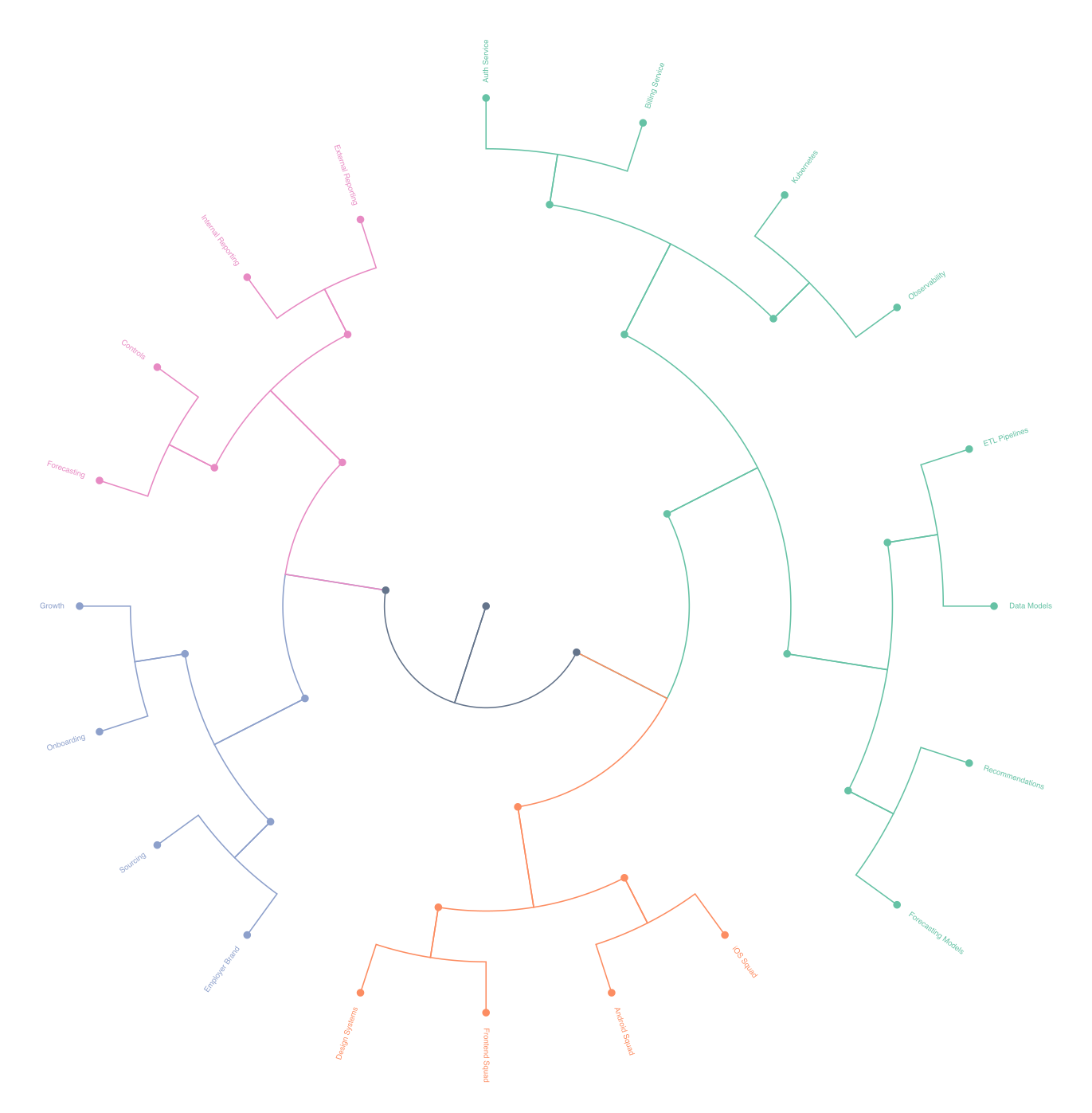
|
Table of Contents
Installation
pip install dendroviz
Install the optional Newick parser only if you need it:
pip install biopython
For local development:
pip install -e .[dev]
Quickstart
Python API
from dendroviz import DendrogramGenerator, LayoutOptions

generator = DendrogramGenerator()
result = generator.generate_tree(
    "examples/dummy_deep.csv",
    tree_layout="radial",
    line_style="split",
    output_csv="build/dummy-deep-radial-split.csv",
    output_json="build/dummy-deep.json",
    output_svg="build/dummy-deep-radial-split.svg",
    show_labels=True,
    options=LayoutOptions(
        label_mode="leaves",
        show_internal_nodes=True,
        show_root_node=True,
        label_orientation="auto",
        label_offset=24,
        colour_mode="palette",
        palette="set2",
        palette_depth=2,
    ),
)

print(len(result.nodes), len(result.edges))
CLI
dendroviz build examples/dummy_deep.csv \
  --input-format csv \
  --tree-layout radial \
  --line-style split \
  --output-svg build/dummy-deep-radial-split.svg \
  --show-labels \
  --label-mode leaves \
  --label-orientation auto \
  --label-offset 24 \
  --colour-mode palette \
  --palette set2 \
  --palette-depth 2 \
  --show-palette-legend
Example test runs:
dendroviz build examples/dummy_small.csv \
  --tree-layout vertical \
  --line-style straight \
  --output-csv build/dummy-small-vertical-straight.csv \
  --output-svg build/dummy-small-vertical-straight.svg \
  --show-labels \
  --colour-mode palette \
  --palette set2 \
  --palette-depth 2

dendroviz build examples/dummy_small.csv \
  --tree-layout horizontal \
  --line-style curved \
  --output-csv build/dummy-small-horizontal-curved.csv \
  --output-svg build/dummy-small-horizontal-curved.svg \
  --show-labels \
  --label-mode all \
  --label-offset 28 \
  --colour-mode palette \
  --palette set2 \
  --palette-depth 2

dendroviz build examples/dummy_deep.csv \
  --tree-layout radial \
  --line-style split \
  --output-csv build/dummy-deep-radial-split.csv \
  --output-svg build/dummy-deep-radial-split.svg \
  --show-labels \
  --label-orientation auto \
  --colour-mode palette \
  --palette set2 \
  --palette-depth 2
Try it with the included dummy data:
Input Format
CSV
The library expects a single rooted tree with exactly these columns:
id,parent,label,order
root,,Root,0
branch_a,root,Branch A,0
branch_b,root,Branch B,1
leaf_a1,branch_a,Leaf A1,0
leaf_a2,branch_a,Leaf A2,1
leaf_b1,branch_b,Leaf B1,0
Rules:
idmust be uniqueparentis empty for the single root row- every non-root parent must exist
ordercontrols sibling order and must be numeric- cycles are not allowed
JSON
JSON input uses the same row fields as CSV. The loader accepts either:
- a top-level array of node objects
- an object with a
nodesarray
Each node object should include:
idparentlabelorder
Example:
{
  "nodes": [
    { "id": "root", "parent": null, "label": "Root", "order": 0 },
    { "id": "left", "parent": "root", "label": "Left", "order": 0 },
    { "id": "right", "parent": "root", "label": "Right", "order": 1 }
  ]
}
Rules:
idmust be uniqueparentisnullfor the single root row- every non-root parent must exist
ordercontrols sibling order and must be numeric- cycles are not allowed
Newick
Newick input is also supported when BioPython is installed. Install it with pip install biopython:
from dendroviz import DendrogramGenerator

generator = DendrogramGenerator()
tree = generator.load_tree("examples/tree.nwk", input_format="newick")
Sibling order is taken from the order children appear in the Newick file.
CLI Reference
Mandatory
| Option | Values | Notes |
|---|---|---|
build |
subcommand | Generate dendrogram artefacts from an input tree |
| input path | path | Path to the input tree file |
--tree-layout |
radial, vertical, horizontal |
radial uses angle/radius coordinates, vertical grows top-to-bottom, horizontal grows left-to-right |
--line-style |
curved, split, straight |
curved uses smooth splines, split branches at forks, straight uses direct segments |
| output flag(s) | --output-csv, --output-json, --output-svg |
Write one or more render artefacts |
Optional
These CLI flags map directly to LayoutOptions fields in the Python API.
| Option | Values | Notes |
|---|---|---|
--log-level |
CRITICAL, ERROR, WARNING, INFO, DEBUG |
Controls CLI verbosity |
--show-labels |
flag | Enables SVG labels |
--label-mode |
all, leaves, none |
leaves shows labels only on leaf nodes; none hides all labels |
--label-orientation |
horizontal, auto |
auto flips radial labels to stay readable on the left side |
--label-offset |
number | Pushes labels farther from the tree |
--font-size |
number | Controls label size |
--hide-internal-nodes |
flag | Hides non-leaf node markers |
--hide-root-node |
flag | Hides the root node marker |
--colour-mode |
global, palette |
Controls whether palette colouring is used |
--palette |
preset name or hex colours | Used only when --colour-mode palette is active |
--palette-depth |
1, 2, ... |
Used only when --colour-mode palette is active; chooses which tree level gets palette colouring |
--show-palette-legend |
flag | Adds a small SVG legend when palette colouring is active |
--show-svg-data-attributes |
flag | Adds data-* metadata to SVG nodes and edges for browser scripting |
--show-svg-titles |
flag | Adds short hover titles to SVG nodes and edges |
--node-colour |
hex colour | Fallback node colour in global mode |
--edge-colour |
hex colour | Fallback edge colour in global mode |
--label-colour |
hex colour | Fallback label colour in global mode |
--depth-spacing |
number | Adjusts the gap between tree levels |
--sibling-spacing |
number | Adjusts the gap between siblings |
--curve-points |
number | Controls curved path smoothness |
--straight-points |
number | Controls how many points are used for straight paths |
--radial-base-angle-deg |
number | Sets the starting angle for radial layouts |
--radial-sweep-deg |
number | Sets the angular sweep for radial layouts |
--scale |
number | Enlarges SVG geometry, strokes, nodes, and text without changing the tree structure |
Colour Palettes
All built-in palettes below are official ColorBrewer, Tableau, or Okabe-Ito palettes.
set1 is the default palette.
Custom palettes are also supported:
- In Python, pass a list or tuple of hex colours to
LayoutOptions.palette - On the CLI, pass a comma-separated hex string with
--palette, such as#112233,#445566,#778899 - Hex colours are validated before export, so invalid values fail fast
Built-In Palettes
| Name | Swatches | Hex codes |
|---|---|---|
set1 |
#e41a1c #377eb8 #4daf4a #984ea3 #ff7f00 #ffff33 #a65628 #f781bf #999999 |
|
set2 |
#66c2a5 #fc8d62 #8da0cb #e78ac3 #a6d854 #ffd92f #e5c494 #b3b3b3 |
|
set3 |
#8dd3c7 #ffffb3 #bebada #fb8072 #80b1d3 #fdb462 #b3de69 #fccde5 #d9d9d9 #bc80bd #ccebc5 #ffed6f |
|
pastel1 |
#fbb4ae #b3cde3 #ccebc5 #decbe4 #fed9a6 #ffffcc #e5d8bd #fddaec #f2f2f2 |
|
pastel2 |
#b3e2cd #fdcdac #cbd5e8 #f4cae4 #e6f5c9 #fff2ae #f1e2cc #cccccc |
|
accent |
#7fc97f #beaed4 #fdc086 #ffff99 #386cb0 #f0027f #bf5b17 #666666 |
|
paired |
#a6cee3 #1f78b4 #b2df8a #33a02c #fb9a99 #e31a1c #fdbf6f #ff7f00 #cab2d6 #6a3d9a #ffff99 #b15928 |
|
tableau |
#1f77b4 #ff7f0e #2ca02c #d62728 #9467bd #8c564b #e377c2 #7f7f7f #bcbd22 #17becf |
|
dark2 |
#1b9e77 #d95f02 #7570b3 #e7298a #66a61e #e6ab02 #a6761d #666666 |
|
scientific |
#e69f00 #56b4e9 #009e73 #f0e442 #0072b2 #d55e00 #cc79a7 #000000 |
Development
For now, use pip install -e .[dev] for local setup and run python -m unittest discover -s tests -v to execute the test suite.
Release Process
This project follows Semantic Versioning:
MAJORfor breaking API or CLI changesMINORfor new backward-compatible featuresPATCHfor bug fixes and release-only polish
Before creating a release tag:
- Update the version in
pyproject.toml. - Add a short note to
CHANGELOG.md. - Run the test suite, Ruff, and a build check.
- Create and push a tag like
v0.1.0. - Let GitHub Actions publish the tagged build to PyPI.
Project details
Verified details
These details have been verified by PyPIProject links
GitHub Statistics
Maintainers
Release history Release notifications | RSS feed


Download files
Download the file for your platform. If you're not sure which to choose, learn more about installing packages.
Source Distribution
Built Distribution
Filter files by name, interpreter, ABI, and platform.
If you're not sure about the file name format, learn more about wheel file names.
Copy a direct link to the current filters
File details
Details for the file dendroviz-0.1.2.tar.gz.
File metadata
- Download URL: dendroviz-0.1.2.tar.gz
- Upload date:
- Size: 36.8 kB
- Tags: Source
- Uploaded using Trusted Publishing? Yes
- Uploaded via: twine/6.1.0 CPython/3.13.12
File hashes
| Algorithm | Hash digest | |
|---|---|---|
| SHA256 |
e04d2e647ef8724b2ae77234536c91adfb1c0381398785c119af706fe13ccb5d
|
|
| MD5 |
717e5e0f236dee8ffa7d82cd5af380fd
|
|
| BLAKE2b-256 |
82a73335f930b1494cfdc1427ffa8a3f949dccddd3f4f4a79c1de461d0bffe21
|
Provenance
The following attestation bundles were made for dendroviz-0.1.2.tar.gz:
Publisher:
publish.yml on lb930/DendroViz
-
Statement:
-
Statement type:
https://in-toto.io/Statement/v1 -
Predicate type:
https://docs.pypi.org/attestations/publish/v1 -
Subject name:
dendroviz-0.1.2.tar.gz -
Subject digest:
e04d2e647ef8724b2ae77234536c91adfb1c0381398785c119af706fe13ccb5d - Sigstore transparency entry: 1357050839
- Sigstore integration time:
-
Permalink:
lb930/DendroViz@2ac27f3cb98f9cb6ffde05496dafa3a9f0c11206 -
Branch / Tag:
refs/tags/v0.1.2 - Owner: https://github.com/lb930
-
Access:
public
-
Token Issuer:
https://token.actions.githubusercontent.com -
Runner Environment:
github-hosted -
Publication workflow:
publish.yml@2ac27f3cb98f9cb6ffde05496dafa3a9f0c11206 -
Trigger Event:
push
-
Statement type:
File details
Details for the file dendroviz-0.1.2-py3-none-any.whl.
File metadata
- Download URL: dendroviz-0.1.2-py3-none-any.whl
- Upload date:
- Size: 27.0 kB
- Tags: Python 3
- Uploaded using Trusted Publishing? Yes
- Uploaded via: twine/6.1.0 CPython/3.13.12
File hashes
| Algorithm | Hash digest | |
|---|---|---|
| SHA256 |
6a5beb4d1aaa7f4961ca13ba1b46b03462d6757e888684f71f97a0051ab2a0e8
|
|
| MD5 |
fe15fe9bd94fc95e8403b25666479854
|
|
| BLAKE2b-256 |
0bd6106b938feaed6ef739b5b6bcbba94b745586d3f4c4125aa4c9eb08de2654
|
Provenance
The following attestation bundles were made for dendroviz-0.1.2-py3-none-any.whl:
Publisher:
publish.yml on lb930/DendroViz
-
Statement:
-
Statement type:
https://in-toto.io/Statement/v1 -
Predicate type:
https://docs.pypi.org/attestations/publish/v1 -
Subject name:
dendroviz-0.1.2-py3-none-any.whl -
Subject digest:
6a5beb4d1aaa7f4961ca13ba1b46b03462d6757e888684f71f97a0051ab2a0e8 - Sigstore transparency entry: 1357050853
- Sigstore integration time:
-
Permalink:
lb930/DendroViz@2ac27f3cb98f9cb6ffde05496dafa3a9f0c11206 -
Branch / Tag:
refs/tags/v0.1.2 - Owner: https://github.com/lb930
-
Access:
public
-
Token Issuer:
https://token.actions.githubusercontent.com -
Runner Environment:
github-hosted -
Publication workflow:
publish.yml@2ac27f3cb98f9cb6ffde05496dafa3a9f0c11206 -
Trigger Event:
push
-
Statement type:






