
Deoverlap
De-overlap Shapely geometries that sit within a tolerance of each other.
Source, examples and issues: github.com/piLeoni/deoverlap
The common case is pen-plotter work: two strokes closer than a pen width visually merge on paper, so only one of them should keep the ink. Unlike endpoint-only “deduplicate” tools, this library builds a corridor around each kept stroke and crops (or drops) later strokes that fall inside it.
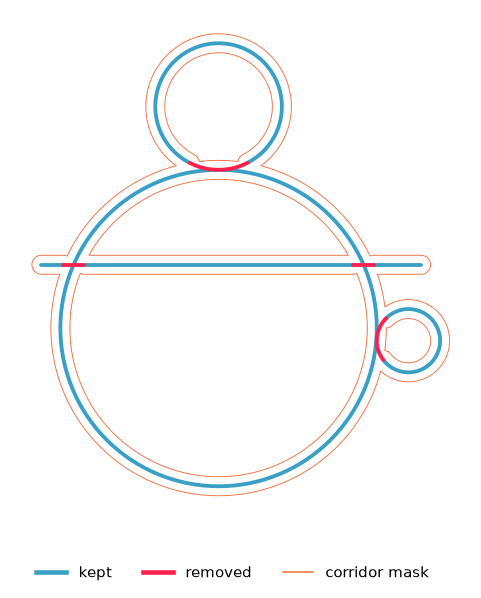
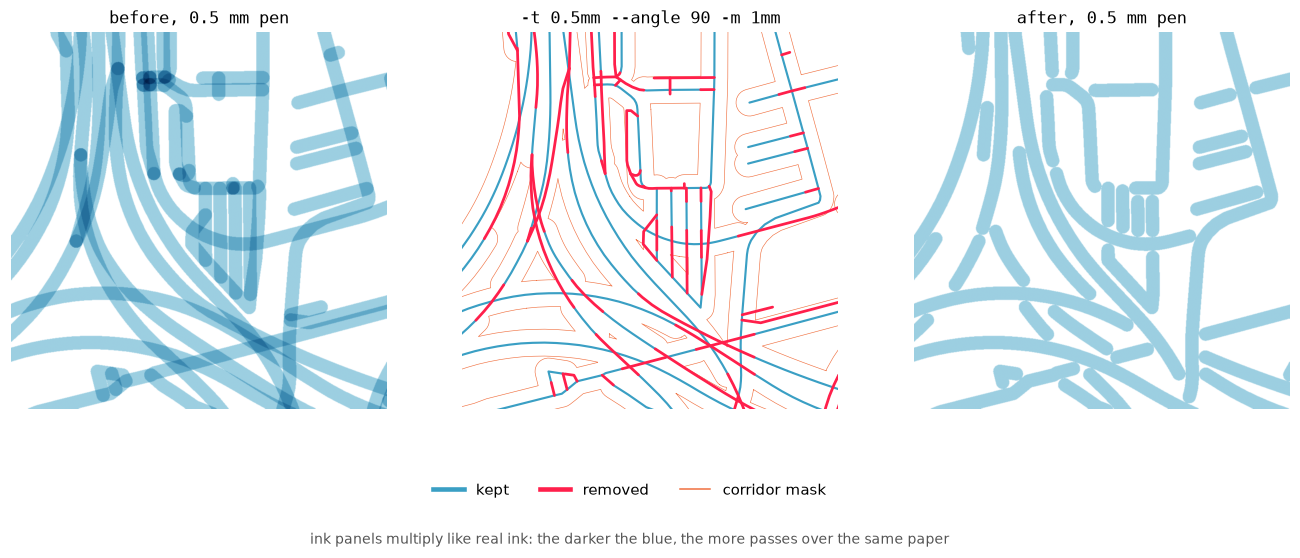
In every figure, blue is kept, red is removed and the thin orange outline is
the corridor mask. They are rendered by examples/make_figures.py.
pip install deoverlap
# with the vpype command:
pip install "deoverlap[vpype]"
Quick start
from shapely.geometry import LineString
from deoverlap import deoverlap, KeepPolicy

geoms = [
    LineString([(0, 0), (2, 0)]),
    LineString([(1, 0.05), (3, 0.05)]),  # parallel, 0.05 away
]
result = deoverlap(geoms, tolerance=0.1, keep=KeepPolicy.LONGEST)

print(len(result.kept), "surviving geometries")
print("wholly removed:", result.wholly_removed)
tolerance is a distance in the same units as the geometries. For a plotter
with a 0.1 mm pen, start around 0.08–0.15 (page mm).
Keep policy — which stroke wins
When two corridors collide, priority is explicit:
keep= |
Behaviour |
|---|---|
first (default) |
Input order — stable, historical behaviour |
longest |
Prefer the stroke that covers more ground |
shortest |
Prefer short marks / detail |

Original indices are preserved in result.kept_parts / removed_parts even
when processing order changes.
Crop vs drop
mode="crop"(default) — subtract the overlap, keep the rest.mode="drop"— if more thandrop_fraction(default 0.5) of a geometry’s length is covered, discard the whole thing instead of leaving stubs.
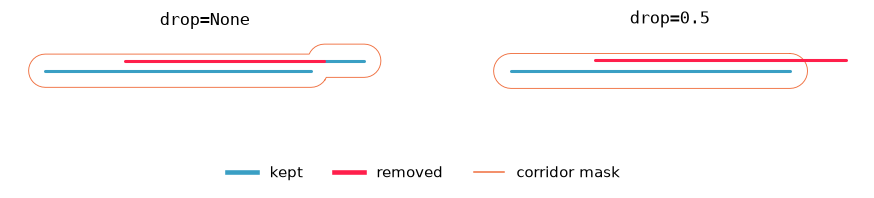
min_length= drops lineal fragments shorter than that threshold after clipping
(points are never removed by it).
Parallel only — keep crossings
By default a corridor punches a hole in any later geometry, including a perpendicular cross. For plotters, overdraw at a cross is usually fine; the pain is parallel near-coincident runs:
result = deoverlap(
    geoms,
    tolerance=0.1,
    parallel_only=True,
    parallel_angle=30,  # degrees
)
Only corridors whose bearing is within parallel_angle of the candidate are
used as clip masks. Bearings are compared locally, edge by edge, so a
curving ramp is cropped only where it actually runs alongside another road,
whatever direction its two ends point in.
parallel_angle is the tangency threshold. Where two strokes meet at an angle
θ, they overlap for roughly pen / sin θ: about 2 pen widths at 30° and 4 at
15°. The default of 30° catches parallel runs and trims shallow merges.
Raising it to 45° or 60° trims steeper merges too. Crossings steeper than the
threshold are never cut.

Groups — split pieces stay one object
When a ring is cut by a corridor it becomes two arcs. With group=True
(default) those arcs are returned as one multipart geometry under the
original input index — a logical stroke, not two anonymous objects:
ring = LineString([(0, 0), (2, 0), (2, 2), (0, 2), (0, 0)])
cutter = LineString([(1, -1), (1, 3)])
result = deoverlap([cutter, ring], 0.15, group=True)

result.kept_parts[1]  # MultiLineString of both arcs
Set group=False for a flat list of primitive pieces (origins still recorded
in kept_parts).
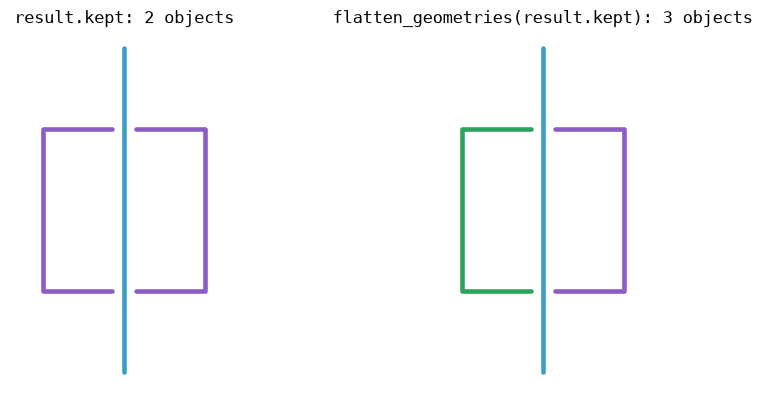
This is the right model for layer-aware pipelines too: treat each input
geometry as a group, run deoverlap per layer, and never let one layer’s
corridor eat another layer’s groups unless you pass a shared mask.
Multi-stage with a carried mask
r1 = deoverlap(batch1, 0.1)
r2 = deoverlap(batch2, 0.1, mask=r1.mask)
Stage 2 is clipped against everything stage 1 kept.
Result
deoverlap(...) returns a DeoverlapResult:
| Field | Meaning |
|---|---|
kept |
Drawable geometries (grouped or flat) |
removed |
Flattened cut pieces (if keep_duplicates=True) |
kept_parts |
{original_index: geometry} |
removed_parts |
{original_index: geometry} |
wholly_removed |
Indices removed entirely |
mask |
Corridor polygons (for the next stage) |
Iterating the result still yields the legacy
(kept, kept_map, removed, mask) tuple.
Performance notes
The heavy lifting is GEOS (via Shapely). The Python loop avoids rebuilding the
spatial index on every insert (tree_rebuild_every) and periodically dissolves
the mask when bearings are not needed (mask_union_every).
vpype plugin
Installing deoverlap[vpype] registers a deoverlap command that is
layer-safe (honours -l) and uses corridor proximity rather than
endpoint-only matching:
pip install "deoverlap[vpype]"
vpype read map.svg deoverlap -t 0.1mm --keep longest -l 1,2,3 write out.svg
| Flag | Default | Meaning |
|---|---|---|
-t / --tolerance |
0.1mm |
Corridor half-width |
--keep |
longest |
first | longest | shortest |
--mode |
crop |
crop | drop |
--min-length |
0 |
Drop stubs shorter than this |
--parallel-only |
on | Do not punch perpendicular crossings |
--parallel-angle |
30 |
Local bearing window in degrees |
--segments |
off | Self-overlap (explode edges; see below) |
--segment-adjacency |
1 |
Keep N neighbours on the same chain |
-l |
all |
Target layer(s) |
-k |
off | Keep removed pieces on a new layer |
Walkthrough with the bundled example
examples/parallel_strokes.svg is a tiny card with two near-parallel pairs
(0.05 mm apart), one deliberate cross, and a dual-kerb rectangle drawn as a
single polyline. No OSM dump required — open it, run the commands, open the
outputs side by side.
# Inspect path count / drawn length
vpype read examples/parallel_strokes.svg stat

# Crop near-parallel duplicates; leave the perpendicular cross alone
vpype read examples/parallel_strokes.svg \
  deoverlap -t 0.1mm --keep longest --parallel-only -l 1 \
  write examples/out_parallel.svg

# Same, but also let the dual-kerb ring collapse against itself
vpype read examples/parallel_strokes.svg \
  deoverlap -t 0.12mm --keep longest --parallel-only --segments -l 1 \
  write examples/out_segments.svg

vpype read examples/out_parallel.svg stat
vpype read examples/out_segments.svg stat
What to look for (in the SVG or in stat’s drawn length):
- Before — each parallel pair is a double stroke; the ring reads as a heavy double outline.
out_parallel.svg— each pair reduced to one survivor; the cross still there; the ring still double (one geometry cannot self-crop).out_segments.svg— the ring’s opposite sides suppress each other, so the dual kerb thins toward a single outline.
A real map: the MacArthur Maze
examples/macarthur_maze.svg is a 3 km square of Oakland's MacArthur Maze
interchange from OpenStreetMap, scaled onto a 100 mm card (1 mm ≈ 33 m). At
that scale dual carriageways, stacked ramps and frontage roads sit a fraction
of a millimetre apart, so a 0.5 mm pen draws the same paper two or three
times. Set the tolerance to the pen width: anything closer than that would
overlap on paper.
vpype read examples/macarthur_maze.svg stat
vpype read examples/macarthur_maze.svg \
  deoverlap -t 0.5mm --keep longest --parallel-angle 90 --min-length 1mm \
  write examples/out_maze.svg
vpype read examples/out_maze.svg stat
--parallel-angle 90 is the maximum: every nearby stroke counts, whatever its
direction. Side streets stop where the main road's ink begins, and at crossings
the shorter path is split around the longer one. The gap is exactly the other
road's ink width, so on paper the crossing still looks whole, just without the
dark spot of doubled ink.
Cutting leaves fragments; almost every piece under 1 mm on this card is one.
--min-length 1mm (two pen widths) drops them. The path count goes from 1473
to 860 and the drawn length drops by 35%. For the more conservative default
(--parallel-angle 30, crossings left alone), the same card loses about 21%.
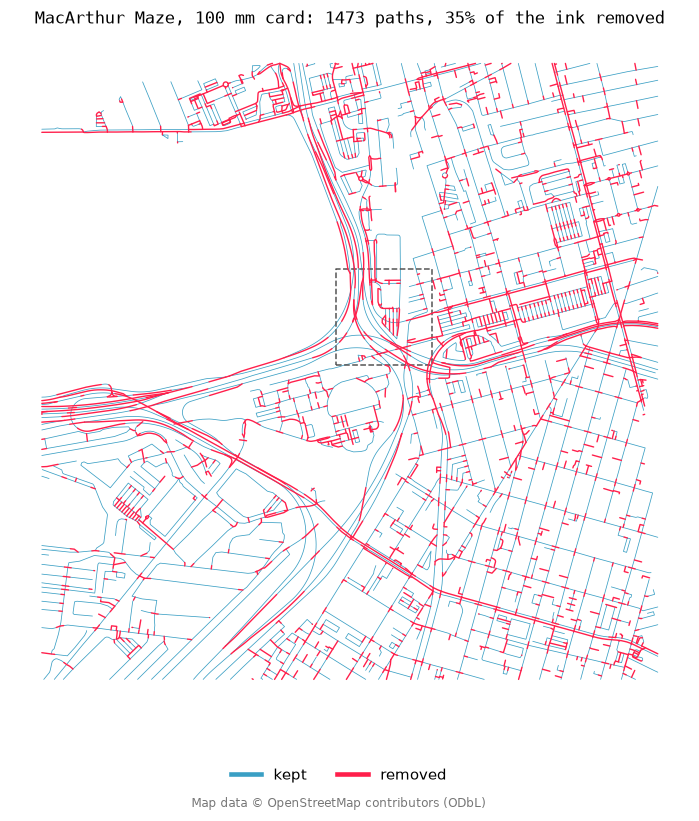
In the zoom, the ink panels are blended like real ink: every pass multiplies the colour, so the darker the blue, the more times the pen went over the same spot. Before, the dark bands are doubled carriageways and the dark dots are junctions, where a round pen tip lands on ink that is already there. After, the ink is one even layer.
To try another place (needs pip install osmnx):
python examples/fetch_osm_example.py --lat 51.5074 --lon -0.1278 --radius 1500 \
  --out examples/my_place.svg
Map data © OpenStreetMap contributors, available under the ODbL.
Different settings per layer
Chain the command to give each layer its own settings:
vpype read map.svg \
  deoverlap -t 0.1mm --keep longest --parallel-only -l 3,4 \
  deoverlap -t 0.15mm --keep longest --parallel-only --segments -l 5 \
  write opt.svg
Self-overlap (--segments)
A thin road outline is often one LineString (left kerb → end cap → right
kerb). Without --segments, deoverlap never compares a geometry to itself, so
the two sides stay as a heavy double stroke. With --segments, every edge is
its own corridor unit; opposite sides can suppress each other, while immediate
neighbours on the same chain (--segment-adjacency, default 1) stay intact so
joints are not nibbled.

vpype read map.svg deoverlap -t 0.15mm --keep longest --segments -l 1 write out.svg
API
deoverlap(
    geometries,
    tolerance,
    *,
    keep="first",          # first | longest | shortest
    mode="crop",           # crop | drop
    min_length=0.0,
    drop_fraction=0.5,
    parallel_only=False,
    parallel_angle=30.0,
    segments=False,        # self-overlap via edge explosion
    segment_adjacency=1,
    group=True,
    keep_duplicates=False,
    progress_bar=False,
    mask=None,
    tree_rebuild_every=32,
    mask_union_every=64,
) -> DeoverlapResult
1 maintainer

Metadata
1 maintainer
Release files for deoverlap 3.2.1
For a detailed explanation of source distributions (sdists) and built distributions (wheels), please see the package formats documentation.
Source distribution (sdist)
| File | Size | Uploaded | Provenance | Actions |
|---|---|---|---|---|
| deoverlap-3.2.1.tar.gz | 23.0 kB | Without provenance | Details for deoverlap-3.2.1.tar.gz |
Built distribution (wheel)
| File | Interpreter | ABI | Platform | Actions Reset |
|---|---|---|---|---|
| deoverlap-3.2.1-py3-none-any.whl | Python 3 | none | any | Details for deoverlap-3.2.1-py3-none-any.whl |
Total release size: 39.5 kB
Release files / deoverlap-3.2.1.tar.gz
| Download URL | deoverlap-3.2.1.tar.gz |
|---|---|
| Size | 23.0 kB |
| Tags | Source |
|
SHA-256 checksum How to use checksums |
0ebc56495e818e5f2d962fd738165a23637c486e085eac7a52973f8855184c70
|
|
BLAKE2b-256 checksum How to use checksums |
48dfd6ca4543c493953516a413300fefc615f2851ccbf069e164335aeff115f2
|
| Upload date | |
|
Uploaded using Trusted Publishing? What is trusted publishing? |
No |
| Uploaded via |
twine/7.0.0 CPython/3.12.13
|
Release files / deoverlap-3.2.1-py3-none-any.whl
| Download URL | deoverlap-3.2.1-py3-none-any.whl |
|---|---|
| Size | 16.5 kB |
| Tags | Python 3 |
|
SHA-256 checksum How to use checksums |
e062ff788f3c65029051ef7cce54fd377e5acb0709944830e5374ce59b4814a7
|
|
BLAKE2b-256 checksum How to use checksums |
c33bfdc2c8b6038174fda8315026a62f434c115c1a674df97d91a57af8a20b3c
|
| Upload date | |
|
Uploaded using Trusted Publishing? What is trusted publishing? |
No |
| Uploaded via |
twine/7.0.0 CPython/3.12.13
|
Security for deoverlap 3.2.1
Provenance
Provenance describes where a file came from. On PyPI, provenance is shared via attestations, which provide a verifiable record of the build or publishing details. View details, limitations and caveats.
No provenance found
None of the files in this release were uploaded with provenance metadata.
A note on package security
PyPI is a repository for distributing packages, not a service for auditing them. While third-party security researchers and our staff do their best to detect and remove malicious packages, PyPI cannot guarantee the quality, security or suitability of any given package.
To learn more about protecting yourself from malicious actors, visit our package security documentation.














