
devalerts





Send unhandled Python exceptions straight to a Telegram chat (or Slack) — the moment they happen, on your phone. No backend, no account, no database — just your own bot token or webhook URL.
import devalerts

devalerts.init(bot_token="123456:ABC-DEF...", chat_id=123456789)
That's the whole setup. Two minutes with @BotFather and every unhandled crash — including ones raised in threads — lands in your chat instead of a log file nobody's watching.

Why devalerts
- Zero infrastructure. No SaaS signup, no ingestion server, no API key to manage beyond your own Telegram bot token. State lives in a local SQLite file you already own.
- One line to install, one line to wire up.
init()installs the hook and gets out of the way. - Not spam. Errors are grouped by fingerprint and rate-limited per group, so a crash loop sends one message, not a thousand.
- Framework-aware. Ships an ASGI middleware for FastAPI/Starlette apps, where the default excepthook would never even see a request error.
- Small and typed. No dependencies, ships
py.typed, ~450 lines total — short enough to read in one sitting before you trust it with your errors.
Install
uv add devalerts
(or pip install devalerts if you're not using uv)
Usage
-
Create a bot with @BotFather and get its token.
-
Message your bot once (or add it to a group) so it's allowed to message you back.
-
Get your chat id — message @userinfobot, or call
https://api.telegram.org/bot<TOKEN>/getUpdatesafter step 2 and readmessage.chat.id. -
Verify it's wired up correctly before touching any code:
uv run devalerts test --bot-token 123456:ABC-DEF... --chat-id 123456789 -
In your app, as early as possible:
import devalerts

devalerts.init(bot_token="123456:ABC-DEF...", chat_id=123456789)
That's it — any unhandled exception (including ones raised in threads) now also lands in your Telegram chat.
The traceback itself arrives folded into a collapsed quote — the exception type, message, and host are visible right away, tap to expand the full traceback. Keeps a big stack trace from taking over the chat.
Grouping, rate limiting, and the dashboard
Exceptions are grouped by fingerprint (exception type + file + line where it
was raised) in a local SQLite file (~/.devalerts/state.db). Each group
sends at most one Telegram message per rate_limit_seconds (default 300);
repeats inside that window are counted but not sent, and the next message
for that group says how many were skipped. Old groups (untouched for 7 days)
are pruned automatically. Configure the window via init():
devalerts.init(bot_token="...", chat_id=123456789, rate_limit_seconds=60)
See what's grouped and what's currently rate-limited:
uv run devalerts dashboard
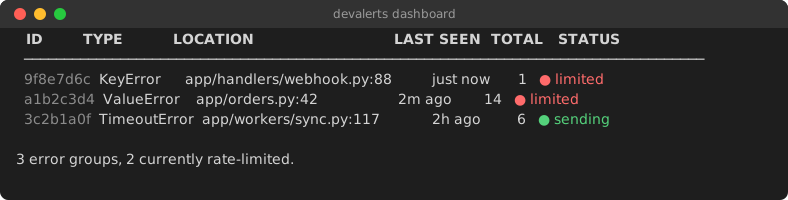
Pass --json for machine-readable output. Silence a noisy group without
touching code — the ID column accepts any unique prefix:
uv run devalerts mute abc12345
uv run devalerts unmute abc12345
uv run devalerts clear abc12345   # or: devalerts clear --all
Unmuting resends the next occurrence with the accumulated skip count, same as a rate-limit window expiring.
Error groups that keep piling up while suppressed are chronic: each such
resend doubles the effective rate_limit_seconds for that group (capped at
8x), so a crash loop backs itself off instead of paging you every window
forever. A group that goes quiet and reappears once resets to the base rate
immediately. The dashboard shows the active multiplier (● sending ×4).
Crash streak badge
devalerts dashboard also reports how long it's been since the last
recorded incident (sent or suppressed by rate-limiting) — same idea as the
classic "days since last workplace accident" sign, applied to your crashes:
🟢 14 days since the last incident.
Get the same number as a shareable SVG badge for your README:
uv run devalerts badge --out docs/streak.svg

No hosting, no cron job built in — regenerate and commit it yourself, e.g. on a schedule with GitHub Actions:
- run: uv run devalerts badge --out docs/streak.svg
- run: git add docs/streak.svg && git commit -m "Update crash streak badge" || true
Pass --label to customize the left-hand text (default "crash streak").
Context: hostname and tags
Every alert automatically includes the sending host, so you can tell which process/server it came from when one bot serves several:
devalerts.init(bot_token="...", chat_id=123456789, tags={"env": "production"})
🔴 ValueError: boom
🖥️ prod-web-2 (env=production)
Add ad-hoc tags to a single call — they override init()'s tags (and each
other) on a key collision:
devalerts.report(extra={"request_id": "abc123"})
Used as a decorator, capture() tags the alert with the wrapped function's
name as job automatically — no extra needed:
@devalerts.capture()
def nightly_sync(): ...
🔴 ValueError: boom
🖥️ prod-web-2 (job=nightly_sync)
Pass extra={"job": "..."} explicitly to override the auto-detected name.
Manually reporting a caught exception
try:
    risky_call()
except Exception:
    devalerts.report()  # sends the currently-handled exception
or:
with devalerts.capture():
    risky_call()  # reports on exception, then re-raises
capture also works as a decorator, so you don't need to touch a function's
body at all:
@devalerts.capture()
def risky_call():
    ...
FastAPI / Starlette / any ASGI app
init()'s excepthook won't see request errors — the framework already catches
them internally to return a 500 response, so nothing "unhandled" ever reaches
the process. Use the ASGI middleware instead:
app.add_middleware(devalerts.ASGIMiddleware)
Only exceptions that actually escape as server errors get reported — routing
404s and raised HTTPExceptions are already turned into responses by the
framework before the middleware sees them.
Celery
Same problem as ASGI apps: init()'s excepthook never sees exceptions raised
inside a task, because Celery catches them itself to record the task's
FAILURE state. Call init_celery() in addition to init():
devalerts.init(bot_token="...", chat_id=123456789)
devalerts.init_celery()
This connects to Celery's task_failure signal (fired once a task has
genuinely failed — retries exhausted or none configured, so retried tasks
don't spam an alert per attempt) and reports through the same
grouping/rate-limiting/redaction path as everything else, tagged with the
task name and id automatically. Requires Celery to already be installed in
the worker process — it's imported lazily, not a devalerts dependency.
Logged (not raised) exceptions
init()'s excepthook only ever sees exceptions that stay unhandled — but most
real errors are caught and logged instead: logger.exception(...) inside a
try/except never propagates anywhere. Attach LogHandler to catch those too:
import logging

logging.getLogger().addHandler(devalerts.LogHandler())
A record with exc_info (logger.exception(), or logger.error(..., exc_info=True)) is reported like a full exception alert — grouped by the
same fingerprint an unhandled instance of it would use, so logging it and
then re-raising sends one alert, not two. A plain logger.error("message")
with no exception attached is reported as a short text alert, grouped by
logger name + level + message. Defaults to level=logging.ERROR; pass
extra={...} for tags added to every alert from this handler.
Blame
Curious who wrote the line that just blew up? blame=True runs git blame
on it and adds the author, short commit hash, and date to the alert:
devalerts.init(bot_token="...", chat_id=123456789, blame=True)
🕵️ blame: sslinNn · a1b2c3d · 2026-07-15 (3d ago)
Best-effort and silent about it — no git installed, no repo (a container
image without .git), or the line isn't committed yet all just skip the
line instead of failing the alert. Off by default; opt in with blame=True.
Slack
Prefer Slack, or want both? Pass a Slack incoming webhook URL alongside or
instead of bot_token/chat_id — every configured channel gets every alert:
devalerts.init(slack_webhook_url="https://hooks.slack.com/services/...")
Create one at api.slack.com/apps → your app → Incoming Webhooks. Same grouping/rate-limiting/redaction/blame path as Telegram, formatted as Slack mrkdwn instead of HTML. Verify it's wired up:
uv run devalerts test --slack-webhook-url https://hooks.slack.com/services/...
Why not Sentry?
If you already run Sentry/Rollbar/etc., keep using it — devalerts isn't a replacement. It's for the side project, internal tool, or small service that doesn't have (and doesn't want) that infrastructure: no account to create, no SDK to configure, no server to trust — just a bot token you already control.
| devalerts | Sentry-style tracker | |
|---|---|---|
| Setup | one bot token | account + project + SDK config |
| Backend | none — Telegram only | hosted or self-hosted service |
| Where alerts land | your Telegram chat | a web dashboard |
| Grouping / rate limiting | yes, local SQLite | yes, server-side |
| Search, trends, releases | no | yes |
FAQ
Works with FastAPI / Starlette?
Yes — use ASGIMiddleware, since the
default excepthook never sees request errors.
Works with Docker?
Yes, nothing container-specific. Just make sure ~/.devalerts/ (the dedup
state file) is either writable inside the container or a mounted volume if
you want dedup state to survive restarts — it self-recreates otherwise.
Works with threads?
Yes — init() installs both sys.excepthook and threading.excepthook.
Works with Celery / background workers?
Yes — call init_celery() in addition to init() to catch
exceptions raised inside tasks, which the excepthook alone won't see.
Catches exceptions I log but don't re-raise?
Yes — add LogHandler to a logger; the
excepthook alone never sees a caught-and-logged exception.
Works on Windows / Linux / macOS?
Yes — stdlib only (urllib, sqlite3, threading), no OS-specific code
paths.
Privacy & Security
- The only network calls devalerts makes are to
api.telegram.organd/or your configured Slack incoming webhook — no telemetry, no analytics, nothing else phones home. - No third-party server and no devalerts-run backend — messages go straight from your process to your own Telegram bot / Slack webhook.
- No accounts, no signup, no API key beyond the bot token / webhook URL you create and control yourself.
- Basic secret redaction only (a few common token/key patterns) — do not rely on this for sensitive production data; scrub what you can before it ever reaches an exception message.
- If delivery fails after retrying, the alert (already redacted, if
redact=True) is appended to~/.devalerts/failed.loginstead of being dropped — clean it up like any other local log file.
What this does NOT do (by design)
- Grouping/rate limiting is local and in-process only (SQLite file, no server) — the dashboard is a CLI table, not a web UI.
- No backend, no accounts — each user runs their own bot.
Roadmap
- Web dashboard (hosted, optional — the local CLI dashboard stays either way)
- Discord delivery
- Email delivery
Development
uv sync --group dev
uv run pre-commit install
pre-commit runs ruff check, ruff format, and mypy before each commit.
Run the full check manually with:
uv run pytest
uv run pre-commit run --all-files
License
MIT — see LICENSE.
1 maintainer

Metadata
1 maintainer
Release files for devalerts 0.4.0
For a detailed explanation of source distributions (sdists) and built distributions (wheels), please see the package formats documentation.
Source distribution (sdist)
| File | Size | Uploaded | |
|---|---|---|---|
| devalerts-0.4.0.tar.gz | 20.8 kB | Details |
Built distribution (wheel)
| File | Interpreter | ABI | Platform | Reset |
|---|---|---|---|---|
| devalerts-0.4.0-py3-none-any.whl | Python 3 | none | any | Details |
Total release size: 46.3 kB
Release files / devalerts-0.4.0.tar.gz
| Download URL | devalerts-0.4.0.tar.gz |
|---|---|
| Size | 20.8 kB |
| Tags | Source |
|
SHA-256 checksum How to use checksums |
edc7a85930709a4d12788b299ac1ffafa2babb066b8260e1582e67fbfe2dd955
|
|
BLAKE2b-256 checksum How to use checksums |
f272a60addf328c623afceb3a50382e99e41aab83604c02111f8df1f3187aa03
|
| Upload date | |
|
Uploaded using Trusted Publishing? What is trusted publishing? |
Yes |
| Uploaded via |
uv/0.11.29 {"installer":{"name":"uv","version":"0.11.29","subcommand":["publish"]},"python":null,"implementation":{"name":null,"version":null},"distro":{"name":"Ubuntu","version":"24.04","id":"noble","libc":null},"system":{"name":null,"release":null},"cpu":null,"openssl_version":null,"setuptools_version":null,"rustc_version":null,"ci":true}
|
Release files / devalerts-0.4.0-py3-none-any.whl
| Download URL | devalerts-0.4.0-py3-none-any.whl |
|---|---|
| Size | 25.5 kB |
| Tags | Python 3 |
|
SHA-256 checksum How to use checksums |
25e206d83a6100bbabece1dff42ff7d8ffe48e82b11e12329db10c3a6cba4603
|
|
BLAKE2b-256 checksum How to use checksums |
48914a9bf9e6914cd8052f3fcf8f477ef5f5268abb61377cc92812418b053347
|
| Upload date | |
|
Uploaded using Trusted Publishing? What is trusted publishing? |
Yes |
| Uploaded via |
uv/0.11.29 {"installer":{"name":"uv","version":"0.11.29","subcommand":["publish"]},"python":null,"implementation":{"name":null,"version":null},"distro":{"name":"Ubuntu","version":"24.04","id":"noble","libc":null},"system":{"name":null,"release":null},"cpu":null,"openssl_version":null,"setuptools_version":null,"rustc_version":null,"ci":true}
|














