

Dev Pair




It's a tool to facilitate the remote pair programming session. Instead of make a lot of git add, git commit, git push, git pull, you can make it more quickly only running devpair start <timer optional> to start coding and devpair next to send the code to another person.
Very useful for teams that like to make pair sessions often. If you never was a driver or a navigator feel free to read here to have a context.
Install
pip install devpair
Commands
devpair start <time in minutes optional>Start a new session inside the current branch.devpair nextSave everything and send to the next person.devpair doneFinish and put all the work in the original branch.devpair summaryShow a simple resume of commit counts and last developer.devpair cowIt's a cow.devpair timer <time in minutes>Create a simple timer for any purposal.devpair --helpI like to have a help some times.
We recommend to create some alias if you want, like:
dvsto rundevpair start,dvnto rundevpair nextanddvdto rundevpair done.
Example of use
# Dev A
main $ devpair start 10 # Will start the new branch with a 10 minutes timer
pair/main $ echo "hello" > welcome.txt
pair/main $ devpair next

# Dev B
main $ devpair start
pair/main $ cat welcome.txt # shows "hello"
pair/main $ echo " world" >> welcome.txt
pair/main $ devpair next

# Dev A
pair/main $ devpair start
pair/main $ cat welcome.txt # shows "hello world"
pair/main $ echo "!" >> welcome.txt
pair/main $ devpair done

main $ git commit -m "feat: created hello world feature"
main $ git push

# Dev B
pair/main $ devpair done # just to come back to the original branch
main
How it works internally?
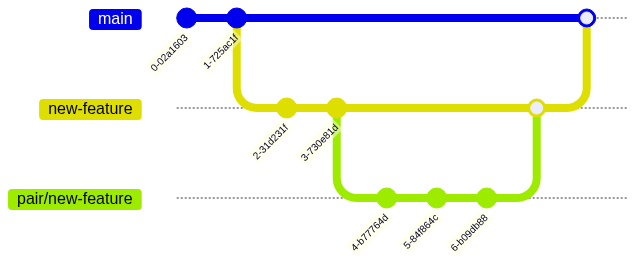
You will work inside a temporary pair branch that in the end all the commits will be squashed to be added to the feature branch.
More details!
Ok ok! Under the hood the devpair start will take your current branch and create a copy with the same name but with the prefix pair
After make your code changes the devpair next will add, commit and push your code using an internal commit message. This step will be more easier to understand checking the example step by step
In the end, we have the devpair done that will add, commit, push and delete the branch. Don't worry we will make a squash commit of everything that you did for the current branch.
Recommendations
- Before the pair programming
- Define the end of the session. How many time do you want pair?
- Define the break time.
- Use a
timer, maybedevpairtimer or any other one, the important thing is to keep the pair rotation:devpair start <time in minutes>- https://cuckoo.team/
- https://double-trouble.wielo.co/
- http://mobtimer.zoeetrope.com/
- ANY other mobile app, web tool, smartwatch app, pomodoro timer and so on.
- The
driverneed to share the screen avoiding to use tools likevscode live share, even they are good it can create some hard moments that you want to show the browser or create a quickly diagram. The preference is that thedriverever need to share the screen. - Antipatterns: https://tuple.app/pair-programming-guide/antipatterns
Contributing
Fork, create a branch from main with the pattern feat/my-feature and make a pull request with your proposal.
Local env
We are using poetry and pyenv to manage all the python versions and dependencies.
# Install all the dependencies
make setup
# Run all the tests
make unit
# Testing the devpair locally
make local
Publishing
sh ./scripts/tag-new-version.bash v0.0.0
Illustration by: popsy
1 maintainer

Metadata
1 maintainer
Release files for devpair 1.1.18
For a detailed explanation of source distributions (sdists) and built distributions (wheels), please see the package formats documentation.
Source distribution (sdist)
| File | Size | Uploaded | |
|---|---|---|---|
| devpair-1.1.18.tar.gz | 8.3 kB | Details |
Built distribution (wheel)
| File | Interpreter | ABI | Platform | Reset |
|---|---|---|---|---|
| devpair-1.1.18-py3-none-any.whl | Python 3 | none | any | Details |
Total release size: 17.2 kB
Release files / devpair-1.1.18.tar.gz
| Download URL | devpair-1.1.18.tar.gz |
|---|---|
| Size | 8.3 kB |
| Tags | Source |
|
SHA-256 checksum How to use checksums |
71695af00adf08159b55df60766602a25bf5c79d41527869d780540a58b4af34
|
|
BLAKE2b-256 checksum How to use checksums |
5976ec67fb1c8a0fd13f108a2e35e1d5d01346ed7114045e70024deee0ed951d
|
| Upload date | |
|
Uploaded using Trusted Publishing? What is trusted publishing? |
No |
| Uploaded via |
twine/4.0.1 CPython/3.9.15
|
Release files / devpair-1.1.18-py3-none-any.whl
| Download URL | devpair-1.1.18-py3-none-any.whl |
|---|---|
| Size | 8.9 kB |
| Tags | Python 3 |
|
SHA-256 checksum How to use checksums |
e495eac7d8723d4ea524f82ad747d361aa3797158b47ea5dc2966fbcaa2b67c9
|
|
BLAKE2b-256 checksum How to use checksums |
b9bad09423f8a7f67f22e229049dfb9bd787e1aba67173efa76ec2c2078ccfcc
|
| Upload date | |
|
Uploaded using Trusted Publishing? What is trusted publishing? |
No |
| Uploaded via |
twine/4.0.1 CPython/3.9.15
|














