
Pair script that manage a pair programming session using git.

Project description

Dev Pair



It's a tool to facilitate the remote pair programming session. Instead of make a lot of git add, git commit, git push, git pull, you can make it more quickly only running devpair start <timer optional> to start coding and devpair next to send the code to another person.
Very useful for teams that like to make pair sessions often. If you never was a driver or a navigator feel free to read here to have a context.
Install
pip install devpair
Commands
devpair start <time in minutes optional>Start a new session inside the current branch.devpair nextSave everything and send to the next person.devpair doneFinish and put all the work in the original branch.devpair summaryShow a simple resume of commit counts and last developer.devpair timer <time in minutes>Create a simple timer for any purposal.devpair --helpI like to have a help some times.
We recommend to create some alias if you want, like:
dvsto rundevpair start,dvnto rundevpair nextanddvdto rundevpair done.
Example of use
# Dev A
main $ devpair start 10 # Will start the new branch with a 10 minutes timer
pair/main $ echo "hello" > welcome.txt
pair/main $ devpair next

# Dev B
main $ devpair start
pair/main $ cat welcome.txt # shows "hello"
pair/main $ echo " world" >> welcome.txt
pair/main $ devpair next

# Dev A
pair/main $ devpair start
pair/main $ cat welcome.txt # shows "hello world"
pair/main $ echo "!" >> welcome.txt
pair/main $ devpair done

main $ git commit -m "feat: created hello world feature"
main $ git push

# Dev B
pair/main $ devpair done # just to come back to the original branch
main
How it works internally?
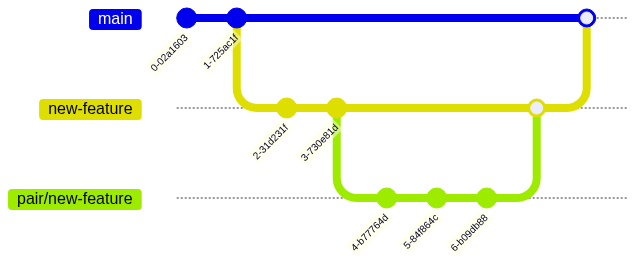
You will work inside a temporary pair branch that in the end all the commits will be squashed to be added to the feature branch.
MORE INFO PLEASE!
Ok ok! Under the hood the devpair start will take your current branch and create a copy with the same name but with the prefix pair
After make your code changes the devpair next will add, commit and push your code using an internal commit message. This step will be more easier to understand checking the example step by step
In the end, we have the devpair done that will add, commit, push and delete the branch. Don't worry we will make a squash commit of everything that you did for the current branch.
Recommendations
- Before the pair programming
- Define the end of the session. How many time do you want pair?
- Define the break time.
- Use a
timer, maybedevpairtimer or any other one, the important thing is to keep the pair rotation:devpair start <time in minutes>- https://cuckoo.team/
- https://double-trouble.wielo.co/
- http://mobtimer.zoeetrope.com/
- ANY other mobile app, web tool, smartwatch app, pomodoro timer and so on.
- The
driverneed to share the screen avoiding to use tools likevscode live share, even they are good it can create some hard moments that you want to show the browser or create a quickly diagram. The preference is that thedriverever need to share the screen. - Antipatterns: https://tuple.app/pair-programming-guide/antipatterns
Contributing
Fork, create a branch from main with the pattern feat/my-feature and make a pull request with your proposal.
Local env
We are using poetry and pyenv to manage all the python versions and dependencies.
# Install all the dependencies
poetry install
# Install the pre-commit
poetry run pre-commit install
# Set the version of the `.python-version`
pyenv local
# Run all the tests
make unit
Publishing
sh ./scripts/tag-new-version.bash v0.0.0
Release history Release notifications | RSS feed


Download files
Download the file for your platform. If you're not sure which to choose, learn more about installing packages.
Source Distribution
Built Distribution
Filter files by name, interpreter, ABI, and platform.
If you're not sure about the file name format, learn more about wheel file names.
Copy a direct link to the current filters
File details
Details for the file devpair-1.1.9.tar.gz.
File metadata
- Download URL: devpair-1.1.9.tar.gz
- Upload date:
- Size: 7.8 kB
- Tags: Source
- Uploaded using Trusted Publishing? No
- Uploaded via: twine/4.0.1 CPython/3.9.15
File hashes
| Algorithm | Hash digest | |
|---|---|---|
| SHA256 |
074c418c691a4186e8ec25c2ec047db9d55eed4d19fc972863a46731696eddef
|
|
| MD5 |
b00dad40a12df8e4336716a81b3ed015
|
|
| BLAKE2b-256 |
40c4b7c8bb3e7534828ec711f6ef5b9a7b699d76ecdba707b81ad9aef379ef60
|
File details
Details for the file devpair-1.1.9-py3-none-any.whl.
File metadata
- Download URL: devpair-1.1.9-py3-none-any.whl
- Upload date:
- Size: 8.3 kB
- Tags: Python 3
- Uploaded using Trusted Publishing? No
- Uploaded via: twine/4.0.1 CPython/3.9.15
File hashes
| Algorithm | Hash digest | |
|---|---|---|
| SHA256 |
69359d2d9ea97b60a481ce081ac25b56f444b9196cac94c18fc8fcbea997571c
|
|
| MD5 |
d2d76f6d1b2346bf1b07084a08fc2fc4
|
|
| BLAKE2b-256 |
a59ee97f09b5f77ffddd4f31543679755693e93e34c89cad67ee5c55c4c7bee2
|






