
diffhouse: Repository Mining at Scale



diffhouse is a Python solution for structuring Git metadata, designed to enable large-scale codebase analysis at practical speeds.
Key features are:
- 🚀 Fast access to commit data, file changes and more
- 📊 Easy integration with pandas and Polars
- 🐍 Simple-to-use Python interface
Performance
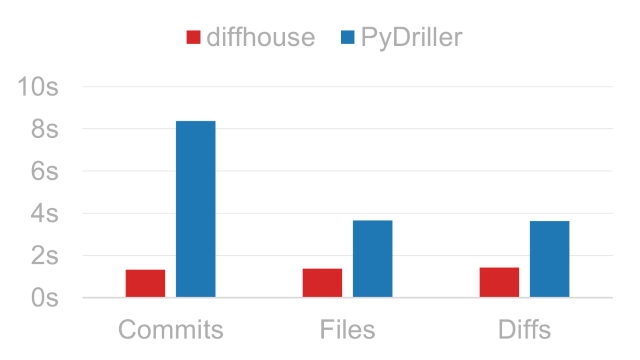
Processing times for tween.js. Lower is better.
For more details, see benchmarks.
Requirements
| Python | 3.10 or higher |
| Git | 2.22 or higher |
Git also needs to be added to the system PATH.
Limitations
At its core, diffhouse is a data extraction tool and therefore does not calculate software metrics like code churn or cyclomatic complexity; if this is needed, take a look at PyDriller instead.
User Guide
This guide aims to cover the basic use cases of diffhouse. For a full list of objects, consider reading the API Reference.
Installation
Install diffhouse from PyPI:
pip install diffhouse
Optional Dependencies
If you plan to combine diffhouse with pandas or Polars, install the package with their respective extras:
| pandas | pip install diffhouse[pandas] |
| Polars | pip install diffhouse[polars] |
Quickstart
from diffhouse import Repo

with Repo('https://github.com/user/repo') as r:
    for c in r.commits:
        print(c.commit_hash[:10], c.date, c.author_email)

    if len(r.branches.to_list()) > 100:
        print('🎉')

    df = r.diffs.to_pandas()
To start, create a Repo instance by passing either a Git-hosting URL or a local path as its source argument. Next, use the Repo in a with statement to clone the source into a local, non-persistent
location.
Inside the with block, you can access data through the following properties:
| Property | Description | Record Type |
|---|---|---|
Repo.commits |
Commit history of the repository. | Commit |
Repo.filemods |
File modifications across the commit history. | FileMod |
Repo.diffs |
Source code changes across the commit history. | Diff |
Repo.branches |
Branches of the repository. | Branch |
Repo.tags |
Tags of the repository. | Tag |
Querying Results
Data accessors like Repo.commits are Extractor objects and can output their results in various formats:
Looping Through Objects
You can use extractors in a for loop to process objects one by one. Data will be extracted on demand for memory efficiency:
with Repo('https://github.com/user/repo') as r:
    for c in r.commits:
        print(c.commit_hash[:10])
        print(c.author_name)

        if c.in_main:
            break
iter_dicts() is a for loop alternative that yields dictionaries instead of diffhouse objects. A good use case for this is writing results into a newline-delimited JSON file:
import json

with (
    Repo('https://github.com/user/repo') as r,
    open('commits.jsonl', 'w') as f
):
    for c in r.commits.iter_dicts():
        f.write(json.dumps(c) + '\n')
Converting to Dataframes
pandas and Polars DataFrame APIs are supported out of the box. To convert result sets to dataframes, call the following methods:
to_pandas()orpd()for pandasto_polars()orpl()for Polars
with Repo('https://github.com/user/repo') as r:
    df1 = r.filemods.to_pandas()  # pandas
    df2 = r.diffs.to_polars()  # Polars
Preliminary Filtering
You can filter data along certain dimensions before processing takes place to reduce extraction time and/or network load.
[!NOTE] Filters are a WIP feature. Additional options like date and branch filtering are planned for future releases.
Skipping File Downloads
If no blob-level data is needed, pass blobs=False when creating the Repo to skip file downloads during cloning. Note that this will not populate:
files_changed,lines_addedandlines_deletedfields ofRepo.commitsRepo.filemodsRepo.diffs
with Repo('https://github.com/user/repo', blobs=False) as r:
    for b in r.branches:
        pass  # business as usual

    r.filemods  # throws FilterError
1 maintainer

Metadata
1 maintainer
Release files for diffhouse 2.0.3
For a detailed explanation of source distributions (sdists) and built distributions (wheels), please see the package formats documentation.
Source distribution (sdist)
| File | Size | Uploaded | |
|---|---|---|---|
| diffhouse-2.0.3.tar.gz | 20.4 kB | Details |
Built distribution (wheel)
| File | Interpreter | ABI | Platform | Reset |
|---|---|---|---|---|
| diffhouse-2.0.3-py3-none-any.whl | Python 3 | none | any | Details |
Total release size: 51.3 kB
Release files / diffhouse-2.0.3.tar.gz
| Download URL | diffhouse-2.0.3.tar.gz |
|---|---|
| Size | 20.4 kB |
| Tags | Source |
|
SHA-256 checksum How to use checksums |
a9979f884e53e506fae0880dddeaee674b7f53186454fd1814e47ffb928becb3
|
|
BLAKE2b-256 checksum How to use checksums |
cbabba284e0097edd360247b0e63fb222427709786208449c4526df47518417f
|
| Upload date | |
|
Uploaded using Trusted Publishing? What is trusted publishing? |
No |
| Uploaded via |
uv/0.8.22
|
Release files / diffhouse-2.0.3-py3-none-any.whl
| Download URL | diffhouse-2.0.3-py3-none-any.whl |
|---|---|
| Size | 30.9 kB |
| Tags | Python 3 |
|
SHA-256 checksum How to use checksums |
bc9ca6035b33cff74a9bb7f84ef9c949c3fd86b245a2d1588359c40aed5b5ea8
|
|
BLAKE2b-256 checksum How to use checksums |
f4844a667087e070cb50ce24f370044b04b33861d7359f8da2178d19f3f95fc3
|
| Upload date | |
|
Uploaded using Trusted Publishing? What is trusted publishing? |
No |
| Uploaded via |
uv/0.8.22
|














