
Repository mining tool for structuring Git metadata at scale.

Project description
diffhouse: Repository Mining at Scale



diffhouse is a Python solution for structuring Git metadata, designed to enable large-scale codebase analysis at practical speeds.
Key features are:
- 🚀 Fast access to commit data, file changes and more
- 📊 Easy integration with pandas and Polars
- 🐍 Simple-to-use Python interface
Performance
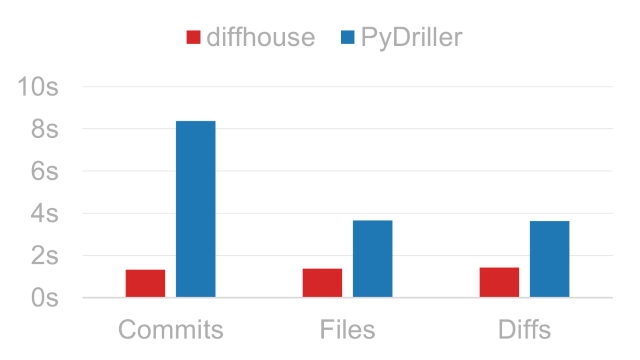
Processing times for tween.js. Lower is better.
For more details, see benchmarks.
Requirements
| Python | 3.10 or higher |
| Git | 2.22 or higher |
Git also needs to be added to the system PATH.
Limitations
At its core, diffhouse is a data extraction tool and therefore does not calculate software metrics like code churn or cyclomatic complexity; if this is needed, take a look at PyDriller instead.
User Guide
This guide aims to cover the basic use cases of diffhouse. For a full list of objects, consider reading the API Reference.
Installation
Install diffhouse from PyPI:
pip install diffhouse
Optional Dependencies
If you plan to combine diffhouse with pandas or Polars, install the package with their respective extras:
| pandas | pip install diffhouse[pandas] |
| Polars | pip install diffhouse[polars] |
Quickstart
from diffhouse import Repo

with Repo('https://github.com/user/repo') as r:
    for c in r.commits:
        print(c.commit_hash[:10], c.date, c.author_email)

    if len(r.branches.to_list()) > 100:
        print('🎉')

    df = r.diffs.to_pandas()
To start, create a Repo instance by passing either a Git-hosting URL or a local path as its source argument. Next, use the Repo in a with statement to clone the source into a local, non-persistent
location.
Inside the with block, you can access data through the following properties:
| Property | Description | Record Type |
|---|---|---|
Repo.commits |
Commit history of the repository. | Commit |
Repo.filemods |
File modifications across the commit history. | FileMod |
Repo.diffs |
Source code changes across the commit history. | Diff |
Repo.branches |
Branches of the repository. | Branch |
Repo.tags |
Tags of the repository. | Tag |
Querying Results
Data accessors like Repo.commits are Extractor objects and can output their results in various formats:
Looping Through Objects
You can use extractors in a for loop to process objects one by one. Data will be extracted on demand for memory efficiency:
with Repo('https://github.com/user/repo') as r:
    for c in r.commits:
        print(c.commit_hash[:10])
        print(c.author_name)

        if c.in_main:
            break
iter_dicts() is a for loop alternative that yields dictionaries instead of diffhouse objects. A good use case for this is writing results into a newline-delimited JSON file:
import json

with (
    Repo('https://github.com/user/repo') as r,
    open('commits.jsonl', 'w') as f
):
    for c in r.commits.iter_dicts():
        f.write(json.dumps(c) + '\n')
Converting to Dataframes
pandas and Polars DataFrame APIs are supported out of the box. To convert result sets to dataframes, call the following methods:
to_pandas()orpd()for pandasto_polars()orpl()for Polars
with Repo('https://github.com/user/repo') as r:
    df1 = r.filemods.to_pandas()  # pandas
    df2 = r.diffs.to_polars()  # Polars
Preliminary Filtering
You can filter data along certain dimensions before processing takes place to reduce extraction time and/or network load.
[!NOTE] Filters are a WIP feature. Additional options like date and branch filtering are planned for future releases.
Skipping File Downloads
If no blob-level data is needed, pass blobs=False when creating the Repo to skip file downloads during cloning. Note that this will not populate:
files_changed,lines_addedandlines_deletedfields ofRepo.commitsRepo.filemodsRepo.diffs
with Repo('https://github.com/user/repo', blobs=False) as r:
    for b in r.branches:
        pass  # business as usual

    r.filemods  # throws FilterError
Release history Release notifications | RSS feed


Download files
Download the file for your platform. If you're not sure which to choose, learn more about installing packages.
Source Distribution
Built Distribution
Filter files by name, interpreter, ABI, and platform.
If you're not sure about the file name format, learn more about wheel file names.
Copy a direct link to the current filters
File details
Details for the file diffhouse-2.0.2.tar.gz.
File metadata
- Download URL: diffhouse-2.0.2.tar.gz
- Upload date:
- Size: 20.4 kB
- Tags: Source
- Uploaded using Trusted Publishing? No
- Uploaded via: uv/0.8.22
File hashes
| Algorithm | Hash digest | |
|---|---|---|
| SHA256 |
014db1aad910a89359c1231c3b65231ac35069b0eeaf451d52e7bb31553b0ed0
|
|
| MD5 |
6188573c3d466a96816ec68ba8634b67
|
|
| BLAKE2b-256 |
5a5e3182f2c232ef1e7849b547a1c77fe03d18b83888a09fce14ab712836c745
|
File details
Details for the file diffhouse-2.0.2-py3-none-any.whl.
File metadata
- Download URL: diffhouse-2.0.2-py3-none-any.whl
- Upload date:
- Size: 30.9 kB
- Tags: Python 3
- Uploaded using Trusted Publishing? No
- Uploaded via: uv/0.8.22
File hashes
| Algorithm | Hash digest | |
|---|---|---|
| SHA256 |
7e1931a2e2c94e8074bfa78acf7de86e22baa0246be74bdbf2b245ea328a18c4
|
|
| MD5 |
4d7300e3e038eab15cb9b3b9544b0d21
|
|
| BLAKE2b-256 |
749e828eb9fc22b5e56a675ef15061d37306e30c06e73f59d6697f9e8785409c
|






