
Digital logic design toolkit: simplify, minimize and transform Boolean expressions, draw KV-maps, etc.

Project description
digtick

digtick (the mnemonic for "dig tk", i.e., digital toolkit) is a command-line-tool tool for creating and solving digital logic design tasks. The primary target audiences are educators (who can use it to create and validate exam questions) and students who want to improve their skills. The toolkit allows you to specify, parse and reformat Boolean equations (e.g., output in LaTeX form for easy inclusion in documents). It can create truth tables from a given Boolean expression and rendering Karnaugh–Veitch (KV) maps with an arbitrary number of variables, both as SVG and to the command line. The output format is highly customizable to match your specific preference. It can check Boolean equations for equivalance and validate if expressions satisfy a given truth table (with counterexamples). A Quine-McCluskey implementation is used to minify expressions.
Boolean expression syntax
digtick accepts a pragmatic Boolean syntax that matches what students often
write on paper, while still being unambiguous and machine-parseable. Variables
follow a typical identifier pattern (e.g. A, B, clk). Constants are 0
and 1.
You can express OR as + or |, AND as * or &, and XOR as ^.
Negation can be written as !, ~, or - prefix. The parser also accepts
NAND @ and NOR % as explicit operators.
Note that neither NAND nor NOR are associative. Their precendence in parsing is as following, from strongest to weakest:
- Parenthesis
- NOT
- AND
- NAND
- OR, XOR, NOR
Note that AND has higher precedence than NOR. This is so that the expression
A @ B C
is interpreted on how it is "naturally" read because of implicit AND as
A @ (B C)
instead of what would be correct if AND and NAND had same precedence:
(A @ B) C
Parentheses work as expected for grouping. Contrary to commonly used parsers,
the parser of digtick treats parenthesis as a syntactical element, which
means they are preserved in the AST. The intention is to allow for expressions
with unnecessary parenthesis to generate exam questions (students should know
that A + (B + C)) is identical to A + B + C without the parser eating away
the exam question):
$ digtick parse '(((((A | (B))))))'
(((((A + (B))))))
For convenience of notation, AND is implicit: adjacency separated by
whitespace counts as AND:
$ digtick parse 'A B C + A !B C + C !A'
A B C + A !B C + C !A
By default, this is also implemented this way in the output, but many commands
allow specifying a particular format, including the --no-implicit-and option:
$ digtick parse --no-implicit-and 'A B C + A !B C + C !A'
A * B * C + A * !B * C + C * !A
There are multiple output options, e.g. a Unicode renderer:
$ digtick parse --expr-format pretty-text 'A B C + A !B C + C !A'
A B C ∨ A B̅ C ∨ C A̅
Operator precedence within Python
Note that, when importing digtick and using it to perform changes under the
hood, you can also naturally use the overloaded operators. They also automatically convert
strings and integers to variables and constants. Example:
from digtick.ExpressionParser import Variable
(A, B, C) = (Variable("A"), Variable("B"), Variable("C"))
print(~((A | B) & C))
>>> [![[A + B] * C]]
Note that also the @ and % operators are overloaded to provide NAND and
NOR, but with the caveat that the operator precedence within Python is
different than our parsing precedence!
from digtick.ExpressionParser import Variable
(A, B, C) = (Variable("A"), Variable("B"), Variable("C"))
print(A @ B & C == (A @ B) & C)
>>> True
Truth table format
There is a human-readable truth table format which uses Unicode characters for pretty viewing in a terminal and the machine-readable format which is whitespace-separated. The latter is the default output variant one of two forms which can be used as input:
$ digtick make-table 'A B C + A !B C + C !A'
A	B	C   >Y
0	0	0	0
0	0	1	1
0	1	0	0
0	1	1	1
1	0	0	0
1	0	1	1
1	1	0	0
1	1	1	1

$ digtick make-table --tbl-format pretty 'A B C + A !B C + C !A'
┌───┬───┬───┬───┐
│ A │ B │ C │ Y │
├───┼───┼───┼───┤
│ 0 │ 0 │ 0 │ 0 │
│ 0 │ 0 │ 1 │ 1 │
│ 0 │ 1 │ 0 │ 0 │
│ 0 │ 1 │ 1 │ 1 │
│ 1 │ 0 │ 0 │ 0 │
│ 1 │ 0 │ 1 │ 1 │
│ 1 │ 1 │ 0 │ 0 │
│ 1 │ 1 │ 1 │ 1 │
└───┴───┴───┴───┘
By default, the output is named Y. Output signals are denoted by the >
prefix in the heading row. There can be multiple output signals in a single table.
Note that commands which accept truth table inputs can all have the filename omitted and will then read from stdin. This allows for easy piping of commands:
$ digtick make-table 'A B C + A !B C + C !A' | digtick synth
CDNF: !A !B C + !A B C + A !B C + A B C
CCNF: (A + B + C) (A + !B + C) (!A + B + C) (!A + !B + C)
DNF : C
CNF : (C)
There is a second format which is also automatically accepted, called the "compact" format. The compact format is useful when you want to modify whole tables in a single command line because it is, as the name indicates, a very compact representation of a truth table:
$ digtick make-table --tbl-format compact 'A B C + A !B C + C !A'
:A,B,C:Y:4444
digtick distinguishes when reading table input by the first character of the
first line -- in compact format, this is always a colon :. Compact format
then lists the input variable names, output variable names and then the
bit-packed data (0 = Low, 1 = High, 2 = Don't Care, 3 = Undefined). Note the
seamless conversion:
$ echo :A,B,C:Y:4444 | digtick print-table
A	B	C	>Y
0	0	0	0
0	0	1	1
0	1	0	0
0	1	1	1
1	0	0	0
1	0	1	1
1	1	0	0
1	1	1	1
Timing diagram format
For timing diagrams (described below in more detail), the general format is this:
# Comment, this will be ignored
A  = 01010101010101010
!B = 10101010101010101
This shows two signals, A and !B. Characters that can be used are:
0/1: LOW or HIGH:: both LOW and HIGH (invalid/ambiguous state)!: LOW -> HIGH and HIGH -> LOW transition simultaneous (only valid within:blocks to indicate a signal may change)Z: High impedance (middle line)|: Marker line at that exact point. May also be a labeled marker by using|'text'._: Empty clock cycle
Whitespace is ignored.
"parse": parse and reformat Boolean expressions
parse parses an equation and outputs it in a different format, such as LaTeX.
It takes care that in overline-style negation of literals the overline does
not automatically carry over to the next character (this is an annoying LaTeX
default, unfortunately, and results in a non-equivalent equation):
$ digtick parse --expr-format tex-tech '!A !B'
\overline{\textnormal{A}} \ \overline{\textnormal{B}}
$ digtick parse --expr-format tex-tech '!(A B)'
\overline{(\textnormal{A} \ \textnormal{B})}
Note that also the mathematical variant of symbols can be used:
$ digtick parse --expr-format tex-math '!(A B)'
\neg \textnormal{A} \ \neg \textnormal{B}
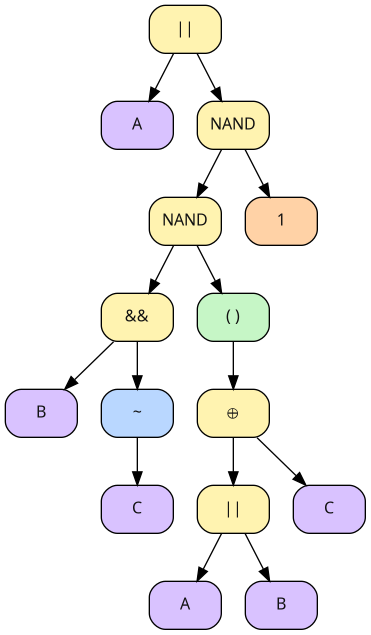
When you are interested in the internal parse tree of an expression, you can emit the expression as Graphviz-compatible format and have it rendererd by dot into a graph:
$ digtick parse --expr-format dot 'A + B -C @ (A + B ^ C) @ 1' | dot -Tpng -oast.png
Which will produce the following ast.png file:
"make-table": generate a truth table from an expression
make-table evaluates a Boolean expression over all input combinations and
prints a truth table. An optional second expression can be used to mark “don't
care” output positions (*). Wherever the “don't care” expression evaluates to
1, the output is printed as * instead of 0 or 1.
$ digtick make-table 'A + B !C' 'A !B'
A	B	C   >Y
0	0	0	0
0	0	1	0
0	1	0	1
0	1	1	0
1	0	0	*
1	0	1	*
1	1	0	1
1	1	1	1
"print-table": read and print a table file
print-table reads a TSV truth table and prints it back in either plain TSV
form or a formatted view. If your table doesn't define every input combination,
you can decide how missing patterns should be treated. In the default strict
mode, missing patterns are considered an error; in the relaxed modes, missing
patterns are filled as 0, 1, or *.
$ digtick make-table 'A + B !C' 'A !B' | \
  head -n 4 | \
  digtick print-table -f pretty --unused-value-is '*'
┌───┬───┬───┬───┐
│ A │ B │ C │ Y │
├───┼───┼───┼───┤
│ 0 │ 0 │ 0 │ 0 │
│ 0 │ 0 │ 1 │ 0 │
│ 0 │ 1 │ 0 │ 1 │
│ 0 │ 1 │ 1 │ * │
│ 1 │ 0 │ 0 │ * │
│ 1 │ 0 │ 1 │ * │
│ 1 │ 1 │ 0 │ * │
│ 1 │ 1 │ 1 │ * │
└───┴───┴───┴───┘
"kv": render a Karnaugh–Veitch map from a table
kv takes a truth table and lays it out as a KV map. There are multiple ways
to create a KV map which are all. As an educator, I usually have the policy
that my students need not adhere to the format taught in my lectures, but may
choose a different format as long as it produces correct output. This puts the
burden of verification on me, which is cumbersome. For this purpose, this
rendering command accepts a number of different parameters that influence the
way the KV diagram is printed.
$ digtick make-table 'A B !C + B D + !C A' 'B !A D + A B C D' >examples/table1.txt
$ digtick kv examples/table1.txt
┌─────┬─────┬─────┬─────┬─────┐
│     │ A̅ B̅ │ A B̅ │ A B │ A̅ B │
├─────┼─────┼─────┼─────┼─────┤
│ C̅ D̅ │  0  │  1  │  1  │  0  │
├─────┼─────┼─────┼─────┼─────┤
│ C D̅ │  0  │  0  │  0  │  0  │
├─────┼─────┼─────┼─────┼─────┤
│ C D │  0  │  0  │  *  │  *  │
├─────┼─────┼─────┼─────┼─────┤
│ C̅ D │  0  │  1  │  1  │  *  │
└─────┴─────┴─────┴─────┴─────┘

$ digtick kv examples/table1.txt -d DCBA --x-offset 1 --y-invert
┌─────┬─────┬─────┬─────┬─────┐
│     │ C̅ D │ C D │ C D̅ │ C̅ D̅ │
├─────┼─────┼─────┼─────┼─────┤
│ A̅ B̅ │  0  │  0  │  0  │  0  │
├─────┼─────┼─────┼─────┼─────┤
│ A B̅ │  1  │  0  │  0  │  1  │
├─────┼─────┼─────┼─────┼─────┤
│ A B │  1  │  *  │  0  │  1  │
├─────┼─────┼─────┼─────┼─────┤
│ A̅ B │  *  │  *  │  0  │  0  │
└─────┴─────┴─────┴─────┴─────┘
This makes it much easier to verify solutions for their correctness, regardless of which format the student chose.
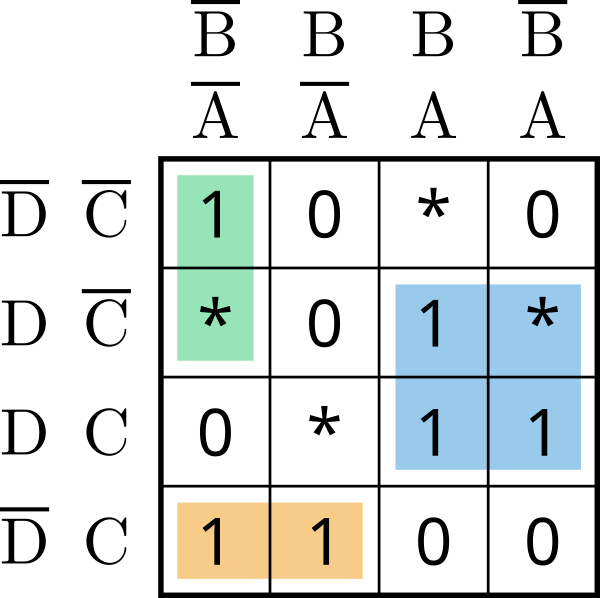
You may also render SVGs from a KV diagram, which will also display the solution implicants for both DNF and CNF using SVG layers:
$ digtick kv --output-filename docs/kv.svg examples/table2.txt
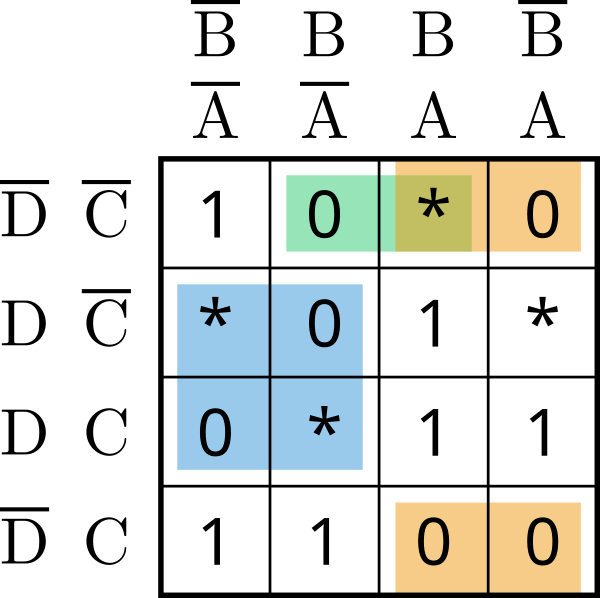
Via layers, you can also switch to CNF view:
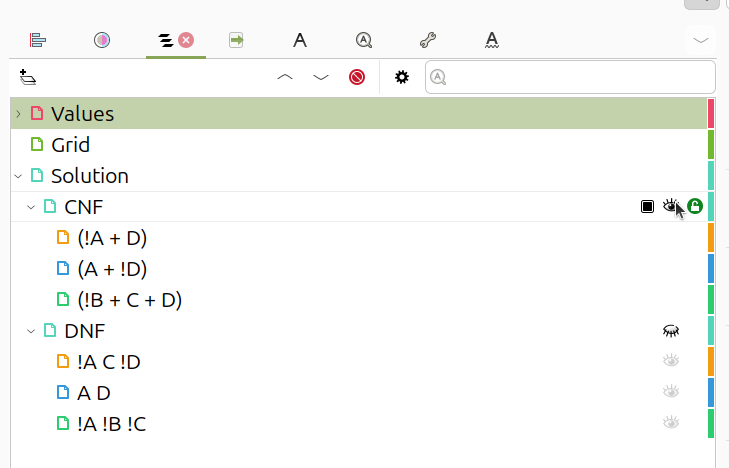
The selection, here shown in Inkscape, allows also for selection based on single min/maxterms:
"synthesize": minimize/synthesize expressions from a truth table
synthesize reads a truth table and prints canonical forms (CDNF/CCNF) as well
as minimized forms (DNF/CNF) produced via Quine-McCluskey.
$ digtick synth exam1.txt
CDNF: A !B !C !D + A !B !C D + A B !C !D + A B !C D
CCNF: (A + B + C + D) (A + B + C + !D) (A + B + !C + D) (A + B + !C + !D) (A + !B + C + D) (A + !B + !C + D) (!A + B + !C + D) (!A + B + !C + !D) (!A + !B + !C + D)
DNF : A !C + B D
CNF : (!C) (A)
"equal": check whether two expressions are equivalent
equal compares two Boolean expressions by evaluating them over all possible
input assignments of the involved variables. If they are equivalent, it reports
success. If they differ, it prints a counterexample assignment.
$ digtick eq 'A @ B @ C' 'A @ (B @ C)'
Not equal: {'A': 0, 'B': 0, 'C': 1} gives 0 on LHS but 1 on RHS

$ digtick eq 'A B C + C !D B + B C' 'B C'
Expressions equal.
Note that digtick also supports checking a whole file for equivalence in the parse command. For example, say you have generated an exam and are preparing the reference solution, in which you are performing tiny simplification steps each line:
$ cat examples/equations.txt
A B C + B C (A + D) + B A !D + F (E + !F)
A B C + B C A + B C D + B A !D + F (E + !F)
A B C + B C A + B C D + B A !D + F E + F !F
A B C + B C A + B C D + B A !D
B C A + B C D + B A !D
B (C A + C D + A !D)
B (C D + A !D)
Did you spot my error? A simple omission that changes the whole formula:
$ digtick parse --read-as-filename --validate-equivalence examples/equations.txt
A B C + B C (A + D) + B A !D + F (E + !F)
A B C + B C A + B C D + B A !D + F (E + !F)
A B C + B C A + B C D + B A !D + F E + F !F
A B C + B C A + B C D + B A !D
Warning: expression "A * B * C + B * C * A + B * C * D + B * A * !D + F * E + F * !F" on line 3 is not equivalent to expression "A * B * C + B * C * A + B * C * D + B * A * !D" on line 4.
B C A + B C D + B A !D
B (C A + C D + A !D)
B (C D + A !D)
There were validation errors, some of the equations are not equivalent to each other.
Once you corrected the mistake, you can then, for example, render as TeX -- I'm sure you'll agree that this output is a write-only format not intended for human consumption:
\textnormal{A} \ \textnormal{B} \ \textnormal{C} \vee \textnormal{B} \ \textnormal{C} \ (\textnormal{A} \vee \textnormal{D}) \vee \textnormal{B} \ \textnormal{A} \ \overline{\textnormal{D}} \vee \textnormal{F} \ (\textnormal{E} \vee \overline{\textnormal{F}})
\textnormal{A} \ \textnormal{B} \ \textnormal{C} \vee \textnormal{B} \ \textnormal{C} \ \textnormal{A} \vee \textnormal{B} \ \textnormal{C} \ \textnormal{D} \vee \textnormal{B} \ \textnormal{A} \ \overline{\textnormal{D}} \vee \textnormal{F} \ (\textnormal{E} \vee \overline{\textnormal{F}})
\textnormal{A} \ \textnormal{B} \ \textnormal{C} \vee \textnormal{B} \ \textnormal{C} \ \textnormal{A} \vee \textnormal{B} \ \textnormal{C} \ \textnormal{D} \vee \textnormal{B} \ \textnormal{A} \ \overline{\textnormal{D}} \vee \textnormal{F} \ \textnormal{E} \vee \textnormal{F} \ \overline{\textnormal{F}}
\textnormal{A} \ \textnormal{B} \ \textnormal{C} \vee \textnormal{B} \ \textnormal{C} \ \textnormal{A} \vee \textnormal{B} \ \textnormal{C} \ \textnormal{D} \vee \textnormal{B} \ \textnormal{A} \ \overline{\textnormal{D}} \vee \textnormal{F} \ \textnormal{E}
\textnormal{B} \ \textnormal{C} \ \textnormal{A} \vee \textnormal{B} \ \textnormal{C} \ \textnormal{D} \vee \textnormal{B} \ \textnormal{A} \ \overline{\textnormal{D}} \vee \textnormal{F} \ \textnormal{E}
\textnormal{B} \ (\textnormal{C} \ \textnormal{A} \vee \textnormal{C} \ \textnormal{D} \vee \textnormal{A} \ \overline{\textnormal{D}}) \vee \textnormal{F} \ \textnormal{E}
\textnormal{B} \ (\textnormal{C} \ \textnormal{D} \vee \textnormal{A} \ \overline{\textnormal{D}}) \vee \textnormal{F} \ \textnormal{E}
"satisfied": Validate a solution against a truth table
satisfied takes a truth table as input as well as a Boolean expression and
verifies that the expression indeed fulfills the truth table. It prints the
locations where it is not fulfilled, again in table format:
$ digtick satisfied -f pretty examples/table1.txt 'A !(A !B C)'
┌───┬───┬───┬───┬───┬──────┬─────┐
│ A │ B │ C │ D │ Y │ Eval │ Sat │
├───┼───┼───┼───┼───┼──────┼─────┤
│ 0 │ 0 │ 0 │ 0 │ 0 │ 0    │ 1   │
│ 0 │ 0 │ 0 │ 1 │ 0 │ 0    │ 1   │
│ 0 │ 0 │ 1 │ 0 │ 0 │ 0    │ 1   │
│ 0 │ 0 │ 1 │ 1 │ 0 │ 0    │ 1   │
│ 0 │ 1 │ 0 │ 0 │ 0 │ 0    │ 1   │
│ 0 │ 1 │ 0 │ 1 │ * │ 0    │ 1   │
│ 0 │ 1 │ 1 │ 0 │ 0 │ 0    │ 1   │
│ 0 │ 1 │ 1 │ 1 │ * │ 0    │ 1   │
│ 1 │ 0 │ 0 │ 0 │ 1 │ 1    │ 1   │
│ 1 │ 0 │ 0 │ 1 │ 1 │ 1    │ 1   │
│ 1 │ 0 │ 1 │ 0 │ 0 │ 0    │ 1   │
│ 1 │ 0 │ 1 │ 1 │ 0 │ 0    │ 1   │
│ 1 │ 1 │ 0 │ 0 │ 1 │ 1    │ 1   │
│ 1 │ 1 │ 0 │ 1 │ 1 │ 1    │ 1   │
│ 1 │ 1 │ 1 │ 0 │ 0 │ 1    │ 0   │
│ 1 │ 1 │ 1 │ 1 │ * │ 1    │ 1   │
└───┴───┴───┴───┴───┴──────┴─────┘
Warning: the given expression does NOT satisfy the truth table


$ digtick satisfied -f pretty examples/table1.txt 'A !(A !B C) !(A B C !D)'
┌───┬───┬───┬───┬───┬──────┬─────┐
│ A │ B │ C │ D │ Y │ Eval │ Sat │
├───┼───┼───┼───┼───┼──────┼─────┤
│ 0 │ 0 │ 0 │ 0 │ 0 │ 0    │ 1   │
│ 0 │ 0 │ 0 │ 1 │ 0 │ 0    │ 1   │
│ 0 │ 0 │ 1 │ 0 │ 0 │ 0    │ 1   │
│ 0 │ 0 │ 1 │ 1 │ 0 │ 0    │ 1   │
│ 0 │ 1 │ 0 │ 0 │ 0 │ 0    │ 1   │
│ 0 │ 1 │ 0 │ 1 │ * │ 0    │ 1   │
│ 0 │ 1 │ 1 │ 0 │ 0 │ 0    │ 1   │
│ 0 │ 1 │ 1 │ 1 │ * │ 0    │ 1   │
│ 1 │ 0 │ 0 │ 0 │ 1 │ 1    │ 1   │
│ 1 │ 0 │ 0 │ 1 │ 1 │ 1    │ 1   │
│ 1 │ 0 │ 1 │ 0 │ 0 │ 0    │ 1   │
│ 1 │ 0 │ 1 │ 1 │ 0 │ 0    │ 1   │
│ 1 │ 1 │ 0 │ 0 │ 1 │ 1    │ 1   │
│ 1 │ 1 │ 0 │ 1 │ 1 │ 1    │ 1   │
│ 1 │ 1 │ 1 │ 0 │ 0 │ 0    │ 1   │
│ 1 │ 1 │ 1 │ 1 │ * │ 1    │ 1   │
└───┴───┴───┴───┴───┴──────┴─────┘
The given expression satisfies the truth table.
"random-expr": generate a random Boolean expression
random-expr generates a random expression over a specified number of
variables that has a certain "complexity" according to some metric (currently,
number of generated minterms/maxterms). It automatically simplifies the
randomized equations and checks that the minimized variant is not below another
complexity metric (so that tautologies are not created unless the user
specifically specifies that simple results are permissible via
--allow-trivial):
$ digtick random-expr 4 60
Expression: !((!B !C D A + A C)) (!C) !B !C (!D + !C) + (!C + D) B C D A + !B !A
Simplified: !B !C !D + !A !B + A B C D
"random-table": generate a random truth table
random-table creates a truth table for a specified number of variables,
randomly choosing output values according to configured probabilities. By
default the output distribution is 40% zeros, 40% ones, and the remainder
don't-cares. You can adjust the zero/one percentages; whatever remains after
those is implicitly treated as *.
$ digtick random-table -0 30 -1 50 3
A	B	C   >Y
0	0	0	0
0	0	1	1
0	1	0	*
0	1	1	*
1	0	0	1
1	0	1	1
1	1	0	1
1	1	1	0
"transform": Transform a Boolean expression
transform allows you to input a Boolean expression and have it converted into
NAND or NOR logic, i.e., replacing all gates exclusively by NAND or NOR.
Examples:
$ digtick transform -t nand 'A ^ B'
((A @ 1) @ B) @ (A @ (B @ 1))

$ digtick transform -t nor 'A ^ !B'
((A % ((B % 0) % 0)) % ((A % 0) % (B % 0)) % 0)
Note that, as stated above, @ is shortcut notation for NAND while % stands
for NOR.
"dtd-create": Create a digital timing diagram
dtd-create generates timing-diagram source text (a compact, line-based
format) for common sequential devices typically used in exam exercises: SR-NAND
flipflops, D-flipflops, JK- or JK-MS-flipflops. It produces randomized inputs
(reproducible via a seed), simulates the device, and prints input/output
waveforms.
To do this, you can simply invoke the command and it will generate a random timing diagram (by default of a SR-NAND-FF):
$ digtick dtd-create
# Random seed: 8910607998
!S = 0|'S'0|'R'11|0|'🗲'111|00|'R'111111|'S'0000|00|'S'00000111|'R'11
!R = 0    1    00 0    111 00    000001    1111 00    11111111    01
Q  = 1    1    00 1    000 11    000000    1111 11    11111111    00
!Q = 1    0    11 1    111 11    111111    0000 11    00000000    11
As you can see, it created a diagram along with notational markers that show when the flipflop was set, when it was reset and where an illegal state transition occurred. Note that for the SR-NAND-FF it is not illegal for both inputs to become active (i.e., LOW) at the same time, this is well-defined behavior. Undefined behavior occurs only when out of this state there is a simultaneous transition into the "keep" state (both inputs inactive, i.e., HIGH).
"dtd-render": render timing diagram data to SVG
dtd-render reads timing-diagram source text (from a file or stdin) and
renders it as an SVG. As an example, consider the example shown before in
dtd-create. Let us reproduce it from its pseudo-random seed and render it:
$ digtick dtd-create -s 8910607998 | digtick dtd-render -o docs/timing_diagram.svg
Will create the file docs/timing_diagram.svg which you can see here (note
that here, a PNG-conversion is shown which is why it looks fuzzy/washed out --
the original is crystal clear):
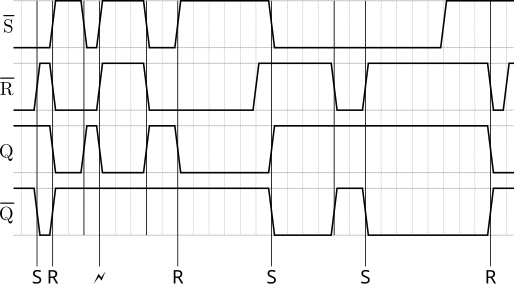
Note that the two-step process makes it exceptionally easy to create random diagrams until you find one that you like, use this as the reference solution for an exam, edit the test file and clear out the signals you want students to fill in, then render that again.
Also note that the created SVG supports layers so it is easy to retroactively disable, for example, labels or tick markers.
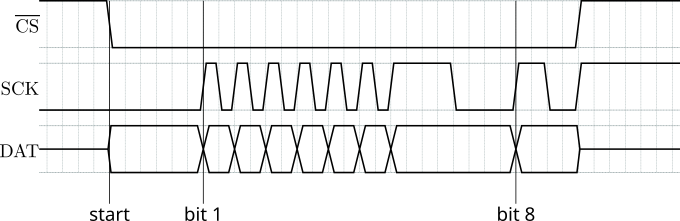
Another example is this timing diagram, showing tri-state states:
!CS = 1111|'start'000000        00000000000000000000        00001111111
SCK = 0000        000000|'bit 1'10101010101011110000|'bit 8'11001111111
DAT = ZZZZ        ::::::        !:!:!:!:!:!:!:::::::        !:::ZZZZZZZ
Which renders as:
License
GNU GPL-3.


Download files
Download the file for your platform. If you're not sure which to choose, learn more about installing packages.
Source Distribution
File details
Details for the file digtick-0.0.2.tar.gz.
File metadata
- Download URL: digtick-0.0.2.tar.gz
- Upload date:
- Size: 79.2 kB
- Tags: Source
- Uploaded using Trusted Publishing? No
- Uploaded via: twine/6.1.0 CPython/3.13.7
File hashes
| Algorithm | Hash digest | |
|---|---|---|
| SHA256 |
cc2b2a50394cb0b6b2b38223a0e886bbe2b37ef32073754f9876972a1ad1c515
|
|
| MD5 |
64319c5c46c787f91c9f38a1352f2873
|
|
| BLAKE2b-256 |
34886cbae670097f6cc0fcd69fd6bf127b9cc14f63c5abcbd93a0b78d32d294a
|






