
DimFort


Static unit-consistency checker for Fortran. You annotate declarations with the dimension they should carry, and DimFort verifies that assignments, arithmetic, intrinsics, and procedure calls all line up. Annotations are written as a custom Doxygen command, so a single source of truth feeds both the checker and your generated documentation.
real :: velocity  !< @unit{m/s}
real :: mass      !< @unit{kg}
real :: force     !< @unit{kg*m/s^2}

force = mass * velocity            ! diagnosed: force unit is kg, expected kg*m/s^2
Status: beta. Usable, tested, and proven against real-world Fortran — but the
@unit{}format, diagnostic codes, and LSP protocol are not frozen yet and may still shift between0.xreleases. End-to-end, these work today: the annotation scanner, attachment pass, the full H-series checker (H001–H004 + H010 + H020–H023 polymorphism family), the unit-algebra wrapper rules forLOG/EXP-tagged quantities (D1.2 – D1.6), parametric polymorphism over function signatures ('a,'b, … with Hindley-Milner unification per call site), per-rule provenance traces, intrinsics, user-defined function and subroutine calls, derived-type field access, rational**exponents, multi-file worksets, a workspace-aware LSP server with live-edit diagnostics, per-surface hover (call / subroutine / expression, each Short or Detailed with a formal-vs-actual pairing or full unit-algebra trace), inlay hints, go-to-definition, code actions, completion, and a CLI that accepts files or directories.
Adopting on an existing codebase
Many real-world Fortran projects already document units in inline
comments — ! [m/s], ! horizontal wind speed [m/s],
! tracer ratio [m^2: Andreas 1989]. DimFort can read your
project's own convention, so you don't rewrite every declaration
just to opt in.
Add a few lines to dimfort.toml:
[parser.unit_comments]
unit = [
  { open = "@unit{", close = "}" },
  { open = "[",      close = "]" },
]
Now ! [m/s] is a first-class unit annotation, checked exactly
like @unit{m/s}. The same table handles unit_assume,
unit_affine, and their nonunit / nonunit_assume /
nonunit_affine filter lists — each on its own key with its own
opt-in. Full recipe in
Bringing DimFort to an existing codebase.
Quick tour
Want a hands-on look first? demos/tour.f90
is a short, self-contained file that exercises the most common
DimFort diagnostics on a textbook moist-thermodynamics routine.
dimfort check --scale demos/tour.f90
demos/README.md
walks through the output line by line.
In an editor, the same analysis renders in an always-visible side panel that follows the cursor — every position shows the unit-algebra tree for the current expression, alongside the diagnostics on that line, the variables in scope, and the modules in scope:
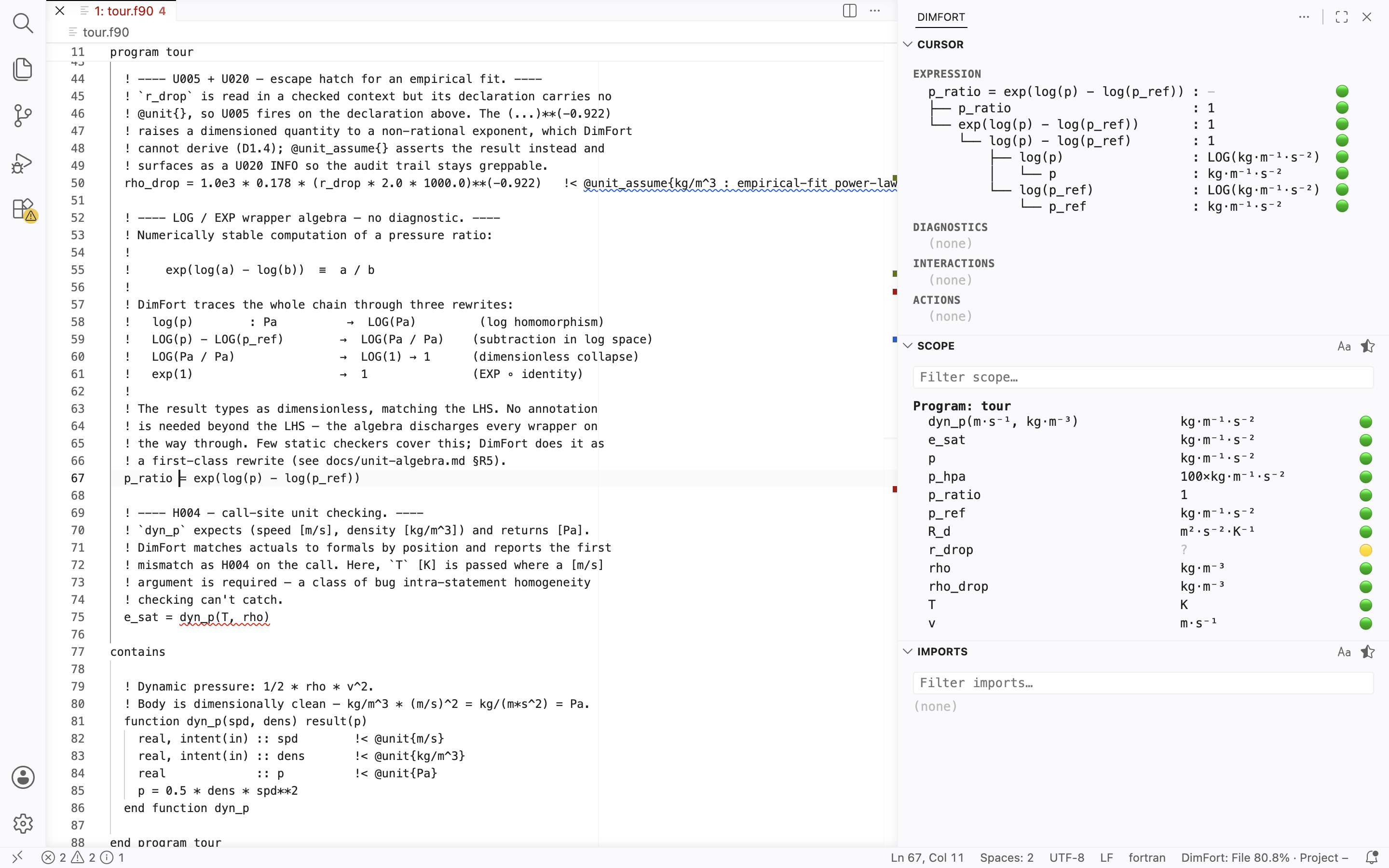
The footer bar carries per-file and project-wide coverage tiers (verified / unverified / violation / unparsed), updated live as you edit. See Editor integrations below.
Install
DimFort is published on PyPI as dimfort. It's a CLI tool with an
entry point — install it isolated with pipx:
pipx install 'dimfort[lsp]'      # includes the LSP server extra
dimfort --version
The [lsp] extra pulls in pygls; omit it if you only want the
CLI and never the language server.
On macOS with Homebrew Python: PEP 668 makes plain
pip installrefuse to touch Homebrew's site-packages. Usepipxas shown above, or install into a virtual environment. Ifpipx installsays "command not found", runbrew install pipx && pipx ensurepathfirst.
From source (contributors)
The canonical workflow uses uv and
the committed uv.lock:
git clone https://github.com/ArrialVictor/DimFort.git
cd DimFort
uv sync --extra dev --extra lsp
The plain-pip equivalent also works — see CONTRIBUTING.md for both
paths.
Requirements
Python ≥ 3.11. The Fortran parser
(tree-sitter-fortran)
is a runtime dependency installed automatically — no external
compiler or subprocess needed for parsing. For .F90 files using
CPP #-directives DimFort shells out to the system cpp if
[parser] cpp_defines or [parser] include_paths are set in
dimfort.toml.
Usage
dimfort init -t climate              # generate dimfort.toml from a discipline template
dimfort check path/to/file.f90       # check a single file
dimfort check path/to/project/       # walk a directory recursively
dimfort check path/...  --summary    # also print a per-file H/U count table
dimfort interactions <var> path/...  # cross-site unit report for one variable
dimfort lsp                          # start the language server (stdio)
dimfort init writes a project dimfort.toml that opens with the SI core
(inherited from the shipped defaults) and includes all five discipline
templates — selected ones uncommented and ready to use, the rest commented
out in the same file for in-file discovery. Pass -t climate,astronomy
to activate multiple, --bare to skip templates entirely, or --dry-run
to print the result without writing.
interactions is an on-demand query: for a single variable it lists every
site that reads or writes it across the workset — grouped into Declaration /
Write / Read / Undetermined, each with the unit that site implies — and
emits X001 when two sites make conflicting unit claims (which the
per-statement check can't see, since it fires even on unannotated variables).
Exit code is 0 if no errors, 1 if any error-severity diagnostic was
produced, 2 for usage / file / config errors. Warnings alone do not
fail the run.
Diagnostics are grouped by code prefix: H for homogeneity,
U for annotation-pipeline problems, S for the opt-in
scale family, X for cross-site findings from dimfort interactions, and P for parser-skipped regions. Full
reference (every code, severity, and trigger) lives at
docs/reference/diagnostic-codes.md.
The unit-algebra rule taxonomy (D1.1–D1.7) that classifies
why a homogeneity diagnostic fires is at
docs/reference/unit-algebra.md.
Doxygen integration
Annotations are read from Doxygen comments (!> / !! preceding a
declaration, or !< trailing it) and apply to every variable in a
declaration list. To make Doxygen render them natively, add one line to
your Doxyfile:
ALIASES += "unit{1}=\par Unit:^^\1"
Module-level constants follow the same notation:
!> @brief Gravitational acceleration.
!> @unit{m/s^2}
real, parameter :: g = 9.81
For quantities that live in log or exp space, wrap the inner unit
with LOG(...) or EXP(...):
real :: lp     !< @unit{LOG(Pa)}
real :: tau    !< @unit{EXP(K)}
DimFort tracks the wrapper through arithmetic: LOG(psol) + LOG(pref)
types as LOG(Pa²), LOG(p1) − LOG(p2) collapses to dimensionless
via the pressure-ratio rule, and EXP(LOG(psol) − ...) cancels back
to Pa. The full rule set is in
docs/reference/unit-algebra.md.
Trace mode
Pass --trace to see the rule chain behind each diagnostic:
dimfort check --trace src/my_module.f90
Each error / warning prints the firing rule IDs (R3.1, R5.6, …)
under the message. The VSCode extension surfaces the same trace in
hover, and lets you pick the depth per surface — call, subroutine,
expression — via the DimFort: Hover settings (Short for a
one-line summary, Detailed for the full unit-algebra tree with
per-row 🟢/🟡/🔴 markers).
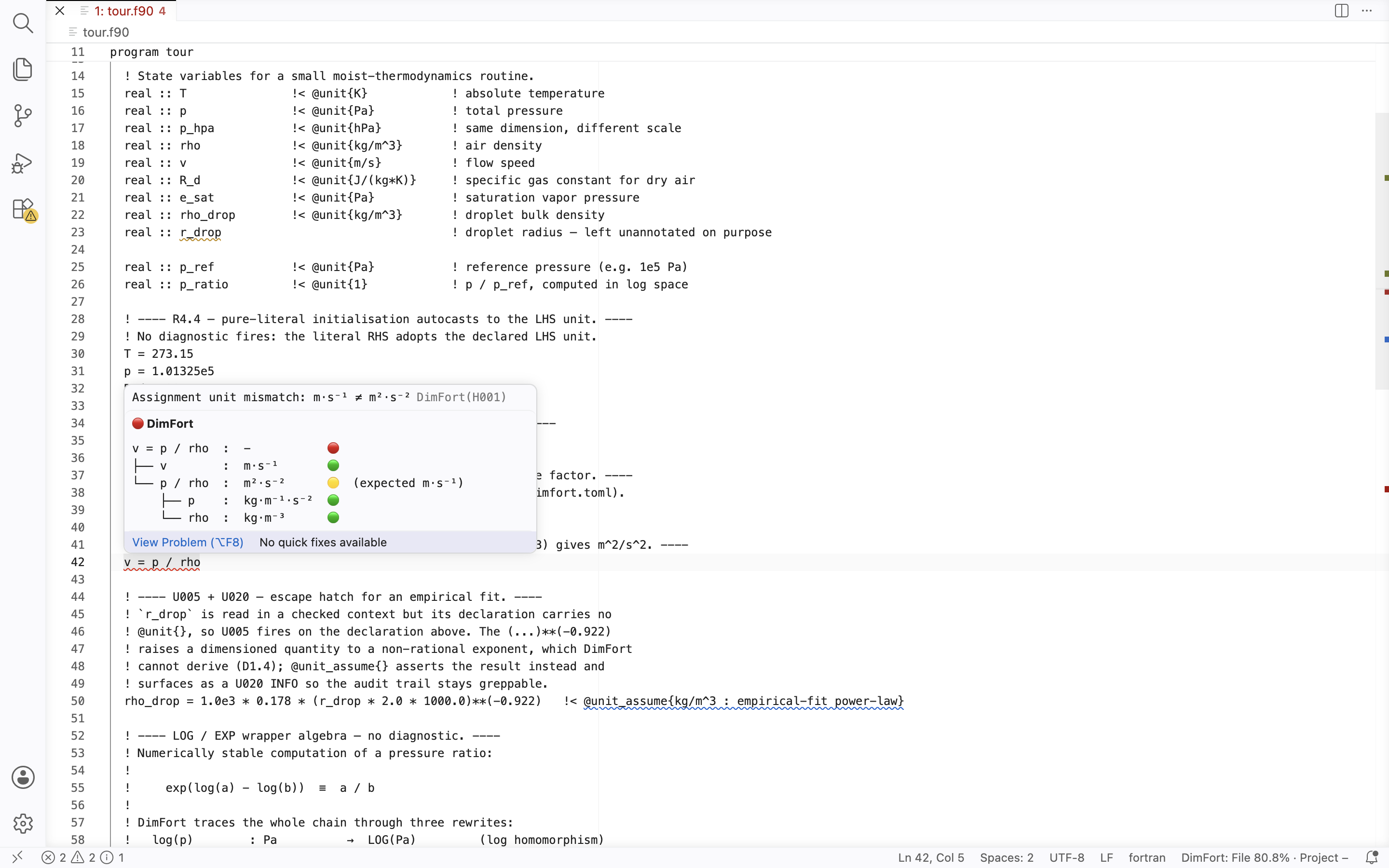
See docs/editor-integration/hover-ui.md for the layout spec.
See docs/reference/annotations.md for the full reference: unit-expression grammar, continuation-line forms, declaration lists, and the diagnostic codes the scanner can emit.
Documentation
- Annotations
- Usage details — and the bringing DimFort to an existing codebase guide (configurable comment delimiters, added 0.2.2).
- Language server
- Releases
Editor integrations
Thin LSP clients that wire dimfort lsp into common editors. Each
lives in its own repository, releases on its own cadence, and shares
the same feature surface — diagnostics, hover, inlay hints,
go-to-definition, code actions, completion, plus the side panel
(cursor-following unit-algebra tree + scope / imports tables) and the
coverage layer introduced in 0.2.4–0.2.5: per-line gutter / tint
showing what DimFort knows about each line, and a footer bar with
file + workspace coverage statistics.
- VSCode —
on the Visual Studio Marketplace
(
ext install arrialvictor.dimfort-vscode) and on Open VSX for VSCodium / Cursor / Theia / code-server. - Neovim (≥ 0.11) — install via any plugin manager pointing at the repo.
- Emacs —
install via straight.el / use-package or manual
require. Works with both eglot (Emacs 29+) and lsp-mode.
License
See LICENSE.
1 maintainer

Metadata
1 maintainer
Release files for dimfort 0.2.7.3
For a detailed explanation of source distributions (sdists) and built distributions (wheels), please see the package formats documentation.
Source distribution (sdist)
| File | Size | Uploaded | |
|---|---|---|---|
| dimfort-0.2.7.3.tar.gz | 19.2 MB | Details |
Built distribution (wheel)
| File | Interpreter | ABI | Platform | Reset |
|---|---|---|---|---|
| dimfort-0.2.7.3-py3-none-any.whl | Python 3 | none | any | Details |
Total release size: 19.6 MB
Release files / dimfort-0.2.7.3.tar.gz
| Download URL | dimfort-0.2.7.3.tar.gz |
|---|---|
| Size | 19.2 MB |
| Tags | Source |
|
SHA-256 checksum How to use checksums |
ef4b389574e39b0e09107f9895d6c026e3cce2734f503ffa1ffa70d0e1a88a17
|
|
BLAKE2b-256 checksum How to use checksums |
c02b7ea77ffea4322895e7c1dee45ed63bba0c9195ec458fd513b9d14e294c5c
|
| Upload date | |
|
Uploaded using Trusted Publishing? What is trusted publishing? |
Yes |
| Uploaded via |
twine/6.1.0 CPython/3.13.12
|
Provenance
Provenance describes where a file came from. On PyPI, provenance is shared via attestations, which provide a verifiable record of the build or publishing details. View details, limitations and caveats.


PyPI Publish Attestation
PyPI verified that this artifact, at this checksum, originated from the publisher listed below.
Signed by GitHub Actions, verified by PyPI on Jul 4, 2026.
Transparency logRelease files / dimfort-0.2.7.3-py3-none-any.whl
| Download URL | dimfort-0.2.7.3-py3-none-any.whl |
|---|---|
| Size | 396.9 kB |
| Tags | Python 3 |
|
SHA-256 checksum How to use checksums |
a8643c87f5e7e5349da2e8ddc91dda3ffa559b6d209b1104fed89614c9e4c52b
|
|
BLAKE2b-256 checksum How to use checksums |
614b48b17661a2a31e7440b14e34791b821ff61074e7b1904965b26ed70adda7
|
| Upload date | |
|
Uploaded using Trusted Publishing? What is trusted publishing? |
Yes |
| Uploaded via |
twine/6.1.0 CPython/3.13.12
|
Provenance
Provenance describes where a file came from. On PyPI, provenance is shared via attestations, which provide a verifiable record of the build or publishing details. View details, limitations and caveats.
PyPI Publish Attestation
PyPI verified that this artifact, at this checksum, originated from the publisher listed below.
Signed by GitHub Actions, verified by PyPI on Jul 4, 2026.
Transparency log













