
Static treemap bitmaps for directory trees, displayed as inline terminal images

Project description
dirplot






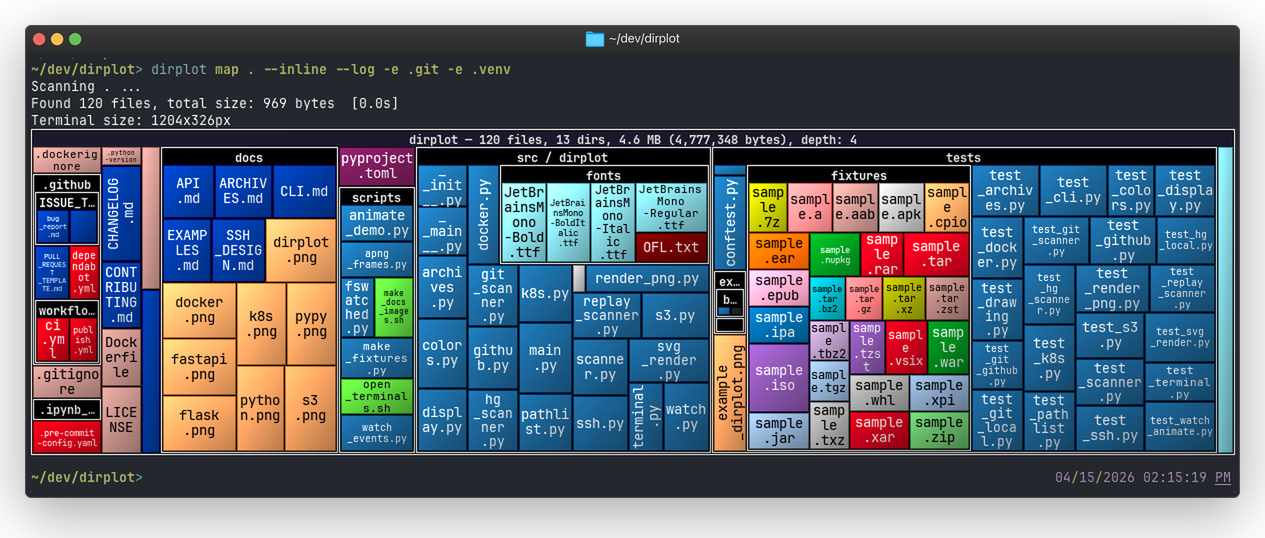
dirplot creates static nested treemap images for directory trees. It can display them in the system image viewer (default, works everywhere) or inline inside the terminal using the iTerm2 inline image protocol or the Kitty graphics protocol — detected automatically at runtime.
Each rectangle represents a file; its area is proportional to the file size and its colour is determined by the file extension. Directories are shown as labelled, nested containers, mirroring the actual hierarchy.
Installation
# As a standalone tool (recommended)
uv tool install dirplot

# Into the current environment
pip install dirplot
From GitHub
# As a standalone tool
uv tool install git+https://github.com/deeplook/dirplot

# Into the current environment
pip install git+https://github.com/deeplook/dirplot
Usage
# Use it before installing it
uvx run dirplot --help

# Show dirplot for the current directory (opens image in system viewer)
dirplot .

# Save to a file without displaying
dirplot . --output dirplot.png --no-show

# Display inline (protocol auto-detected: iTerm2, Kitty, Ghostty)
dirplot . --inline

# Exclude directories
dirplot . --exclude .venv --exclude .git

# Use a different colormap and larger directory labels
dirplot . --colormap Set2 --font-size 18

# Render at a fixed resolution instead of terminal size
dirplot . --size 1920x1080 --output dirplot.png --no-show

# Don't apply cushion shading — makes tiles look flat
dirplot . --no-cushion
Options
| Flag | Short | Default | Description |
|---|---|---|---|
--output |
-o |
— | Save PNG to this path |
--show/--no-show |
--show |
Display the image after rendering | |
--inline |
off | Display in terminal (protocol auto-detected) | |
--legend/--no-legend |
--no-legend |
Show file-extension colour legend | |
--font-size |
-s |
12 |
Directory label font size in pixels |
--colormap |
-c |
tab20 |
Matplotlib colormap for unknown extensions |
--exclude |
-e |
— | Path to exclude (repeatable) |
--size |
terminal size | Output dimensions as WIDTHxHEIGHT (e.g. 1920x1080) |
|
--header/--no-header |
--header |
Print info lines before rendering | |
--cushion/--no-cushion |
--cushion |
Apply van Wijk cushion shading for a raised 3-D look |
Inline Display
The --inline flag renders the image directly in the terminal. The protocol is auto-detected at runtime: terminals that support the Kitty graphics protocol use APC chunks (ESC_G…); all others fall back to the iTerm2 inline image protocol (ESC]1337;File=…).
| Terminal | Platform | Protocol |
|---|---|---|
| iTerm2 | macOS | iTerm2 |
| WezTerm | macOS, Linux, Windows | iTerm2 |
| Warp | macOS, Linux | iTerm2 |
| Hyper | macOS, Linux, Windows | iTerm2 |
| Kitty | macOS, Linux | Kitty |
| Ghostty | macOS, Linux | Kitty |
The default mode (--show, no --inline) opens the PNG in the system viewer (open on macOS, xdg-open on Linux) and works in any terminal.
Note:
--inlinedoes not work in AI coding assistants such as Claude Code, Cursor, or GitHub Copilot Chat. These tools intercept terminal output as plain text and do not implement any graphics protocol, so the escape sequences are either stripped or displayed as garbage. Use the default--showmode (system viewer) or--outputto save the PNG to a file instead.
How It Works
- Scans the directory tree, collecting each file's path, extension, and size in bytes.
- Computes a squarified dirplot layout recursively — directories allocate space for their children.
- Renders to a PNG via Pillow (PIL) at the exact pixel dimensions of the current terminal window (detected via
TIOCGWINSZ), or at a custom size when--sizeis given. - Displays via the system image viewer (
open/xdg-open) or inline via an auto-detected terminal graphics protocol (iTerm2 or Kitty).
Extension colours come from the GitHub Linguist language colour table (~500 known extensions). Unknown extensions fall back to an MD5-stable colour derived from the chosen --colormap. File label text is automatically black or white depending on the background luminance.
Development
git clone https://github.com/deeplook/dirplot
cd dirplot
make test
See CONTRIBUTING.md for full details.
Platform Support
This tool has been developed and tested on macOS. Linux should work, and Windows support is untested. Feedback and bug reports from Linux and Windows users are very welcome — please open an issue on GitHub.
License
Release history Release notifications | RSS feed


Download files
Download the file for your platform. If you're not sure which to choose, learn more about installing packages.
Source Distribution
Built Distribution
Filter files by name, interpreter, ABI, and platform.
If you're not sure about the file name format, learn more about wheel file names.
Copy a direct link to the current filters
File details
Details for the file dirplot-0.1.1.tar.gz.
File metadata
- Download URL: dirplot-0.1.1.tar.gz
- Upload date:
- Size: 921.8 kB
- Tags: Source
- Uploaded using Trusted Publishing? No
- Uploaded via: uv/0.10.8 {"installer":{"name":"uv","version":"0.10.8","subcommand":["publish"]},"python":null,"implementation":{"name":null,"version":null},"distro":{"name":"macOS","version":null,"id":null,"libc":null},"system":{"name":null,"release":null},"cpu":null,"openssl_version":null,"setuptools_version":null,"rustc_version":null,"ci":null}
File hashes
| Algorithm | Hash digest | |
|---|---|---|
| SHA256 |
77250fd3c56440ea443c60b63b85505345357bfee4333388f57d77106c0b2e7f
|
|
| MD5 |
a0906dad9ac686616c86d4019be48068
|
|
| BLAKE2b-256 |
5abd2476f642bea25ef645655699ba7f5f8bd27356c6e910d8b3b6c2fc9085f6
|
File details
Details for the file dirplot-0.1.1-py3-none-any.whl.
File metadata
- Download URL: dirplot-0.1.1-py3-none-any.whl
- Upload date:
- Size: 551.3 kB
- Tags: Python 3
- Uploaded using Trusted Publishing? No
- Uploaded via: uv/0.10.8 {"installer":{"name":"uv","version":"0.10.8","subcommand":["publish"]},"python":null,"implementation":{"name":null,"version":null},"distro":{"name":"macOS","version":null,"id":null,"libc":null},"system":{"name":null,"release":null},"cpu":null,"openssl_version":null,"setuptools_version":null,"rustc_version":null,"ci":null}
File hashes
| Algorithm | Hash digest | |
|---|---|---|
| SHA256 |
d5b2442b1af15503b03d23f52d26ab1952dbf85e2c5bea1e93e1e8160c3341e5
|
|
| MD5 |
009ab298b1eb98ddf4a5bb4725dc54a1
|
|
| BLAKE2b-256 |
e43879a0a081ea823b25c24b1382246edcb564ce828157c75dcc319c1985d15f
|






