
Static treemap bitmaps for directory trees and archives, displayed as inline terminal images

Project description
dirplot






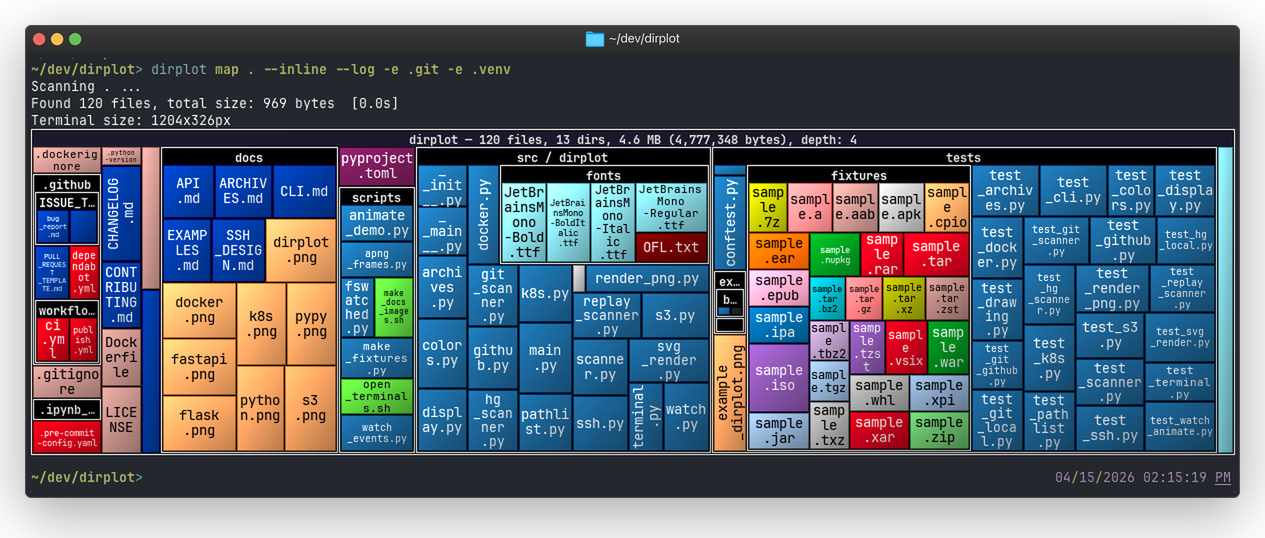
dirplot creates static nested treemap images for directory trees. It can display them in the system image viewer (default, works everywhere) or inline inside the terminal using the iTerm2 inline image protocol or the Kitty graphics protocol — detected automatically at runtime.
Features
- Directories are shown as labelled, nested containers, mirroring the actual hierarchy.
- Squarified treemap layout — rectangles are as square as possible for easy reading.
- File area proportional to file size; colour determined by file extension.
- ~500 known extensions mapped to colours from the GitHub Linguist table; unknown extensions get an MD5-stable colour from any Matplotlib colormap.
- Label colour (black/white) chosen automatically based on background luminance.
- Output resolution matches the current terminal window pixel size (via
TIOCGWINSZ), or a customWIDTHxHEIGHT. - Van Wijk cushion shading gives tiles a raised 3-D appearance (optional).
- SVG output (
--format svgor--output file.svg) produces a fully self-contained interactive file: CSS hover highlight, a JavaScript floating tooltip panel, and cushion shading via a gradient — no external dependencies. - Display via system image viewer or inline in the terminal (iTerm2 and Kitty protocols, auto-detected).
- Save output to a PNG or SVG file with
--output. - Exclude paths with
--exclude(repeatable). - Works on macOS, Linux, and Windows; WSL2 fully supported.
- Scan remote hosts over SSH (
pip install "dirplot[ssh]"), AWS S3 buckets (pip install "dirplot[s3]"), any public/private GitHub repository, running Docker containers, or Kubernetes pods — all without extra dependencies beyond the respective CLI/SDK. See EXAMPLES.md.
How It Works
- Scans the directory tree, collecting each file's path, extension, and size in bytes.
- Computes a squarified dirplot layout recursively — directories allocate space for their children.
- Renders to a PNG via Pillow (PIL) at the exact pixel dimensions of the current terminal window (detected via
TIOCGWINSZ), or at a custom size when--sizeis given. - Displays via the system image viewer (
open/xdg-open) or inline via an auto-detected terminal graphics protocol (iTerm2 or Kitty).
Extension colours come from the GitHub Linguist language colour table (~500 known extensions). Unknown extensions fall back to an MD5-stable colour derived from the chosen --colormap. File label text is automatically black or white depending on the background luminance.
Installation
Note: The recommended install methods below use uv. See the uv installation guide if you don't have it yet. Alternatively, use
pip install dirplotto install without uv.
# As a standalone tool (recommended)
uv tool install dirplot

# Into the current environment
pip install dirplot
From GitHub
# As a standalone tool
uv tool install git+https://github.com/deeplook/dirplot

# Into the current environment
pip install git+https://github.com/deeplook/dirplot
Platform Support
This tool has been developed and tested on macOS and is CI-tested on Linux and Windows (Python 3.10+). The default --show mode works on all platforms. The --inline mode requires a terminal emulator that supports the iTerm2 or Kitty graphics protocol; on Windows, only WezTerm currently qualifies. WSL2 is treated as Linux and has full support. Feedback and bug reports are welcome — please open an issue on GitHub.
Usage
# Use it before installing it
uvx dirplot --help

# Show dirplot for the current directory (opens image in system viewer)
dirplot map .

# Show current terminal size in characters and pixels
dirplot termsize

# Save to a file without displaying
dirplot map . --output dirplot.png --no-show

# Display inline (protocol auto-detected: iTerm2, Kitty, Ghostty)
dirplot map . --inline

# Exclude directories
dirplot map . --exclude .venv --exclude .git

# Use a different colormap and larger directory labels
dirplot map . --colormap Set2 --font-size 18

# Render at a fixed resolution instead of terminal size
dirplot map . --size 1920x1080 --output dirplot.png --no-show

# Don't apply cushion shading — makes tiles look flat
dirplot map . --no-cushion

# Save as an interactive SVG (hover highlight + floating tooltip)
dirplot map . --output treemap.svg --no-show

# Force SVG format explicitly
dirplot map . --format svg --output treemap.svg --no-show
Options
| Flag | Short | Default | Description |
|---|---|---|---|
--output |
-o |
— | Save to this path (PNG or SVG) |
--format |
-f |
auto | Output format: png or svg. Auto-detected from --output extension |
--show/--no-show |
--show |
Display the image after rendering | |
--inline |
off | Display in terminal (protocol auto-detected; PNG only) | |
--legend/--no-legend |
--no-legend |
Show file-extension colour legend | |
--font-size |
-s |
12 |
Directory label font size in pixels |
--colormap |
-c |
tab20 |
Matplotlib colormap for unknown extensions |
--exclude |
-e |
— | Path to exclude (repeatable) |
--size |
terminal size | Output dimensions as WIDTHxHEIGHT (e.g. 1920x1080) |
|
--header/--no-header |
--header |
Print info lines before rendering | |
--cushion/--no-cushion |
--cushion |
Apply van Wijk cushion shading for a raised 3-D look | |
--log/--no-log |
--no-log |
Use log of file sizes for layout, making small files more visible | |
--github-token |
$GITHUB_TOKEN |
GitHub personal access token for private repos or higher rate limits |
Inline Display
The --inline flag renders the image directly in the terminal. The protocol is auto-detected at runtime: terminals that support the Kitty graphics protocol use APC chunks (ESC_G…); all others fall back to the iTerm2 inline image protocol (ESC]1337;File=…).
| Terminal | Platform | Protocol |
|---|---|---|
| iTerm2 | macOS | iTerm2 |
| WezTerm | macOS, Linux, Windows | Kitty & iTerm2 |
| Warp | macOS, Linux | iTerm2 |
| Hyper | macOS, Linux, Windows | iTerm2 |
| Kitty | macOS, Linux | Kitty |
| Ghostty | macOS, Linux | Kitty |
The default mode (--show, no --inline) opens the PNG in the system viewer (open on macOS, xdg-open on Linux, system default on Windows) and works in any terminal.
Windows note: Common Windows shells (PowerShell, cmd, Git Bash) and terminal emulators (Windows Terminal, ConEmu) do not support any inline image protocol.
--inlinewill silently produce no output in these environments. WezTerm is currently the only mainstream Windows terminal emulator that supports inline image rendering (via the Kitty graphics protocol). WSL2 is treated as Linux and has full support.
Tip: In terminals that support inline images (iTerm2, WezTerm, Kitty, etc.), the rendered image can often be dragged directly out of the terminal window and dropped into another application or saved to the desktop — no
--outputneeded. This drag-and-drop behaviour is not guaranteed across all terminals.
Note:
--inlinedoes not work in AI coding assistants such as Claude Code, Cursor, or GitHub Copilot Chat. These tools intercept terminal output as plain text and do not implement any graphics protocol, so the escape sequences are either stripped or displayed as garbage. Use the default--showmode (system viewer) or--outputto save the PNG to a file instead. Or use Pi where it is easily added as an extension.
Archives
dirplot can read local archive files (zip, tar, 7z, rar, and ZIP-based formats like jar, whl, apk) as treemap inputs without unpacking them. See ARCHIVES.md for supported formats, dependencies, and RAR setup on macOS.
dirplot map project.zip
dirplot map release.tar.gz --depth 2
dirplot map app.jar
Remote Access
dirplot can scan SSH hosts, AWS S3 buckets, GitHub repositories, running Docker containers, and Kubernetes pods. See EXAMPLES.md for full details.
pip install "dirplot[ssh]"   # SSH via paramiko
pip install "dirplot[s3]"    # AWS S3 via boto3
                             # GitHub: no extra dependency needed
                             # Docker: only the docker CLI required
                             # Kubernetes: only kubectl required
dirplot map ssh://alice@prod.example.com/var/www
dirplot map s3://noaa-ghcn-pds --no-sign
dirplot map github://pallets/flask
dirplot map docker://my-container:/app
dirplot map pod://my-pod:/app
dirplot map pod://my-pod@staging:/app
GitHub authentication
Public repositories work without a token but are subject to GitHub's unauthenticated rate limit of 60 requests/hour. A personal access token raises this to 5,000 requests/hour and is required for private repositories.
Pass a token via the --github-token flag or the GITHUB_TOKEN environment variable:
# via flag
dirplot map github://my-org/private-repo --github-token ghp_…

# via environment variable (also picked up automatically by the CLI)
export GITHUB_TOKEN=ghp_…
dirplot map github://my-org/private-repo
To create a token: GitHub → Settings → Developer settings → Personal access tokens → Generate new token (see GitHub's guide). For read-only treemap access the public_repo scope (or no scope for public repos) is sufficient; add repo for private repositories.
Python API
The public API is small — build_tree, create_treemap, create_treemap_svg, and the display helpers:
from pathlib import Path
from dirplot import build_tree, create_treemap, create_treemap_svg

root = build_tree(Path("/path/to/project"))

# PNG — returns a BytesIO containing PNG bytes
buf = create_treemap(root, width_px=1920, height_px=1080, colormap="tab20", cushion=True)
Path("treemap.png").write_bytes(buf.read())

# SVG — returns a BytesIO containing UTF-8 SVG bytes
# Includes CSS hover highlight, a JS floating tooltip, and cushion gradient shading.
buf = create_treemap_svg(root, width_px=1920, height_px=1080, cushion=True)
Path("treemap.svg").write_bytes(buf.read())
To open a PNG in the system image viewer or display it inline in the terminal:
from dirplot.display import display_window, display_inline

buf.seek(0)
display_window(buf)   # system viewer (works everywhere)

buf.seek(0)
display_inline(buf)   # inline in terminal (iTerm2 / Kitty / WezTerm)
In a Jupyter notebook, PNG output renders automatically via PIL:
from PIL import Image
buf = create_treemap(root, width_px=1280, height_px=720)
Image.open(buf)  # Jupyter renders PIL images automatically via _repr_png_()
Development
git clone https://github.com/deeplook/dirplot
cd dirplot
make test
See CONTRIBUTING.md for full details.
License
Release history Release notifications | RSS feed


Download files
Download the file for your platform. If you're not sure which to choose, learn more about installing packages.
Source Distribution
Built Distribution
Filter files by name, interpreter, ABI, and platform.
If you're not sure about the file name format, learn more about wheel file names.
Copy a direct link to the current filters
File details
Details for the file dirplot-0.3.0.tar.gz.
File metadata
- Download URL: dirplot-0.3.0.tar.gz
- Upload date:
- Size: 1.8 MB
- Tags: Source
- Uploaded using Trusted Publishing? No
- Uploaded via: uv/0.10.9 {"installer":{"name":"uv","version":"0.10.9","subcommand":["publish"]},"python":null,"implementation":{"name":null,"version":null},"distro":{"name":"macOS","version":null,"id":null,"libc":null},"system":{"name":null,"release":null},"cpu":null,"openssl_version":null,"setuptools_version":null,"rustc_version":null,"ci":null}
File hashes
| Algorithm | Hash digest | |
|---|---|---|
| SHA256 |
6427ce3ccc12de01ce2ffd24b3c7420ddb54530f0bb7a3c74f4ee29f3e6d3b8c
|
|
| MD5 |
f22290a6aa800ea4dcda4a2ba5eab8a8
|
|
| BLAKE2b-256 |
432541159e1f95d4129dd30350bba64530bd4db854993fc016c1857f87c77422
|
File details
Details for the file dirplot-0.3.0-py3-none-any.whl.
File metadata
- Download URL: dirplot-0.3.0-py3-none-any.whl
- Upload date:
- Size: 576.9 kB
- Tags: Python 3
- Uploaded using Trusted Publishing? No
- Uploaded via: uv/0.10.9 {"installer":{"name":"uv","version":"0.10.9","subcommand":["publish"]},"python":null,"implementation":{"name":null,"version":null},"distro":{"name":"macOS","version":null,"id":null,"libc":null},"system":{"name":null,"release":null},"cpu":null,"openssl_version":null,"setuptools_version":null,"rustc_version":null,"ci":null}
File hashes
| Algorithm | Hash digest | |
|---|---|---|
| SHA256 |
f92682ea2723a094372cb8c9441e1f96e63d4290c388dbefccc0926021839338
|
|
| MD5 |
82565ca540d9d9b55748372a56293355
|
|
| BLAKE2b-256 |
2a4c77c39902a621c3eaaedb9ea07e57bf740f563ea7eeb2d8bc0d45d4d21072
|






