
diskpack
State-of-the-art circle packing for arbitrary polygons.
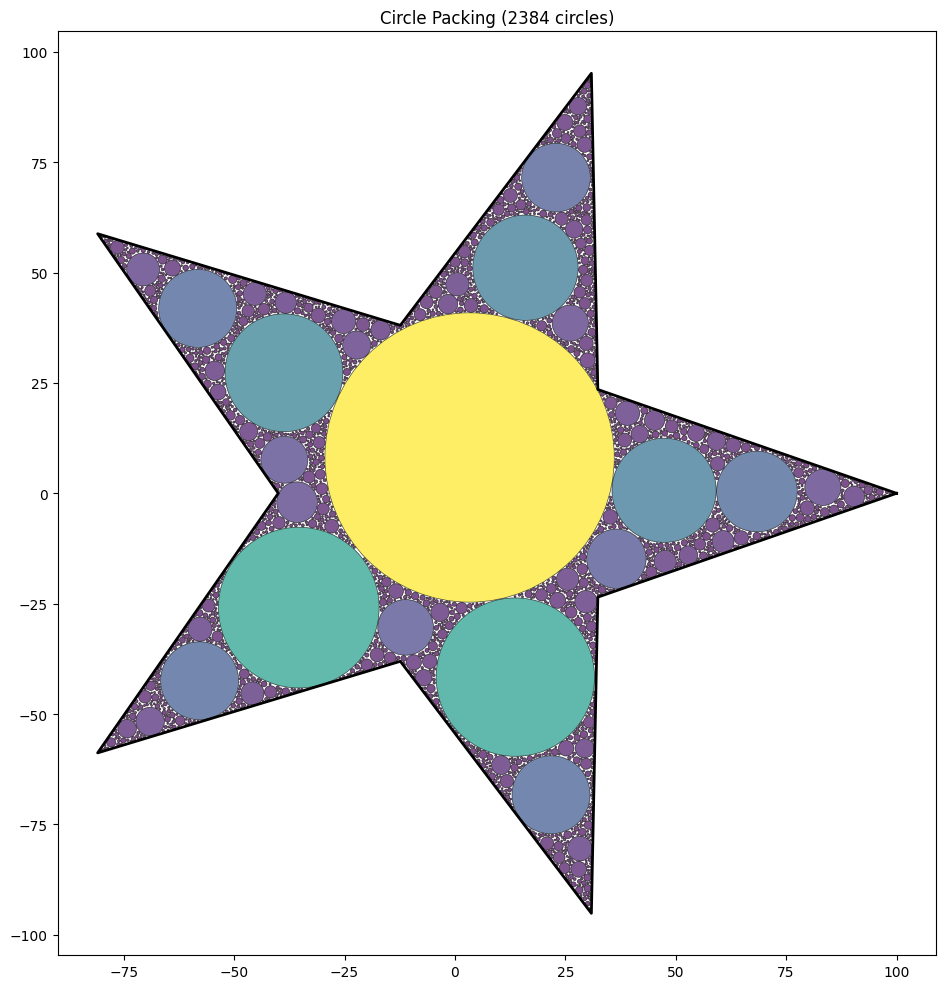
pip install diskpack
Quick Start
from diskpack import CirclePacker, PackingConfig
import numpy as np

# Define a polygon (list of vertices)
square = [(0, 0), (100, 0), (100, 100), (0, 100)]

# Pack circles
packer = CirclePacker([np.array(square)])
circles = packer.pack()

# Each circle is (x, y, radius)
for x, y, r in circles:
    print(f"Circle at ({x:.1f}, {y:.1f}) with radius {r:.1f}")
Choosing the Right Algorithm
diskpack offers multiple packing strategies optimized for different use cases:
| Shape Type | Best Algorithm | Config |
|---|---|---|
| Simple convex (square, rectangle) | Random sampling | PackingConfig() |
| Complex/concave (star, L-shape, letters) | Hybrid | PackingConfig(use_hybrid_packing=True) |
| Fixed radius, need speed | Hex grid | PackingConfig(fixed_radius=5.0) |
| Fixed radius, need density | Hybrid | PackingConfig(fixed_radius=5.0, use_hybrid_packing=True) |
| Artistic/organic look | Random | PackingConfig(use_hex_grid=False) |
Simple Convex Shapes
For squares, rectangles, and other simple convex polygons, the default random sampling achieves the best density:
config = PackingConfig(
    padding=0.5,
    min_radius=1.0,
)
packer = CirclePacker([np.array(square)], config)
circles = packer.pack()  # ~86% density
Complex/Concave Shapes
For stars, L-shapes, letters, and other complex polygons, hybrid mode fills corners better:
star = [
    (50, 0), (61, 35), (98, 35), (68, 57), (79, 91),
    (50, 70), (21, 91), (32, 57), (2, 35), (39, 35)
]

config = PackingConfig(
    use_hybrid_packing=True,
    verbose=True,  # See progress
)
packer = CirclePacker([np.array(star)], config)
circles = packer.pack()  # ~69% density (vs ~64% for random)
Fixed Radius Packing
When all circles must have the same radius:
# Fastest (hex grid pattern)
config = PackingConfig(fixed_radius=3.0)

# Densest (fills corners)
config = PackingConfig(fixed_radius=3.0, use_hybrid_packing=True)

# Organic look (random placement)
config = PackingConfig(fixed_radius=3.0, use_hex_grid=False)
Tuning Hybrid Mode
Hybrid mode works in three phases:
- Phase 1 (Large): Place circles ≥ 50% of max possible radius
- Phase 2 (Medium): Place circles ≥ 25% of max possible radius
- Phase 3 (Small): Fill remaining gaps with random sampling
You can tune the thresholds:
# For complex shapes with tight corners (default)
config = PackingConfig(
    use_hybrid_packing=True,
    hybrid_large_threshold=0.5,   # Phase 1: >= 50% of max
    hybrid_medium_threshold=0.25, # Phase 2: >= 25% of max
)

# For simpler shapes (more circles in Phases 1-2)
config = PackingConfig(
    use_hybrid_packing=True,
    hybrid_large_threshold=0.3,   # Phase 1: >= 30% of max
    hybrid_medium_threshold=0.1,  # Phase 2: >= 10% of max
)
Performance Tuning
config = PackingConfig(
    # Stop after N consecutive failed attempts (higher = more circles, slower)
    max_failed_attempts=200,

    # Points sampled per iteration (higher = better placements, more memory)
    sample_batch_size=50,

    # Minimum gap between circles
    padding=1.5,

    # Smallest circle to place
    min_radius=1.0,
)
API Reference
CirclePacker
CirclePacker(polygons: List[np.ndarray], config: PackingConfig = None)
polygons: List of polygon vertices. Each polygon is an Nx2 numpy array.config: Optional configuration. Uses defaults if not provided.
Methods:
pack() -> List[Tuple[float, float, float]]: Pack circles and return as listgenerate() -> Iterator[Tuple[float, float, float]]: Generate circles lazily
PackingConfig
See the docstring for full parameter documentation:
from diskpack import PackingConfig
help(PackingConfig)
Benchmark Results
Tested on 100×100 unit shapes:
| Shape | Algorithm | Time | Circles | Density |
|---|---|---|---|---|
| Square | Random | 0.31s | 49 | 86.4% |
| Square | Hybrid | 0.15s | 55 | 85.8% |
| L-Shape | Random | 0.68s | 50 | 76.9% |
| L-Shape | Hybrid | 0.30s | 36 | 79.3% |
| Star | Random | 0.32s | 39 | 64.4% |
| Star | Hybrid | 0.25s | 27 | 68.8% |
Fixed radius (r=3.0) on Star shape:
| Algorithm | Time | Circles | Density |
|---|---|---|---|
| Hex Grid | 0.007s | 40 | 40.0% |
| Hybrid | 0.08s | 51 | 51.0% |
Comparison with Shapely
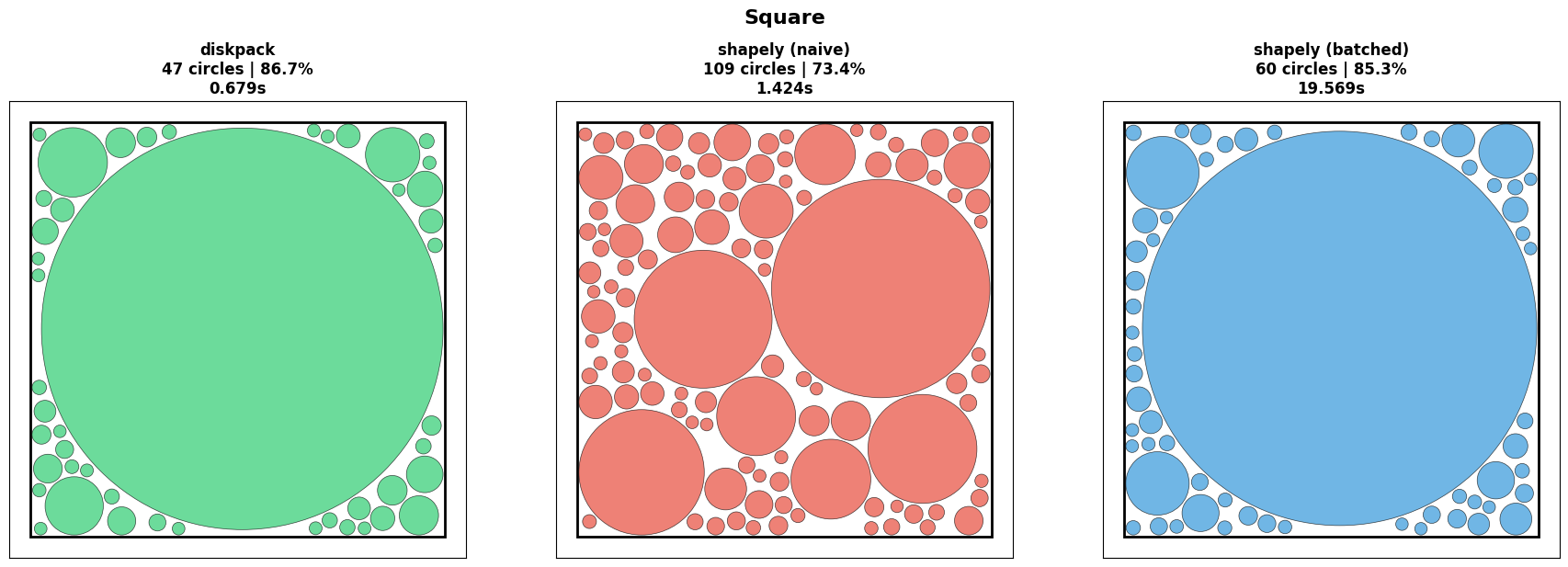
diskpack achieves higher density and faster packing compared to the Python Shapely library. Where Shapely creates Python objects for each point-in-polygon and distance check, diskpack uses vectorized NumPy operations with precomputed edge geometry and batched candidate evaluation — sampling many points per iteration and greedily placing the largest valid circle. A grid-based spatial index keeps collision detection O(1) as circle count grows. The batched Shapely method can approach similar density by also picking the best of many candidates, but at ~30x the runtime due to per-point object overhead.
| Method | Circles | Density | Time |
|---|---|---|---|
| diskpack | 47 | 86.7% | 0.679s |
| shapely (naive) | 109 | 73.4% | 1.424s |
| shapely (batched) | 60 | 85.3% | 19.569s |
See demo/diskpack_comparisons.ipynb for the full benchmark notebook.
License
MIT
1 maintainer

Metadata
1 maintainer
Release files for diskpack 0.10.3
For a detailed explanation of source distributions (sdists) and built distributions (wheels), please see the package formats documentation.
Source distribution (sdist)
| File | Size | Uploaded | Provenance | Actions |
|---|---|---|---|---|
| diskpack-0.10.3.tar.gz | 16.4 kB | With provenance | Details for diskpack-0.10.3.tar.gz |
Built distribution (wheel)
| File | Interpreter | ABI | Platform | Actions Reset |
|---|---|---|---|---|
| diskpack-0.10.3-py3-none-any.whl | Python 3 | none | any | Details for diskpack-0.10.3-py3-none-any.whl |
Total release size: 31.8 kB
Release files / diskpack-0.10.3.tar.gz
| Download URL | diskpack-0.10.3.tar.gz |
|---|---|
| Size | 16.4 kB |
| Tags | Source |
|
SHA-256 checksum How to use checksums |
cd8157301e902a8225419a3042f3277910a104b0a4492e3448d44e8da018dd55
|
|
BLAKE2b-256 checksum How to use checksums |
e246a63a912d99e0c876c277680b36593e2dbdc1630670807ab1370189550e08
|
| Upload date | |
|
Uploaded using Trusted Publishing? What is trusted publishing? |
Yes |
| Uploaded via |
twine/6.1.0 CPython/3.13.12
|
Provenance
Provenance describes where a file came from. On PyPI, provenance is shared via attestations, which provide a verifiable record of the build or publishing details. View details, limitations and caveats.


PyPI Publish Attestation
PyPI verified that this artifact, at this checksum, originated from the publisher listed below.
Signed by GitHub Actions, verified by PyPI on Jun 24, 2026.
Transparency logRelease files / diskpack-0.10.3-py3-none-any.whl
| Download URL | diskpack-0.10.3-py3-none-any.whl |
|---|---|
| Size | 15.3 kB |
| Tags | Python 3 |
|
SHA-256 checksum How to use checksums |
332ecae18b34dfe7626f330ede8f5490629e4c7d1b8cdfa729827cb132423323
|
|
BLAKE2b-256 checksum How to use checksums |
7e3c98d04ec7d40a0e7a2406ddb08d846c137e7fb1523dba115cec588fa45330
|
| Upload date | |
|
Uploaded using Trusted Publishing? What is trusted publishing? |
Yes |
| Uploaded via |
twine/6.1.0 CPython/3.13.12
|
Provenance
Provenance describes where a file came from. On PyPI, provenance is shared via attestations, which provide a verifiable record of the build or publishing details. View details, limitations and caveats.
PyPI Publish Attestation
PyPI verified that this artifact, at this checksum, originated from the publisher listed below.
Signed by GitHub Actions, verified by PyPI on Jun 24, 2026.
Transparency logSecurity for diskpack 0.10.3
Provenance
Provenance describes where a file came from. On PyPI, provenance is shared via attestations, which provide a verifiable record of the build or publishing details. View details, limitations and caveats.
Full provenance
All 2 files in this release have been uploaded with provenance metadata.
Attestation for diskpack-0.10.3.tar.gz
PyPI Publish Attestation
PyPI verified that this artifact, at this checksum, originated from the publisher listed below.
Signed by GitHub Actions, verified by PyPI on Jun 24, 2026.
Transparency logA note on package security
PyPI is a repository for distributing packages, not a service for auditing them. While third-party security researchers and our staff do their best to detect and remove malicious packages, PyPI cannot guarantee the quality, security or suitability of any given package.
To learn more about protecting yourself from malicious actors, visit our package security documentation.














