







Django Doom Panel

The Django admin panel that matters.
Every project eventually asks the same question: Can it run DOOM?
Yes. Yes it can.
dj-doom-panel adds a fully playable DOOM panel to your Django admin interface. It sits right there in your sidebar, between your cache monitor and your Celery queue. Just where it belongs.
Installation
pip install dj-doom-panel dj-control-room
Add to INSTALLED_APPS:
INSTALLED_APPS = [
    ...
    "dj_control_room_base",
    "dj_doom_panel",
    "dj_control_room",
    ...
]
Add to urls.py:
from django.urls import path, include

urlpatterns = [
    path("admin/dj-doom-panel/", include("dj_doom_panel.urls")),
    path("admin/dj-control-room-base/", include("dj_control_room_base.urls")),
    path("admin/dj-control-room/", include("dj_control_room.urls")),
    path("admin/", admin.site.urls),
]
That's it. Open your admin. Click DOOM. Enjoy.
Configuration
All settings are optional. Add a DJ_DOOM_PANEL_SETTINGS dict to your Django settings to override any of them:
DJ_DOOM_PANEL_SETTINGS = {
    "ALLOWED_GROUPS": [],
    "REQUIRE_SUPERUSER": False,
    "LOAD_DEFAULT_CSS": True,
    "EXTRA_CSS": [],
}
Access control
By default, any staff user can access the panel. The permission settings below are inherited from dj-control-room-base.
| Setting | Type | Default | Description |
|---|---|---|---|
ALLOWED_GROUPS |
list[str] |
[] |
Django group names allowed to access the panel. An empty list means any staff user is allowed. |
REQUIRE_SUPERUSER |
bool |
False |
Restrict the panel to superusers only. |
Superusers always bypass group checks.
CSS
| Setting | Type | Default | Description |
|---|---|---|---|
LOAD_DEFAULT_CSS |
bool |
True |
Load the shared design-system stylesheet. Set to False if a parent template already loads it. |
EXTRA_CSS |
list[str] |
[] |
Additional stylesheets to inject. Relative paths resolve through Django's staticfiles; absolute URLs are used as-is. |
Requirements
- Django 4.2+
- dj-control-room >= 1.3.0
- dj-control-room-base >= 1.0.0
How it works
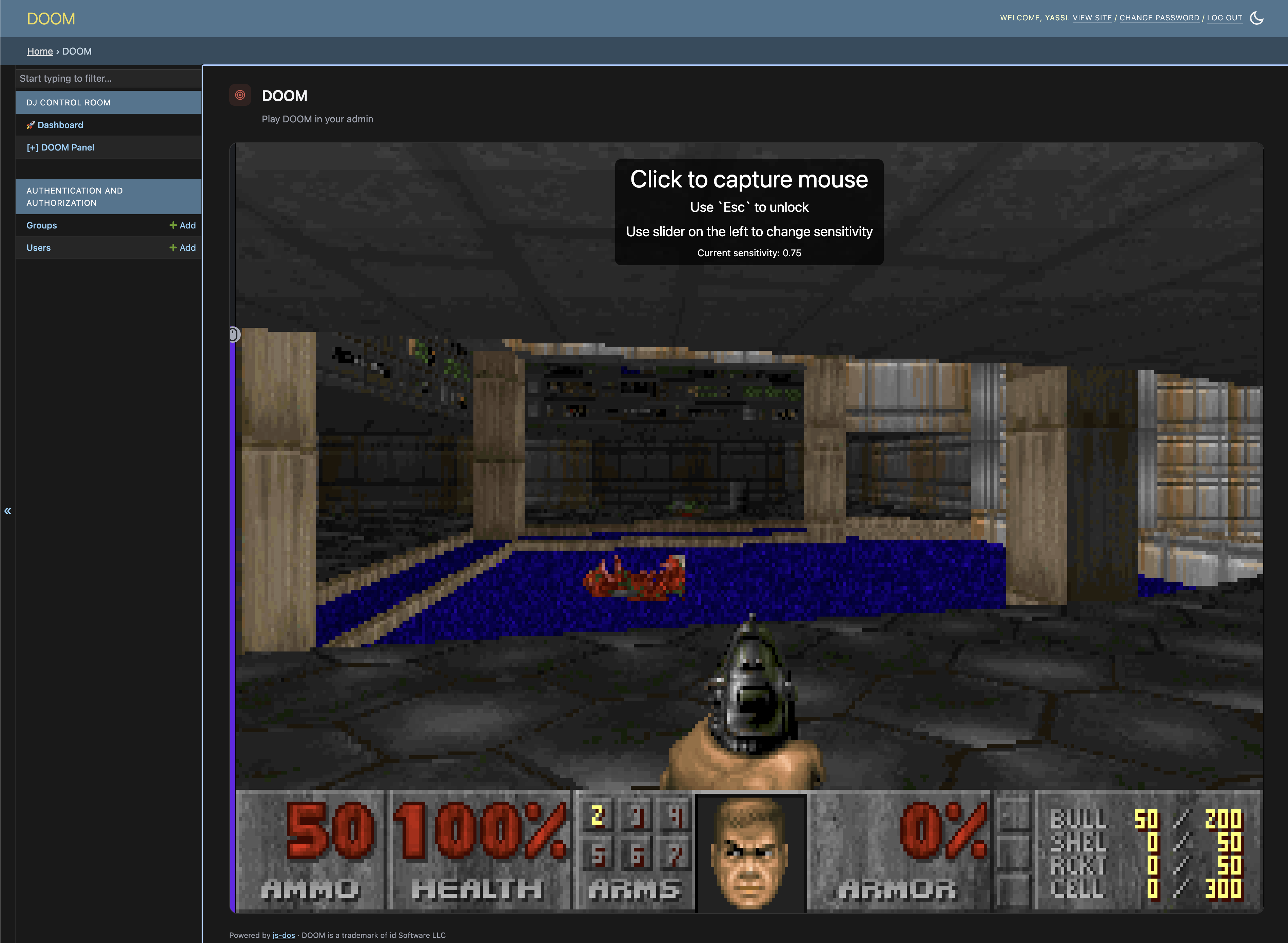
The panel embeds js-dos v8 — a DOSBox-powered DOS emulator that runs in the browser via WebAssembly. The game bundle (DOOM1.WAD + DOOM.EXE) is the DOOM shareware v1.9, which id Software has explicitly made freely distributable.
The bundle is shipped as a Django static file and served directly from your own application — no external CDN required. The game works offline once your static files are collected.
CSP note
If your project uses a Content Security Policy, you'll need to allow v8.js-dos.com for script-src, style-src, connect-src, and worker-src (for the js-dos emulator runtime itself).
Controls
| Key | Action |
|---|---|
| Arrow keys | Move / turn |
| Ctrl | Fire |
| Space | Use / open |
| Shift | Run |
| Alt + Arrow | Strafe |
Part of the dj-control-room ecosystem
dj-doom-panel is a plugin for dj-control-room, a framework for building operational admin panels in Django. Other panels in the ecosystem include cache inspection, Redis monitoring, and Celery queue management.
All critically important, of course.
License
MIT
DOOM is a trademark of id Software LLC. dj-doom-panel is an unaffiliated fan project and is not endorsed by id Software, ZeniMax, or Bethesda.
1 maintainer

Metadata
1 maintainer
Release files for dj-doom-panel 0.2.0
For a detailed explanation of source distributions (sdists) and built distributions (wheels), please see the package formats documentation.
Source distribution (sdist)
| File | Size | Uploaded | |
|---|---|---|---|
| dj_doom_panel-0.2.0.tar.gz | 2.1 MB | Details |
Built distribution (wheel)
| File | Interpreter | ABI | Platform | Reset |
|---|---|---|---|---|
| dj_doom_panel-0.2.0-py3-none-any.whl | Python 3 | none | any | Details |
Total release size: 4.3 MB
Release files / dj_doom_panel-0.2.0.tar.gz
| Download URL | dj_doom_panel-0.2.0.tar.gz |
|---|---|
| Size | 2.1 MB |
| Tags | Source |
|
SHA-256 checksum How to use checksums |
0445fe3861d9c23ff3f47ab095795167671d59a5f5c375b011d5c628c42cea6b
|
|
BLAKE2b-256 checksum How to use checksums |
4ddb404327ae37a24d50e0f489f45039739983f897d16417c0919b6fc2ed65be
|
| Upload date | |
|
Uploaded using Trusted Publishing? What is trusted publishing? |
Yes |
| Uploaded via |
twine/7.0.0 CPython/3.13.14
|
Provenance
Provenance describes where a file came from. On PyPI, provenance is shared via attestations, which provide a verifiable record of the build or publishing details. View details, limitations and caveats.


PyPI Publish Attestation
PyPI verified that this artifact, at this checksum, originated from the publisher listed below.
Signed by GitHub Actions, verified by PyPI on Aug 11, 2026.
Transparency logRelease files / dj_doom_panel-0.2.0-py3-none-any.whl
| Download URL | dj_doom_panel-0.2.0-py3-none-any.whl |
|---|---|
| Size | 2.1 MB |
| Tags | Python 3 |
|
SHA-256 checksum How to use checksums |
b687b40901fb1d01f42035da4de0fa7b116a63aede48fe1cd3e7b9bd7bba9ce3
|
|
BLAKE2b-256 checksum How to use checksums |
a04efd611ee4f1f13df6515478f2fffcfb3587d30dcfcea99f28f8970968c92d
|
| Upload date | |
|
Uploaded using Trusted Publishing? What is trusted publishing? |
Yes |
| Uploaded via |
twine/7.0.0 CPython/3.13.14
|
Provenance
Provenance describes where a file came from. On PyPI, provenance is shared via attestations, which provide a verifiable record of the build or publishing details. View details, limitations and caveats.
PyPI Publish Attestation
PyPI verified that this artifact, at this checksum, originated from the publisher listed below.
Signed by GitHub Actions, verified by PyPI on Aug 11, 2026.
Transparency log













