
Play DOOM in your Django admin
Verified details
These details have been verified by PyPIProject links
GitHub Statistics
Maintainers

Project description







Django Doom Panel

The Django admin panel that matters.
Every project eventually asks the same question: Can it run DOOM?
Yes. Yes it can.
dj-doom-panel adds a fully playable DOOM panel to your Django admin interface. It sits right there in your sidebar, between your cache monitor and your Celery queue. Just where it belongs.
Installation
pip install dj-doom-panel dj-control-room
Add to INSTALLED_APPS:
INSTALLED_APPS = [
    ...
    "dj_control_room_base",
    "dj_doom_panel",
    "dj_control_room",
    ...
]
Add to urls.py:
from django.urls import path, include

urlpatterns = [
    path("admin/dj-doom-panel/", include("dj_doom_panel.urls")),
    path("admin/dj-control-room-base/", include("dj_control_room_base.urls")),
    path("admin/dj-control-room/", include("dj_control_room.urls")),
    path("admin/", admin.site.urls),
]
That's it. Open your admin. Click DOOM.
Configuration
All settings are optional. Add a DJ_DOOM_PANEL_SETTINGS dict to your Django settings to override any of them:
DJ_DOOM_PANEL_SETTINGS = {
    "ALLOWED_GROUPS": [],
    "REQUIRE_SUPERUSER": False,
    "LOAD_DEFAULT_CSS": True,
    "EXTRA_CSS": [],
}
Access control
By default, any staff user can access the panel. The permission settings below are inherited from dj-control-room-base.
| Setting | Type | Default | Description |
|---|---|---|---|
ALLOWED_GROUPS |
list[str] |
[] |
Django group names allowed to access the panel. An empty list means any staff user is allowed. |
REQUIRE_SUPERUSER |
bool |
False |
Restrict the panel to superusers only. |
Superusers always bypass group checks.
CSS
| Setting | Type | Default | Description |
|---|---|---|---|
LOAD_DEFAULT_CSS |
bool |
True |
Load the shared design-system stylesheet. Set to False if a parent template already loads it. |
EXTRA_CSS |
list[str] |
[] |
Additional stylesheets to inject. Relative paths resolve through Django's staticfiles; absolute URLs are used as-is. |
Requirements
- Django 4.2+
- dj-control-room >= 1.3.0
- dj-control-room-base >= 1.0.0
How it works
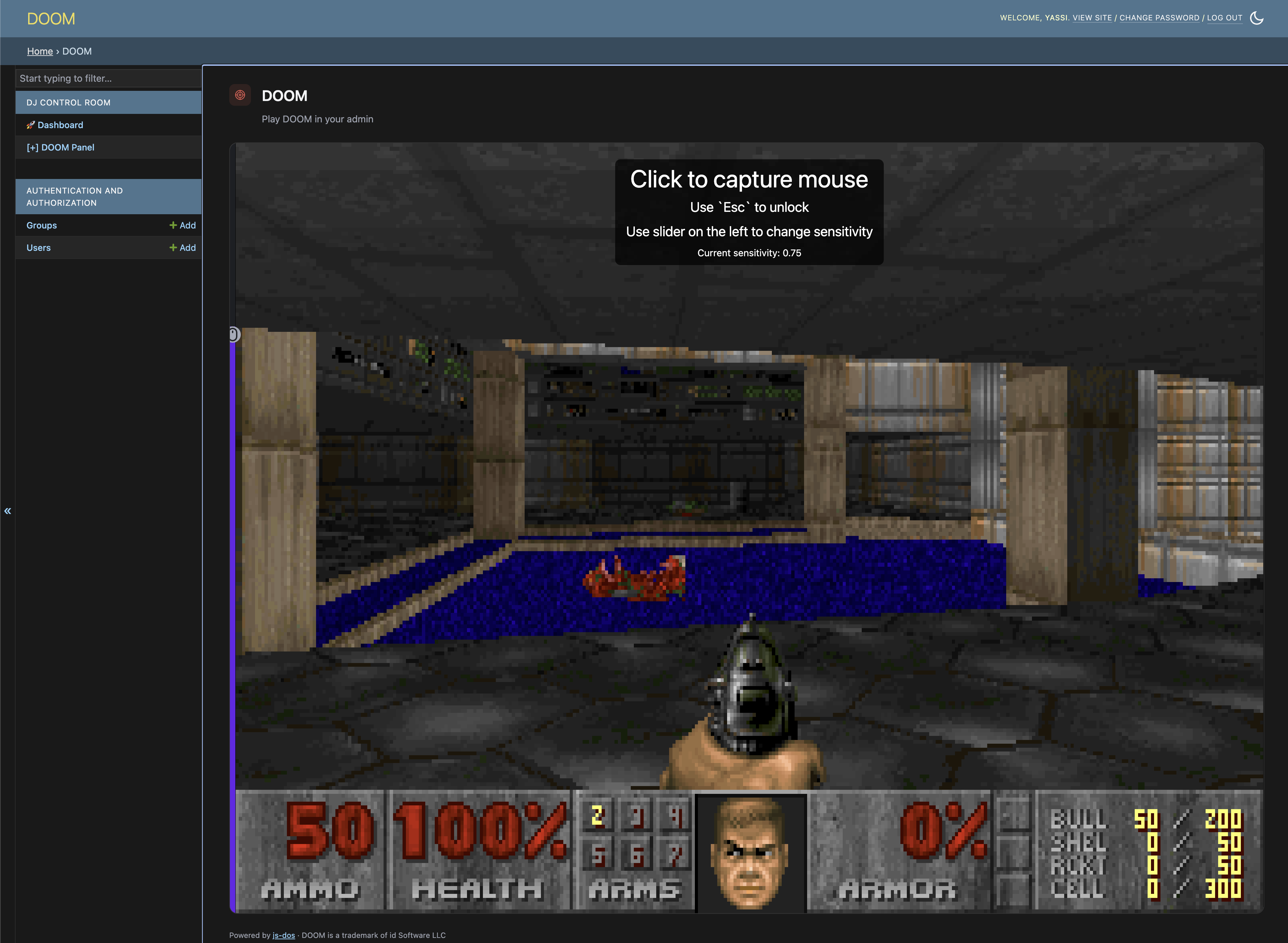
The panel embeds js-dos v8 — a DOSBox-powered DOS emulator that runs in the browser via WebAssembly. The game bundle (DOOM1.WAD + DOOM.EXE) is the DOOM shareware v1.9, which id Software has explicitly made freely distributable.
The bundle is shipped as a Django static file and served directly from your own application — no external CDN required. The game works offline once your static files are collected.
CSP note
If your project uses a Content Security Policy, you'll need to allow v8.js-dos.com for script-src, style-src, connect-src, and worker-src (for the js-dos emulator runtime itself).
Controls
| Key | Action |
|---|---|
| Arrow keys | Move / turn |
| Ctrl | Fire |
| Space | Use / open |
| Shift | Run |
| Alt + Arrow | Strafe |
Part of the dj-control-room ecosystem
dj-doom-panel is a plugin for dj-control-room, a framework for building operational admin panels in Django. Other panels in the ecosystem include cache inspection, Redis monitoring, and Celery queue management.
All critically important, of course.
License
MIT
DOOM is a trademark of id Software LLC. dj-doom-panel is an unaffiliated fan project and is not endorsed by id Software, ZeniMax, or Bethesda.
Project details
Verified details
These details have been verified by PyPIProject links
GitHub Statistics
Maintainers
Release history Release notifications | RSS feed


Download files
Download the file for your platform. If you're not sure which to choose, learn more about installing packages.
Source Distribution
Built Distribution
Filter files by name, interpreter, ABI, and platform.
If you're not sure about the file name format, learn more about wheel file names.
Copy a direct link to the current filters
File details
Details for the file dj_doom_panel-0.1.1.tar.gz.
File metadata
- Download URL: dj_doom_panel-0.1.1.tar.gz
- Upload date:
- Size: 2.1 MB
- Tags: Source
- Uploaded using Trusted Publishing? Yes
- Uploaded via: twine/6.1.0 CPython/3.13.12
File hashes
| Algorithm | Hash digest | |
|---|---|---|
| SHA256 |
31f80b249581b5567475fd26435b5159d5122560f89e4bb8457d252df18ee2ba
|
|
| MD5 |
4a399fe525004dd781e43e05cbe9dc7e
|
|
| BLAKE2b-256 |
976b91518f51f8c2825613f938ceb8e9e2c721b994dc18d1f86238777160b8cd
|
Provenance
The following attestation bundles were made for dj_doom_panel-0.1.1.tar.gz:
Publisher:
python-publish.yml on yassi/dj-doom-panel
-
Statement:
-
Statement type:
https://in-toto.io/Statement/v1 -
Predicate type:
https://docs.pypi.org/attestations/publish/v1 -
Subject name:
dj_doom_panel-0.1.1.tar.gz -
Subject digest:
31f80b249581b5567475fd26435b5159d5122560f89e4bb8457d252df18ee2ba - Sigstore transparency entry: 1920530073
- Sigstore integration time:
-
Permalink:
yassi/dj-doom-panel@b61d13835b48c9fa8a5e51ad26ed681257e45b88 -
Branch / Tag:
refs/tags/0.1.1 - Owner: https://github.com/yassi
-
Access:
public
-
Token Issuer:
https://token.actions.githubusercontent.com -
Runner Environment:
github-hosted -
Publication workflow:
python-publish.yml@b61d13835b48c9fa8a5e51ad26ed681257e45b88 -
Trigger Event:
release
-
Statement type:
File details
Details for the file dj_doom_panel-0.1.1-py3-none-any.whl.
File metadata
- Download URL: dj_doom_panel-0.1.1-py3-none-any.whl
- Upload date:
- Size: 2.1 MB
- Tags: Python 3
- Uploaded using Trusted Publishing? Yes
- Uploaded via: twine/6.1.0 CPython/3.13.12
File hashes
| Algorithm | Hash digest | |
|---|---|---|
| SHA256 |
1f822c9113375cb7f8ea565287c8ae74d18fc51702930f086717b209a7c59c26
|
|
| MD5 |
d849ea71d8ee3561efeffbbfdee756e9
|
|
| BLAKE2b-256 |
b0e8866394f233f624fceb48cb6e1e7b79246a6fb479ce5ed3d735e10b0b5159
|
Provenance
The following attestation bundles were made for dj_doom_panel-0.1.1-py3-none-any.whl:
Publisher:
python-publish.yml on yassi/dj-doom-panel
-
Statement:
-
Statement type:
https://in-toto.io/Statement/v1 -
Predicate type:
https://docs.pypi.org/attestations/publish/v1 -
Subject name:
dj_doom_panel-0.1.1-py3-none-any.whl -
Subject digest:
1f822c9113375cb7f8ea565287c8ae74d18fc51702930f086717b209a7c59c26 - Sigstore transparency entry: 1920530190
- Sigstore integration time:
-
Permalink:
yassi/dj-doom-panel@b61d13835b48c9fa8a5e51ad26ed681257e45b88 -
Branch / Tag:
refs/tags/0.1.1 - Owner: https://github.com/yassi
-
Access:
public
-
Token Issuer:
https://token.actions.githubusercontent.com -
Runner Environment:
github-hosted -
Publication workflow:
python-publish.yml@b61d13835b48c9fa8a5e51ad26ed681257e45b88 -
Trigger Event:
release
-
Statement type:






