
A Django Admin panel for browsing and inspecting Redis keys
Verified details
These details have been verified by PyPIProject links
GitHub Statistics
Maintainers

Project description
Django Redis Panel





A Django Admin panel for browsing, inspecting, and managing Redis keys. No postgres/mysql models or changes required.
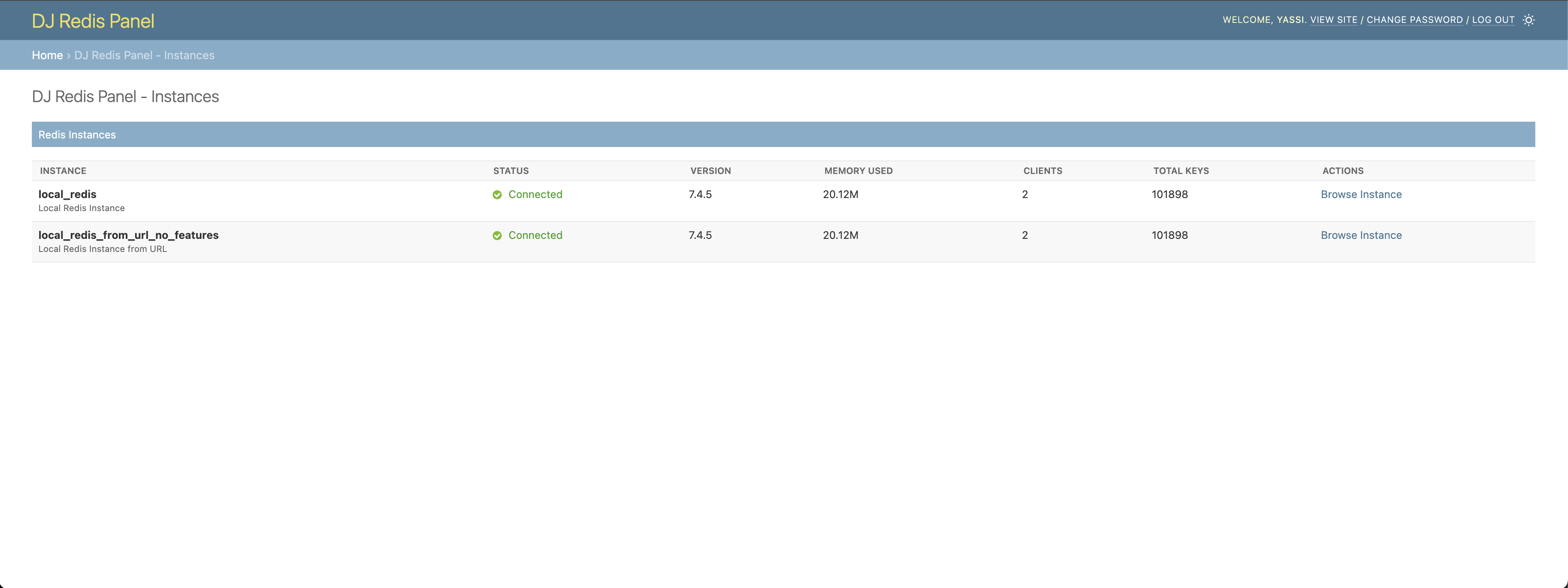
Docs
https://yassi.github.io/dj-redis-panel/
Features
- 🔍 Browse Redis Keys: Search and filter Redis keys with pattern matching
- 📊 Instance Overview: Monitor Redis instance metrics and database statistics
- 🔧 Key Management: View, edit, and delete Redis keys with support for all data types
- 🎛️ Feature Toggles: Granular control over operations (delete, edit, TTL updates)
- 📄 Pagination: Both traditional page-based and cursor-based pagination support
- 🎨 Django Admin Integration: Seamless integration with Django admin styling and dark mode
- 🔒 Permission Control: Respects Django admin permissions and staff-only access
- 🌐 Multiple Instances: Support for multiple Redis instances with different configurations
Supported Redis Data Types
- String: View and edit string values
- List: Browse list items with pagination
- Set: View set members
- Hash: Display hash fields and values in a table format
- Sorted Set: Show sorted set members with scores
Project Structure
dj-redis-panel/
├── dj_redis_panel/          # Main package
│   ├── templates/           # Django templates
│   ├── redis_utils.py       # Redis utilities
│   ├── views.py            # Django views
│   └── urls.py             # URL patterns
├── example_project/         # Example Django project
├── tests/                   # Test suite
├── images/                  # Screenshots for README
└── requirements.txt         # Development dependencies
Requirements
- Python 3.9+
- Django 4.2+
- Redis 4.0+
- redis-py 4.0+
Screenshots
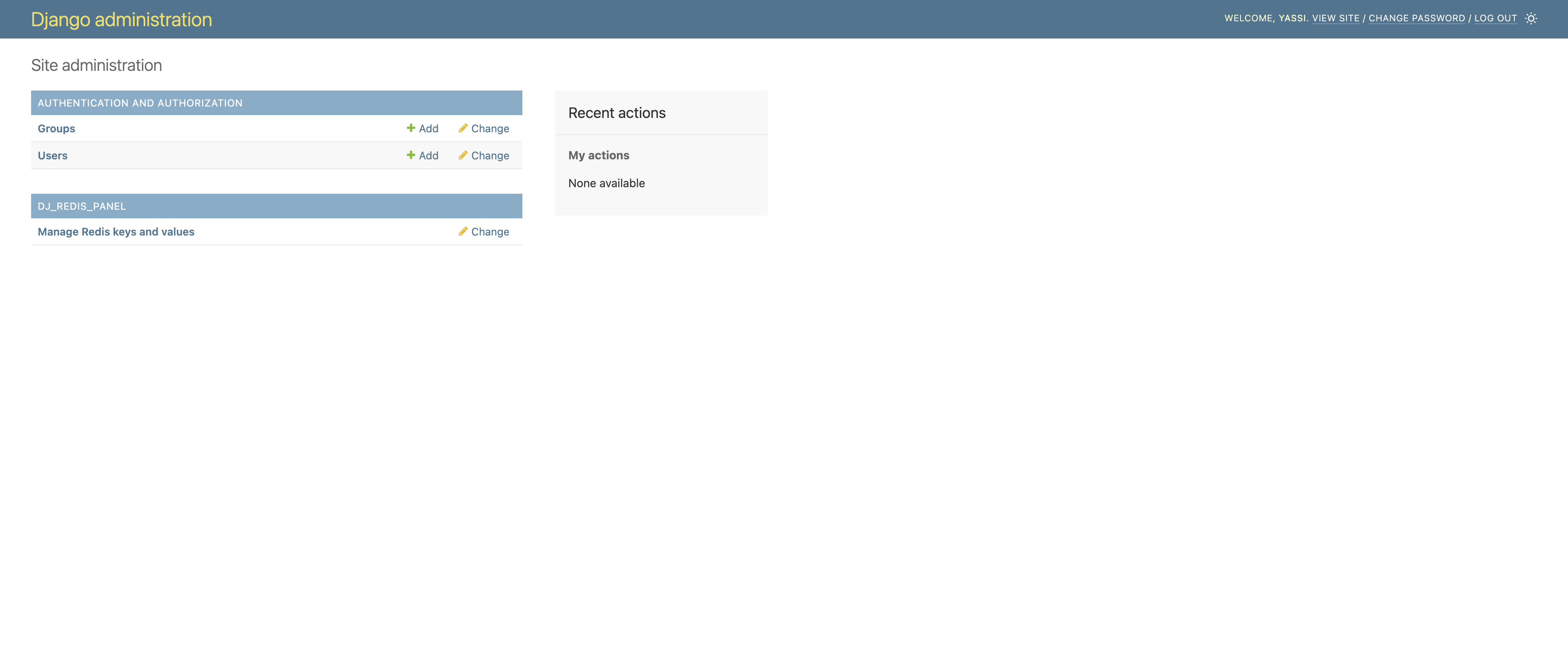
Django Admin Integration
Seamlessly integrated into your Django admin interface. A new section for dj-redis-panel will appear in the same places where your models appear.
NOTE: This application does not actually introduce any model or migrations.
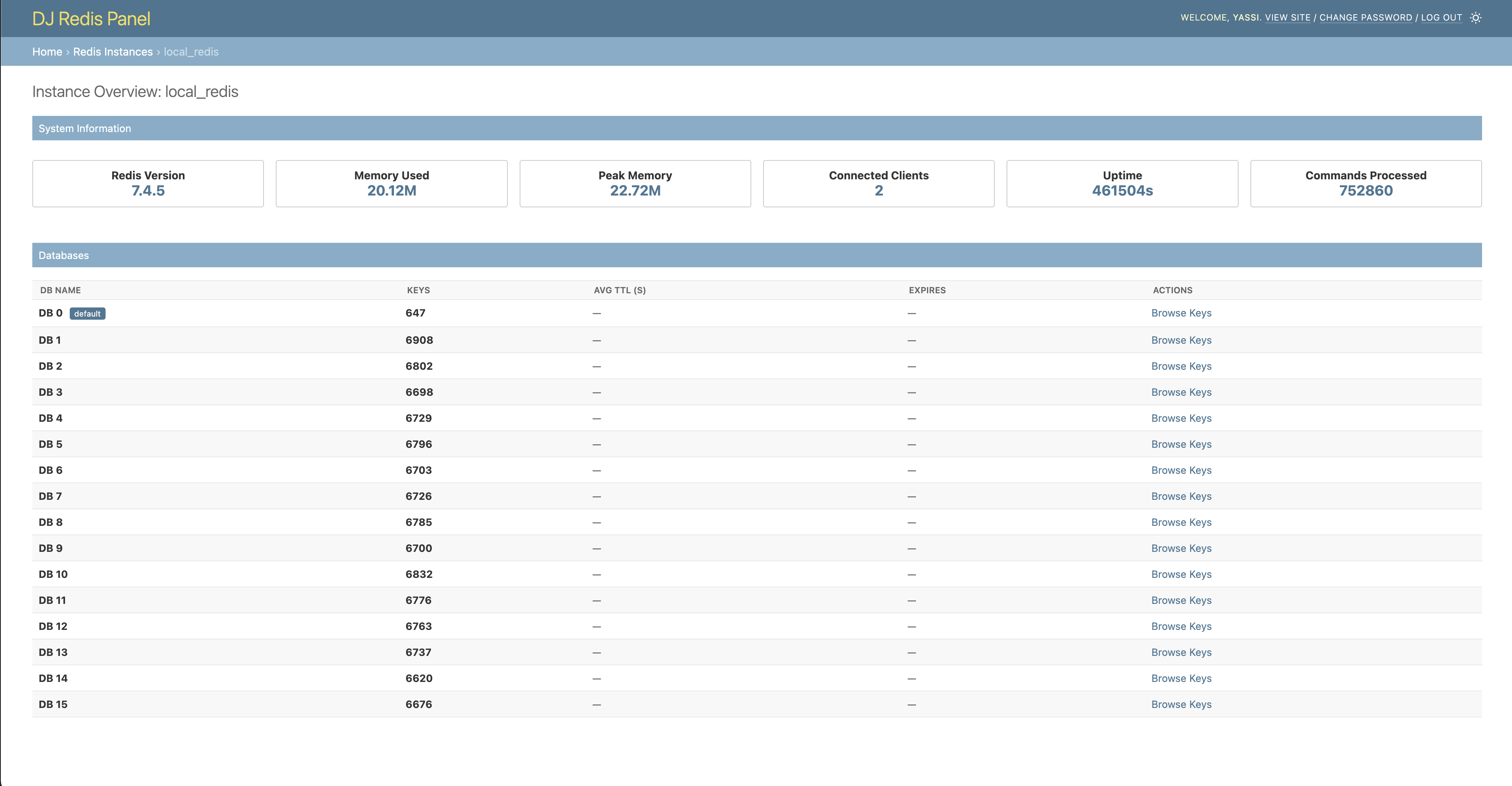
Instance Overview
Monitor your Redis instances with detailed metrics and database information.
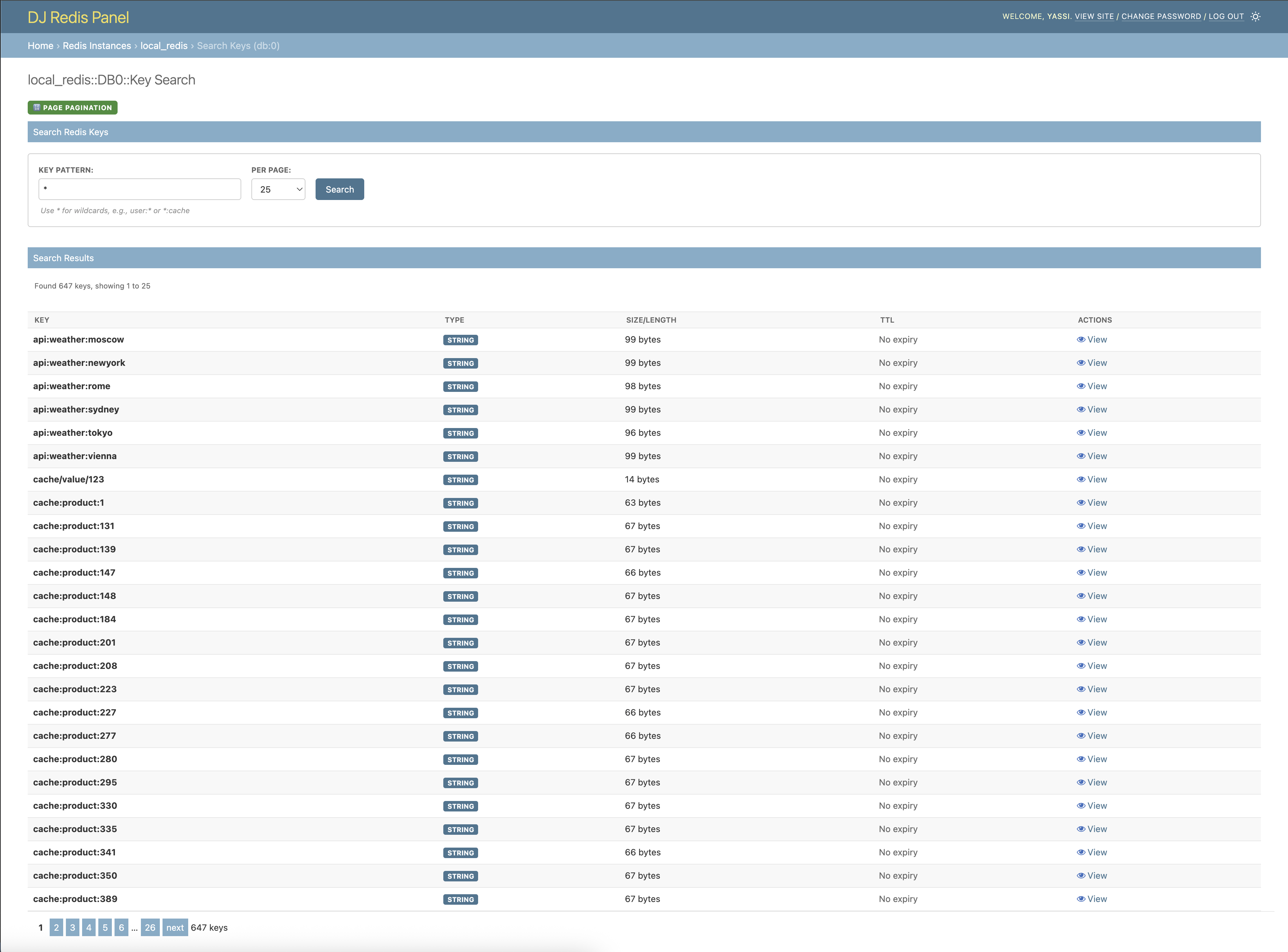
Key Search - Page-based Pagination
Search for keys with traditional page-based navigation.
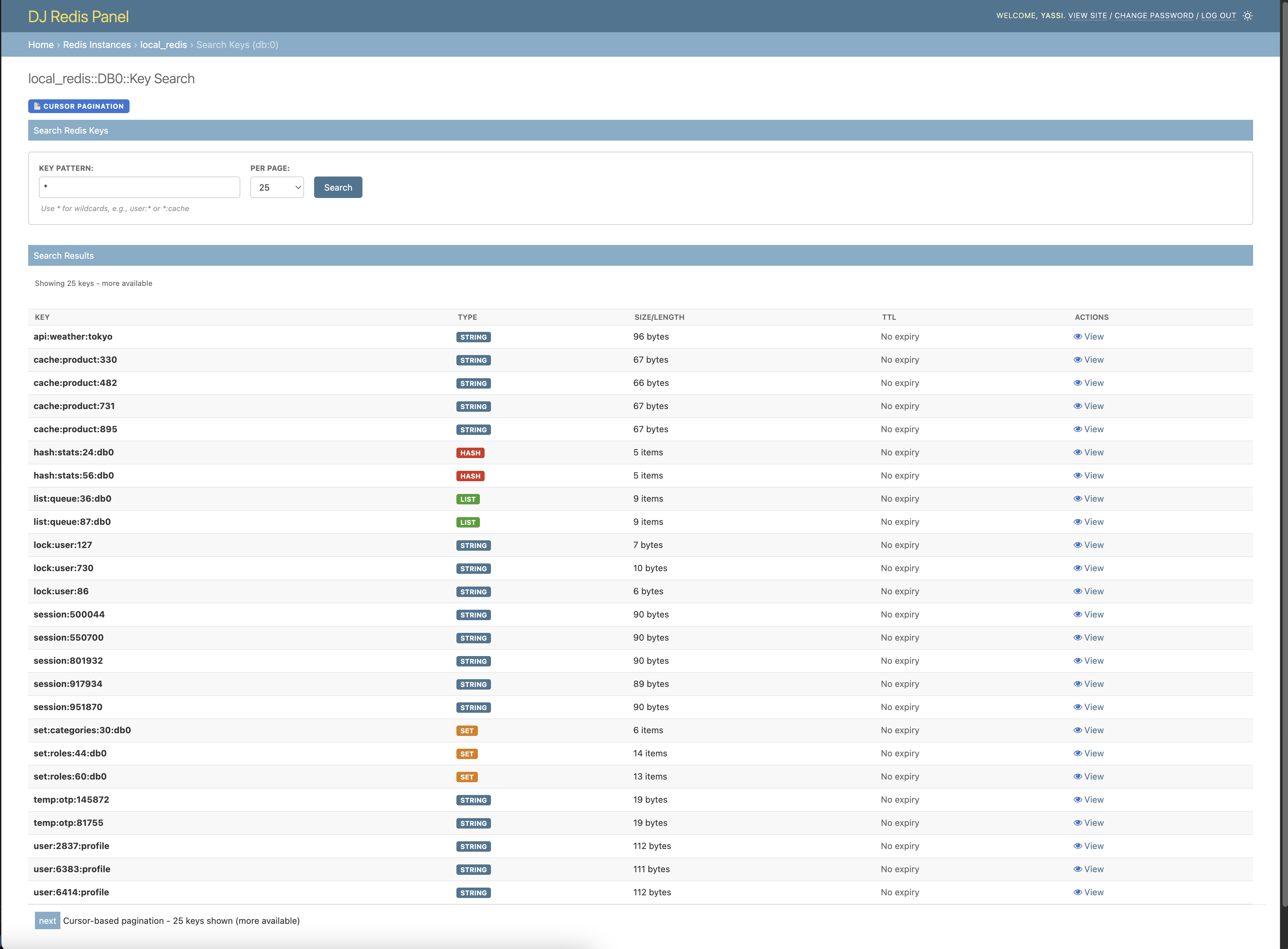
Key Search - Cursor-based Pagination
Efficient cursor-based pagination for large datasets.
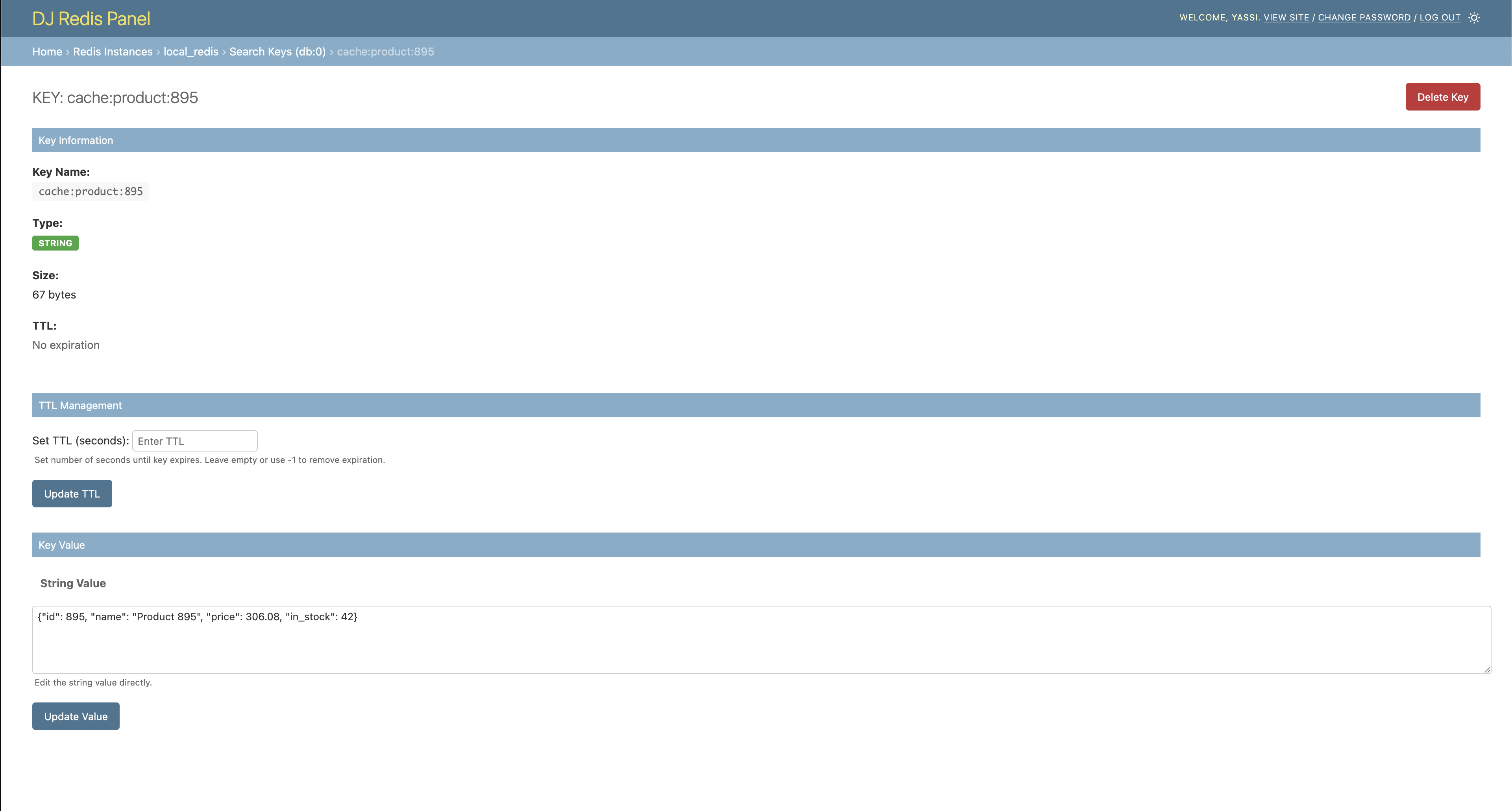
Key Detail - String Values
View and edit string key values with TTL management.
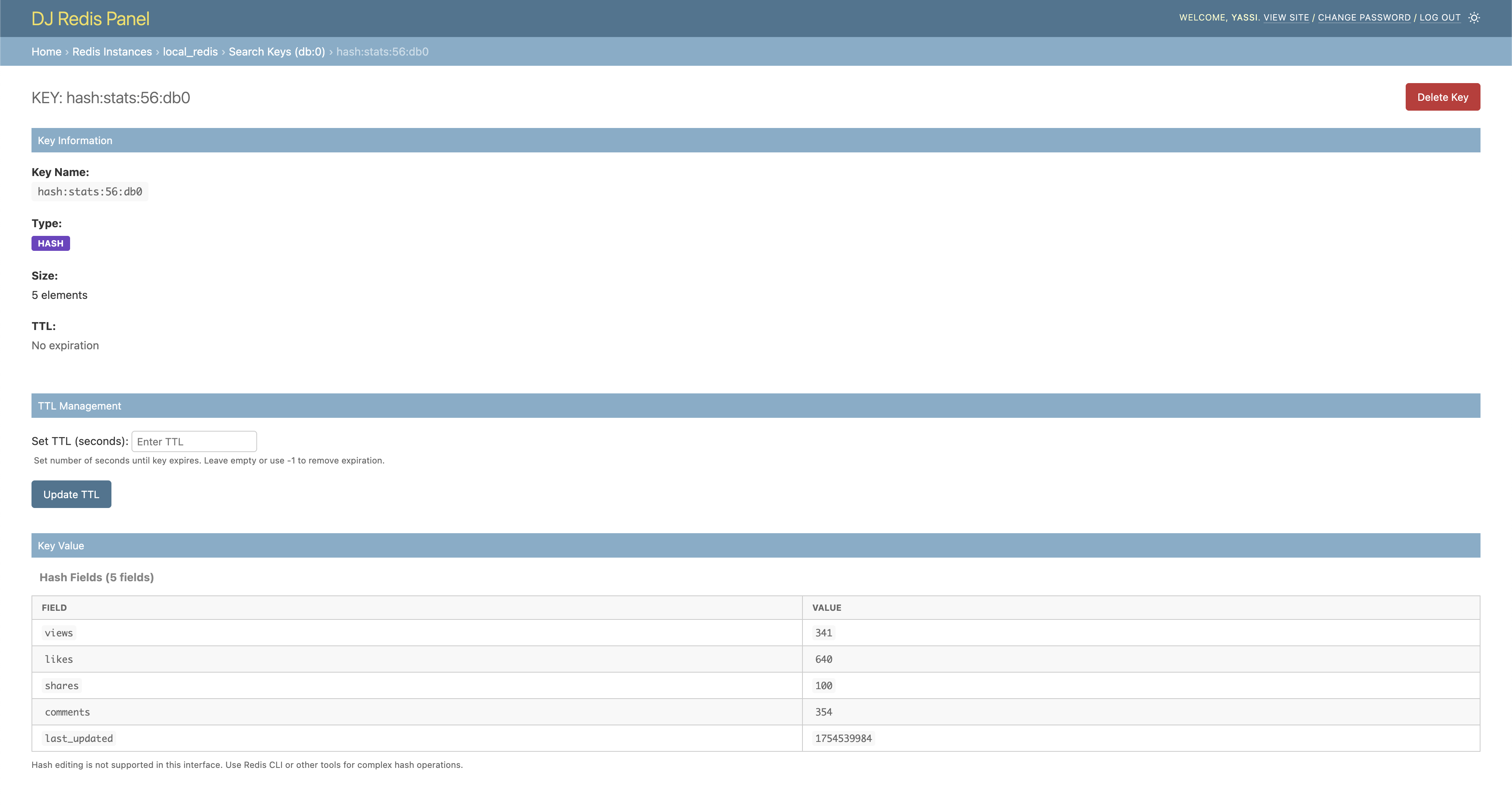
Key Detail - Other data structures
Browse keys with more complex data structures such as hashes, lists, etc.
Installation
1. Install the Package
pip install dj-redis-panel
2. Add to Django Settings
Add dj_redis_panel to your INSTALLED_APPS:
INSTALLED_APPS = [
    'django.contrib.admin',
    'django.contrib.auth',
    'django.contrib.contenttypes',
    'django.contrib.sessions',
    'django.contrib.messages',
    'django.contrib.staticfiles',
    'dj_redis_panel',  # Add this line
    # ... your other apps
]
3. Configure Redis Instances
Add the Django Redis Panel configuration to your Django settings:
DJ_REDIS_PANEL_SETTINGS = {
    # Global feature flags (can be overridden per instance)
    "ALLOW_KEY_DELETE": False,
    "ALLOW_KEY_EDIT": True,
    "ALLOW_TTL_UPDATE": True,
    "CURSOR_PAGINATED_SCAN": False,
    "CURSOR_PAGINATED_COLLECTIONS": False,

    "INSTANCES": {
        "default": {
            "description": "Default Redis Instance",
            "host": "127.0.0.1",
            "port": 6379,
            # Optional: override global settings for this instance
            "features": {
                "ALLOW_KEY_DELETE": True,
                "CURSOR_PAGINATED_SCAN": True,
            },
        },
        "other_instance": {
            "description": "Cache Redis Instance",
            "url": "rediss://127.0.0.1:6379",
        },
    }
}
4. Include URLs
Add the Redis Panel URLs to your main urls.py:
from django.contrib import admin
from django.urls import path, include

urlpatterns = [
    path('admin/redis/', include('dj_redis_panel.urls')),  # Add this line
    path('admin/', admin.site.urls),
]
5. Run Migrations and Create Superuser
python manage.py migrate
python manage.py createsuperuser  # If you don't have an admin user
6. Access the Panel
-
Start your Django development server:
python manage.py runserver
-
Navigate to the Django admin at
http://127.0.0.1:8000/admin/ -
Look for the "DJ_REDIS_PANEL" section in the admin interface
-
Click "Manage Redis keys and values" to start browsing your Redis instances
Configuration Options
Global Settings
| Setting | Default | Description |
|---|---|---|
ALLOW_KEY_DELETE |
False |
Allow deletion of Redis keys |
ALLOW_KEY_EDIT |
True |
Allow editing of key values |
ALLOW_TTL_UPDATE |
True |
Allow updating key TTL (expiration) |
CURSOR_PAGINATED_SCAN |
False |
Use cursor-based pagination instead of page-based |
CURSOR_PAGINATED_COLLECTIONS |
False |
Use cursor based pagination for key values like lists and hashs |
Instance Configuration
Each Redis instance can be configured with:
Connection via Host/Port:
"instance_name": {
    "description": "Human-readable description",
    "host": "127.0.0.1",
    "port": 6379,
    "password": "password",     # Optional
    "features": {               # Optional: override global settings
        "ALLOW_KEY_DELETE": True,
    },
}
Connection via URL:
"instance_name": {
    "description": "Human-readable description",
    "url": "redis://user:password@host:port",
    "features": {               # Optional: override global settings
        "CURSOR_PAGINATED_SCAN": True,
    },
}
Feature Flags
Feature flags can be set globally and overridden per instance:
ALLOW_KEY_DELETE: Controls whether the delete button is enabledALLOW_KEY_EDIT: Controls whether key values can be modifiedALLOW_TTL_UPDATE: Controls whether key expiration can be updatedCURSOR_PAGINATED_SCAN: Chooses pagination method (cursor vs. page-based)CURSOR_PAGINATED_COLLECTIONS: Chooses pagination method for looking at key values
License
This project is licensed under the MIT License. See the LICENSE file for details.
Development Setup
If you want to contribute to this project or set it up for local development:
Prerequisites
- Python 3.9 or higher
- Redis server running locally
- Git
- Autoconf
1. Clone the Repository
git clone https://github.com/yassi/dj-redis-panel.git
cd dj-redis-panel
2. Create Virtual Environment
python -m venv venv
source venv/bin/activate  # On Windows: venv\Scripts\activate
3. Install dj-redis-panel inside of your virtualenv
A make file is included in the repository root with multiple commands for building and maintaining this project. The best approach is to start by using one of the package installation commands found below:
# Build and install a wheel for this project
# Also install all dev dependencies such as pytest and other utilities
make install_dev

# Build and install a wheel for this project
make install

# build and install all dev dependencies and run all tests
make test
4. Set Up Example Project
The repository includes an example Django project for development and testing:
cd example_project
python manage.py migrate
python manage.py createsuperuser
5. Populate Test Data (Optional)
An optional CLI tool for populating redis keys automatically is included in the example django project in this code base.
python manage.py populate_redis
This command will populate your Redis instance with sample data for testing.
6. Run the Development Server
python manage.py runserver
Visit http://127.0.0.1:8000/admin/ to access the Django admin with Redis Panel.
7. Running Tests
The project includes a comprehensive test suite. You can run them by using make or by invoking pytest directly:
# run using make which will also install all dependencies (recommended)
make test

# run using pytest directly
pytest tests/

# Run with coverage
pytest tests/ --cov=dj_redis_panel

# Run specific test file
pytest tests/test_views.py
Note: Tests require a running Redis server on 127.0.0.1:6379. The tests use databases 13, 14, and 15 for isolation and automatically clean up after each test.
8. Dockerized Redis
Test for this project (as well as any active development) require an active redis installation. Although not required, a docker-compose file is included to allow for easy creation of local redis instances.
# Start Redis on localhost and the usual port 6379
docker-compose up redis -d
Project details
Verified details
These details have been verified by PyPIProject links
GitHub Statistics
Maintainers
Release history Release notifications | RSS feed


Download files
Download the file for your platform. If you're not sure which to choose, learn more about installing packages.
Source Distribution
Built Distribution
Filter files by name, interpreter, ABI, and platform.
If you're not sure about the file name format, learn more about wheel file names.
Copy a direct link to the current filters
File details
Details for the file dj_redis_panel-0.2.0.tar.gz.
File metadata
- Download URL: dj_redis_panel-0.2.0.tar.gz
- Upload date:
- Size: 39.5 kB
- Tags: Source
- Uploaded using Trusted Publishing? Yes
- Uploaded via: twine/6.1.0 CPython/3.12.9
File hashes
| Algorithm | Hash digest | |
|---|---|---|
| SHA256 |
adc927acce3d8764b19f3ca7ea8c682b7c778fb9fdf010ae49a411df83cdaef3
|
|
| MD5 |
d29b3560b69e469d66ff346f529565d9
|
|
| BLAKE2b-256 |
0933bd1f59f62f008534373e6da2532a36443c1ff85f108b515ed2ecf63364c0
|
Provenance
The following attestation bundles were made for dj_redis_panel-0.2.0.tar.gz:
Publisher:
python-publish.yml on yassi/dj-redis-panel
-
Statement:
-
Statement type:
https://in-toto.io/Statement/v1 -
Predicate type:
https://docs.pypi.org/attestations/publish/v1 -
Subject name:
dj_redis_panel-0.2.0.tar.gz -
Subject digest:
adc927acce3d8764b19f3ca7ea8c682b7c778fb9fdf010ae49a411df83cdaef3 - Sigstore transparency entry: 405335275
- Sigstore integration time:
-
Permalink:
yassi/dj-redis-panel@a5835cd723517db412136bdb7c4b04a925aeee3e -
Branch / Tag:
refs/tags/v0.2.0 - Owner: https://github.com/yassi
-
Access:
public
-
Token Issuer:
https://token.actions.githubusercontent.com -
Runner Environment:
github-hosted -
Publication workflow:
python-publish.yml@a5835cd723517db412136bdb7c4b04a925aeee3e -
Trigger Event:
release
-
Statement type:
File details
Details for the file dj_redis_panel-0.2.0-py3-none-any.whl.
File metadata
- Download URL: dj_redis_panel-0.2.0-py3-none-any.whl
- Upload date:
- Size: 31.9 kB
- Tags: Python 3
- Uploaded using Trusted Publishing? Yes
- Uploaded via: twine/6.1.0 CPython/3.12.9
File hashes
| Algorithm | Hash digest | |
|---|---|---|
| SHA256 |
e46b7e418473a41a31b43537a4e8929c0e7cb96bfa33fd0217dde559eea8108c
|
|
| MD5 |
d0230d73cb90210d3dbd23da24518363
|
|
| BLAKE2b-256 |
60f19282f277bcfdee5fd62ac0c7fd9c6c33945f9a4acc409b9b5ff1b0c58af5
|
Provenance
The following attestation bundles were made for dj_redis_panel-0.2.0-py3-none-any.whl:
Publisher:
python-publish.yml on yassi/dj-redis-panel
-
Statement:
-
Statement type:
https://in-toto.io/Statement/v1 -
Predicate type:
https://docs.pypi.org/attestations/publish/v1 -
Subject name:
dj_redis_panel-0.2.0-py3-none-any.whl -
Subject digest:
e46b7e418473a41a31b43537a4e8929c0e7cb96bfa33fd0217dde559eea8108c - Sigstore transparency entry: 405335298
- Sigstore integration time:
-
Permalink:
yassi/dj-redis-panel@a5835cd723517db412136bdb7c4b04a925aeee3e -
Branch / Tag:
refs/tags/v0.2.0 - Owner: https://github.com/yassi
-
Access:
public
-
Token Issuer:
https://token.actions.githubusercontent.com -
Runner Environment:
github-hosted -
Publication workflow:
python-publish.yml@a5835cd723517db412136bdb7c4b04a925aeee3e -
Trigger Event:
release
-
Statement type:






