
A simple Django app to render list filters in django admin using autocomplete widget

Project description

Django Admin Autocomplete Filter
A simple Django app to render list filters in django admin using autocomplete widget. This app is heavily inspired from dal-admin-filters.
Overview:
Django comes preshipped with an admin panel which is a great utility to create quick CRUD's. The django 2.0 came with much needed autocomplete_fields which uses select2 widget that comes with a search feature that loads the options asynchronously. We can use this in django admin list filter.
Requirements:
Requires Django version >= 2.0
Installation:
You can install it via pip or to get the latest version clone this repo.
pip install django-admin-autocomplete-filter
Add admin_auto_filters to your INSTALLED_APPS inside settings.py of your project.
Usage:
Let's say we have following models:
from django.db import models

class Artist(models.Model):
    name = models.CharField(max_length=128)

class Album(models.Model):
    name = models.CharField(max_length=64)
    artist = models.ForeignKey(Artist, on_delete=models.CASCADE)
    cover = models.CharField(max_length=256, null=True, default=None)
And you would like to filter results in Album Admin on the basis of artist, then you can define search fields in Artist and then define filter as:
from django.contrib import admin
from admin_auto_filters.filters import AutocompleteFilter


class ArtistFilter(AutocompleteFilter):
    title = 'Artist' # display title
    field_name = 'artist' # name of the foreign key field


class ArtistAdmin(admin.ModelAdmin):
    search_fields = ['name'] # this is required for django's autocomplete functionality
    # ...


class AlbumAdmin(admin.ModelAdmin):
    list_filter = [ArtistFilter]

    """
        defining this class is required for AutocompleteFilter
        it's a bug and I am working on it.
    """
    class Media:
        pass

    # ...
After following these steps you may see the filter as:
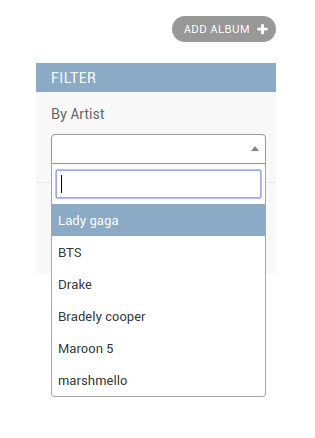
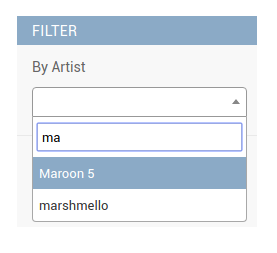
Now you can also register your custom view instead of using django admin's search_results to control the results in the autocomplete. For this you will need to create your custom view and register the url in your admin class as shown below:
In your views.py:
from admin_auto_filters.views import AutocompleteJsonView


class CustomSearchView(AutocompleteJsonView):
    def get_queryset(self):
        """
           your custom logic goes here.
        """
        queryset = Artist.objects.all().order_by('name')
        return queryset
After this, register this view in your admin class as:
from django.contrib import admin
from django.urls import path


class AlbumAdmin(admin.ModelAdmin):
    list_filter = [ArtistFilter]

    class Media:
        pass

    def get_urls(self):
        urls = super().get_urls()
        custom_urls = [
            path('custom_search/', self.admin_site.admin_view(CustomSearchView.as_view(model_admin=self)),
                 name='custom_search'),
        ]
        return custom_urls + urls
Finally just tell the filter class to use this new view as:
from django.shortcuts import reverse
from admin_auto_filters.filters import AutocompleteFilter


class ArtistFilter(AutocompleteFilter):
    title = 'Artist'
    field_name = 'artist'

    def get_autocomplete_url(self, request, model_admin):
        return reverse('admin:custom_search')
License:
Django Admin Autocomplete Filter is an Open Source project licensed under the terms of the GNU GENERAL PUBLIC LICENSE.


Download files
Download the file for your platform. If you're not sure which to choose, learn more about installing packages.
Source Distribution
Built Distribution
Filter files by name, interpreter, ABI, and platform.
If you're not sure about the file name format, learn more about wheel file names.
Copy a direct link to the current filters
File details
Details for the file django-admin-autocomplete-filter-0.4.tar.gz.
File metadata
- Download URL: django-admin-autocomplete-filter-0.4.tar.gz
- Upload date:
- Size: 18.1 kB
- Tags: Source
- Uploaded using Trusted Publishing? No
- Uploaded via: twine/3.1.1 pkginfo/1.5.0.1 requests/2.22.0 setuptools/41.6.0 requests-toolbelt/0.9.1 tqdm/4.41.0 CPython/3.7.5
File hashes
| Algorithm | Hash digest | |
|---|---|---|
| SHA256 |
c7aa61b95821603157b85be39ba03b4d788c82d74f144921f1300e2ce647740a
|
|
| MD5 |
a230783e7335587ed54491c016e4a7ed
|
|
| BLAKE2b-256 |
8fd0ad2018723bcc74c9e45c76c486b3cc9f56bf07bb7080659433a1e3d8ecb6
|
File details
Details for the file django_admin_autocomplete_filter-0.4-py3-none-any.whl.
File metadata
- Download URL: django_admin_autocomplete_filter-0.4-py3-none-any.whl
- Upload date:
- Size: 19.7 kB
- Tags: Python 3
- Uploaded using Trusted Publishing? No
- Uploaded via: twine/3.1.1 pkginfo/1.5.0.1 requests/2.22.0 setuptools/41.6.0 requests-toolbelt/0.9.1 tqdm/4.41.0 CPython/3.7.5
File hashes
| Algorithm | Hash digest | |
|---|---|---|
| SHA256 |
b479ddf145d5f342bc5c9913f6e5977ccbcf20fa5b6036b86e79b2b74966da61
|
|
| MD5 |
e526d3b17005ee00871003a6ea8fb648
|
|
| BLAKE2b-256 |
f85940434298e0a793fa3bd55d0ba4175545dcd87dcbf23422e45e26d84fb995
|






