
A Django extension that allows customizing the admin list view

Project description
Django Admin FlexList
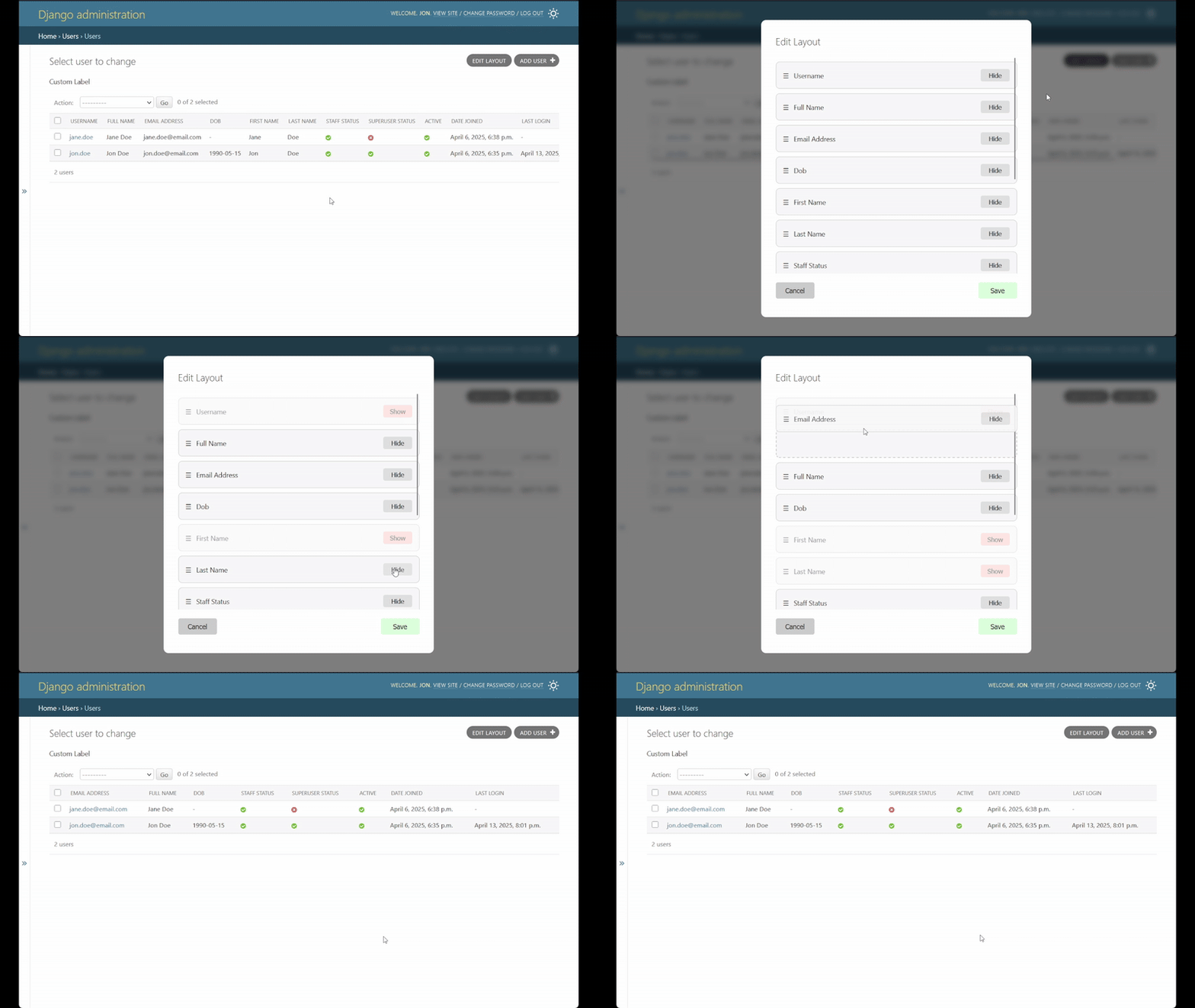
A Django package that enhances the admin interface by providing customizable list views. This package enables users to customize the Django admin list view by adding an "Edit layout" button to the page. When clicked, it opens a dialog form that allows users to:
- Toggle the visibility of list columns
- Change the order of columns
- Save their preferred layout for future use
Setup
1. Installation
To install the package, run:
$ pip install django-admin-flexlist
2. Install app
Add "django_admin_flexlist" to INSTALLED_APPS in your project's settings.py file:
INSTALLED_APPS = [
    # ...
    "django_admin_flexlist",
    # ...
]
This allows Django to find the package's migrations and templates.
3. Apply migrations
Django Admin FlexList stores each user's layout preferences in the database. To create the necessary table, run:
$ python manage.py migrate
4. Include URLs
The package adds endpoints so the JavaScript on the custom template can load the user's preferences into the dialog form and then save the changes to the DB model. To enable those, add the following to your project's urls.py file:
urlpatterns = [
    # ...
    path("", include("django_admin_flexlist.urls")),
    # ...
]
5. Extend the admin class
The customization functionality is introduced by the FlexListAdmin class. It mainly implements two changes:
- Intercepts the
get_list_displaymethod to apply the user's custom changes - Uses a custom change list template that allows the user to change the layout
To use it, extend your admin class as follows:
from django_admin_flexlist import FlexListAdmin

class YourAdmin(FlexListAdmin):
    pass
Notice that you can replace admin.ModelAdmin with the FlexListAdmin class, since the latter already extends that Django class.
You don't need to implement the get_list_display method for this feature to work. If you do override it, the customization should still work without any additional changes.
In case your admin class overrides change_list_template, you can keep the "Edit layout" feature by extending your custom template as follows:
{% extends "django_admin_flexlist/change_list.html" %}
In case your custom template already extends a template other than "admin/change_list.html", you can still keep the feature by adding the following blocks to your file:
{% block extrahead %}
{{ block.super }}
{% include "django_admin_flexlist/change_list_head.html" %}
{% endblock %}

{% block object-tools-items %}
{% include "django_admin_flexlist/change_list_actions.html" %}
{{ block.super }}
{% endblock %}

{% block content %}
{{ block.super }}
{% include "django_admin_flexlist/change_list_content.html" %}
{% endblock %}
Limitations
The implementation expects fields defined in list_display or get_list_display to be a list or tuple of strings. This simplifies serializing and deserializing changes saved to the DB model. As a result, the following Django implementation of a field isn't supported:
@admin.display(description="Name")
def upper_case_name(obj):
    return f"{obj.first_name} {obj.last_name}".upper()

class PersonAdmin(admin.ModelAdmin):
    list_display = [upper_case_name]
Demo project
To try out the package, you can run the included demo project. Make sure you have tox installed. Then:
- Clone this repository
- Run the demo project with:
$ tox -e py310-django42 -- runserver
(Replacepy310-django42with your desired Python and Django versions - seetox.inifor supported combinations)
This will:
- Spin up a Django app with the specified version
- Create a new SQLite database
- Populate it with two demo users:
- Username: "jon.doe", Password: "jon.doe"
- Username: "jane.doe", Password: "jane.doe"
The supported Python and Django versions can be found in the tox.ini file.
Release history Release notifications | RSS feed


Download files
Download the file for your platform. If you're not sure which to choose, learn more about installing packages.
Source Distribution
Built Distribution
Filter files by name, interpreter, ABI, and platform.
If you're not sure about the file name format, learn more about wheel file names.
Copy a direct link to the current filters
File details
Details for the file django_admin_flexlist-0.1.0.tar.gz.
File metadata
- Download URL: django_admin_flexlist-0.1.0.tar.gz
- Upload date:
- Size: 16.5 kB
- Tags: Source
- Uploaded using Trusted Publishing? No
- Uploaded via: twine/6.1.0 CPython/3.10.11
File hashes
| Algorithm | Hash digest | |
|---|---|---|
| SHA256 |
3526a4b3b7bba3a356360fb8c2a09a933701fd981d67424367c0cfb8b1574775
|
|
| MD5 |
714f5c624418814ded5b7bff71b72591
|
|
| BLAKE2b-256 |
16c9c670ee4377ff3ad7326d7676fcb173a3fc20432145e561b799ef1e9ee6a2
|
File details
Details for the file django_admin_flexlist-0.1.0-py3-none-any.whl.
File metadata
- Download URL: django_admin_flexlist-0.1.0-py3-none-any.whl
- Upload date:
- Size: 17.9 kB
- Tags: Python 3
- Uploaded using Trusted Publishing? No
- Uploaded via: twine/6.1.0 CPython/3.10.11
File hashes
| Algorithm | Hash digest | |
|---|---|---|
| SHA256 |
b2aea6980ef46725a2e8624b42a5663a03e223c2363ae30641b1e73448fe3711
|
|
| MD5 |
db5b1889b9b530d226e711596e40f31d
|
|
| BLAKE2b-256 |
602c83efbbfe0e150a2f5f6af76c13c5229e32b18ba89d7977cab7c15eb6db70
|






