

Django Admin Searchable Dropdown
A Django admin filter implementation that renders as a searchable select field dropdown.
Overview:
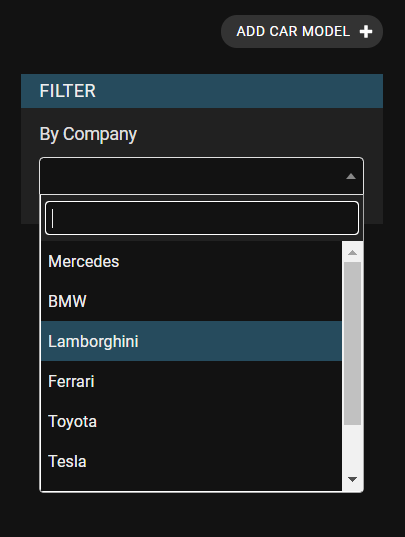
If you have more than twenty values for a field that you want to filter by in Django admin, the filtering sidebar gets long, cluttered, sometimes wide and hence, hard to use.
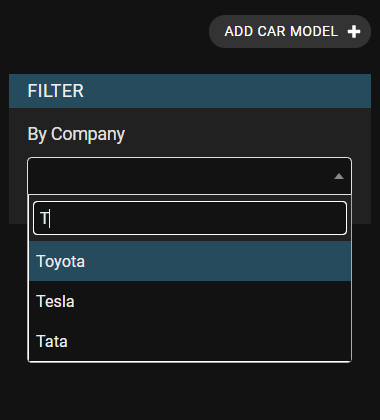
This app contains the AutocompleteFilter class that renders as a drop-down in the
filtering sidebar that can be searched to avoid this problem.
Requirements:
Requires Django version >= 2.0
Features:
- Custom search view/endpoint (more details)
list_filterFilter Factory support (more details)- Custom widget text (more details)
- Support for Grappelli
Installation:
You can install it via pip. To get the latest version clone this repo.
pip install django-admin-searchable-dropdown
Add admin_searchable_dropdown to your INSTALLED_APPS inside settings.py of your project.
Usage:
Let's say you have following models:
from django.db import models

class CarCompany(models.Model):
    name = models.CharField(max_length=128)

class CarModel(models.Model):
    name = models.CharField(max_length=64)
    company = models.ForeignKey(CarCompany, on_delete=models.CASCADE)
And you would like to filter results in CarModelAdmin on the basis of company. You need to define search fields in CarCompany and then define filter like this:
from django.contrib import admin
from admin_searchable_dropdown.filters import AutocompleteFilter


class CarCompanyFilter(AutocompleteFilter):
    title = 'Company' # display title
    field_name = 'company' # name of the foreign key field


class CarCompanyAdmin(admin.ModelAdmin):
    search_fields = ['name'] # this is required for django's autocomplete functionality
    # ...


class CarModelAdmin(admin.ModelAdmin):
    list_filter = [CarCompanyFilter]
    # ...
After following these steps you may see the filter as:
Functionality to provide a custom view for search:
You can also register your custom view instead of using Django admin's search_results to control the results in the autocomplete. For this you will need to create your custom view and register the URL in your admin class as shown below:
In your views.py:
from admin_searchable_dropdown.views import AutocompleteJsonView


class CustomSearchView(AutocompleteJsonView):
    def get_queryset(self):
        """
           your custom logic goes here.
        """
        queryset = CarCompany.objects.all().order_by('name')
        return queryset
After this, register this view in your admin class:
from django.contrib import admin
from django.urls import path


class CarModelAdmin(admin.ModelAdmin):
    list_filter = [CarCompanyFilter]

    def get_urls(self):
        urls = super().get_urls()
        custom_urls = [
            path('custom_search/', self.admin_site.admin_view(CustomSearchView.as_view(model_admin=self)),
                 name='custom_search'),
        ]
        return custom_urls + urls
Finally, just tell the filter class to use this new view:
from django.shortcuts import reverse
from admin_searchable_dropdown.filters import AutocompleteFilter


class CarCompanyFilter(AutocompleteFilter):
    title = 'Company'
    field_name = 'company'

    def get_autocomplete_url(self, request, model_admin):
        return reverse('admin:custom_search')
Shortcut for creating filters:
It's also possible to use the AutocompleteFilterFactory shortcut to create
filters on the fly, as shown below. Nested relations are supported too, with
no need to specify the model.
        AutocompleteFilterFactory('My title', 'field_name')
        AutocompleteFilterFactory('My title', 'fourth__third__second__first')
    Be sure to include distinct in the model admin get_queryset() if the second form is used.
    Assumes: parameter_name == f'fourth__third__second__{field_name}'
        * title: The title for the filter.
        * base_parameter_name: The field to use for the filter.
        * viewname: The name of the custom AutocompleteJsonView URL to use, if any.
        * use_pk_exact: Whether to use '__pk__exact' in the parameter name when possible.
        * label_by: How to generate the static label for the widget - a callable, the name
          of a model callable, or the name of a model field.```

Example:

```python
from django.contrib import admin
from admin_searchable_dropdown.filters import AutocompleteFilterFactory


class AlbumAdmin(admin.ModelAdmin):
    list_filter = [
        AutocompleteFilterFactory('Company', 'company', 'admin:custom_search', True)
    ]

    def get_urls(self):
        """As above..."""
Customizing widget text
You can customize the text displayed in the filter widget, to use something
other than str(obj). This needs to be configured for both the dropdown
endpoint and the widget itself.
In your views.py, override display_text:
from admin_searchable_dropdown.views import AutocompleteJsonView


class CustomSearchView(AutocompleteJsonView):

    @staticmethod
    def display_text(obj):
        return obj.my_str_method()

    def get_queryset(self):
        """As above..."""
Then use either of two options to customize the text.
Option one is to specify the form_field in an AutocompleteFilter in your
admin.py:
from django import forms
from django.contrib import admin
from django.shortcuts import reverse
from admin_searchable_dropdown.filters import AutocompleteFilter


class FuelChoiceField(forms.ModelChoiceField):
    def label_from_instance(self, obj):
        return obj.my_str_method()


class CarCompanyFilter(AutocompleteFilter):
    title = 'Company'
    field_name = 'company'
    form_field = FuelChoiceField

    def get_autocomplete_url(self, request, model_admin):
        return reverse('admin:custom_search')


class CarModelAdmin(admin.ModelAdmin):
    list_filter = [CarCompanyFilter]

    def get_urls(self):
        """As above..."""
Option two is to use an AutocompleteFilterFactory in your admin.py
add a label_by argument:
from django.contrib import admin
from admin_searchable_dropdown.filters import AutocompleteFilterFactory


class CarModelAdmin(admin.ModelAdmin):
    list_filter = [
        AutocompleteFilterFactory('Company', 'company', 'admin:custom_search', True, label_by='my_str_method')
    ]

    def get_urls(self):
        """As above..."""
Contributing:
Based on this StackOverflow question, and the comments that went unresolved in the selected answer and code from FeinCMS and code from mrts.
To Contribute, please fork the project, make a pull-request, and clearly mention the problems or improvements your PR is addressing.
License:
Django Admin Searchable Dropdown is an Open Source project licensed under the terms of the MIT LICENSE.
1 maintainer

Release files for django-admin-searchable-dropdown 1.2
For a detailed explanation of source distributions (sdists) and built distributions (wheels), please see the package formats documentation.
Source distribution (sdist)
| File | Size | Uploaded | |
|---|---|---|---|
| django-admin-searchable-dropdown-1.2.tar.gz | 10.4 kB | Details |
Built distribution (wheel)
| File | Interpreter | ABI | Platform | Reset |
|---|---|---|---|---|
| django_admin_searchable_dropdown-1.2-py3-none-any.whl | Python 3 | none | any | Details |
Total release size: 23.0 kB
Release files / django-admin-searchable-dropdown-1.2.tar.gz
| Download URL | django-admin-searchable-dropdown-1.2.tar.gz |
|---|---|
| Size | 10.4 kB |
| Tags | Source |
|
SHA-256 checksum How to use checksums |
7db77cc966af88134d383b2fe36b11aa67dcf743dd5f66ab53d9169e993bd8c5
|
|
BLAKE2b-256 checksum How to use checksums |
7154cdbf110b4a3f2e4d6eef96db33cfcad2edf1e6e355112dfe1b6fb15f13ff
|
| Upload date | |
|
Uploaded using Trusted Publishing? What is trusted publishing? |
No |
| Uploaded via |
twine/3.4.2 importlib_metadata/4.6.4 pkginfo/1.7.1 requests/2.26.0 requests-toolbelt/0.9.1 tqdm/4.62.1 CPython/3.9.6
|
Release files / django_admin_searchable_dropdown-1.2-py3-none-any.whl
| Download URL | django_admin_searchable_dropdown-1.2-py3-none-any.whl |
|---|---|
| Size | 12.6 kB |
| Tags | Python 3 |
|
SHA-256 checksum How to use checksums |
5e8dc7544c76d3aed4b7410eda4b63b845b908b4b6bf9351d0e993b56747ba45
|
|
BLAKE2b-256 checksum How to use checksums |
17141e528db4639079e3571e0d1a8d9f3d2e76a82af066a04bde86567938588d
|
| Upload date | |
|
Uploaded using Trusted Publishing? What is trusted publishing? |
No |
| Uploaded via |
twine/3.4.2 importlib_metadata/4.6.4 pkginfo/1.7.1 requests/2.26.0 requests-toolbelt/0.9.1 tqdm/4.62.1 CPython/3.9.6
|













