
django-ai-command
Query your Django database in natural language — from the terminal or directly inside the Django Admin.
Powered by LangChain, compatible with Gemini, Groq, DeepSeek, OpenAI, and Anthropic.
How it works
django-ai-command introspects your Django models automatically, sends the schema + your question to an LLM, generates safe read-only ORM code, executes it, and returns the result.
No manual tool configuration. No hardcoded models. Just install, configure your API key, and ask.
Features
- Natural language queries from the terminal
- Floating chat widget embedded in the Django Admin (available on every admin page)
- Full-page chat view at
/your-admin-prefix/ai-assistant/ - Multi-provider support via LangChain (Groq, Gemini, DeepSeek, OpenAI, Anthropic)
- Safe mode: blocks all write operations by default
- Automatic model introspection — no setup required per model
- Designed to become a standalone PyPI package
Screenshots
Terminal command

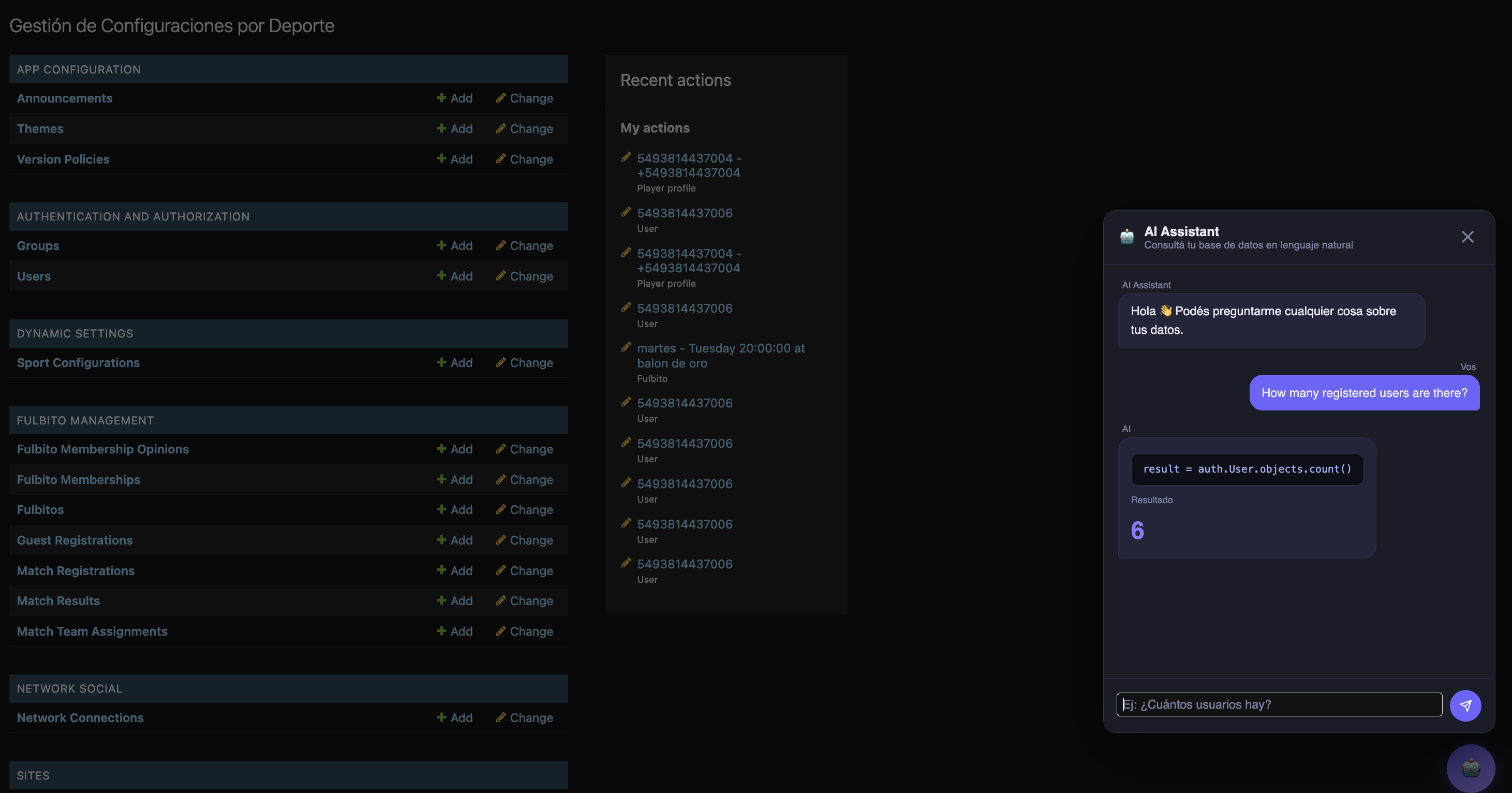
Floating modal in Django Admin
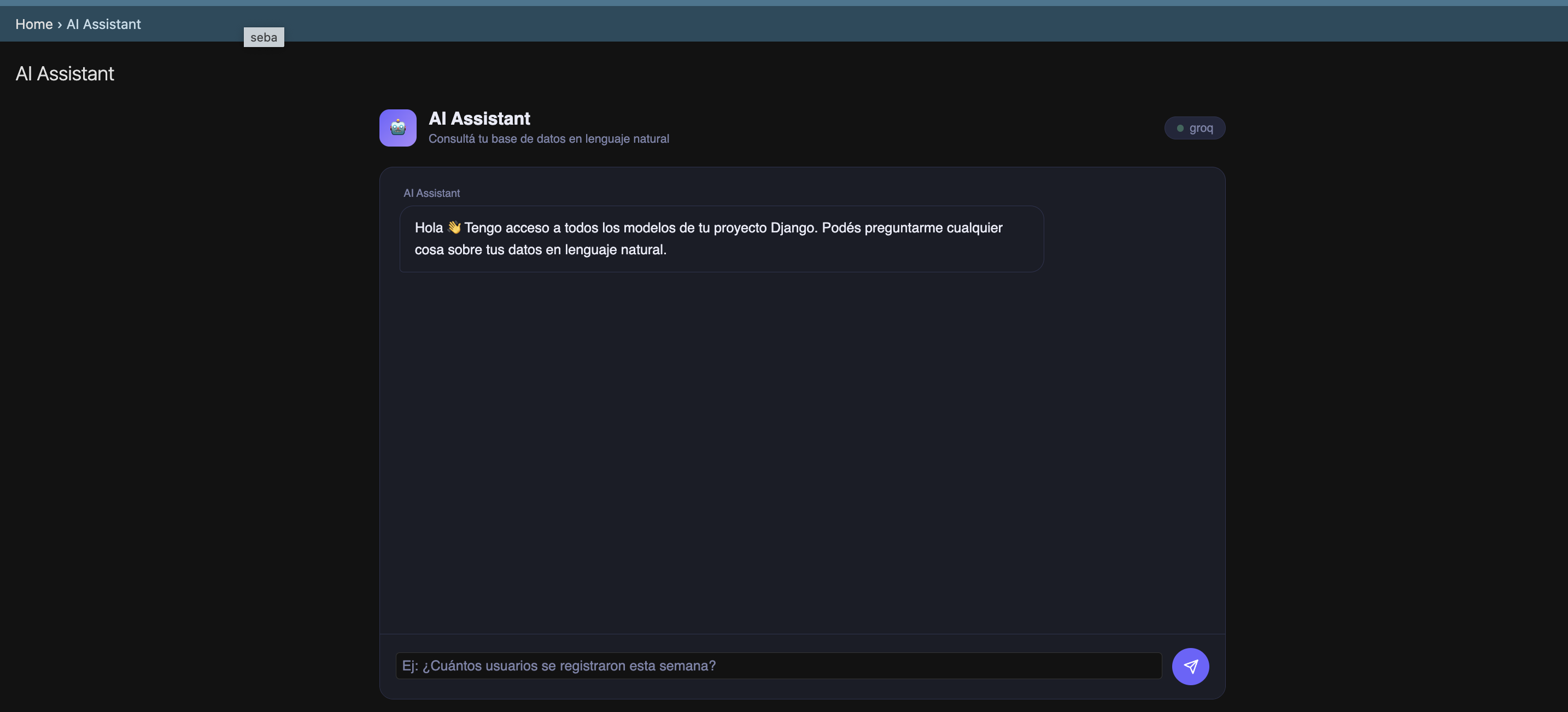
Full-page chat view
Installation
For now, copy the django_ai_command/ folder into your project root.
Install dependencies:
pip install langchain langchain-core langchain-openai langchain-google-genai
Add to INSTALLED_APPS — must be before django.contrib.admin:
INSTALLED_APPS = ['django_ai_command'] + CORE_APPS + EXTERNAL_APPS + LOCAL_APPS
Configuration
Add DJANGO_AI_COMMAND to your settings.py:
DJANGO_AI_COMMAND = {
    "provider": "groq",             # LLM provider (see options below)
    "api_key": env("GROQ_API_KEY"), # API key for the selected provider
    "safe_mode": True,              # Block write operations (recommended)
    "admin_prefix": "admin",        # Your admin URL prefix (see note below)
}
admin_prefix
If you changed the default Django admin URL for security reasons (recommended), set admin_prefix to match. For example, if your admin is at /15_admin_27/, set:
"admin_prefix": "15_admin_27",
This ensures the chat widget inside the Admin points to the correct endpoint. If you use the default /admin/ URL, you can omit this field.
Provider examples
Groq (free, recommended for development)
Get your API key at console.groq.com.
DJANGO_AI_COMMAND = {
    "provider": "groq",
    "api_key": env("GROQ_API_KEY"),
    "safe_mode": True,
    "admin_prefix": "admin",
}
Gemini (Google)
Get your API key at aistudio.google.com.
DJANGO_AI_COMMAND = {
    "provider": "gemini",
    "api_key": env("GEMINI_API_KEY"),
    "safe_mode": True,
    "admin_prefix": "admin",
}
DeepSeek
Get your API key at platform.deepseek.com.
DJANGO_AI_COMMAND = {
    "provider": "deepseek",
    "api_key": env("DEEPSEEK_API_KEY"),
    "base_url": "https://api.deepseek.com",
    "safe_mode": True,
    "admin_prefix": "admin",
}
OpenAI
DJANGO_AI_COMMAND = {
    "provider": "openai",
    "api_key": env("OPENAI_API_KEY"),
    "safe_mode": True,
    "admin_prefix": "admin",
}
Anthropic (Claude)
DJANGO_AI_COMMAND = {
    "provider": "anthropic",
    "api_key": env("ANTHROPIC_API_KEY"),
    "safe_mode": True,
    "admin_prefix": "admin",
}
Usage
Terminal
python manage.py ai "How many users registered this week?"
python manage.py ai "List the 5 products with the most stock"
python manage.py ai "Which orders have been pending for more than 3 days?"
python manage.py ai "¿Cuántos usuarios hay registrados?"
Django Admin — floating button
A floating 🤖 button appears on every page of the Django Admin. Click it to open the chat modal and ask questions without leaving your current page.
Django Admin — full page
Navigate to:
/your-admin-prefix/ai-assistant/
Example: https://yourdomain.com/admin/ai-assistant/
Safe mode
When safe_mode is True (default), the following ORM operations are blocked:
delete, update, save, create, bulk_create, bulk_update, raw, extra, execute
The LLM is also instructed via prompt to only generate read operations. Safe mode provides two layers of protection: prompt-level and AST-level validation before execution.
Project structure
django_ai_command/
├── admin.py            # Injects routes and context into Django Admin
├── apps.py             # AppConfig — loads admin.py via ready()
├── executor.py         # Executes ORM code safely (AST validation)
├── introspection.py    # Reads all registered Django models automatically
├── llm.py              # LangChain wrapper — multi-provider support
├── urls.py             # URL definitions for chat views
├── utils.py
├── views.py            # AiChatView (full page) and AiAskView (POST endpoint)
├── management/
│   └── commands/
│       └── ai.py       # Management command: python manage.py ai "question"
├── templates/
│   ├── admin/
│   │   └── base_site.html          # Injects floating button into all admin pages
│   └── django_ai_command/
│       └── ai_chat.html            # Full-page chat view template
└── docs/
    ├── img_01.png      # Terminal command screenshot
    ├── img_02.png      # Floating modal screenshot
    └── img_03.png      # Full-page view screenshot
Roadmap
| Version | Description |
|---|---|
| v1.0 | Terminal command + Gemini |
| v2.0 | Terminal command + multi-provider via LangChain ✅ |
| v3.0 | Chat widget in Django Admin ✅ |
| v4.0 | LLM-suggested charts rendered in the Admin |
License
MIT
Author
Sebastián Martín Artaza Saade
1 maintainer

Metadata
1 maintainer
Release files for django-ai-command 1.0.1
For a detailed explanation of source distributions (sdists) and built distributions (wheels), please see the package formats documentation.
Source distribution (sdist)
| File | Size | Uploaded | |
|---|---|---|---|
| django_ai_command-1.0.1.tar.gz | 604.2 kB | Details |
Built distribution (wheel)
| File | Interpreter | ABI | Platform | Reset |
|---|---|---|---|---|
| django_ai_command-1.0.1-py3-none-any.whl | Python 3 | none | any | Details |
Total release size: 627.9 kB
Release files / django_ai_command-1.0.1.tar.gz
| Download URL | django_ai_command-1.0.1.tar.gz |
|---|---|
| Size | 604.2 kB |
| Tags | Source |
|
SHA-256 checksum How to use checksums |
3bbc29fec0ef87251e5800fbeb2ed14eef24b768d5a16a869c5c1fcb877b0f4c
|
|
BLAKE2b-256 checksum How to use checksums |
c1c77bd9862fac5af426008f0dda08658d350b851e282e9fd4a941e8981de9d5
|
| Upload date | |
|
Uploaded using Trusted Publishing? What is trusted publishing? |
No |
| Uploaded via |
twine/6.2.0 CPython/3.13.13
|
Release files / django_ai_command-1.0.1-py3-none-any.whl
| Download URL | django_ai_command-1.0.1-py3-none-any.whl |
|---|---|
| Size | 23.8 kB |
| Tags | Python 3 |
|
SHA-256 checksum How to use checksums |
b0bffb151b27bce6c85e41246fd4751e20cbf26607a0b61d5b2e31a198757cc0
|
|
BLAKE2b-256 checksum How to use checksums |
8d9719c38846a59fc57bdeff9c621564adea1dcf5b1d6a3df7f89632e0237b3f
|
| Upload date | |
|
Uploaded using Trusted Publishing? What is trusted publishing? |
No |
| Uploaded via |
twine/6.2.0 CPython/3.13.13
|














