
Query your Django database in natural language from the terminal or Django Admin.

Project description
django-ai-command
Query your Django database in natural language — from the terminal or directly inside the Django Admin.
Powered by LangChain, compatible with Gemini, Groq, DeepSeek, OpenAI, and Anthropic.
How it works
django-ai-command introspects your Django models automatically, sends the schema + your question to an LLM, generates safe read-only ORM code, executes it, and returns the result.
No manual tool configuration. No hardcoded models. Just install, configure your API key, and ask.
Features
- Natural language queries from the terminal
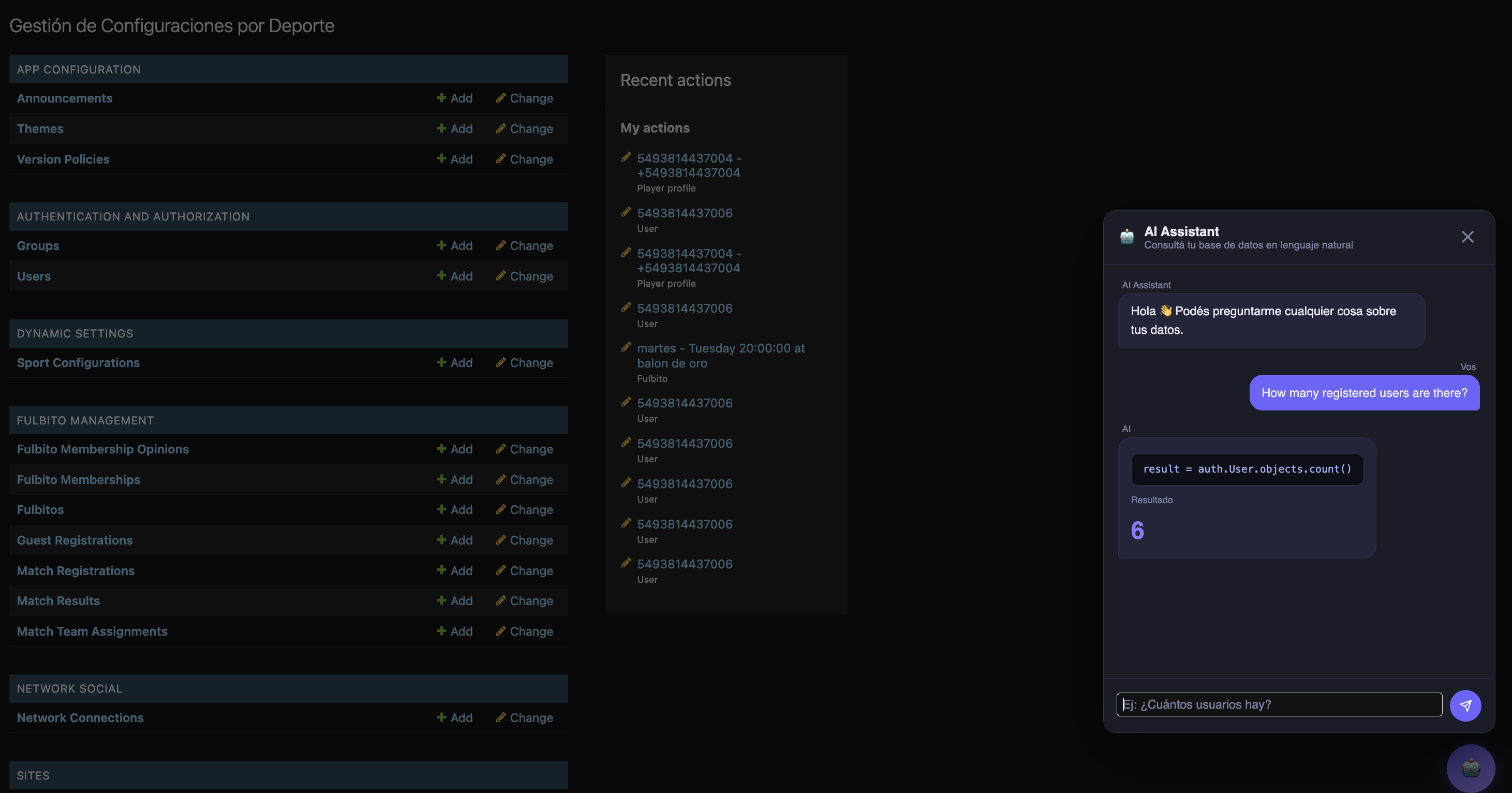
- Floating chat widget embedded in the Django Admin (available on every admin page)
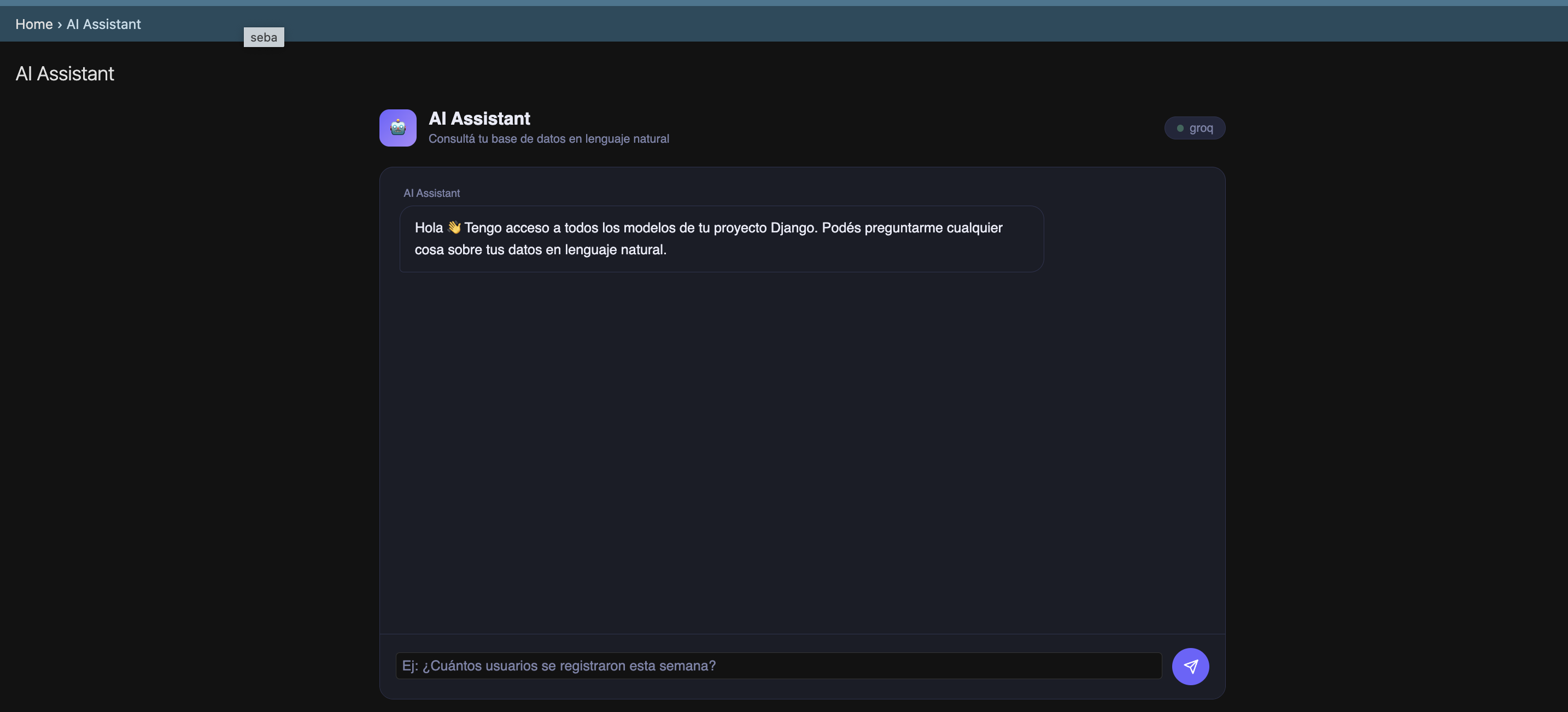
- Full-page chat view at
/your-admin-prefix/ai-assistant/ - Multi-provider support via LangChain (Groq, Gemini, DeepSeek, OpenAI, Anthropic)
- Safe mode: blocks all write operations by default
- Automatic model introspection — no setup required per model
- Designed to become a standalone PyPI package
Screenshots
Terminal command

Floating modal in Django Admin
Full-page chat view
Installation
For now, copy the django_ai_command/ folder into your project root.
Install dependencies:
pip install langchain langchain-core langchain-openai langchain-google-genai
Add to INSTALLED_APPS — must be before django.contrib.admin:
INSTALLED_APPS = ['django_ai_command'] + CORE_APPS + EXTERNAL_APPS + LOCAL_APPS
Configuration
Add DJANGO_AI_COMMAND to your settings.py:
DJANGO_AI_COMMAND = {
    "provider": "groq",             # LLM provider (see options below)
    "api_key": env("GROQ_API_KEY"), # API key for the selected provider
    "safe_mode": True,              # Block write operations (recommended)
    "admin_prefix": "admin",        # Your admin URL prefix (see note below)
}
admin_prefix
If you changed the default Django admin URL for security reasons (recommended), set admin_prefix to match. For example, if your admin is at /15_admin_27/, set:
"admin_prefix": "15_admin_27",
This ensures the chat widget inside the Admin points to the correct endpoint. If you use the default /admin/ URL, you can omit this field.
Provider examples
Groq (free, recommended for development)
Get your API key at console.groq.com.
DJANGO_AI_COMMAND = {
    "provider": "groq",
    "api_key": env("GROQ_API_KEY"),
    "safe_mode": True,
    "admin_prefix": "admin",
}
Gemini (Google)
Get your API key at aistudio.google.com.
DJANGO_AI_COMMAND = {
    "provider": "gemini",
    "api_key": env("GEMINI_API_KEY"),
    "safe_mode": True,
    "admin_prefix": "admin",
}
DeepSeek
Get your API key at platform.deepseek.com.
DJANGO_AI_COMMAND = {
    "provider": "deepseek",
    "api_key": env("DEEPSEEK_API_KEY"),
    "base_url": "https://api.deepseek.com",
    "safe_mode": True,
    "admin_prefix": "admin",
}
OpenAI
DJANGO_AI_COMMAND = {
    "provider": "openai",
    "api_key": env("OPENAI_API_KEY"),
    "safe_mode": True,
    "admin_prefix": "admin",
}
Anthropic (Claude)
DJANGO_AI_COMMAND = {
    "provider": "anthropic",
    "api_key": env("ANTHROPIC_API_KEY"),
    "safe_mode": True,
    "admin_prefix": "admin",
}
Usage
Terminal
python manage.py ai "How many users registered this week?"
python manage.py ai "List the 5 products with the most stock"
python manage.py ai "Which orders have been pending for more than 3 days?"
python manage.py ai "¿Cuántos usuarios hay registrados?"
Django Admin — floating button
A floating 🤖 button appears on every page of the Django Admin. Click it to open the chat modal and ask questions without leaving your current page.
Django Admin — full page
Navigate to:
/your-admin-prefix/ai-assistant/
Example: https://yourdomain.com/admin/ai-assistant/
Safe mode
When safe_mode is True (default), the following ORM operations are blocked:
delete, update, save, create, bulk_create, bulk_update, raw, extra, execute
The LLM is also instructed via prompt to only generate read operations. Safe mode provides two layers of protection: prompt-level and AST-level validation before execution.
Project structure
django_ai_command/
├── admin.py            # Injects routes and context into Django Admin
├── apps.py             # AppConfig — loads admin.py via ready()
├── executor.py         # Executes ORM code safely (AST validation)
├── introspection.py    # Reads all registered Django models automatically
├── llm.py              # LangChain wrapper — multi-provider support
├── urls.py             # URL definitions for chat views
├── utils.py
├── views.py            # AiChatView (full page) and AiAskView (POST endpoint)
├── management/
│   └── commands/
│       └── ai.py       # Management command: python manage.py ai "question"
├── templates/
│   ├── admin/
│   │   └── base_site.html          # Injects floating button into all admin pages
│   └── django_ai_command/
│       └── ai_chat.html            # Full-page chat view template
└── docs/
    ├── img_01.png      # Terminal command screenshot
    ├── img_02.png      # Floating modal screenshot
    └── img_03.png      # Full-page view screenshot
Roadmap
| Version | Description |
|---|---|
| v1.0 | Terminal command + Gemini |
| v2.0 | Terminal command + multi-provider via LangChain ✅ |
| v3.0 | Chat widget in Django Admin ✅ |
| v4.0 | LLM-suggested charts rendered in the Admin |
License
MIT
Author
Sebastián Martín Artaza Saade
Release history Release notifications | RSS feed


Download files
Download the file for your platform. If you're not sure which to choose, learn more about installing packages.
Source Distribution
Built Distribution
Filter files by name, interpreter, ABI, and platform.
If you're not sure about the file name format, learn more about wheel file names.
Copy a direct link to the current filters
File details
Details for the file django_ai_command-1.0.0.tar.gz.
File metadata
- Download URL: django_ai_command-1.0.0.tar.gz
- Upload date:
- Size: 604.1 kB
- Tags: Source
- Uploaded using Trusted Publishing? No
- Uploaded via: twine/6.2.0 CPython/3.13.13
File hashes
| Algorithm | Hash digest | |
|---|---|---|
| SHA256 |
4fbfa70e1845263eb5d959dc2957af17c05dea61362a0e1b50a67c8f595c14da
|
|
| MD5 |
e982aacb25943cce9fcc2a47febdbd5b
|
|
| BLAKE2b-256 |
9fb80b90c0bc1a510d64bc3f9643567273d587a54bf116b639ac20765180994c
|
File details
Details for the file django_ai_command-1.0.0-py3-none-any.whl.
File metadata
- Download URL: django_ai_command-1.0.0-py3-none-any.whl
- Upload date:
- Size: 23.8 kB
- Tags: Python 3
- Uploaded using Trusted Publishing? No
- Uploaded via: twine/6.2.0 CPython/3.13.13
File hashes
| Algorithm | Hash digest | |
|---|---|---|
| SHA256 |
b421607885ff0e6a4ea29fbb4ec3cd1175e6235a5c522503820900d01b7fe50b
|
|
| MD5 |
1ed6ec57fe33ee0b160bc937220aed65
|
|
| BLAKE2b-256 |
65277049fec59c122133cafdc439c893e590793a479858fe6fd0cd548068f4a5
|






