
Django Casbin Auth





django-casbin-auth is an authorization library for Django framework.
Based on Casbin and Django-casbin (middleware, light weight of this plugin), an authorization library that that supports access control models like ACL, RBAC, ABAC.
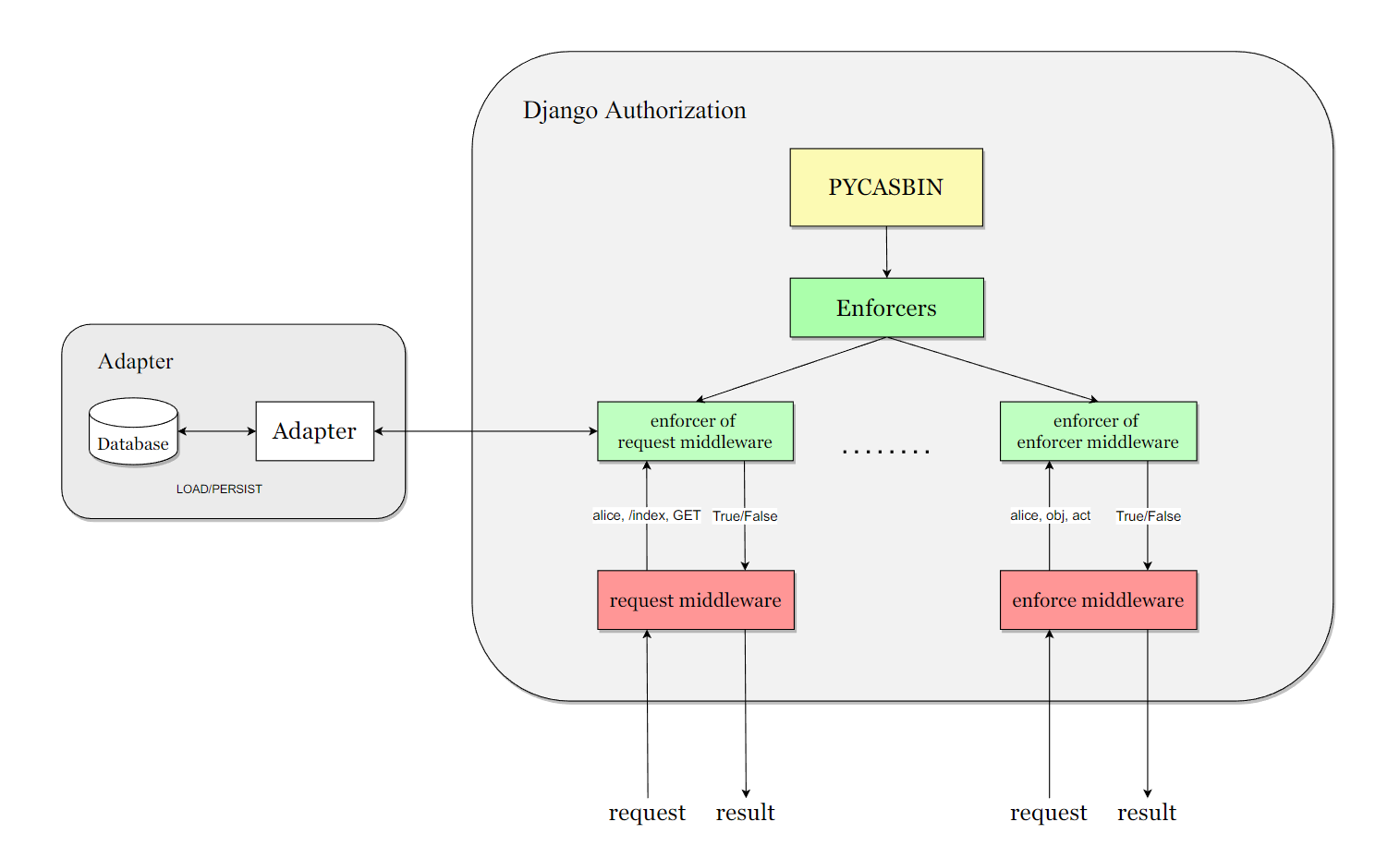
Installation and Configure
pip install django-casbin-auth
We recommend that you first configure the adapter for persistent storage of the policy, such as:
django-orm-adapter, After integrating it into the project continue with the configuration of django-authrization
# 1. Add the app to INSTALLED_APPS
INSTALLED_APPS = [
    "django.contrib.admin",
    "django.contrib.auth",
    "django.contrib.contenttypes",
    "django.contrib.sessions",
    "django.contrib.messages",
    "django.contrib.staticfiles",
    "dauthz.apps.DauthzConfig",	# add this app to INSTALLED_APPS
]

# 2. Add configure of dauthz
DAUTHZ = {
    # DEFAULT Dauthz enforcer
    "DEFAULT": {
        # Casbin model setting.
        "MODEL": {
            # Available Settings: "file", "text"
            "CONFIG_TYPE": "file",
            "CONFIG_FILE_PATH": Path(__file__).parent.joinpath("dauthz-model.conf"),
            "CONFIG_TEXT": "",
        },
        # Casbin adapter .
        "ADAPTER": {
            "NAME": "casbin_adapter.adapter.Adapter",
            # 'OPTION_1': '',
        },
        "LOG": {
            # Changes whether Dauthz will log messages to the Logger.
            "ENABLED": False,
        },
    },
}
to better prompt the configure method of django-casbin-auth, we made a django-app based on django-casbin-auth, you can see it in django-casbin-auth-example
Usage
Some Important Concepts:
such as .conf file, policy, sub, obj, act, please refer to the casbin website
Middleware Usage
# Install middleware for django-casbin-auth as required
MIDDLEWARE = [
    "django.middleware.security.SecurityMiddleware",
    "django.contrib.sessions.middleware.SessionMiddleware",
    "django.middleware.common.CommonMiddleware",
    "django.middleware.csrf.CsrfViewMiddleware",
    "django.contrib.auth.middleware.AuthenticationMiddleware",
    "django.contrib.messages.middleware.MessageMiddleware",
    "django.middleware.clickjacking.XFrameOptionsMiddleware",
    "dauthz.middlewares.request_middleware.RequestMiddleware",	# add the middleware
]
You can freely set the casbin enforcer for the middleware via API: set_enforcer_for_request_middleware(enforcer_name) and set_enforcer_for_enforcer_middleware(enforcer_name)
Decorator Usage
Request decorator will check the authorization status of user, path, method
# use request decorator
@request_decorator
def some_view(request):
    return HttpResponse("Hello World")
Enforcer decorator will check the authorization status of user, obj, edit. example:
# use enforcer decorator
# sub: user in request obj: "artical" act: "edit"
@enforcer_decorator("artical", "edit")
def some_view(request):
    return HttpResponse("Hello World")
Command Line Usage
The command line operation allows you to operate directly on the enforcer's database. Three sets of commands are available: policy commands, group commands and role commands.
Add/Get policy, usage:
python manage.py policy [opt: --enforcer=<enforcer_name>] add <sub> <obj> <act>
python manage.py policy [opt: --enforcer=<enforcer_name>] get <sub> <obj> <act>

Add/Get role to user, usage:
python manage.py role [opt: --enforcer=<enforcer_name>] add <user> <role>
python manage.py role [opt: --enforcer=<enforcer_name>] get <user>

Add/Get group policy, usage:
python manage.py group [opt: --enforcer=<enforcer_name>] add <user> <role> [opt:<domain>]
python manage.py group [opt: --enforcer=<enforcer_name>] get <user> <role> [opt:<domain>]
Backend Usage
You can integrate Pycasbin with Django authentication system. For more usage, you can refer to tests/test_backend.py. To enable the backend, you need to specify it in settings.py.
AUTHENTICATION_BACKENDS = [
    "dauthz.backends.CasbinBackend",
    "django.contrib.auth.backends.ModelBackend",
    ]
Note that you still need to add permissions for users with pycasbin add_policy() due to the mechanism of the django permission system.
License
This project is licensed under the Apache 2.0 license.
1 maintainer

Metadata
1 maintainer
Release files for django-casbin-auth 1.8.0
For a detailed explanation of source distributions (sdists) and built distributions (wheels), please see the package formats documentation.
Source distribution (sdist)
| File | Size | Uploaded | |
|---|---|---|---|
| django_casbin_auth-1.8.0.tar.gz | 373.8 kB | Details |
Built distribution (wheel)
| File | Interpreter | ABI | Platform | Reset |
|---|---|---|---|---|
| django_casbin_auth-1.8.0-py3-none-any.whl | Python 3 | none | any | Details |
Total release size: 783.3 kB
Release files / django_casbin_auth-1.8.0.tar.gz
| Download URL | django_casbin_auth-1.8.0.tar.gz |
|---|---|
| Size | 373.8 kB |
| Tags | Source |
|
SHA-256 checksum How to use checksums |
2386c3ed004839d00fddbd8629c3397ee63fd9c86fc750e418d54f521c4b38b5
|
|
BLAKE2b-256 checksum How to use checksums |
ec078d0f001b0c4ba60ccfe419b99ca0eeacd8c2e100ba3d653f3a2ebc97e31f
|
| Upload date | |
|
Uploaded using Trusted Publishing? What is trusted publishing? |
No |
| Uploaded via |
twine/6.1.0 CPython/3.12.11
|
Release files / django_casbin_auth-1.8.0-py3-none-any.whl
| Download URL | django_casbin_auth-1.8.0-py3-none-any.whl |
|---|---|
| Size | 409.6 kB |
| Tags | Python 3 |
|
SHA-256 checksum How to use checksums |
104dcc1b043233eecddbb3181b56a4ef221a41a06187e27ef91afeefd88989ab
|
|
BLAKE2b-256 checksum How to use checksums |
72377dc13a4a48281ed991188c77d94285b453351baed25bf6e950eb985fa3b9
|
| Upload date | |
|
Uploaded using Trusted Publishing? What is trusted publishing? |
No |
| Uploaded via |
twine/6.1.0 CPython/3.12.11
|














