
An authorization library that supports access control models like ACL, RBAC, ABAC in Django

Project description
Django Casbin Auth





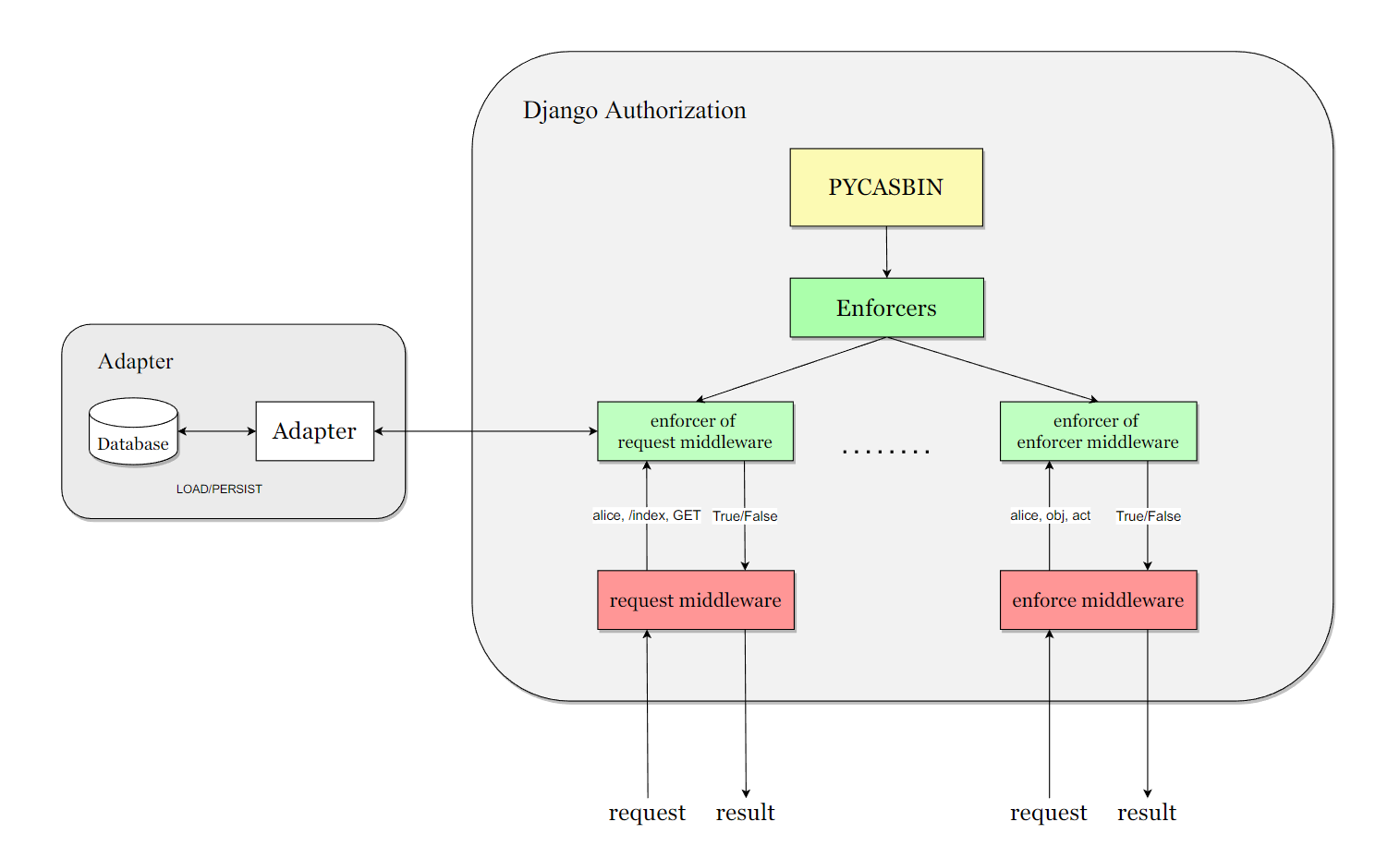
django-casbin-auth is an authorization library for Django framework.
Based on Casbin and Django-casbin (middleware, light weight of this plugin), an authorization library that that supports access control models like ACL, RBAC, ABAC.
Installation and Configure
pip install django-casbin-auth
We recommend that you first configure the adapter for persistent storage of the policy, such as:
django-orm-adapter, After integrating it into the project continue with the configuration of django-authrization
# 1. Add the app to INSTALLED_APPS
INSTALLED_APPS = [
    "django.contrib.admin",
    "django.contrib.auth",
    "django.contrib.contenttypes",
    "django.contrib.sessions",
    "django.contrib.messages",
    "django.contrib.staticfiles",
    "dauthz.apps.DauthzConfig",	# add this app to INSTALLED_APPS
]

# 2. Add configure of dauthz
DAUTHZ = {
    # DEFAULT Dauthz enforcer
    "DEFAULT": {
        # Casbin model setting.
        "MODEL": {
            # Available Settings: "file", "text"
            "CONFIG_TYPE": "file",
            "CONFIG_FILE_PATH": Path(__file__).parent.joinpath("dauthz-model.conf"),
            "CONFIG_TEXT": "",
        },
        # Casbin adapter .
        "ADAPTER": {
            "NAME": "casbin_adapter.adapter.Adapter",
            # 'OPTION_1': '',
        },
        "LOG": {
            # Changes whether Dauthz will log messages to the Logger.
            "ENABLED": False,
        },
    },
}
to better prompt the configure method of django-casbin-auth, we made a django-app based on django-casbin-auth, you can see it in django-casbin-auth-example
Usage
Some Important Concepts:
such as .conf file, policy, sub, obj, act, please refer to the casbin website
Middleware Usage
# Install middleware for django-casbin-auth as required
MIDDLEWARE = [
    "django.middleware.security.SecurityMiddleware",
    "django.contrib.sessions.middleware.SessionMiddleware",
    "django.middleware.common.CommonMiddleware",
    "django.middleware.csrf.CsrfViewMiddleware",
    "django.contrib.auth.middleware.AuthenticationMiddleware",
    "django.contrib.messages.middleware.MessageMiddleware",
    "django.middleware.clickjacking.XFrameOptionsMiddleware",
    "dauthz.middlewares.request_middleware.RequestMiddleware",	# add the middleware
]
You can freely set the casbin enforcer for the middleware via API: set_enforcer_for_request_middleware(enforcer_name) and set_enforcer_for_enforcer_middleware(enforcer_name)
Decorator Usage
Request decorator will check the authorization status of user, path, method
# use request decorator
@request_decorator
def some_view(request):
    return HttpResponse("Hello World")
Enforcer decorator will check the authorization status of user, obj, edit. example:
# use enforcer decorator
# sub: user in request obj: "artical" act: "edit"
@enforcer_decorator("artical", "edit")
def some_view(request):
    return HttpResponse("Hello World")
Command Line Usage
The command line operation allows you to operate directly on the enforcer's database. Three sets of commands are available: policy commands, group commands and role commands.
Add/Get policy, usage:
python manage.py policy [opt: --enforcer=<enforcer_name>] add <sub> <obj> <act>
python manage.py policy [opt: --enforcer=<enforcer_name>] get <sub> <obj> <act>

Add/Get role to user, usage:
python manage.py role [opt: --enforcer=<enforcer_name>] add <user> <role>
python manage.py role [opt: --enforcer=<enforcer_name>] get <user>

Add/Get group policy, usage:
python manage.py group [opt: --enforcer=<enforcer_name>] add <user> <role> [opt:<domain>]
python manage.py group [opt: --enforcer=<enforcer_name>] get <user> <role> [opt:<domain>]
Backend Usage
You can integrate Pycasbin with Django authentication system. For more usage, you can refer to tests/test_backend.py. To enable the backend, you need to specify it in settings.py.
AUTHENTICATION_BACKENDS = [
    "dauthz.backends.CasbinBackend",
    "django.contrib.auth.backends.ModelBackend",
    ]
Note that you still need to add permissions for users with pycasbin add_policy() due to the mechanism of the django permission system.
License
This project is licensed under the Apache 2.0 license.


Download files
Download the file for your platform. If you're not sure which to choose, learn more about installing packages.
Source Distribution
Built Distribution
Filter files by name, interpreter, ABI, and platform.
If you're not sure about the file name format, learn more about wheel file names.
Copy a direct link to the current filters
File details
Details for the file django_casbin_auth-1.7.0.tar.gz.
File metadata
- Download URL: django_casbin_auth-1.7.0.tar.gz
- Upload date:
- Size: 373.7 kB
- Tags: Source
- Uploaded using Trusted Publishing? No
- Uploaded via: twine/6.1.0 CPython/3.12.11
File hashes
| Algorithm | Hash digest | |
|---|---|---|
| SHA256 |
6f4e4ccb5b18b7889ea69446a2bf1a997381d47a54397a7a3d83f10cf278c03a
|
|
| MD5 |
324ac1095461d4d6ec987119483fc4de
|
|
| BLAKE2b-256 |
b76927d01e7f700493a6410d749610d4118cee72b44a8e41bb17312a56bcfeda
|
File details
Details for the file django_casbin_auth-1.7.0-py3-none-any.whl.
File metadata
- Download URL: django_casbin_auth-1.7.0-py3-none-any.whl
- Upload date:
- Size: 409.5 kB
- Tags: Python 3
- Uploaded using Trusted Publishing? No
- Uploaded via: twine/6.1.0 CPython/3.12.11
File hashes
| Algorithm | Hash digest | |
|---|---|---|
| SHA256 |
35c55d66df6b8122e07a05159fe9384d823f6856be3d91c21bfe913760021fb4
|
|
| MD5 |
2c83803b511f07e2ecf145b7e075de12
|
|
| BLAKE2b-256 |
8213fa9b57b1431c73fbec832a0ec80c0378b8f04c42e8c2e9a44e73de2035ba
|






