
Django Chartjs
Django Chartjs lets you manage charts in your Django application.


This is compatible with Chart.js and Highcharts JS libraries.
Using a set of predefined Class Based Views you are able to get started after writing just your SQL query.
Authors: Rémy Hubscher and contributors
Licence: BSD
Compatibility: Django 1.5+, python2.7 up to python3.7
Project URL: https://github.com/peopledoc/django-chartjs
Getting Started
Install django-chartjs:
pip install django-chartjs
Add it to your INSTALLED_APPS settings:
INSTALLED_APPS = (
    '...',
    'chartjs',
)
Using it
A simple Line Chart example.
1. Create the HTML file
{% load staticfiles %}
<html>
    <head>
        <title>django-chartjs line chart demo</title>
        <!--[if lte IE 8]>
            <script src="{% static 'js/excanvas.js' %}"></script>
        <![endif]-->
    </head>
    <body>
        <h1>Some Line Charts loaded in Ajax!</h1>

        <canvas id="myChart" width="500" height="400"></canvas>

        <script type="text/javascript" src="http://code.jquery.com/jquery-1.10.0.min.js"></script>
        <script type="text/javascript" src="{% static 'js/Chart.min.js' %}"></script>
        <script type="text/javascript">
            $.get('{% url "line_chart_json" %}', function(data) {
                var ctx = $("#myChart").get(0).getContext("2d");
                new Chart(ctx, {
                    type: 'line', data: data
                });
            });
        </script>
    </body>
</html>
2. Create the view with labels and data definition
from random import randint
from django.views.generic import TemplateView
from chartjs.views.lines import BaseLineChartView


class LineChartJSONView(BaseLineChartView):
    def get_labels(self):
        """Return 7 labels for the x-axis."""
        return ["January", "February", "March", "April", "May", "June", "July"]

    def get_providers(self):
        """Return names of datasets."""
        return ["Central", "Eastside", "Westside"]

    def get_data(self):
        """Return 3 datasets to plot."""

        return [[75, 44, 92, 11, 44, 95, 35],
                [41, 92, 18, 3, 73, 87, 92],
                [87, 21, 94, 3, 90, 13, 65]]


line_chart = TemplateView.as_view(template_name='line_chart.html')
line_chart_json = LineChartJSONView.as_view()
3. Get a Chart.js Line Chart
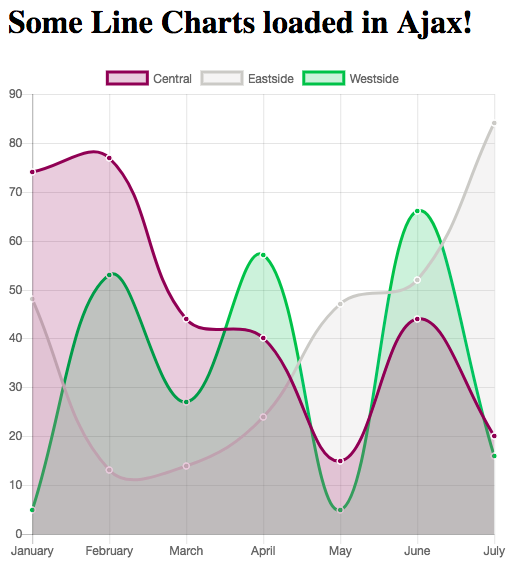
It is that simple!
For other examples including a HighCharts line chart, don’t hesitate to look at the demo project.
Also, feel free to contribute your demo!
2 maintainers


Metadata
2 maintainers
Release files for django-chartjs 1.4.0
For a detailed explanation of source distributions (sdists) and built distributions (wheels), please see the package formats documentation.
Source distribution (sdist)
| File | Size | Uploaded | Provenance | Actions |
|---|---|---|---|---|
| django-chartjs-1.4.0.tar.gz | 568.8 kB | Without provenance | Details for django-chartjs-1.4.0.tar.gz |
Built distribution (wheel)
| File | Interpreter | ABI | Platform | Actions Reset |
|---|---|---|---|---|
| django_chartjs-1.4.0-py3-none-any.whl | Python 3 | none | any | Details for django_chartjs-1.4.0-py3-none-any.whl |
Total release size: 1.2 MB
Release files / django-chartjs-1.4.0.tar.gz
| Download URL | django-chartjs-1.4.0.tar.gz |
|---|---|
| Size | 568.8 kB |
| Tags | Source |
|
SHA-256 checksum How to use checksums |
f521be3b4b413549991240caab41d925971cc32c0df80b7c50907d08b2ff21d4
|
|
BLAKE2b-256 checksum How to use checksums |
bce491560842d4f157dba4c6f43b333c503d33c7f129a2df4d15b927a64543ac
|
| Upload date | |
|
Uploaded using Trusted Publishing? What is trusted publishing? |
No |
| Uploaded via |
twine/1.12.1 pkginfo/1.4.2 requests/2.18.4 setuptools/40.7.1 requests-toolbelt/0.8.0 tqdm/4.19.7 CPython/3.6.7
|
Release files / django_chartjs-1.4.0-py3-none-any.whl
| Download URL | django_chartjs-1.4.0-py3-none-any.whl |
|---|---|
| Size | 598.3 kB |
| Tags | Python 3 |
|
SHA-256 checksum How to use checksums |
9747a2ef6a0aabfbd5b3d52f0827af761eb764ed3707934aa5cb7269cc08940e
|
|
BLAKE2b-256 checksum How to use checksums |
b4773889cd99408cd51befd0e69c3d3ee96bb81715b3149e9d2749aaca664992
|
| Upload date | |
|
Uploaded using Trusted Publishing? What is trusted publishing? |
No |
| Uploaded via |
twine/1.12.1 pkginfo/1.4.2 requests/2.18.4 setuptools/40.7.1 requests-toolbelt/0.8.0 tqdm/4.19.7 CPython/3.6.7
|
Security for django-chartjs 1.4.0
Provenance
Provenance describes where a file came from. On PyPI, provenance is shared via attestations, which provide a verifiable record of the build or publishing details. View details, limitations and caveats.
No provenance found
None of the files in this release were uploaded with provenance metadata.
A note on package security
PyPI is a repository for distributing packages, not a service for auditing them. While third-party security researchers and our staff do their best to detect and remove malicious packages, PyPI cannot guarantee the quality, security or suitability of any given package.
To learn more about protecting yourself from malicious actors, visit our package security documentation.














